



Click Here !
Product ID: 200024517
Details
- Hardware interfaceUSB 3.0
- BrandYottamaster
- Colour5 bay
- Hardware platformLinux Mac
- MaterialAluminium
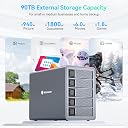
⚡5Gbps USB 3.1 Gen 1 speed
💾90TB max storage
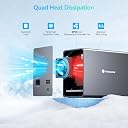
❄️80mm silent cooling fan
💼 Elevate your data game with pro-level speed, capacity, and reliability.
The Yottamaster 5 Bay RAID Hard Drive Enclosure (FS5RU3) is a professional-grade DAS storage solution supporting up to 90TB across five 3.5" or 2.5" SATA drives. Featuring versatile RAID modes, a USB 3.1 Gen 1 interface with 5Gbps transfer speeds, and an aluminum chassis with silent cooling, it’s designed for demanding workflows in studios and offices alike.




| ASIN | B085DS8XDS |
| Best Sellers Rank | 144,635 in Computers & Accessories ( See Top 100 in Computers & Accessories ) 633 in Enclosures |
| Brand | Yottamaster |
| Brand Name | Yottamaster |
| Colour | 5 bay |
| Compatible Devices | Personal Computer |
| Customer Reviews | 3.9 out of 5 stars 33 Reviews |
| Data Transfer Rate | 5 Gigabits Per Second |
| Enclosure Material | Aluminium |
| Hardware Interface | USB 3.0 |
| Hardware Platform | Linux, Mac, Windows |
| Hardware interface | USB 3.0 |
| Hardware platform | Linux, Mac, Windows |
| Manufacturer | Yottamaster |
| Manufacturer Part Number | Yottamaster-FS5RU3-UK-GY |
| Material | Aluminium |
| Memory Storage Capacity | 90 TB |
| Memory storage capacity | 90 TB |
| Model Number | FS5RU3 |
| Network Connectivity Technology | USB |
| Supported Devices Quantity | 5 |
| The Standard Size of the Hard Drive or the Bay the Hard Drive Is Compatible With (in inches) | 3.5 Inches |
| Unit Count | 1.0 count |
C**H
Great bit of kit but instructions poor
This is a great bit of kit, extremely well constructed, works very well once set up and is quite and power efficient. However it is not intuitive to set up, I have several NAS boxes so familiar with setting up raid volumes but this works differently. You will have to read the instructions FIRST, and you will have to read them several times as they are not well written or clear, and ensure you follow the steps for formatting. If you are installing new drives or drives that have been in a Linux based NAS you will have to format them for FAT or NTFS first using a drive toaster or similar, at least I think this is the case, at least it this is the solution that worked for me having failed to format the drives in the Yottamaster box. Having got it set up, I am very impressed, it is fast, quiet and just works as a raid5 external disk.
T**C
Well made, strong construction and unbelievably easy to set up!
Straight out of the box, this HDD enclosure/NAS drive is extremely easy to set up and configure. The default setting is what they call 'normal' which lets you access each disk individually (in any combination up to five 18Tb SSD/HDDs). You also have the option of using it as a JBOD (Just a Bunch Of Disks) or spanning them (effectively creating one huge storage device) or setting it up as a RAID drive (RAID 0, 1, 3, 5 or 10 are all available if you have enough drives), using the flip switches on the rear of the unit. This unit uses a USB 3.0 connection so you are 'limited' to 5Gbps. You can use Solid State Drives or more traditional Hard Disk Drives in either 3.5" or 2.5" configurations. The sleds come with all the attachment screws (both 2.5" and 3.5" threads) you could possibly need (and a free screwdriver if you need it) for installing your drives securely. The software available from the Yottamaster website is easy to find and install, though I would prefer that they actually make a clear link available for it! One great feature is the ability to see what resources are available to you if you change your RAID settings (what is used/what is unavailable on certain disks) To explain this, if, for example, I had three 2Tb HDDs and one 4Tb HDDs and I wanted to use them all in a RAID 10 configuration, the 4Tb HDD would only use 2Tb, with the rest being unavailable (far from ideal). The only drawback I have found in this item is that it isn't clearly identified in your System Resources. I think this would really help people trouble shoot. That said, if you keep to the basic setting, you can easily identify and use each of the disks you've installed. The set up takes less than 2 minutes (mainly the time it takes to screw in the disks!), and you're ready to go. This is ideal for anyone needing a fairly good, basic enclosure or NAS.
I**O
Fast and simple unit - quiet too.
This is actually a good little unit. I have 5 x 3TB Seagate NAS drive in it in Raid5 and I am getting around 250MB/s read and write connected to my MacbookPro. The thing I really like about it is it switches the fan off when the drives go to sleep so it is totally silent when not in use. Even when it is running it's not overly noisy - I have it on my desk and it certainly isn't distracting (although that is an individual opinion - others may be more noise sensitive!) The only down side is there is no Raid software, so you can't see what's going on on the unit - but for the money I cant complain. The Orico units do have Raid software, but it does not work on Catalina :-( I use mine for storing movies and it will happily steam 4k files
R**S
Two dead hard drives in a WEEK with this device!
I recently moved from an old Mac Pro to a M1 Mac Mini. I needed a new home for my drives, but I was very nervous of what product to trust. This one appeared to fit the bill. I didn't plan on using RAID initially, but thought maybe I would buy that model if I need that feature later. My intention was to just give the HDDs a home to be used individually for now. A few days after using the device I noticed after shutting down the Mac Mini, the drives in the enclosure would start spinning up! Then immediately they would spin down again, then immediately spin up again! This was very off putting and worrying. At the time I just thought maybe it was odd but normal. After a week of using the enclosure a 5TB drive just died on me. I tried it in a separate dock; nope, it was toast. Worrying, but I just put it down to the fact it was a 6yr old drive. Today, 6 days later ANOTHER drive has failed! This time a 4TB one. I am a full time professional photographer and the first drive had over 125 weddings that just vanished, and the second drive had lots of family photography (clients) and my website files amongst other things. Also GONE! Thankfully I have backups, but now I don't trust this thing one bit!! So it was bad enough that it would spin the disks up and down every-time I shut down the computer, but it would also do it during operation! When the 5TB weddings HDD died, I bought a new 6TB drive and copied the lost data from my backup drives onto the new one. The backups were in a 2 slot dock and the new drive in the Yottamaster enclosure. Every now and again the drives in the enclosure would spin down, then up, then down again, then up and then the copying process which had paused would then continue. This is NOT normal behaviour. I didn't notice at first (because of where I have the enclosure positioned) that when the drives would spin down the blue lights on the front would go out! In case it was a loose connection, I tried gently touching the USB cable behind, but that didn't affect anything. There seems to be either some loose connection or a communication error inside. Needless to say I am livid that I have put my trust in this device with very precious data (the fact it is backed up is irrelevant) and it is has failed me terribly. A new 6TB drive was £205 and today I have just ordered a 4TB drive for £125. I haven't had a failed drive in a few years and now in a week I have lost two! Yottamaster should be paying for these!! I also own a cheap and cheerful two slot dock and that hasn't had any of the issues the Yottamaster has. I have sent this one back and have been looking for an alternative. There is one made by Orico, the same company as the two slot docking station I have, but I notice it is almost exactly the same design as the Yottamaster. I have also found a similar one by another company. It seems to me that this (BAD) design is being manufactured, and some minor changes and a change of logo are the only differences. I have now ordered an enclosure by OWC and I sincerely hope I don't have these problems again!! Funny how when I contacted Yottamaster they were all very helpful until I said I thought they should be paying for the destroyed hard drives, then they went completely silent! My advice is to avoid this like the plague. Buy one from a more well known brand rather than a generic Chinese brand with lower quality standards. I would have done the same, but I didn’t know there were good alternatives until I found a four bay OWC one.
A**M
Not very reliable.
Build raid, use raid, raid drops out. Format. Build raid, use raid, raid drops out. Format. Build raid on another computer (mac rather than windows), use raid, raid drops out. Format. Replace USB cable, build raid, use raid, raid drops out. Insert drives in to old HPE server with B120i raid card. Build raid, use raid, weeks later still no issues. I was right to return the product and the suggestions by Yottamaster besides return it weren’t great. I’m sure a working unit would be fantastic but as it stands, for my use currently, unreliable and as a result pointless. Pretty though..
M**B
Bought this a backup for my NAS
OK, this is not the most expensive device out there, not even the easiest to get working how you want it to... But I tell you it does work not overly noisy, you can't even hear the HDDs in it and I have Western Digital Red Pros in there which are apparently bad for noise, maybe I am just no too concerned about the noise of expect it. It is plugged in to the back of my NAS and works exactly as it is supposed to. Certainly cheaper than another NAS Would I buy again, yes.
W**L
Manual needs a re-write, screws feel old school but the unit is solid and well made.
My initial impressions of the Yottamaster enclosure were mixed. After removing it from the packaging it was reassuringly heavy, looks very nice and seems well made. Initially the top two drive bays were stuck and couldn't be removed, but after removing all the other bays I realised that they'd shifted up and locked into the case, moving them down slightly corrected the issue and they have remained trouble-free since. The raid configuration via dip switches does seem very old fashioned and something I've seen being used since the 1990s so something I'd encountered plenty of times before with SCSI etc. The other old school feature is mounting the drives with screws, a lot of other NAS and drive enclosures use a much quicker and simpler clip interface which just means when installing multiple drives it's a lot quicker. All this aside once the drives are mounted they slide easily into each bay. My main reason for purchasing this unit was that according to Amazon all the bays could be used in a RAID configuration, some other brands seem to limit RAID to two bays with the remaining drives used individually. I wanted to use the Yottamaster as a single large backup drive by spanning drives together to form a contiguous amount of space. I used some existing 4TB drives I had, in total linking all four together to form a 16TB drive (minus the usual overheads). My plan was to then use this large drive connected to a Synology NAS to backup photos, cloud sync data and movies I stored on that device. There began my problems, I followed the manual to the letter, however put simply the manual is wrong. The enclosure by default has RAID disabled and all drives appear individually which is not what I wanted or paid a premium for. After multiple attempts to set the raid configuration I began to worry that power cycling my drives too frequently might result in damage so I contacted support and asked a question on Amazon. The manufacturer themselves responded which was nice (but not with a solution) however independently I found a site reviewing a different enclosure but one presumably using the same underlying hardware and with a better written manual. To that end this is the information you need to set the RAID configuration and what should have been written in the manual: 1. Power the enclosure off. 2. To clear the current RAID mode, push all the dip switches to the up position. 3.Press and hold the Set button. While holding the Set button, press and release the Power button to turn it on. As it turns on, you’ll hear one beep. Keep holding the Set button until you hear a second beep (wait for a proper beep–there are some electronic bits that aren’t the same). After the second beep, release the Set button. 4. Turn it off again using the power button. 5. Set the dip switches to the pattern matching your chosen configuration. 6. Press and hold the Set button. 7. Press the power button (while holding the Set button). Wait for second beep. I'll write my long-term evaluation after I have been running the enclosure for a while, hopefully trouble-free.
J**W
Useful enclosure for accessing 5 SATA HDDs - either individually or as a RAID array.
When I first came across this FS5RU3 drive enclosure, I was uncertain of the actual colour of the case. I e-mailed the company to enquire as to 'what shade of grey' the case was, as well as a couple of other technical issues (such as whether the caddies were plastic or metal - they're metal, with some plastic bits! - what speed the processors - plural! - ran at, how much RAM was incorporated and whether it was was expandable by the user or not.) I also pointed out that the 10% Discount code they offered through their website wasn't currently working on Amazon.co.uk (although they claim that it ought to!) but sadly, to date I have not had a response from the company, YottaMaster. When the substantial, very robust, thick 'anodised aluminium' enclosure arrived (courtesy of Amazon.co.uk) and was unpacked, the first small obstacle encountered was that the drive caddies couldn't be ejected from the chassis. [It seems that the plastic catches don't retract quite sufficiently - at least not without a little extra force being applied! - for the caddy to be ejected. These caddies are robust, with no sharp edges to the metal parts: only time will tell how long-lived they will be since, unlike some other NAS RAID devices, the drives need to be attached to the caddies which act like sleds, in order to be ejected. A small screwdriver and a collection of appropriate small screws to attach the drives to the sleds are supplied with the enclosure. The mounting holes for the 2.5" HDDs and SSDs are on the underside of the sled, whilst those for 3.5" HDDs are on the sides. The FS5U3 enclosure can accommodate up to 5 SATA drives - be they SSDs or HDDs or a mixture of the two - each of up to 16TB, giving a total storage capacity of 80TB. The data connection for this model is through an 'expanded' Type-B USB 3.0 socket [Note: The description on the Amazon page incorrectly identifies this as a USB 3.1 Gen 1 connector] whereas the PS500RU (which is designated as "suitable for home/office users") features a USB-C connector. The appropriate 1.1m USB cable is supplied, and both YottaMaster enclosures should therefore have a maximum throughput of 5Gb/s. Copying a large file from one HDD on my PC to a drive in the FS5U3 showed an average throughput of 128MB/s, which is suitably fast, if not blazingly so! One reason I opted for the FS5U3 enclosure (as opposed to the newer PS500RC3) was the inclusion of a 240v PSU, which I personally find more convenient than the external 6.5A 'power brick' of the newer model. The internal PSU also enables a small fan (which is not entirely noise-free) which runs quite slowly inside the enclosure, keeping the air inside the cabinet moving, and the drives somewhat cooler. The YottaMaster devices can operate in many different modes, from JBOD through the RAID series (1-5) but interestingly can also operate as 5 individual disks when set to PM mode, and they're then not treated as a 'spanned' set. In this mode, if one drive were to fail, the remaining drives would not be affected unlike a RAID system. If the drives are not accessed for a number of minutes - YottaMaster claim it's 10 by default - then the drives (and the fan!) are allowed to spin down. They spin up again in just a few seconds if a drive needs to be read from or written to, and YottaMaster have a software download which allows the user to set this to '0' - which suspends the sleep function - or to some other value to suit the user's needs. The FS5U3 appears to be quite happy operating with Windows 10; I have no means to test it with an Apple Mac or with Linux. Nor can I confirm the amount of RAM fitted, or whether it is upgradable. As for and the speed of the processors, I can only say that they appear to be adequate for the task they need to perform.
Trustpilot
1 month ago
4 days ago