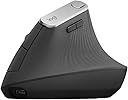
🖱️ Elevate your workflow, not your wrist strain.
The Logitech MX Vertical Mouse 910-005448 is a premium ergonomic wireless mouse designed to reduce hand and wrist strain with its vertical layout and adjustable angle. Featuring advanced 4000 DPI optical tracking, multi-device Bluetooth and USB connectivity, and an impressive 4-month battery life, it supports both Windows and macOS platforms, making it ideal for professionals seeking comfort and precision in their daily computing.
| ASIN | B07FNHV4MW |
| Batteries | 1 Lithium Polymer batteries required. (included) |
| Best Sellers Rank | #333 in Computer Mice |
| Brand | Logitech |
| Color | Black |
| Computer Memory Type | DIMM |
| Customer Reviews | 4.6 4.6 out of 5 stars (12,988) |
| Date First Available | August 22, 2018 |
| Is Discontinued By Manufacturer | No |
| Item Dimensions LxWxH | 4.72 x 3.11 x 3.09 inches |
| Item Weight | 4.6 ounces |
| Item model number | 910-005448 |
| Language | English |
| Manufacturer | Logitech |
| Operating System | Windows, macOS |
| Power Source | Battery Powered |
| Product Dimensions | 4.72 x 3.11 x 3.09 inches |
| Voltage | 1.5 Volts |
L**0
Excellent Mouse!
I have had this mouse for a while now and I love it. It is so easy on my hands and I love the extra buttons that I can reprogram. I use this across my PC and my Mac and it works great. This mouse is very comfortable, high quality and definitly worth the money.
A**N
The only vertical mouse I love!
I now own three of these mice, and they've not only saved my arms from a lot of RSI, but they're also just generally great - three switchable bluetooth connections, very good battery life (I recharge them maybe once every few months), a good weight and size in the hand, and just generally pleasant to use. Only downside is that they eventually get some rubber degradation where your hand sits but that's been true of every mouse with similar soft-touch materials that I've owned, and that took at least two years of daily use to happen, so feels very reasonable.
A**T
Highly Recommended!
Without a doubt, my favorite mouse. It looks odd at first, but once you start using it any pain you’ve developed in your wrist from long hours computing is GONE. Battery life lasts a few months on a single charge, solid weight, obviously a quality product. I’ve had multiple people ask about it and chuckle only to come back later having purchased one themselves, nothing but glowing reviews.
T**.
Perfect
I’ve used this mouse for years, helps tremendously and no longer notice my carpal tunnel issues when working with my mouse
M**C
It's comfortable to use but requires configuration (if the PC supports it)
I do like my MX Vertical Mouse but it has limitations. While this can be a plus for some people it is not possible to program the buttons one time to work for everything you use the computer for. For example, you can program the buttons for general use in Windows but when you load Microsoft Edge the buttons revert to default settings. The software requires it to be programmed specifically for Edge. At this point Edge and Chrome are the only ones I use that need individual programming so I don't know which others require it. I found another shortcoming of the MX mouse when my work computer got replaced with a Chromebook. Logi Options Plus, the software needed for programming the buttons, is not available for the Chrome OS. This mouse is no more useful than a generic $5 mouse with two buttons and a scroll wheel when used with a Chromebook. As I said, I do like the feel of the mouse and bought a second before I learned that the extra features don't work on Chrome OS. I will edit my review if I can find a way to program it for the Chromebook.
J**A
Logitech Mouse MX Vertical
Excellent product.
A**L
High quiality Logi professional Mouse
I absolutely love the professional Logi vertical mouse. It is comfortable in my hand. I have carpal tunnel syndrome in my hands, and it doesn't cause any pain in my hands or wrist. I love its functionality. It can be used wired or wirelessly. It is a quality product for the money I paid. I am going to order a few more for the staff in my office.
B**N
I wish I had listened to the negative reviews.
I wrote off the negative reviews as personal preference but I find myself having the same experience. I came from the regular MX Master and I didn't think this would be that large of a jump to go vertical, but I am mistaken. Cons: - This mouse feels cheap, very cheap compared to the MX Master line. It's very light and easy to overshoot your mark, even after adjusting the DPI. - The wheel feels outdated and has no option for free scroll, so scrolling takes much longer now. That being said the wheel is comfortable. - There is only one light for battery power. Without going into the Logi app it's difficult to see how much battery is left. Not a dealbreaker but an annoyance. - The mouse is smaller than I imagined. I went to a store to see how the Lift felt and went with the MX Vertical knowing it was larger. That being said it's still just a little small for my hands (7.5" from wrist to middle finger-tip, 3.5" across fingers). - I find myself missing the horizontal scroll wheel of the MX Master, but that's preference. - Maybe it's the learning curve but I find my pinky finger dragging and uncomfortable. It doesn't naturally feel at place on the mouse and a little bump out may help instead of the side curving in. After using this for a week it's getting better but I have to focus on keeping my pinky higher on the mouse. - The thumb forward/backward buttons feel too far forward. The isn't very comfortable with my hand all the way on it so I find myself gripping it a little further back. I also bought a Keychron M5 Vertical to compare to this. Somehow that mouse is even lighter and the scroll wheel even worse. That has a smaller finger area because of equal size buttons that takes up finger space despite the bump out at the bottom. I ended up keeping the Logitech and returning the Keychron, but I'm not happy with it and would not recommend.
A**O
Excelente para no forzar mi mano. Tengo tres equipos y solo un mouse
P**.
j'aime beaucoup cette souri vertical. ça enlève mon inconfort pour le tunelle carpien.
D**L
Have both this and the LIFT. Both come up short in the same way and each has their own ergonomic problem. The problem with both is that the mouse buttons are too high up, yes even on the smaller LIFT, meaning you end up straining your hand just in a different orientation... Even in the 'handshake' position, your fingers want to naturally point downwards toward the desk and stack on top of one another, not be constantly pointing straight and spread open to reach the left click button at the 'top' of the mouse. Really, the left click button should be where the right click button is located and the dead space at the bottom of the mouse (under the actual right click button) should be the right click button. Individual ergonomic issues: Started with the LIFT but there is not enough bulk to the palm section to support the hand properly, (despite hand measuring as an M on Logitec's own guide) so the palm feels unsupported and kind of makes your hand form a narrow claw. Ring and small fingers have nowhere to rest, other than stacking on the table (which restricted moving the mouse). Changed to the MX Vertical as it looked like it was bulkier and would support the hand better. It does, and there is more room for your fingers, but again, with the buttons being too high, you can feel your finger strain as it is again having to fight the natural downward position of the fingers and now technically is also fighting gravity somewhat as the mouse itself is that much higher than the LIFT. Also, the MX Vertical has straight buttons, rather than curved ones, like the LIFT has, this adds to the discomfort as there is no real natural shape for your finger (think about it, even a cheap normal mouse usually has somewhat curved buttons). So, in short, both are not great. Solution, make the LIFT shape larger like the size of the MX Vertical and move the button location as described, in a more angled down position. Honestly, the pros and cons of each are enough not to bother with either, but if you really want to try one because you are in a lot of pain with a standard mouse, the LIFT would be the better choice as it at least has the curved buttons and you can use it like you're pinching it, giving you some relief over a standard mouse, but don't expect great palm support. But, again, neither are great. Logitech should have committed to a steeper angle and better orientated buttons.
S**D
I was told by a physiotherapist that I should get an ergonomic mouse to help with my elbow and shoulder pain. I bought the Logitech MX Vertical, mostly because it paired well with a Mac and I needed a mouse to fit a medium to large hand. I was a bit confused as to all the different brands and shapes of ergonomic mouse, but this seemed to have good reviews so I went with it. I adapted to the upright ergonomic shape almost immediately, it just felt natural and comfortable, all the buttons are where your hand expects them to be! plus there are some extra buttons that help to refine the experience (probably wont use them that much, but it is nice to know they are there). It is too soon to tell if the mouse is having a major effect on my arms recovery, however so far it defiantly isn't causing more pain seems to have improved a little. Generally really happy with it and I can pair it to my other devices, so I can take it with me when I work in or out of the office.
L**I
Negli ultimi anni l'uso intensivo del PC nei periodi lavorativi più intensi mi ha portato a ricercare degli strumenti di lavoro professionali che massimizzassero la mia produttività e minimizzassero lo stress fisico sulle articolazioni. Da circa un anno sto utilizzando la straordinaria MX Keys in accoppiata con l'ottimo Logitech G900, che uso sin dal 2016. Poiché la batteria di quest'ultimo aveva iniziato a mostrare segni di cedimento, ho deciso di cercare un nuovo mouse che mettesse al primissimo posto l'ergonomia... E ho trovato il Logitech MX Vertical. Pro: + Possibilità di mappare 3 dispositivi differenti via bluetooth o tramite dongle Unifying, passaggio da una configurazione all'altra con la semplice pressione di un tasto + Supporto a dongle Unifying, il comodissimo ricevitore USB che supporta fino a 6 dispositivi contemporaneamente, lasciando libere più porte USB + Ergonomia perfetta che permette alla mano di stare in posizione "stretta di mano". Estremamente più "gentile" sulle articolazioni anche rispetto ad altri ottimi mouse Logitech come G900, G703, MX Master 3 + Pochi tasti ma tutti utili: tasto destro, sinistro, rotellina cliccabile, tasti rapidi avanti/indietro, tasto di variazione sensibilità puntatore. È praticamente impossibile cliccare un tasto per sbaglio + Possibilità di configurare i tasti rapidi avanti/indietro dall'app Logitech Options + Lunga durata e ricarica tramite USB C + Prezzo altino (80/90 euro) ma onesto per le funzionalità offerte e la qualità Contro: - Necessario un po' di tempo per abituarsi - Poco versatile se usate macro/configurazioni personalizzate dei pulsanti Conclusioni: Questo mouse condivide tutte le funzioni di connettività avanzate del MX Master 3, perdendo le funzioni da "power user" (come la rotella orizzontale, lo scroll veloce o i tasti aggiuntivi) ma spingendo incredibilmente sull'ergonomia. In questo mouse ho trovato una soluzione essenziale ma funzionale: non mi interessano (anzi mi danno fastidio) troppi tasti, trovo invece estremamente utile il fatto di usare un unico dongle per più dispositivi e avere i 3 profili di connessione selezionabili premendo un bottone. L'ergonomia, come già accennato, è ottima ed è particolarmente indicata a persone che soffrono di tunnel carpale o epicondilite. Vale tutti i soldi spesi, e sicuramente lo ricomprerei. Consigliatissimo!
Trustpilot
2 days ago
3 days ago