🎶 Elevate Your Sound Game with the Scarlett 2i2!
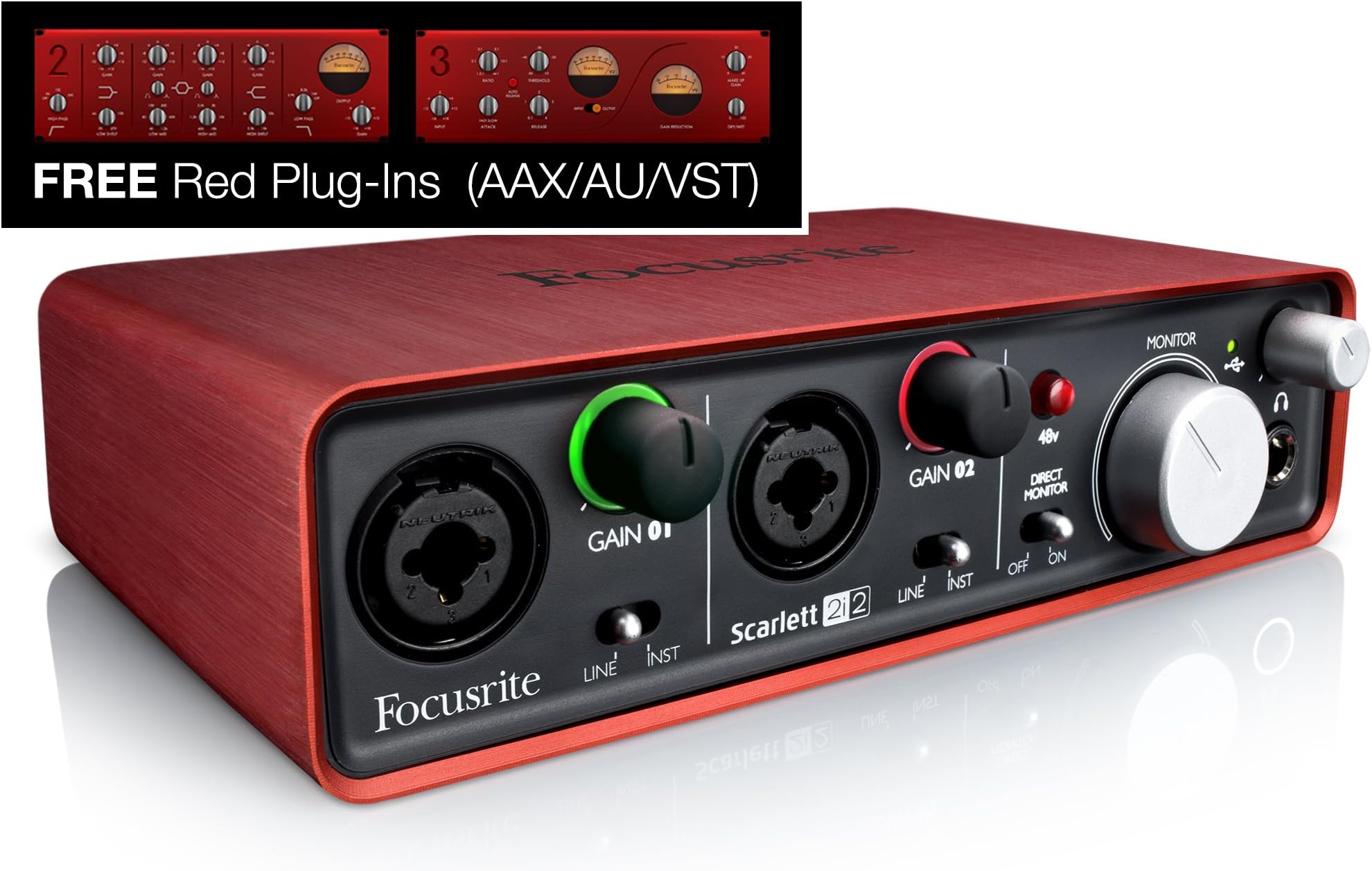
The Focusrite Scarlett 2i2 (1st Gen) USB Recording Audio Interface is a high-performance audio interface designed for musicians and podcasters. It features high-quality mic preamps, excellent digital performance, and a rugged metal unibody case, making it both portable and durable. The package includes an authorization code for Ableton Live Lite and a suite of premium plug-ins, providing everything you need to start creating professional-quality audio.
| ASIN | B005OZE9SA |
| Audio Input | XLR, Instrument |
| Best Sellers Rank | #103,891 in Musical Instruments ( See Top 100 in Musical Instruments ) #679 in Computer Recording Audio Interfaces |
| Brand | Focusrite |
| Brand Name | Focusrite |
| Compatible Devices | Personal Computer |
| Connectivity Technology | USB |
| Customer Reviews | 4.5 out of 5 stars 1,447 Reviews |
| Global Trade Identification Number | 00815301008170 |
| Item Weight | 2 Pounds |
| Manufacturer | American Music and Sound |
| Manufacturer Part Number | SCARLETT2I2 |
| Maximum Sample Rate | 96 KHz |
| Model Number | SCARLETT 2i2 USB |
| Number of Channels | 2 |
| Operating System | Windows, macOS |
| Supported Software | Ableton Live Lite, Focusrite Studio |
| UPC | 815301008170 133587589580 |
| Unit Count | 1.00 Count |
| Warranty Description | 2 years. |
A**N
PIP PIP CHEERIO, FOCUSRITE!
I purchased this interface because my aging 2008 mac pro was getting a bit snippy about running my even older M-Audio 1814 Firewire interface. In fact, I think Avid stopped writing new drivers for that old M-Audio device about the time my mac was purchased. I wasn't thrilled to replace the old gal but I got over 10-15 years of near daily service out that thing. I was reluctant to try the Scarlet 2i2 but based on many excellent reviews and the Focusrite reputation, I thought this could work for me. And it did! Installation on my mac was dead simple. Open the box, remove the interface, plug in the USB cable and bingo! I was up and running. Logic Pro recognized the hardware without incident and I recorded a voice over project the next day. Comparative to my previous recordings, there was no audible difference. So I tempted fate, reduced my latency sample rate from 512 to 256 and changed my preferences to record at 196k/24bit. Amazing. Not a single pop or stammer. I'm not putting out a higher quality product with no discernible strain on my aging system. Tech heads will want to know that I'm running a 2008 mac pro early version with 3.0 processors and Yosemite installed. I have not yet used the included plugins with any regularity but my tests showed them to be excellent quality and easy to use. I am very pleased with this purchase. If I could make any negative comment, it would be that I much prefer to have cable connections on the back on an interface. For a desk top unit, this helps keep the cables and clutter to a minimum on my desk. As a portable unit, this thing is perfect for a laptop based set up. It's compact and lightweight form factor make it easy to dump in a bag and carry to gigs. The pre-amps are excellent and the value is outstanding. I may buy a second one to dedicate to mobile recording...
D**H
High quality construction, easy to use, no problems whatsoever
After several months of intermittent use I have no complaints whatsoever about this audio interface. It does exactly what I need, and from all the ones I looked at seems to be a great value for the price. The construction is really nice - the case (red part) is smooth and feels high quality. All the controls are easy to operate and turn nicely. The driver was easy to download from Focusrite's website and install, in my experience. So far I mainly use it to play my electric guitar through amp modeling software (Guitar Rig) on my computer. If you're going to do this, you might experience noticeably high latency in the software until you lower the buffer rate in the Focusrite Audio Control Panel. At least that's what I had to do. My latency in Guitar Rig was around 50ms at first - definitely noticeable while playing, to the point that it threw me off. Once I lowered the buffer rate from 10 to 2 my latency dropped to around 12ms, which isn't noticeable to me. I got the 2i2 specifically because it provides phantom power to microphones that require it. I don't use it yet, but it seems like it'd be silly not to have that. The "direct monitor" switch on the front is useful sometimes, too. I saw some audio interfaces that didn't have either of those features. While I probably wouldn't buy this audio interface to use only as a computer soundcard, I do enjoy having it even just for listening to music/watching videos on my computer. I feel like I can tell a difference in sound quality vs when I had my speakers/headphones connected directly to my motherboard. It's also handy having the volume knob right on my desk within arm's reach - quicker and easier than changing volume in Windows or on my speakers. Plus I get to look like the world's most simple DJ. Oh, and I switch back and forth between my computer speakers and headphones by swapping which device is plugged into the 2i2 headphone output port - faster than going into the Windows audio menu and changing the default device, in my opinion. And you get the nice, tactile feedback of unplugging/plugging in audio cables. All in all, I'm very pleased with my 2i2 and will probably go with Focusrite again if I ever buy more gear in the future.
C**K
Full Video Review of the Scarlett 2i2
The Focusrite Scarlett 2i2 is a 2 input, 2 output XLR amp that plugs into via USB to a computer. I upgraded to using it about 4 months ago and I'm glad I did. If you're using an XLR microphone or instrument to record onto a computer, this is a perfect entry level pro amp to start with. It has two XLR inputs on the front, which you can manually control the gain of individually. These gain controls also show the colors that correspond to the peak levels of your audio. Green, Amber, and Red. Setting It Up To set it up, you run your XLR microphone, in this case my Heil PR-40, into port #1. Then turn the gain to roughly 2 or 3 o clock, switch direct monitor to on, plug in headphones (using a 1/4 to 1/8 stereo headphone jack adapter) to monitor yourself. Lastly, just plug in the USB cord into the back of your Scarlett and your computer. Now you're almost ready to record. Using it for Both Input & Output When using the Focusrite make sure to set it for the input and output device for my system (which on a Mac you can easily do by option clicking the volume icon). This way all of computer's sounds will go through the Focusrite. I do this all the time actually, specifically because that little hiss sound you get in your headphones when no sounds are playing on your computer doesn't happen with the Focusrite. Skype Settings Now, you won't be able to properly monitor yourself unless you turn the volume way up on the Focusrite, which when you're talking to someone over Skype, may make them extremely loud. To fix this, go into your Skype settings, then to the Audio/Video tab and turn down the Skype volume. You can also do this by pressing option + command and the up and down arrow keys. Mono Check Depending on what application you're using to record, input 1 and input 2 may both come through as mono left and right. So double check that you've changed the settings in your app to dual mono before exporting the file. 48 Volt Power I co-hosted a Google Hangout on Air and also recorded a quick interview via webcam with Pat Flynn using the Focusrite and two lavalier microphones, and the Audio Technica AT899 lavaliers that I use need external power or a battery to run. Luckily this Focusrite can provide 48 volt power through the XLR ports. Monitor Speakers Another cool feature of this Scarlett 2i2 is that you can plug in Monitor style speakers (which means they are higher quality and havezero latency so that what comes out of them doesn't get picked back up by the microphone). The plugs on the back aren't your typical RCA outputs though. They are ¼" TRS Jack outputs, so make sure the monitor speakers you buy have those inputs. Some monitor speakers that I'd recommend are either the M-Audio Studiophile AV 40's or the KRK Rokit's. Final Thoughts That's it for this review. I really like this Focusrite. It is sleak, small, sexy, and sounds great with my Heil PR-40. For just over a hundred dollars I highly recommend it. If you're interested in picking it or anything else I mentioned up, links to them all are above. For more gear recommendations from me, including all the equipment I used to make this video, go get my free gear guide. http://calebwojcik.com/gear Other equipment mentioned: Heil PR-40 - http://amzn.to/1pLK83B Audio Technica AT899 - http://amzn.to/1m8NaZS 1/4" to 1/8" Stereo Headphone Jack Adapter - http://amzn.to/1u1uW1S M-Audio Studiophile AV 40's - http://amzn.to/1fqdRdX KRK RP5G3-NA Rokit 5's - http://amzn.to/1fqdRL0 For the full transcript + links to items mentioned in this review, read the full post » http://calebwojcik.com/blog/focusrite-scarlett-2i2-review
L**M
Having trouble with drivers on Windows 7? Read here
Hi, I've had this interface for a few weeks now, and my final rating is basically what everyone else has said: Drivers: Horrible Hardware: Fantastic I'm am running Pro Tools 10 on a new(ish) HP Pavilion Core i5, with Windows 7 64 bit. Add the Focusrite Scarlett 2i2, and if you Google around, you'll find this is a perfect recipe for disaster. Maybe you have a pretty similar set up, and that's why you're reading this. Well I'm here to tell you that although Pro Tools 10 is somewhat buggy on the PC, and although Focusrite's drivers are horrendous, I got everything to run pretty smoothly after 3 or 4 days of errors, intense googling, and even contacting Focusrite. I'm going to give you the steps that I took, and maybe, if you're having the same problems I was, you can make it work, because honestly, we all would love to give this interface a five star rating. So the drivers installed great, no errors or anything. Plugged everything in, and opened up Pro Tools. Pro Tools found the interface, and I was like "YES!!!". It appeared everything would be ok. But when I started up a new session at 24 bit and 44.1 kHz, but got an error saying that the ASIO properties for my interface had been changed, and Pro Tools needed to restart. After posting on Avid's Pro Tools forums and seeing what they had to say, I came to the conclusion that I needed to set the 2i2's sampling rate BEFORE I opened Pro Tools. Unfortunately, the Focusrite drivers don't give you that option. The only way I knew to change the sampling rate was from inside of the DAW. I Googled like mad, and after many hours of being frustrated, and being THIS close to sending the 2i2 back and getting something made by Avid or M-Audio, I finally got everything to work. Here is what did it: Step 1 Download the MOST recent drivers at beta.focusrite.com, not the ones off the public Focusrite website. Instal them. Step 2 On your PC, go to the Start Menu>Control Panel>Hardware and Sound> Under Sound click "Manage Audio Devices". Click the recording tab, and set the Scarlett 2i2 as the default device. Click "properties" and then "advanced", from here you can set default format to "2 channel, 16 bit 48000 Hz". Step 3 Go to the Star Menu, and type "Focusrite" in the search, and then bring up the Focusrite USB 2.0 Audio Control Panel. Set the buffer length to 6 ms. Step 4 Open up Pro Tools (or your DAW of choice). Start a new session at 24 bit 48 kHz. If it says (like it did for me) that the ASIO properties had been changed, and that it needs to restart, click ok, but than click cancel when it asks you if you want to save. Then go to "Setup" and then "Hardware". From here set the sample rate to 48 kHz, and set the buffer length to 6 ms. Step 5 Close Pro Tools, open up the Focusrite Audio Control Panel on more time and double check that the buffer length is set to 6 ms. Step 6 Open Pro Tools, start a new session at 24 bit 48 kHz, and pray no errors will show up when you press record! And there you have it. This took me about 4 days to figure out. Hope it works for you! And if it doesn't, or if you have any questions, leave comment below and I'll see what I can do! As for the 2i2, yeah, its a fantastic little interface. Super quiet pres, awesome halo clip indicators, phantom power. Some people are complaining the headphone gain doesn't get very loud, but I found it sufficient. The little line/instrument switches are plastic, by the way, the pictures make them look like metal, but its plastic ;) Altogether, its a sturdy little box, great for the price, I just wish Focusrite would put a bit more effort into their drivers. Cheers!
R**R
-It can effectively be an external sound card with a great ADC. I rip vinyls by hooking my preamp ...
I bought this over a year ago for voice over, as I had just upgraded from a USB mic to XLR. I'll admit I bought it without doing much research, going for the 2i2 over the solo just because 'you never know.' As an interface for VO, it powers my mid-range condenser mic (phantom powered) perfectly. Direct monitoring works flawlessly too. I'm reviewing it now because I keep finding new uses for this little box. -It can effectively be an external sound card with a great ADC. I rip vinyls by hooking my preamp up to the combi ports (RCA>1/4" cable) and can get 24bit/96khz rips of my records on audacity(ASIO build). They sound amazing. -As a DAC/headphone amp it offers ridiculous improvement to my laptop's integrated sound card when listening to lossless music files (and those vinyl rips!). -Finally, those combi ports can take direct TRS input from my fender and record directly into ableton lite (bundled software codes finally came in useful). All in all this is a versatile and durable device. I've never found a need for greater than 96khz output, I've never had any problems with it's phantom power even when hooked to my Surface pro 3 which has weak usb power. I've never had any issues with clipping even when directly hooking up my electric guitar. Drivers work fine (maybe they've fixed the problems other's complain about?), I have recorded through Abelton and Audacity on Windows 10 surface pro 3. Nearly two years on and I have no need to replace or upgrade this device.
B**A
Great Little Box
I use this with Logic Pro X on an iMac running Mavericks (it's replacing an Mbox) and with a Sony Vaio running Windows 7 and get excellent results (don't forget to install the Windows drivers or you'll run into latency issues). I also use it with the Auria App on my iPad Air. The iPad Air doesn't supply enough juice to power it so if you want to use it with an iPad, you'll need the Lightning to USB camera adapter (buy the real one from Apple or you'll likely run into problems) and a powered USB hub. When you're shopping for a hub, make sure you get one with a decent power supply--5V, 500 mA/port output will do the trick. Many 4-port hubs come with wimpy power supplies that don't provide enough power, but you're usually safe with any 7-port hub (the Dynex 4- and 7-port hubs come with great power supplies). The headphone output level is adequate, but if you want loud, you'll need to boost it. Mic pre's are surprisingly excellent sounding for a box at this price point. The main outs are balanced TRS, so it'll work with most pro powered monitors or into any preamp/monitor amp combo. Also, it's built like a tank--if you can't find a hammer when you need one, this thing will do the job.
A**T
Couldn't ask for more, great unit!
I bought this unit to digitize my guitars and mics and provide a USB input to my Mac(s) and primarily GarageBand. My typical configuration is one guitar via 1/4 TS cable into input one, and one mic via XLR cable into input two. Each device works perfectly and each channel can be adjusted for best level and to prevent overload. The Neutric style connectors allowing either a 1/4 or XLR are perfectly flexible for this device, the outputs are the same and provide a balanced signal with either XLR or 1/4" TRS connections. Like many others, my mics require phantom power and the 2i2 provides it, it can be easily switched on or aff from the front panel and a red light indicates it's on. Recently I also made some stereo recordings of my band using a pair of balanced outputs from my mixer, once again the 2i2 performed perfectly. The unit is small and portable and runs totally on USB power, and although In my studio I use a different DAC/Preamp to drive my powered monitors, it can also be used to perform this function and it works perfectly when I'm traveling. There is a large output level control for adjusting monitor level, and a separate control for the 1/4 stereo headphone jack, a switch allows you to directly monitor your sources. There's really nothing bad I can say about this unit unless you don't like red, it's performance and features are exactly what I needed. I fully recommend the Focusrite 2i2, it helps me make great recordings, and based on it's performance I'd recommend the other Focusrite products based on this design. Great job!
N**E
Great Little Interface
First off, this works wonderfully with my Windows 7 (64bit Home) laptop. Having read another review that this unit didn't work with Windows 7 I was a little cautious, but it works great. Installation was as easy as installing the software from the cd and pluggin the unit into the USB port. Ableton Live Lite that in included offers an easy setup lesson that walks you through everything you need to get the unit working with that DAW. I've played my P-Bass and Drum Machine through the unit and it all sounds wonderful. Clean, clear, no pops, no buzzing (other than passive bass buzz, lol) and even though there is a switch for "Direct Monitor" I found in unnessesary as there was no noticable delay when recording and using filters via the provided Ableton software. I'm actually really impressed with the software provided, even if it is a "LITE" version. It's been fun learning how to use it. I would recommend this unit for any one wanting a small 2 input unit that's great for bedroom or portable applications. The unit is small and fits easily into my laptop bag and since it is powered via USB you don't have to worry about extra power cables. 5 Stars for a great product!!
A**B
Great interface for both the beginner, and the user whom requires mobility.
As it was fulfilled by Amazon, the product was shipped and delivered at a very speedy and efficient (but safe) way. No damage was inflicted on transit. The packaging was subtle but very easy to open and the items inside were well-contained. The interface itself is beautiful, easy to clean, and sturdy. The pads on the bottom are extra helpful for grip and keeping the interface positioned how you would like it to be. Knobs are easy to use and move without resistance on the outgoing volume for monitors and headphones, so adjustment is easy. XLR and line in inputs I have found to have some resistance, but only to the point where it allows you to be precise and accurate in the ingoing gain you'd like for your microphone or source. The grip on these knobs is appreciated as well to compliment the resistance and make it still easy to control without slipping. The overall interface is very simple and easy to understand, while simultaneously providing splendid sound transferring to your computer system (or other) as if it was a much more expensive product. The size of the interface makes it the go-to for mobility, transportation, and diversity. Everything you need for recording audio to your DAW right there, and it can fit in the majority of bags and possibly even some pockets of coats and such if you tried, for the always busy and travelling musician, engineer, vocalist, producer, or band. The plug-in and effect packs (Red and Scarlett) that come with the 2i2 are extremely helpful for the beginners in music who would like to take their sound to the next level. As far as latency goes, listening to the on-board feedback for inputs is immediate without delay both in monitors and the headphones. I do notice a very small delay doing the same in a DAW compared to the interface, although there are many factors that can go into account here. This interface is bus-powered and runs USB 2.0, but I think the small sacrifice is an okay price to pay for the otherwise top notch quality of this product in the price range for beginners and moving users. Focusrite continues to prove themselves with their line of interfaces in the audio world, and I am for sure glad I made this purchase. Looking forward to upgrade some day to an even more advanced interface by them. Thank you!
A**R
Excellent, great value interface
I had to buy a new USB interface to replace my old firewire one when I realised my new Alienware laptop doesn't have a firewire port After reading all the reviews I went for this one and I'm glad I did, audio quality is excellent for the price, even when just playing music mp3's through it I was impressed with the greater clarity it produces compared to the onboard sound. Used with a decent set of headphones (I use the Sennheiser HD598 - [...]) it produces a greater soundstage and really brings out detail in the music that you don't notice with the onboard chip. My wife doesn't usually appreciate audio quality but when I passed her the headphones to have a listen to an mp3 through the Focusrite Scarlett she said "wow I could really get lost in that" which is high praise coming from her ! Used with Cakewalk Sonar it copes with a latency of 5ms with no problems, not quite as low as the 2.8ms I was using with my firewire interface, but certainly plenty low enough for my purposes Recordings from microphone are very clear My only gripe is that if I close my laptop, when I reopen it and it wakes up from sleep mode the sound is horribly fuzzy and distorted and I have to unplug the interface from the USB socket and plug it back in again to reset it. It's a very minor irritation though, knowing what Windows is like with sleep mode issues it's no doubt Windows / driver related. Incidentally the same thing happens if you try to use the interface for the first time having just installed the drivers without doing a re-boot. I spent ages trying to work out why I was getting an awful distorted noise from it then found out all that was needed was a re-boot after installing the driver software - the software doesn't actually prompt you to. Oh and it looks superb too - matches a treat with my red laptop, and feels very sturdily built.
A**Y
Ottima scheda audio!
5 stelle perche questo prodotto soddisfa in pieno tutte le aspettative! Solida è la struttura dell'oggetto in questione, necessita soltanto di un filo per alimentazione, già presente nel pacco. Posso dire che è molto semplice ed intuitivo, basta infatti solo collegare la scheda al computer o al mac, configurare l'output tramite dispositivi di registrazione ed è fatta. E' possibile anche aumentare o diminuire i volumi dei strumenti collegatbili, come: la tastiera, chitarra acustica o elettrica, microfono ecc. Un mixer di facile utilizzo permette di gestire tutto il lavoro senza riscontrare difficoltà. In contemporanea si possono collegare due periferiche esterne. Consigliato molto a chi cerca una scheda audio a buon prezzo ma con caratteristiche avanzate. Registro le mie tracce con questa scheda e un microfono Rode NT1A e devo dire che mi sto trovando davvero bene..
F**F
Guter DAC mit gutem Mikro Eingang
Habe mir den Scarlett 2i2 geholt zum anschließen meiner Kopfhörer und meinem Rhode NT1a. Hauptsächlich bin ich Gamer und höre viel Musik am PC. Kopfhörer die ich daran betreibe: MMX300 mit 600 OHM Impedanz, AKG 702, Beyerdynamic T90 und den Beyerdynamic DT 1770. Für das MMX300 so wie auch AKG 702 brauchte ich leider einen extra Kopfhörerverstärker um auf eine angenehme Lautstärke zu kommen, klanglich arbeitet der DAC aber sehr gut, einen Stern für die geringe Ausgangsleistung werde ich nicht abziehen, da diese vom Hersteller auch angegeben war und ich wusste das ich evtl einen Kopfhörerverstärker extra benötigen werde. Mein Rhode NT1a klingt am Scarlett einwandfrei, kein Rauschen. Win Volume steht bei 100 % und de Mic Eingang ist auf 3/4 aufgedreht. Um im Spiel zur Kommunikation und zum aufnehmen das Mikro wie ein Stereo Mic verwenden zu können, verwende ich ein XLR Y Kabel. Siehe Bild. Die Lautstärkeregler für die hinteren Monitor so wie auch für den Kopfhörer Ausgang arbeiten ohne knistern beim verstellen der Lautstärke. Daher weil das Gerät einfach perfekt arbeitet 5/5 Sternen, das einzig negative wäre das der Kopfhörerausgang scheinbar nicht bombenfest verlötet ist. Aber ob das ein Problem sein wird wird die Zeit zeigen, vor allem glaube ich nicht das ich betroffen sein werde, da ich zum anschließen meines KHVs die hinteren beiden 6,35 MM Klinkenanschlüsse für rechts und links nutze. Außerdem gibt es ein Problem mit dem Win Schnellstart welches sich aber sehr leicht beheben lässt: [...]
C**N
perfecta para homestudio
plug & play. La uso con mac y ni siquiera necesita drivers. La característica de direct monitor para reducir latencia está genial La única pega que le pondría es que los knobs de volumen son de rosca y no hay manera de saber exactamente a qué ganancia grabaste algo luego de haberlos modificado para grabar otra cosa.
Trustpilot
3 weeks ago
1 week ago