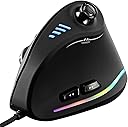
🎯 Elevate your grip, game, and grind with precision and comfort!
The ZLOT Vertical Gaming Mouse combines ergonomic vertical design with a high-performance Pixart PMW3325 sensor, offering up to 10,000 DPI and 1000 Hz polling rate. Featuring 11 programmable buttons including a unique joystick, customizable RGB lighting, and on-board memory, it’s engineered for both professional productivity and immersive gaming. Compatible across multiple OS platforms, this wired USB mouse reduces wrist strain while delivering responsive control for gamers and professionals alike.
| ASIN | B07T3PFWCB |
| Batteries | 1 12V batteries required. |
| Best Sellers Rank | #9,556 in Video Games ( See Top 100 in Video Games ) #408 in PC Gaming Mice |
| Brand | ZLOT |
| Color | Black |
| Customer Reviews | 4.3 4.3 out of 5 stars (1,323) |
| Date First Available | June 14, 2019 |
| Hardware Platform | PC |
| Is Discontinued By Manufacturer | No |
| Item Dimensions LxWxH | 4.33 x 2.83 x 0.04 inches |
| Item Weight | 6 ounces |
| Item model number | G19C18 |
| Manufacturer | zelotes |
| Operating System | Linux |
| Power Source | Corded Electric |
| Product Dimensions | 4.33 x 2.83 x 0.04 inches |
A**R
Incredible value! As a decades long PC gamer, I am thoroughly impressed.
I LOVE this mouse. It has replaced my Evoluent Ergonomic mouse as a daily driver (for work - software developer). It's almost replaced my Logitech G604/G602 for gaming (World of Warcraft). I expect it to fully replace my gaming mouse once I re-learn all the muscle memory. If you're a parent looking for a cheap mouse for your kid, you can't go wrong with this one. I wasn't expecting much at this price point, but this mouse is a great option for anybody. It feels good in my large hand, doesn't stress my wrist at all. Cursor tracks great with default settings on lowest sensitivity. Had to download the software from a Chinese website (thank you Google Translate!), but once I got it installed, it's all in English. I was able to re-map the D-stick to numpad keys, which I then keybind in World of Warcraft. It took all of an hour and replaced my old Logitech G602 when it died at a bad time. I'm currently using this to tank mythic+ WoW dungeons, using the D-stick for many core abilities. Much more than I expected for $30, and still the only ergonomic mouse I can find with enough buttons to be useful for WoW. The Cons: * The directional stick ... isn't actually one. It doesn't show up in Windows as an actual directional stick (like an Xbox/PS controller would - with an X and Y axis). Rather, it's just 4 buttons (WASD). For my purposes, this is fine (I want it to just trigger buttons) but still feel I'd be better off with just 5 buttons than the "D stick that isn't actually a D stick". Maybe this can be changed in the software and I just didn't dig deep enough? As other reviewers point out, the "dead zone" of this D stick makes it feel a bit cumbersome. * The RGB color settings are quite limited. Personally, I don't use any of that. But if you want a super fancy customizable RGB mouse, this isn't the one for you (also, expect to pay at least double). * The software is definitely not nearly as pretty as the Logitech equivalent. Functionally it's comparable (macros, key rebinds, change DPI settings), just not quite as polished. Honestly this didn't bother me at all (I figured it out easy enough), and the mouse will function just fine without the software. You only need the software if you want to customize what each button does. Once that's done, the settings are actually saved to the mouse's internal memory, so you never need the software again! * The button right underneath the scroll wheel is a bit tricky to reach. That's probably by design (the default is for this to change cursor speed/DPI). I have re-bound it to my "Taunt" ability in WoW, and sometimes it's hard to reach in the heat of the moment. I am slowly re-leaning how to press it with the underside of my middle finger knuckle which is actually very comfortable/ergonomic.
J**E
I like it overall, but not a gaming mouse. Just a decent ergonomic mouse
First of all, if you need an ergonomic, this helps. Honestly, every mouse should ALWAYS have been designed this way. It took an adjustment to a vertical mouse, but this makes the numbness in my hand go away when using a mouse. Pros: It works to provide ergonomic relief. Cons: -The Mouse buttons (right and left click) are slightly mushy and really terrible for gaming. -The mouse wheel will be jammed so it cannot spin if you left click too close to the center. The button actually grinds and locks up the mouse wheel. You have to adjust where you click AWAY from the mouse wheel to allow the mouse wheel to spin freely. -The tracking accuracy and input feels totally fine for casual use/ business, but I can tell it would not be responsive/accurate enough for someone actually gaming with it in any quasi-competitive sense. It is decent, but just not really a gaming mouse. If you want a CHEAP ergonomic mouse with almost gaming level characteristics responsiveness, it's OK
J**T
Great Ergonomic Mouse
I haven't yet had the chance to use this mouse for gaming (putting together my first gaming PC soon), but while using it for normal web browsing and studying I really appreciate it. Along with a wrist rest on a mouse pad, I find it's very comfortable and easy to use, and the inclusion of the DPI adjustment button and LEDs are nice features that let you adjust the mouse to your preferences without any hassle at all. The back and forward buttons are pretty helpful when web browsing, and don't get in the way at all when just holding the mouse normally. The RGB is a nice add on, especially at this price point, if you care about that sort of thing. If I had to have a complaint, it's that the software to adjust the RGB features comes on a mini disc. Does anyone have a drive that can read a mini disc, or any disc for that matter, in 2020? The website to download the software looks a bit sketchy, and without someone else verifying that they downloaded the software from there without issue, I'd personally hesitate to click one of their links. I suppose there's a chance that it's also worth mentioning that the RGB software doesn't work when the mouse is used with a Mac. Since I don't yet have a gaming PC, I'm using the mouse just fine with the Mac I use casually, but the RGB just does its normal rainbow cycle with no way to adjust it. Not the worst problem to have. The cable is also that nice no-tangle sort of nylon fabric, rather than the typical black plastic/rubber coating that most cables use. It also includes a velcro strap on the cable for cable management, which is a great little add on. Overall, great mouse, especially at the price point. There are lots of very expensive mice out there, but this one has been very kind to my wrist, I haven't had any problems with it, and it's cheap.
Trustpilot
1 month ago
2 weeks ago