


Desertcart purchases this item on your behalf and handles shipping, customs, and support to Malaysia.
🚀 Upgrade your home network to pro-level speed and control — don’t get left buffering!
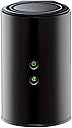
The D-Link DIR-850L Wireless AC1200 Dual-Band Gigabit Router delivers up to 1200 Mbps combined Wi-Fi speeds across 2.4 GHz and 5 GHz bands, ensuring reliable HD streaming and gaming. Equipped with four gigabit Ethernet ports and a USB share port, it supports multiple wired and wireless devices simultaneously. Backward compatible with older Wi-Fi standards and featuring advanced WPA2 security, it offers easy setup and remote management via a free mobile app, making it ideal for modern connected homes.


| ASIN | B00BYRPPAS |
| Antenna Location | Gaming |
| Antenna Type | Internal |
| Best Sellers Rank | #26,209 in Computers & Accessories ( See Top 100 in Computers & Accessories ) #721 in Computer Routers |
| Brand | D-Link |
| Built-In Media | Router, Ethernet Cable, Power Adapter, Installation CD, Product Manual |
| Color | Black |
| Compatible Devices | Smartphone, Tablet |
| Connectivity Protocol | ethernet, wi-fi |
| Connectivity Technology | wireless |
| Control Method | App |
| Controller Type | vera |
| Coverage | Extensive wireless coverage for multiple devices and high-bandwidth activities |
| Customer Reviews | 3.9 out of 5 stars 404 Reviews |
| Data Transfer Rate | 1200 megabits_per_second |
| Frequency | 2.4 GHz |
| Frequency Band Class | Dual-Band |
| Item Weight | 9.92 ounces |
| LAN Port Bandwidth | 10/100/1000 (Gigabit) |
| Manufacturer | D-Link Systems, Inc. |
| Maximum Upstream Data Transfer Rate | 600 megabits_per_second |
| Mfr Part Number | DIR-850L |
| Model Name | DIR-850L |
| Model Number | DIR-850L |
| Number of Antennas | 2 |
| Number of Items | 1 |
| Number of Ports | 5 |
| Operating System | Windows® 8, Windows® 7, Windows Vista®, Windows® XP SP2, or Mac OS® X (v10.4) |
| Other Special Features of the Product | QoS |
| Router Network Type | Dual-Band |
| Security Protocol | WPA, WPA2 |
| Special Feature | QoS |
| UPC | 172302833379 790069423376 168141653759 809185828429 638458727844 012300357357 809385679920 889955693778 806293540410 603895773211 132017775876 803982751522 718117597176 807030509271 989894680362 790069389849 021112440652 163121434960 809186285085 |
| Unit Count | 1 Count |
| Voltage | 240 volts |
| Wi-Fi Generation | Wi-Fi 5 |
| Wireless Communication Standard | 2.4 GHz Radio Frequency , 802.11a/b/g/n |
| Wireless Compability | 2.4 GHz Radio Frequency, 802.11a/b/g/n |
S**Y
Ahead of the curve
I upgraded from an expensive Netgear running DD-WRT because my WAN to LAN throughput was being throttled. I recently upgraded to gigabit and wasn't getting close to that on my old Netgear. No offense to Netgear, it was partially a problem with DD-WRT that's been thoroughly documented. That firmware just does so much computation that the speed is throttled if the hardware can't keep up. This is understandable, and this D-Link worked to solve that problem. This D-Link is capable of some fairly amazing speeds. It was rated at about 900 Mbit speeds for WAN to LAN. As soon as I got it home I snapped in my ethernet ports and clicked that speedtest button. When I saw 830+ Mbit coming back across my screen I knew things were better. I configured the router to use a static external IP, it didn't have a problem with that. I set it up to do port forwarding as I run a number of services on my network that need to be externally accessible. It gave me a number that I could have. I was surprised it would limit it to ~25 or whatever it said. I don't run that many services, or I don't manually require that many ports to be open, but I was close. This could be a limiting factor for another user, so beware. I got the wireless setup, but knew I didn't have any AC devices yet. My N still looks good on there; I got enough speed on my phone and iPad to know it was an improvement, despite no external antenna on the device. Honestly, my coverage was spotty directly above the device, one floor up, so I laid the router on its side and tried again. I saw SIGNIFICANT improvements. I don't know if this is because of how it broadcasts, I didn't make the thing, I'm just saying I had success with it, maybe you can too! I had a friend with a newer MacBook Pro come over to see what the AC was actually capable of. Long story short he got mad at me because he got 200 Mbit faster on my wireless than he gets at his house using an ethernet cable. The interface reminded me of every D-Link I've had in the past 5-7 years, except faster. You could tell that the chip running this router is a bit nicer than what I'm used to. I tried to find a reason to only give this router 4 stars, and couldn't think of one. It works well for people using up to 25 services. It works well for the casual user. It works well with old hardware and wireless technologies. It's not ugly. It's not too loud. Five stars.
M**E
C.R. or CNET recommended. I used it to replace a single band DLink. It's working great!
Awesome router. I have a D-Link model 650, single band router that I was using until yesterday, because the ASUS dual band router that I had failed after less than 6 months of use. The Asus (my 2nd and my last) would intermittently just disconnect from my devices from a wireless perspective. However, I love dual band functionality, because I could put guest on the 2.4ghz band (with a separate password), while putting streaming devices on the 5ghz frequency. So internet access downtime was minimal, I did this. I plugged in this D-Link AC 1200 router into the power, 'without' connecting it to the internet modem. Once it started broadcasting, I had my tablet ignore the normal network it connects to and connect to the SSID wi-fi signals of this router, using the default password provided by a sticker on the router.. Went into the settings of the router, set a new administrative i.d. password, changed the SSID's to a personal preference (giving each wifi signal its own SSID name), changed the default passwords on each of the bands, assigned specific channels (instead of the auto mode), enabled two firewall settings on it (that are by default disabled), then told the router to save the settings. Again, the router was not connected to the internet when I did this. So my tablet was only talking to the new router only via the IP address. In the meanwhile, other devices were still working with the single bank D-Link, so there was no interference. Shut off the cable modem, connected the D-Link Wireless AC 1200 to it, powered back on the cable modem. Within 5 minutes all devices were working flawlessly. I did a signal strength test with the wifi analysis app from the android store and noticed improvement in strength. I'm sticking with the D-Link brand and very pleased with this new dual band router. It was also recommended by either Consumer Reports or CNET. I can't remember which one.
M**R
It drops the signal frequently and range is weak
If it is working it is actually quite good. But I assume that you want a consistent signal and not one where devices of various brands out of the sudden are no longer connected and the only way of resolving it is to restart the wireless router. My iPhone and IPad run on the 5 ghz network and when they lose the signal they automatically sign in under the 2.4 ghz network. Once that happens the internet is awfully slow. We have another iPhone 4s that cannot connect to the 5 ghz and therefore is always on the 2.4, but the speed is by far faster than my Iphone 5 when it automatically signs in on the 2.4 after losing the 5 ghz network. Why remains a mystery. The range is not good at all. When you close the door in the room right next to the living room (where the router is located) you see how the signal decreases instantly. D-Link claims an amazing range, but fact is that our previous 8 year old Netgear router outperformed this one here by far. I recommend you stay away from this one and re-think if an AC router is really necessary or if a good N-router still might be the better alternative.
G**T
Good router, not good support, buy extended warranty.
So far, this has been a great router tho installing was quiet Difficult due to the very short length of the power cord. Shortest I've ever seen & was a total pain. I see they sell a longer cord separately which I think is tacky of DLink. I installed the same model router the week before mine for a friend & we had such difficulty also w the short power cord. But, the most frustrating part was working with Dlink support. The internet light in front wud never turn on so after 3 calls to DLink, they finally came to the conclusion that the Ethernet cord was no good. We had to have the router working that afternoon so had to go to a retailer & spend $26 on an Ethernet cord. DLink never said they wud send us one or reimburse for the one we bought nor did they ever say sorry that they shipped us a router w a bad Ethernet cord. They weren't rude, they simply didn't seem to be concerned. Bought a 2 year replacement warranty from Squaretrade as I was left feeling a bit shaky about the life of this router.
M**I
Nice entry level AC router
I live in a very crounded neighborhood and the 2.4Ghz band is getting pretty full. I have started moving my systems to 5G and that is helping, but the range is not so hot. I recently purchased a couple of PC's that came with AC cards, so I started looking at AC routers. Despite my poor experiences with D-Link in the past, based on the reviews and the price, I decided to give this on a try. I am glad I did. While the range is not much better than the 5G router is replaced, the speeds are incredible. TBO, I am getting close to hardwire LAN transfer speed. At this point, I think my bottleneck might by the machine itself. However, I cannot aford multiple TB in SSD. The router was easy to set up. I am not using it as my main router into the house. It is set up as an AP on the main level for maximum throughput. I have had a lot of problems with routers getting hot and needing to be reset (other than WRT routers), but so far, this has been running for a month with no problems. While I have not done extensive testing, like some reviewers have, I have been very pleased with the performance and reliability of the router.
J**B
Good Product with lot of features but some connectivity issues with Roku
The router is really easy to setup for most of the usual items like PC, Laptop, Smart Phones and iPads. I discovered that my my Roku 2 xs player could did not connect automatically. Roku 2 player was working excellently with my previous router Linksys E2000. I called up Roku Support to get the problem resolved (Roku works on a channel 11 of the router). But I still face one problem. I am trying to setup a media server. I am using Twonky Beam. But some how the router is blocking the device discovery. Just to be sure that this is not a software problem or my iPad problem, I installed it on my iphone and same problem exist. Then I tried the Roku remote for iphone (Same media server different software). I am facing the same challenge. My device is not getting discovered over the wifi. So any one who is looking to buy this product, please consider the above constraint. I will try to connect with the DLINK support (not easy to find a support) for figuring out a solution. If I find a solution, I will update it in my post. Update 30-Sep-2013 I have returned this item and bought a Netgear AC Router from Costco. All the above issues have gone. So looks like there something which is blocking the Roku Remote for iPad to cast the channels from iPad. Hopefully this review helps for people with casting needs.
J**N
Excellent router - only complaint is there isn't a good ...
Excellent router - only complaint is there isn't a good way to hide the wires coming out its back. If it were made to lay flat like my old linksys router, you would not notice the wires. Other than that, its a great router, with great range. Its in the corner of my basement, and it extends all through the 4,500 sq foot house, and down 6 flights of stairs to the lake. And it will come back on line after the cable modem goes down and back up. My previous router, the DIR 817W will ONLY come on line IFF the cable is already up and running. If it comes up before the cable box, or if the cable service is interrupted and resumed, the DIR 817W would require a manual power off/on cycle to come back up. I got a UPS to prevent the race-to-power-up problem for short outages, but when the service was interrupted, I had to reboot the old router. This router, the DIR 850L (AC 1200) does not have that problem. If the cable goes out and comes back, it is able to re-establish internet service.
T**Y
Great AC / N Access Point - Dual Band.
If you are buying an AC (or other brand) "n" capable router / access point to increase your transmission speed or cut down on delays, think again. I was getting collision interference from wireless / streaming surveillance cameras competing for air time with streaming video to my internet enabled tv. Here's the considerations: Your device (e.g., tv) you want to hook up must be enabled for the ac/n mode to use the 5 ghz band. There are two wireless access points in one: 2.4 ghz and 5.0 ghz. The 2.4 will workd for n, g or b. The 5 ghz will work for ac, n and a. Either access point will run at the mode and rate of the SLOWEST device connected to that access point. You also need to carefully choose your channels so you don't compete for bandwidth with your neighbors. It has a very good built in firewall and even has provision for your guests to be able to get to the internet without your security password (can't see your network devices). The vertical shape is a little unstable when you plug all those wires in at the back -- would have been nice to have a place to screw it so the shelf for stability. That being said, this is a great device. Vendor sold it at a very good price. Shipped promptly and securely. As is usual for Dlink, the quality is excellent and the internal setup is easy.
E**H
Pour doubler le wifi
utiliser sur quest 2 fais son job et la prise usb pour disque dur envois les films dans le casque !!!!!!
Í**A
Funciona bien
Buen producto. Tenía otro extensor de señal que nada más no generaba ninguna diferencia, éste sí. Escuché problemas de que reinicia pero a mi no me ha pasado, llevo ya más de 2 meses con él y sólo lo he tenido que apagar unas 2 veces por intermitencia, algo que encuentro común en los routers.
N**I
Five Stars
Good quality and look. Best features, long strength of wifi
C**N
Un buen producto.
Cumple su cometido, si manejan las velocidades y los rangos de frecuencia que muestra en la descripcion. El detalle es su corto alcance ya que no cuenta con antenas potentes.Y los materiales se notan que son de baja calidad. Por todo lo demas y por el precio es buen producto y funciona a la perfeccion.
S**B
superb
superb product, I get almost 440+ mb on my dell laptop in wireless. I even get 90+ on my other IBM laptop.
Trustpilot
2 weeks ago
1 day ago