🎯 One Remote to Rule Them All — Simplify, Streamline, and Stay in Control
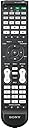
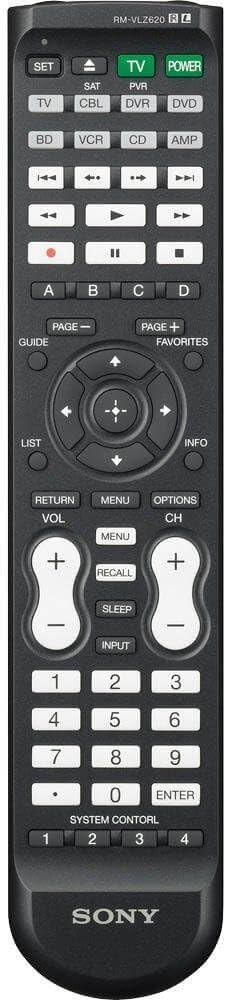
The Sony RM-VLZ620 Universal Remote Control consolidates up to 8 AV devices into a single, ergonomic controller featuring 12 programmable macro buttons and advanced Ultra 3X IR spread technology for a 180° signal range. Designed for seamless compatibility with Sony and non-Sony equipment, it offers a learning function to customize commands, making it the ultimate solution for decluttering your entertainment setup and elevating your control experience.
| ASIN | B00385XUG0 |
| Additional Features | Universal |
| Battery Type | Lithium |
| Best Sellers Rank | #274,176 in Electronics ( See Top 100 in Electronics ) #21,630 in Remote Controls (Electronics) |
| Brand | Sony |
| Button Quantity | 12 |
| Color | Black |
| Compatible Devices | VCR |
| Connectivity Technology | Infrared |
| Controller Type | Button Control |
| Customer Reviews | 4.0 out of 5 stars 999 Reviews |
| Global Trade Identification Number | 00027242780095, 00151903483350 |
| Item Weight | 150 Grams |
| Manufacturer | Sony |
| Max Number of Supported Devices | 8 |
| Maximum Number of Supported Devices | 8 |
| Maximum Range | 10 Meters |
| Mfr Part Number | RMVLZ620 |
| Model Name | RMVLZ620 |
| Model Number | RMVLZ620 |
| Special Feature | Universal |
| UPC | 151903483350 085090324359 777786204839 666669767656 631571041880 027242780095 |
| Warranty Description | 90 days limited |
A**R
Outstanding product at a great price
Before = Five remote controls: (1) Verizon FiOS 500GB DVR; (2) Sharp AQUOS LCD HD TV; (3) Panasonic Blu-ray player; (4) Sony A/V system; (5) Roku HD streaming player. After = One remote control that completely replaces all the other five in day-to-day operations. Setup took a couple of hours, in part because I actually read user manuals, in part because of my incompetence (I must remember to wait for SET light to finish flashing before moving to the next step!), and in part because there was a lot to do. The RM-VLZ620 recognized my Sony A/V system automatically, with no code-entering on my part, but codes were required for the TV, Blu-ray player, and DVR. The activities that took the most time were training the device to impersonate my Roku remote control, for which no code was provided but which luckily has very few buttons, and setting up what Sony calls the "system control" buttons, buttons that store a sequence of commands for one or more devices (think of them as key-press macros). In order to help you understand the effect the Sony RM-VLZ620 has had on my life, I have written a brief play. It's entitled "The Effect the Sony RM-VLZ620 has had on My Life," and is in two acts. ************************************************ "The Effect the Sony RM-VLZ620 has had on My Life," by The Gold Tooth ***** Dramatis Personae ***** Father: An intrepid technologist blessed with a rich wife and nine-year-old boy and girl twins Mother (non-speaking part): A saintly woman of rare and spectacular beauty, also an excellent cook Alex: A budding scientist with grave character defects much given to insolence, talking back, irritating his sister, and simulating the noises of gunfire, explosions, and bodily effluences Emma: A future veterinary artist or artistic veterinarian who delights in the company of animals, drawing, pleasing her friends with little homemade gifts, and snuggling with her parents ***** Act I: Yesterday ***** Father (picking up TV remote control from under cushion): "Alex, where's the remote control for the DVR?" Alex: "You've got it." Father: "No, I don't. This is the TV remote. We need the one for the DVR to actually watch anything. Where is it? Emma, do you know?" Emma (reluctantly): "Alex had it. I saw him stirring his oatmeal with it this morning." Alex (shouting): "I did not! It fell in!" Emma (not quite so reluctantly): "No it didn't! He was stirring and then he licked it." Alex (indignantly, as if addressing mental defectives): "I *had* to lick it, it had maple syrup on it!" Father: "Alex! What on earth ....? Okay, what did you do with it when you'd finished preparing your breakfast?" Alex: "Well, Tommy said that if you take the back off and put ground-up eggshells .... [hugely long and rambling tale omitted, the purpose of which appears to be to establish that at no point did Alex do anything reprehensible or censurable, and that other people were to blame even if he did]. Father (sighing deeply): "Bring it home from school tomorrow, please Alex, and clean it in the *outside* sink, mind. Now, where's the remote for the A/V system? Can't watch anything without that!" ***** Act II: Today ***** Father picks up Sony RM-VLZ620 and presses System Control button #1. Automatically, TV turns on, DVR turns on, A/V system turns on and switches itself to the appropriate input. Father settles on couch, emits the sound that Emma calls "Daddy's purr," and changes channel to C-SPAN2 to watch a Heritage Foundation discussion on tort reform. Children scream.
T**S
A nice update to the RM-VL610
I purchased this remote to replace a well-worn Sony RM-VL610 that had served me well for a few years, but was starting to show its age. I think it's a nice evolution of the prior model. Subtle but notable changes (upgrades?): - Ergonomic refinements: a ribbed back and rubber strip around the edge (which I missed from my old RM-VL900 way back in the day) make it easier to grip, and the more conventional battery cover is more secure than on the VL610, which had exchangeable colored backs that were kinda neat but slid off too easily. The VLZ620 is slightly longer at the bottom, which makes the lower buttons more comfortable to use. The all-critical Button feel is pretty much identical to the old model - firm with decent feedback. It's not as tactile as the RM-YD029 that came with my Sony XBR TV, but better than the typical cheapo universal remotes from the cable company. - Range and spread were always good on the VL610; never had any complaints. The VLZ620 packaging boasts "Ultra 3X" spread, with an illustration showing the IR waves spreading past 180 degrees. The IR lens has 3 convex bubbles which ostensibly spready the signal, and sure enough, you can point the remote almost completely backwards and it'll still register (at least on my Sony TV). Pretty impressive. - The component buttons have been modernized: CBL/SAT is now the 2nd button next to TV (instead of DVD), the 3rd button button is now DVR/PVR, a BD (BluRay) button has been added, and TAPE has been removed (who has a tape deck anymore??). They also added a dedicated hard button just for TV power - very handy if your turn-on sequence gets out of sync and you need to power up/down your TV w/o leaving CBL mode. - The numeric keypad has been swapped with the playback controls, so they're now below the volume/channel buttons at the bottom. I think another reviewer felt this was more awkward, but I actually find it to be a more natural setup - you can quickly grab the bottom of the control and operate the most critical buttons for TV watching w/o having to slide your hand up the wand. - There's now a dedicated INFO button (yay, finally), arrayed around the cursor control along with GUIDE, FAVORITES and LIST, all of which are cable/satellite friendly. PAGE +/- are now just above the cursor, naturally positioned to the left and right. Overall the layout feels better generalized and more intuitive. - The "record" function now takes only a single button to engage (it used to have a safeguard that required simultaneously pressing the play button) - more appropriate for the "record all the shows all the time RIGHT NOW" DVR age. - The pre-programmed code for my Comcast Motorola DVR was not perfect, but a lot closer than the last model - I only had to reprogram a few functions. Looks like Sony put some effort into updating the codes. The only negative I can think of is that the programming procedure is a bit more convoluted than before, requiring the entry of random 3 digit codes to enable different modes. Also, the remote times out programming mode a bit too quickly, annoying when you're rifling through the documentation looking for codes and sequences. Overall though it's all pretty straightforward and workable. All in all, a solid 4-star product; for around 20 bucks, i'm uprating it to 5 stars for value. p.s. I've seen a few comments about the remote requiring new alkaline batteries to function properly. Just FYI that I'm using a set of freshly-charged Sanyo Eneloop rechargeables with no issues at all, including the learning function. Other brands of NiMH rechargeables may not be as consistent (Eneloops are amazing), so YMMV; when in doubt, use fresh alkalines.
J**E
Best remote for the price. It does it all!
I originally purchased the Sony RM-AV2100 years ago and it worked flawlessly on all of my main home entertainment equipment. As the buttons got worn over the years, I stepped up to the RM-AX4000 in which I really fell in love with. I just wish Sony continued to make them. All the macros I programmed worked very well, and I really programmed that remote to do it all with a one button push. So after replacing the upstairs TV and DVR, and I could no longer find a 4000, I decided on the RM-VL-600. Again I was able to program it to run the DVR, DVD and TV and do all the macro switching and settings with the push of a single button. So now after 5 years, my AX-4000 buttons are getting hard to press. I did a lot of searching around and almost purchased a Harmony One, but didn't want to pay the price. So I decided to try the Sony RM-VLZ620 since it was the upgrade to the VL-600, and the price was right. It took a little time to set up, since the included codes did not work on some of my equipment, like the Denon DVD player or Parasound processor, so I tried the learning funciton, which I prefer anyway since you can assign which button you want for certain functions. After getting everything programmed, macros included, I was very impressed with this remote. In fact I think it is as good as, if not better than the RM-AX4000, even though I prefer the LCD touch screen with a backlight, and being able to rename some of the soft buttons. So this little $20 remote was worth getting and it can keep up with the expensive big boys. It also has 3 IR LED's for a wider and stronger operation, so it never has missed any of the steps when performing the macros. I would recommend this over the Harmony One, especially for the price difference. As a no brainer, make sure you use fresh alkaline batteries when programming it. As an example of one of the macros I have programmed into it, when I watch a blu-ray movie, it can switch inputs on the TV. Turn the TV speakers off, power on the blu-ray player, powers on the Parsound processor and switch the input to blu-ray and start the movie. When the movie is over, I press a system control button, and it stops the blu-ray player, powers it off, lowers the volume on the processor, switches the processor to the FM station I listen to, powers it off, sets the TV input back to TV and turn the TV speakers back on. You can only program 16 functions for each macro you use. But what is nice is you have 12 buttons to perform individual macos on.(Device select buttons and the four System Control buttons). I also recommend taking your time when programming it, and familiarize yourself with the manual before you start. It comes preprogrammed for Sony products and even has a Device select button for a blu-ray player as well as a DVD player. Now for the cons. I wish it had a back-lit display and you could rename some of the buttons. Also on the older RM-VL-600, if you are watching a DVD and you use a macro to go back to TV, it will finish the macro function, and set the remote back to TV on the Device Select. But with the VLZ-620, the Device Select button will stay on the DVD button, so you have to go back to the TV button manually. My wife always forgets to press the TV button after watching a movie and tells me the remote doesn't work for TV. I gave it 4 stars because of the cons which really are minor. I also wish you could rename some of the buttons. Other than these few cons, I highly recommend this remote. Update 07/20/2012 Just an update that I just purchased an Oppo BDP-93 from Amazon, and I had no problem having the RM-VLZ620 learn all the commands and 'teach' some macros. So save yourself some money on those high dollar remotes, when this under $20 unit will perform just as well.
V**T
A good buy for the money but it has some problems
This universal remote has a lot of features and is a very good buy for the money, but it has some problems. First problem... The programming procedure is unnecessarily complicated, especially the key command learning function. Don't misplace the user's manual because without it you will be hosed! If you are a technologically challenged individual you are going to be very frustrated with this remote (I am not, and it frustrates ME). I took off one full star for this. Sony has a long standing problem with overly complicated programming procedures on ALL of their consumer electronics equipment (at least all of the Sony devices that I have personally owned). Second problem... During the learning procedure you need to be quick about doing the steps because it times-out far too quickly and exits the learning routine, requiring you to start over. This is more difficult than it sounds because both this remote, and most of the remotes that you will be using to program it with, have a large number of buttons and you will be looking at one or both of the remotes either upside down or sideways, so finding the correct keys to hit on both remotes can take a few seconds. I can't figure out why Sony felt like they had to put such a short time-out on the programming routine. I took off half a star for this. Third problem... For remotes that have device codes available, some of the Sony remote's key functions don't match up to the key functions on the original remote. For example, I have a Toshiba TV and the enter key function on the Sony remote doesn't match the enter key function on the Toshiba remote. In fact, the enter key on the Sony resets all of the Toshiba TV settings to it's factory defaults. Toshiba doesn't even have a key like this on their remote (for a VERY good reason). This was VERY maddening! Toshiba TV owners, you have been warned. A way around this problem is to "teach" the Sony the correct individual key functions, but, if you are purchasing this remote to replace a lost or broken remote for your device, this WILL be a problem for you. I took off another half star for this. An observation; There isn't an "Exit" key on this remote like there is on every other remote that I have. Sony has chosen to label this key "Return" for some unknown reason (you have to be different, don't you Sony). Fourth problem... It forgets some of the learned keys and needs to have them reprogrammed. The specific keys that it forgets are random. This has happened to me a couple of times. This may turn out to be a temporary glitch so I didn't dock it any stars for this. The bottom line is that Sony could have done better. I HAVE been able to get all of my remotes programmed into it (with some time and effort) and it HAS eliminated my remote control clutter, so I am satisfied with it overall (considering what I paid for it). I wish it had backlit keys, but one can't expect to get EVERYTHING for this kind of money. Update 5/13/16: At a little over a year of use, some of the buttons do not respond well and have to be pushed quite hard. It is not holding up very well and I have lowered my rating to 2 stars.
E**.
Pretty powerful, yet easy to program.
Pros: Learning remote, in case your specific device isn't covered (though it probably will, there are a gabillion codes). Good feel in the hand. Cons: Programming individual buttons is tedious. Doesn't play as nicely with older Samsung LCD TVs as I would've hoped. I purchased this remote because I misplaced another universal remote that I purchased after losing my original Samsung TV remote. I was looking for 2 main criteria in a replacement remote: 1. I didn't want a digital programmable thing with a million macros, or anything too hard to program, and 2. I wanted a learning device to be able to program my AppleTV remote commands. I scoured Amazon for hours, seeing what was available. I settled on this because it had all the features I wanted, and I have a Sony BluRay/DVD player, and may likely get a Sony TV as my next home theater purchase. When I got the remote, I really liked the feel in my hand. Not too heavy. Not too light. Good size. And the button positions seemed natural. When I cracked the manual to set the codes for my TV, it seemed easy enough. That was, until I tried to get a code that worked with my 4 year-old Samsung LCD TV. I found a code that worked on the eighth try. And even then, the button mapping doesn't quite match up to my original remote. I guess if you had the original remote, you can always just custom map every button to make it exactly the way you want, but that wasn't the case in my situation. With my original remote lost, I had to accept the codes as they were. After finding an acceptable code for my TV, I moved on to setting up my AppleTV (again, my BluRay player is a Sony, so no programming was required). I actually went through the custom programming of a source with the learning feature. It was pretty straight forward, but kinda repetitive. I got tired after just the AppleTV remote, which has like 6 buttons. I can't imagine mapping an entire TV remote. Then, to my surprise, Sony actually has a program code for Apple products. So I actually reset the code for that source, and reprogrammed it with the Apple code, and it worked perfectly. Lastly, as I was flipping through the instructions, I came across how to program your A/C remote. I thought to myself, "You've got be kidding!" But actually, it was easy and quick. I now can also control my window air conditioner from the couch with the same remote. Pretty convenient I thought. I guess you can also program a fan or whatever else you might want to control with the remote. That being said, I only had to worry about 3 devices, 2 of which have really simple controls. If you are planning on custom programming all 8 devices, you're going to be in for a long afternoon. But then again, if that's the case, maybe some digital thing might be better bet. All in all I think this remote is pretty good. It's definitely better than the Phillips one I used to have. I'd recommend it.
C**O
An excellent remote for the price
An excellent remote for the price. A bargain in my opinion. I liked it so much I bought a second one for my basement setup. It did everything I was expecting it to do and more. My setup is a Samsung TV, a Samsung Blu-Ray player, a Sony AV receiver, Samsung speakers and Verizon Fios media client set top box (not sure who the manufacturer is since the default factory just worked). One of my concerns was whether I could control the volume with my receiver while in other device modes like Cable or Blu-Ray. That feature was available and worked as expected. Given that I have a Sony receiver, the default setting for AMP worked however to my surprise, buttons like the arrows and the menu and the return did not work. I had to teach it using the remote from the receiver. My one very minor complaint is the learn function is not as smooth as I would like it to be. In some cases I had to hold the button on the source remote a significant amount of time before the universal remote finally learned it or it failed and I had to try a second time. Since this is something you only do once, it is not a big deal but it can be a frustrating experience for someone just trying to learn how to use the remote. Once I realized that I needed to hold the button longer on the source remote or that I had to try again if the red light by the SET button only flashed once meaning the learn function was incomplete than I was able to pretty quickly teach it all the commands I wanted the remote to learn. In regards to the buttons on the remote, I did not think there was single extraneous button that should have been removed for a better layout. The layout in general was very good and similar to many other remotes so it felt very natural to use. Overall, a top notch universal remote at a great price. Highly recommended. Update - 1/17/2015 I was defining a sequence of commands for one of the system control buttons and wanted to add a significant delay (5 seconds)and discovered I was unable to do this. I had to resort to define the first sequence with one system control button and the second sequence after the delay with a second system control button. A minor flaw with this remote but something I wanted to let everyone know about.
R**R
Works, but has problems
This remote has problems that a prospective buyer should be aware of. Most programmable remotes require you to hold a button or two for a while before letting you enter programming mode, presumably to prevent accidental button edits. This remote requires you to hold down two buttons for three seconds and then enter a three number code, which is probably overkill. This seems minor at first, but this problem grows in significance the more you use the programming feature. Unlike my previous Sony programmable remote, I cannot pick this one up at random and program any button on a whim. I have to grab the manual and look up the particular three digit code required for whatever type of edit I'm making. Despite being minor as far as inconveniences go, this programming scheme has multiple drawbacks and no realistic advantanges. I am baffled this got into the final design and would like to study the engineers responsible for this, doing my part by adding to the corpus of mind science. So that was the minor inconvenience...Here is the deal breaker: This remote has a cheap voltage regulator or something in it that requires you to have FULLY CHARGED batteries before programming. I mean, these batteries must be brand new, pumping out exactly 1.5 volts. A battery with even minor use will cause the programming mode to fail, which occurs AFTER you've grabbed the manual and enterred the silly button presses. That's why I think this is a voltage regulator issue: You've enterred the button combo and told the remote to turn on it's programming chip, but it can't get enough juice because the regulator isn't biased correctly or is otherwise flawed. So it just fails without any feedback, because the rest of the remote "thinks" the programming chip is enabled and interacting with the user. So this is defective by design and uses cheap/incorrect parts that makes it defective in practice.
B**E
Great Universal Remote!
Love this remote. A little finicky to program (really, just a matter of following instructions properly!), but once that's done, it's a dream to be able to operate all of our electronic boxes easily with a single remote. I've packed away all the other remotes...no more coffee table clutter! The RM-VLZ620 instantly recognized the manufacturer codes for my 2012 Sharp LCD 52" tv, 2012 Sharp Blu-ray Player, and old JVC vcr, assigning tasks to the appropriate buttons without any need for further action on my part. It didn't recognize my Motorola Satellite box or Philips low-end soundbar, even with the code search function, so I had to use the infrared "learning function" (is that too cool, or what?) to manually program each function from those two units. Not a problem, except for some reason, it just would not program the on/off function for the Satellite box. Not a biggie, though...everything else was programmable, so we just leave it turned on. As the instruction manual says, MAKE SURE YOU USE FRESH BATTERIES in the remotes you use for "learning"...it makes a difference!) Has a nice weight, feels good in the hand. Has "grippy strips" on the sides so doesn't slip and slide around while you're holding it. It's big enough not to get lost, but not too big and bulky. Would have liked backlit buttons, but hey, for less than $20, I'm good without. Besides, the buttons have enough distinct shapes and locations (nice design, Sony!) that you soon get the feel for executing commands easily. Can also take a bit of abuse. One of the reasons I didn't want a remote with a screen was because some reviews had said that dropping them, even from a very short distance, wrecked the screen function. Sure enough, within a week of owning the RM-VLZ620, it got caught in a lap blanket when I stood up and fell to the floor...no problem. Everything still works perfectly. In short, we love it. Would buy again and recommend to friends.
Trustpilot
5 days ago
3 weeks ago