Buy anything from 5,000+ international stores. One checkout price. No surprise fees. Join 2M+ shoppers on Desertcart.
Desertcart purchases this item on your behalf and handles shipping, customs, and support to Malaysia.
🚀 Elevate Your Connectivity Game!
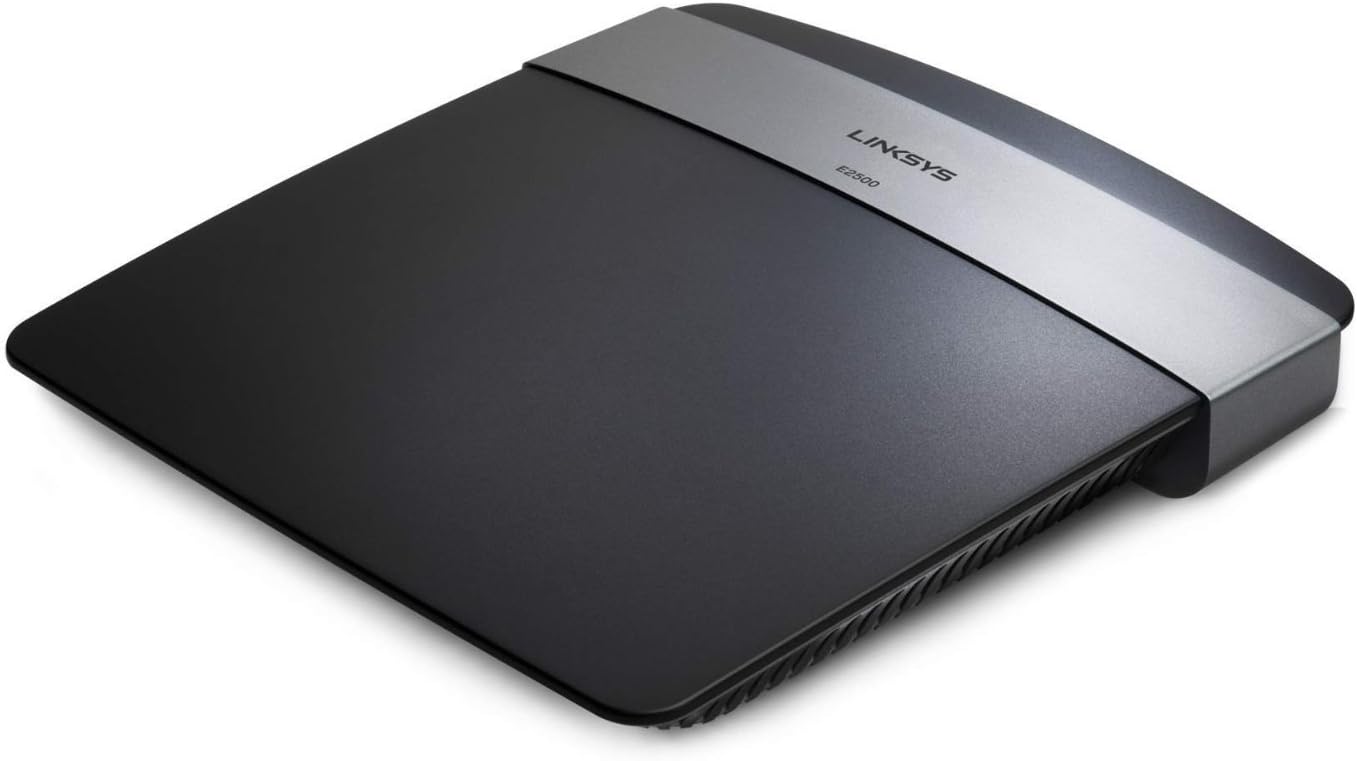
The Linksys E2500 (N600) is an advanced dual-band wireless router that offers high-speed internet access with a maximum transfer rate of 600 Mbps. It features a MIMO antenna array for enhanced range, four Fast Ethernet ports for wired connections, and robust security protocols to protect your network. Setup is a breeze with Cisco Connect software, making it ideal for both home and office use.
| ASIN | B004T9RR4A |
| Antenna Location | Security |
| Antenna Type | Internal |
| Best Sellers Rank | #110,525 in Electronics ( See Top 100 in Electronics ) #731 in Computer Routers |
| Brand | Linksys |
| Built-In Media | N600 Dual-band N Router |
| Color | Black |
| Compatible Devices | Personal Computer, Printer |
| Connectivity Protocol | Ethernet, Wi-Fi |
| Connectivity Technology | Wireless |
| Control Method | Touch |
| Controller Type | Switch |
| Coverage | wide |
| Customer Reviews | 4.1 out of 5 stars 1,471 Reviews |
| Data Transfer Rate | 300 Megabits Per Second |
| Frequency | 5 GHz |
| Frequency Band Class | Dual-Band |
| Global Trade Identification Number | 00930443442863 |
| Has Internet Connectivity | Yes |
| Is Modem Compatible | No |
| Item Type Name | Belkin Router |
| Item Weight | 0.71 Pounds |
| LAN Port Bandwidth | 10/100 megabits_per_second |
| Manufacturer | Linksys |
| Maximum Upstream Data Transfer Rate | 600 Megabits Per Second |
| Mfr Part Number | E2500-NP |
| Model Name | N600 |
| Model Number | E2500-NP |
| Number of Ports | 4 |
| Operating System | Windows XP Professional Edition |
| Other Special Features of the Product | WPS |
| Router Network Type | hybrid |
| Security Protocol | WPA-PSK, WPA2-PSK |
| Smart Home Compatibility | Not Smart Home Compatible |
| Special Feature | WPS |
| UPC | 930443442863 745883596744 603199642411 700736687642 898029713175 163120533954 803982780706 745883592371 |
| Unit Count | 1.0 Count |
| Voltage | 12 Volts |
| Warranty Description | 1 year limited warranty |
| Wi-Fi Generation | Wi-Fi 4 |
| Wireless Communication Standard | 802.11a/b/g/n |
| Wireless Compability | 802.11a/b/g/n |
T**T
Excellent quality at an affordable price
I have been in technology for many, many years, and my expertise concerns Voice over Internet Protocol (VoIP) and telecommunications in general. I work remotely from my corporate office, and I use an IP phone to talk to my co-workers. I have been dealing with the call quality issues that our customers experience mostly due to poor-quality routers for most of my career. I've put hands on just about SOHO device out there, and Linksys has always been a great product for the small office. The best part of this line of Linksys devices is that Cisco bought the company but kept the easy-to-use software management in tact, only changing the brand name. All of these Linksys devices for the past decade have generally built on the same competent administrative interface, which means that every time you upgrade, you have a familiar experience waiting for you. One of the nicest features for me is the QoS settings. You can create policies by IP, port, protocol, and MAC address, and then assign a High Medium Low value to that device for Quality of Service. In an office environment, if you had hard IP phones (like Polycom phones), you would want to put in the MAC of each phone and set it's QoS to High so that the router would automatically prioritize traffic from these devices over PCs and network storage, printers, etc. For a home office, you would still want high priority for your phone, or if you were using a softphone on your computer you might give your laptop priority. Of course, assigning the priority to your laptop would mean that youtube would compete with your voice conversations, so in this case it might be better to establish a port and protocol QoS policy. Many Amazon customers may not find this level of technical detail helpful when considering which device to purchase, but these are the things that matter to me when evaluating a router for my home office. Linksys / Cisco do some great things with repeaters, making it easy to have this device as your central router and then smaller access points throughout your home to extend the wireless range. All that stuff works really well if you know enough to configure it. One really cool thing Linksys / Cisco has been doing for the past few years is the guest access SSID for wireless. You can have a secured wireless name for your family, and then a guest access that has it's own password or no password at all for friends or neighbors stealing your wifi. But these separate SSIDs allow you to create policies restricting access so that a cunning neighbor cruising on your wifi wouldn't have access to your entire home network, and you don't have to give our your primary password to a friend who is staying the weekend. This model of router goes a step further with simultaneous 2.4 GHz and 5 GHz transmissions. Since the 2.4 GHz spectrum is so crowded (cordless phones, all manny of wifi router, etc.) sometimes you are in an apartment location where everyone has wifi and all the available channels have been used, so you get poor performance from your device due to the crowded airwaves. With the dual 2.4 GHz and 5 GHz transmissions, you get tons of air space, and you can even have certain devices on 2.4 while others are on 5 in your own home to reduce the chatter on a particular channel. I have my laptop and iPad on 5 GHz, but the iPhones in the home are on 2.4 GHz. I don't honestly think I've improved anything - we're only talking about 10 devices all told - but it's nice that this is a feature. Plus certain devices that have older B/G antennas can't use the super-fast N antenna, but this router serves both devices equally. In our home, we have two iPads, three iPhones, three Macbooks, one xbox 360, one Apple TV (2nd Gen), and one Samsung Smart TV (with wifi or LAN cable access). I have all of these devices networked through the router, and just to be a jerk I decided to start video streaming on all of them at once, then try my VoIP phone (laptop) to see if quality was affected - no issues at all. If you have the $190 for the high-end model with 6 antennas - get that one. I didn't want to spend the cash.
B**N
Easy setup, good range
I'm a really old fellow and I'm just an ordinary computer user, far from an expert. I was a bit apprehensive about setting up this router, since I had a great deal of trouble setting up a Netgear router several years ago. But setup was very quick and easy, almost a "no brainer", using the Linksys Connect software. The only hitch I had was that I had to download the software from the Linksys site, because the CD which came with the router did not work. But even that download was simple, easy, and quick. If the CD had worked normally, setup would have taken less than 10 minutes. As it was, I was up and running in about 20 minutes, with no frustration at all. The Linksys 2500 has much better range than my former Netgear router. It allows internet access everywhere in our two story 5 bedroom ranch style house, including the basement, so I guess you could say that's three stories of access, in a pretty big house. It also works in the garage and in the front and back yards. I couldn't ask for more than that. A very tiny warning - even though I get good access everywhere, there are places in the distant corners of the house where I only see one out of the four access band indicators when I'm using my Kindle Fire. I think part of the limitation is the Fire's WiFi antenna, not the router. I don't know whether speed of access has improved, since I never measured speed with my Netgear - but access in the upstairs of the house (where the router is) is instantaneous. Access in the distant corners of the house is a few seconds slow, but that's a huge improvement, since I never had access there with the Netgear. I have not measured data throughput. I don't mean to knock Netgear. That router is several years old and it's only a g router. Hardware, Software and ease of installation have improved a lot since then. Once I've used the Linksys 2500 for a few weeks, I'll update this and report on longer term reliability.
N**K
Outdated hardware for the price
This router feels very dated for what it costs. Setup was straightforward enough, but performance did not meet expectations, especially compared to newer routers in the same price range. Speeds were inconsistent, range was limited, and I experienced frequent drops when multiple devices were connected. While it technically supports dual-band wireless, it struggles to handle modern internet usage like streaming, video calls, and smart home devices all at once. The interface also feels old and lacks features that are standard on more current models. Overall, it functions, but for the price, there are far better and more reliable options available. This might work for very basic needs, but it is overpriced for what it delivers today.
S**M
Good Router, Cisco Quality, Range Could be Better
This router replaced my old G+ MIMO router from Linksys. The old one was just having issues freezing up and had to be re-booted at least once a week. I bought this one on recommendation from a friend, and so far, it has met my every expectation... save one... RANGE! The router out of the box is easy to set up, and activating/deactivating the 5GHz channel is as easy as adding or removing a check-mark. I left the 5GHz channel running so I could get the benefits at close range, but very few of my devices support 5GHz, so I may change that channel back to 2.5GHz and be done with it. The good news is that all my laptops, etc. have excellent data speeds now, even at 2.5GHz! My biggest complaint thus-far is range. My old G+ was in the same location, but I could get good signal nearly anywhere on my property (even the gazebo ~100' away from the house). Not so much with this router... I'm struggling to get a signal in my driveway which is one wall and 60-ft from the router, and get NOTHING at the gazebo. Even signal in the farthest bedroom is spotty (40' and two walls). I've called Linksys about it and they suggested moving the router to a different location, first of all, that is not easily possible, and secondly, the old one worked GREAT in that location... I'll try moving it at a later date, but if it does not make it better, I'll have to ask for a warranty replacement, as I feel something is wrong with this unit. I'll update this review afterwards. UPDATE: After speaking with Cisco support via phone and chat several times, regarding channel settings, etc., I've played with settings until I've found a channel combination that seems to work much better for my home. I've disabled the 5GHz (switched it to 2.4GHz), running dual-band 2.4Ghz, and also re-enabled the 5Ghz band in my quest for better range. I've continued to tweak channels and found two channel combinations that seem to provide better range for my wireless devices. If you have range issues with this router, switch the channel selection from "Auto", and give each channel and frequency a test to see what works best for your home/business. It will take a little effort, but if "Auto" is not working for you, this is the best option for finding the best range and speed (reduction of interference). I still like the router, and Cisco/Linksys customer support has been great to work with, but honestly, out of the box, I expected better function and range... and right now, I'm still not getting the range I received from my old WRT110 G+ router. Yes, the router is a good router (no crashes, lockups, bottlenecks, etc.), speed is better than my old router (wired or wireless), but range is still not in my "happy-zone". Raised review to 4-stars from three, because of customer support help, and the fact that it does work!
L**T
A good router
this is a very good and effective router. Just what I needed to bring my internet service to my computer.
D**O
Quick, Easy, Flawless Setup
Although i am fairly competent regarding PC technology. I had never bothered before setting up my own Wifi at home. heck, ive never setup wifi ever. I wanted to find a reasonably priced router that could handle my needs. I have a ps3 i played on, iPhone, pc etc. i wanted a router that has a nice signal strength(dual transmitting and receiving antenna's). although not perfect - i lose some reception only 15 away from the router in the other room. though, even with one single bar of reception - my wifi is strong, doesnt lag. and is a solid stable signal. I have a signal up to around 150-200 feet away from my house. I wanted a router that wouldnt have problems with interference from electronics running/broadcasting on 2.4 ghz. (wireless home theater speakers, bluetooth, home cordless phones, many electronics even those that arent wireless devices, often generate interference on the 2.4ghz freq. etc) So i purchased this dual band. Not just any dual band, but simultaneous dual band(most dual band wifi routers, you have to manually select which frequency band to run on). This router will run on either frequency, 2.4 or 5 ghz or both automatically, whichever is better to help you with maintaining a stable signal. In closing i bought this, setup it in in 5 minutes (was a breeze, had no problems at all considering ive NEVER done this before) works great. reasonably price! I recommend this router for anyone that needs a little extra in there home network. more than one person using the wifi, online gaming, want to stream media to your ps3, smartphone users ? This is your router!
M**G
DOWNGRADE UPDATE FOLLOWS - Easy setup, seems to be working well, ... time will tell more
****UPDATES BELOW**** This is an interim rating considering the benefit of the doubt. I have been burned a few times already by Linksys/Cisco routers, and I was hoping that they had gotten their act together. My first was a 54G which sufficed until it started getting a little flaky and unreliable ... also slow because of the additional devices (tablet, two smart phones, etc.) So I upgraded to a N300 which was a nightmare to set up and very slow because of the single channel. In addition, the signal strength was absolutely useless. I live in a ranch style house and it was almost impossible to get a strong signal at the other end of the house. When my wife and I used it simultaneously, I would have been better off with tin cans on a string. Enter the E2500: The setup was a breeze, two Android smartphones, an HP AIO wireless printer, a Kindle Fire, and a guest network in addition. The signal strength doesn't appear to have changed very much, but the dual band operation enables much better multiplexing of traffic, so it seems faster ... I don't know yet whether I will need a range extender. I'm hoping not. Guidance: Use the setup disk. It works like a charm. Also, use the guest network option with a password so proximity users don't jump on your net and eat up your bandwidth. I'll have to give it some time, so tonight when we are both watching Jeopardy and playing WWF and Candy Crush on our own devices, we'll see just how well it works. I will not hesitate to upgrade this to 5 stars, or downgrade it if need be. ****UPDATE 11/13/2013**** I have downgraded this router to three stars for one simple reason. It performs no better than my older N300 single channel Linksys router in terms of range. I should have known better having been in network development for the last 40 years of my career. The throughput appears to be better because of the dual channel, but the signal strength is the same - abysmal. I will most likely have to purchase a range extender to get decent reception at the other end of my 2400 square foot home - max end to end distance is about 45 feet through three walls. Not a great distance, and I am a little annoyed that Cisco has not improved upon this. ****Update 11/21/2013**** I received a question from an Amazon customer asking whether this router had a USB port. I looked at the picture on the product page, and sure enough, it showed a USB port to the left of the Ethernet ports. I don't need the USB port so it doesn't really bother me, but it appears that Cisco is using the same photo for a group of related products. At the end of the product page there is a matrix showing the features and the E2500 does NOT have a USB port and it is clearly stated. So there is a discrepancy between the different pieces of data on the product port. If you want a USB port you will have to move up to a more expensive device. This all said, I did purchase a range extender (as I thought I might in my update of 11/13/2013) RE2000. This is a dual band range extender and is designed to work with this series of routers. It works beautifully and gives me four wireless arc signal strength throughout my home. There is an issue with the RE2000 though since there is a faulty firmware chip which has to be upgraded before it will work. Read my review on the RE2000. I even give you Cisco/Linksys Home support number ... and they were very competent. They know the problem --- you won't be the first person they have spoken to.
T**S
Fine router for the money
This is my second Linksys product. I was very happy with WRT54G til about 4 months ago when all of sudden it would not let my my wireless laptops print. The desktop was fine, but not the laptops. Then the download speed began to decay. After talking to some friends, it was clear the router was on it's way out. I looked for a couple of months and finally decided on this one. I could have purchased a cheaper one, but I was concerned about the range and the durability. I read the reviews and this one seemed to be the clear choice for the price point. So far, I am pleased with the choice. Set up was ok. I wouldn't say it was a breeze (I hate setting up networks) but it wasn't terrible. I do not think it was the routers shortcomings, rather I feel it was all the different operating systems I have (XP, Vista, Windows 7 across 3 computers). All computers were up and running with an internet connection in about 15 minutes, and the XP laptop and Vista desktop were printing immediately. The Windows 7 laptop was another story, but it was my fault because I skipped an "add printer" step. But all computers are doing fine, chatting mindlessly with each other, and printing on command. Range is very good. Router is located on second floor and I have range to my backyard patio are and beyond. I love working outside so not being able to do this would be a deal breaker. Download speed has improved over the older router, making it a win-win. Love Linksys products and I highly recommend it.
C**U
Works well
Best out of three we tried.
C**N
Excelente producto
Buen rango de transmisión y con el puerto USB de almacenamiento tengo acceso a una unidad sin necesidad de perder puertos USB de mi laptop
D**S
great service , great delivery.
it is used for my internet & WY-FI works great.
M**T
Programmation difficile
Retourner au vendeur.
Trustpilot
5 days ago
2 months ago