Desertcart purchases this item on your behalf and handles shipping, customs, and support to Malaysia.
🔢 Elevate your data game with sleek wireless precision!
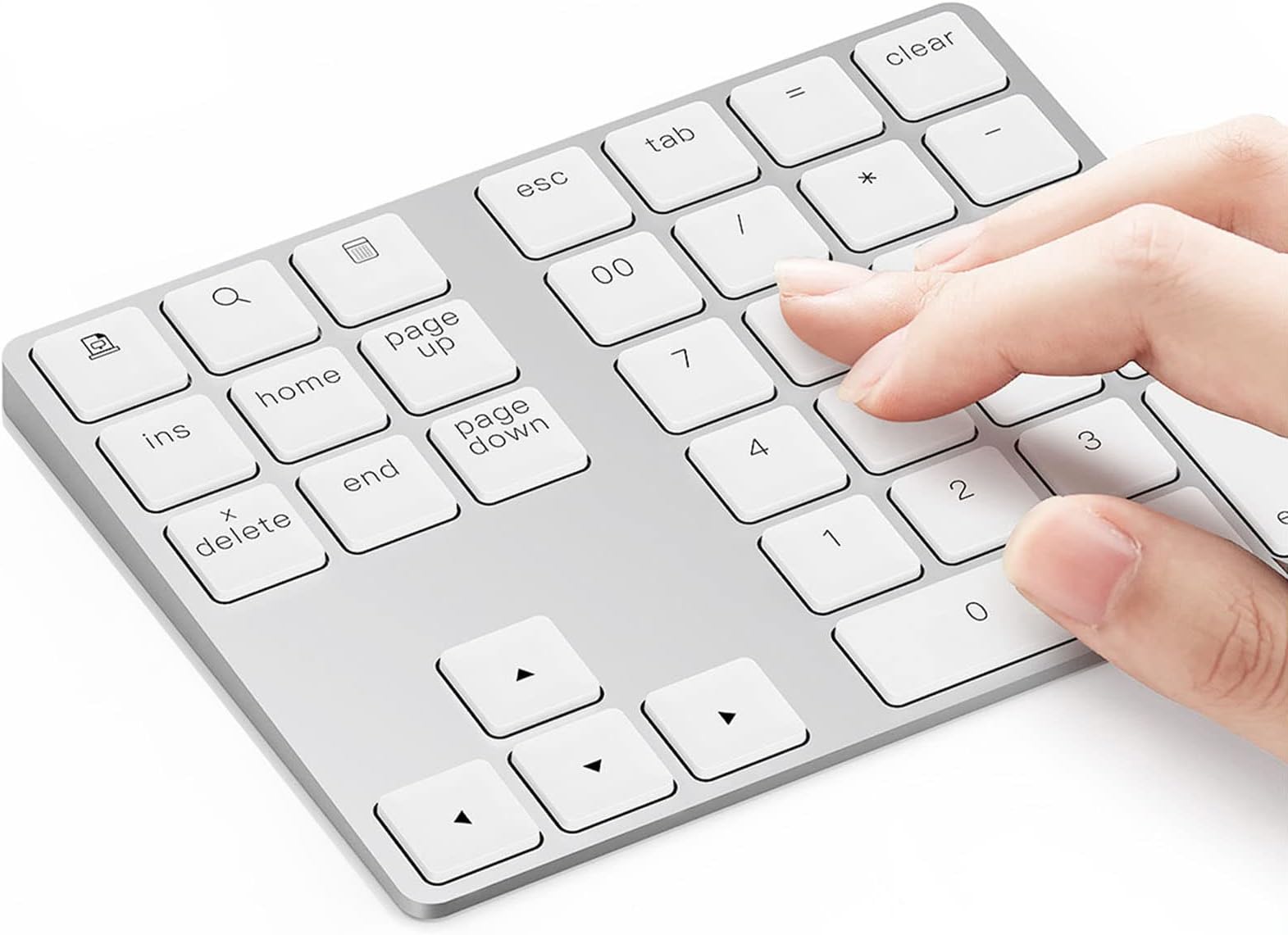
The Lekvey Bluetooth Number Pad is a slim, premium aluminum wireless numeric keypad featuring Bluetooth 5.0 connectivity with a 10-meter range, a rechargeable 160mAh battery with USB-C charging, and ergonomic tilt design. Compatible with a wide range of devices including MacBooks, Windows PCs, and tablets, it offers quiet scissor-switch keys for efficient, comfortable data entry on the go.


| ASIN | B07NPC5241 |
| Additional Features | Ergonomic, Rechargeable |
| Antenna Location | Business |
| Best Sellers Rank | #6 in Numeric Keypads |
| Brand | Lekvey |
| Built-In Media | USB Cable |
| Button Quantity | 34 |
| Color | White and Silver |
| Compatible Amazon Tablet Models | Amazon Fire HD 10 11th Generation, Amazon Fire HD 10 13th Generation, Amazon Fire HD 8 10th Generation, Amazon Fire HD 8 11th Generation, Amazon Fire HD 8 12th Generation, Amazon Fire HD 8 7th Generation, Amazon Fire HD 8 8th Generation, Amazon Fire HD 8 Kids 10th Generation, Amazon Fire HD 8 Kids 12th Generation, Amazon Fire HD 8 Kids 7th Generation, Amazon Fire HD 8 Kids 8th Generation, Amazon F… |
| Compatible Devices | Laptop, Tablet, Desktop, PC |
| Compatible Operating System Family | Android, Windows |
| Compatible Tablet Computer Models | Amazon Fire HD 10 11th Generation, Amazon Fire HD 10 13th Generation, Amazon Fire HD 8 10th Generation, Amazon Fire HD 8 11th Generation, Amazon Fire HD 8 12th Generation, Amazon Fire HD 8 7th Generation, Amazon Fire HD 8 8th Generation, Amazon Fire HD 8 Kids 10th Generation, Amazon Fire HD 8 Kids 12th Generation, Amazon Fire HD 8 Kids 7th Generation, Amazon Fire HD 8 Kids 8th Generation, Amazon F… |
| Connectivity Technology | Bluetooth |
| Customer Reviews | 4.4 out of 5 stars 3,477 Reviews |
| Enclosure Material | Aluminum |
| Hand Orientation | Ambidextrous |
| Item Dimensions L x W x H | 5.6"L x 4.5"W x 0.35"H |
| Item Highlight | Slim 34-Keys, External Numpad Keyboard, Data Entry for Laptop, MacBook, MacBook Air/Pro, iMac, Windows, Surface Pro - Silver |
| Item Weight | 4.32 ounces |
| Keyboard Backlighting Color Support | Single Color |
| Keyboard Description | Wireless |
| Keyboard Layout | QWERTY |
| Manufacturer | Lekvey |
| Mfr Part Number | JP0006WS |
| Model Name | WS |
| Model Number | JP0006WS |
| Number of Keys | 34 |
| Number of Packs | 1 |
| Number of Sections | 1 |
| Recommended Uses For Product | Business |
| Special Feature | Ergonomic, Rechargeable |
| Style Name | Contemporary |
| Switch Type | Tactile |
| Theme | Business |
| Unit Count | 1 Count |
| Water Resistance Level | Not Water Resistant |
P**R
Simple functional workhorse companion to the mac
Light weight, sturdy, no wobble when typing, lasts forever on one charge, simply works. I use these for frame by frame multimedia editing, rebinding all keys for different purposes. Just throw it in my laptop sleeve and take it with me to work, been doing for the past months with zero complaints.
E**.
Great little keyboard for work, super reliable and long battery life
Used this keyboard and reassigned the keys to have function keys while working on my iPad (reassigned the keys using the settings on my virtual desktop for work). Works really well and has held up well during daily use. Is the exact same look and feel as my apple keyboard. Battery life seems to be indefinite since I’ve only charged it once since I bought it and use it almost daily. The Bluetooth never fails. Honestly, very much surpassed my expectations for the price and very satisfied with this purchase.
N**S
works but . . .
Okay, so this works, but I wanted it for the num keys and I play video games (on my MacBook) where my controls are: Num: 1-0 Cntrl num: 1-0 Cmd num: 1-0 This does not "understand" Cmd or Cntrl. It is not a Mac thing, it is a kb thing. The quality of the kb is great, and the feel is really nice, but if you need that extra "reach" (modifier keys) this is not for you.
T**T
Good quality, but chiclet keys are not natural for 10 key
I gave this 5 stars because the product is excellent quality, syncs quickly and performs very well. I do have buyers regret, however, and will be buying a different ten key. It has nothing to do with quality, but with the chiclet style of keys. They do not give good tactile guidance (meaning feeling your finger centered on the key), which is vital for a ten key when your head is turned reading numbers and you need tactile accuracy without looking at the 10 key. Because these keys are flat, I cannot confirm my hand position by feel and therefore cannot turn my head too long, reach for keys above the 10 key, or work prolonged without checking my hand position and data entry. I am making a lot of input errors on this, solely because of the keyboard style. Again, this has nothing to do with quality. The quality is top notch. It's just the wrong key type feel for 10 key. It needs a more robust keybed with concave key tops. Too bad, because this really nice, very thin and easy to pack. UPDATE: Top-notch customer support. I did purchase another 10-key, but still keep this one in my laptop bag because it is so easy to travel with. I did encounter an issue with one of the keys. I contacted the vendor. They told me it has a 2-year warranty and took care of the issue right away, no problems at all and very easy to deal with. Really top-notch professional service. Still stand behind the 5-star review of this product, and based on this service, same feeling for the brand.
S**K
Hard to read, but great customer support!
The numberpad works fine. My major quibble is that the numbers are very pale gray. On the black numberpad, it's hard to see. The picture shows them as much brighter than they actually are. I missed the return date, or I'd get the white one, instead. EDIT: The company immediately contacted me, and shipped me a numberpad in white. Raised to 5 stars!
J**N
Perfect Addition for a MacBook
The Lekvey Aluminum Rechargeable Bluetooth Number Pad was exactly what I needed for my MacBook. Since many MacBooks don’t include a numeric keypad, this adds that missing functionality while keeping the setup clean and portable. The Bluetooth connection is quick and stable, and pairing with the MacBook was simple. Once connected, it works immediately without any lag, making it great for entering numbers, spreadsheets, accounting work, or any tasks that benefit from a dedicated numeric keypad. A few things I really like about it: • Slim aluminum design that matches the look and feel of a MacBook • 34-key layout that provides full numeric keypad functionality • Rechargeable battery, so there’s no need to constantly replace batteries • Stable Bluetooth connection with quick pairing • Compact and lightweight, making it easy to carry with a laptop The keys have a nice responsive feel and are comfortable to use for longer periods. The build quality also feels solid, and the aluminum finish gives it a premium look that fits perfectly alongside Apple devices. Overall, this numeric keypad is a great solution for MacBook users who need fast number entry without carrying a full-size keyboard. It’s convenient, well-built, and works exactly as expected.
E**N
Amazing gadget for teachers with a laptop
I bought this item when I knew I needed a better way to enter grades as an instructor. The laptop did not have a numeric keypad and sometimes you just need a little something to save a lot of time. This did it. I love the slant of it as well and the extra keys that it has. The calculator mode is BRILLIANT! Easy connectivity and I like that it is Bluetooth. I can put it right where my hand would normally move to. I did need to contact the company regarding an issue and I have NEVER had a faster more kind reply as well as oustanding customer service as I had with this company. I have had other instructors comment on my little keyboard as it being great to be portable and to ask how well it works (which it works great). For me this is perfect. Portable (where some teachers are using a whole keyboard and building stands and all the extras or taking more time to input grades) I just bring this great keypad when I need it.
K**R
Misses the Mark
**UPDATE 2/6/25** I found myself once again needing a numeric keypad as my 2023 MacBook Air M2 doesn't have one, and I inadvertently purchased this one again, and my original review/complaints stand strong. This really does miss the mark, and it's evident the manufacturer pays no attention to customer reviews when considering whether to release a new and improved version of this keypad. I will be returning and finding something else. Original review follows. __________________________________________________________________ The concept of this numeric keypad is great. If you're a Windows user (I am not), it's even better since then at least ALL of the buttons will work for you. However, if you use a Mac, you will not have use of four different buttons: Print Screen, Search, Calculator, and Insert. I knew this going into it, but for me, this still begs the question: why not create a separate version for the multitude of us Mac users out here and eliminate the non-working bits and streamline this thing a bit more? I don't know if this is a consistent issue or not, but each time I power on my number pad, if I am already working in a spreadsheet (as I often am), it will type a series of four 9s on the screen after it connects - and it makes a weird sound as it's typing each of them. This happens each and every time, so it's not some random fluke, and I have not found a way to stop this from happening. While a minor inconvenience needing to go back and delete those 9s from a cell, it's an inconvenience, nonetheless. I also don't care for how this device is sloped. Some might argue this is ergonomics, but I would argue the fact that if we need a number pad, it's because we're working from a notebook computer that doesn't have one - and notebook computers do not have the same "ergonomic slope" this number pad has, so why bother with it? Design the number pad to be as thin as possible, instead. Another thing I don't like about this number pad is the fact that the buttons sit so high up, and the raised part of the 5 button to centre one's fingers properly for 10-key by touch is virtually nonexistent. I use a 2019 model of the MacBook Pro with Touch Bar, and the buttons are nearly flush with the chassis; I also like the response of the keys since there is minimal travel and a wonderful tactile feel as I'm typing. I would like to have seen this number pad have something very similar. Not only are the buttons sitting up too high, but they are VERY spongy/squishy and have a lot of travel and wobble as they are being pressed. This often forces me to ensure I've typed all the numbers I've intended as I'm using this, and roughly 15% of the time, I haven't. When you're working with millions of numbers a day, this is a very high margin of error. Overall, I can state this device is functional - but barely. I like the aluminium body, I like that it comes close to matching the colour of my MBP, and over the last week I've been using it, I haven't had to charge it. However, the charge issue brings up another sticking point. On my MBP, anything else that connects via Bluetooth, I can monitor the current battery level of each device, letting me know when I should charge it and not have to wait for it to actually stop working before I charge it again. Not this number pad. You cannot tell how much charge is remaining on this device at all, and I find that I'm having to keep it plugged into a charger for the sake of it not crapping out on me right in the middle of working on something. To me, this defeats the entire purpose of something being Bluetooth in the first place. We go with Bluetooth so we don't have to have charging cables and more bits and bobs sitting on our workstations as much as each piece of technology permits. Otherwise, why wouldn't we go with a cabled version for home use and a BT version whilst traveling?? I would not purchase this device again based upon all of these shortcomings, and I am currently trying to find a better version for my daily use. This device simply falls way too short of hitting its mark to be very useful.
A**R
The best number pad.
Very handy and good quality. Keys are lightweight and smooth. 100 times better than the generic black numerical keypads. Loved it.
P**0
Doesn't work
This is a terrible product. The bluetooth never connected, and it wont even work when plugged in. Trash.
A**N
Worked great for a while but number 1 key not working anymore
Edit: The seller reached out and helped me with my problem. Great customer service. So updated review. Literally perfect the connection is easy too. But all of a sudden the number 1 key just doesn’t press anymore like I have to press 1 directly from my Mac keyboard which is so annoying. And I can’t even find how to contact the seller. Bought for $63 + tax too.
L**Z
Excelente producto
Producto muy versátil. Se configuró en automático en la Mac.
R**K
does what it says. but feels cheap.
works fine. not sure why they couldn't match the font sizes on the keys to match the apple keyboard, as it's obviously going for the vibe. Would've liked to be able to modify the function of the keys. Not really worth the money, but not much alternative.
Trustpilot
1 week ago
2 weeks ago