


🚀 Upgrade your rig with the SSD that keeps you ahead of the pack!
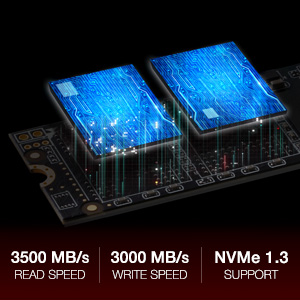
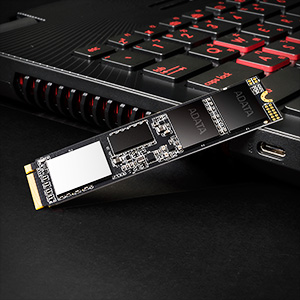
The ADATA XPG SX8200 Pro 1TB M.2 NVMe SSD delivers ultra-fast PCIe Gen3x4 speeds up to 3500MB/s read and 3000MB/s write, powered by next-gen 3D NAND for enhanced durability and efficiency. Its compact M.2 2280 form factor supports the latest Intel and AMD platforms, making it ideal for gamers, content creators, and PC enthusiasts. The included black XPG heatsink with thermal compound ensures superior cooling, while advanced error correction and a 5-year warranty guarantee reliable, high-performance storage.
| ASIN | B07K1J3C23 |
| Best Sellers Rank | 69,111 in Computers & Accessories ( See Top 100 in Computers & Accessories ) 436 in Internal Solid State Drives |
| Box Contents | SSD |
| Brand Name | XPG |
| Cache Memory Installed Size | 1 |
| Color | Black |
| Compatible Devices | Desktop |
| Customer Package Type | Standard packaging |
| Customer Reviews | 4.5 out of 5 stars 10,173 Reviews |
| Data Transfer Rate | 3500 Megabits Per Second |
| Digital Storage Capacity | 1 TB |
| EU Spare Part Availability Duration | 2 Years |
| Enclosure Material | aluminium Plastic |
| Form Factor | M.2 2280 |
| Global Trade Identification Number | 04713218469465 |
| Hard Disk Average Latency | 1 Milliseconds |
| Hard Disk Description | Solid State Drive |
| Hard Disk Form Factor | 2280 Inches |
| Hard Disk Interface | Serial ATA |
| Hard Disk Rotational Speed | 7200 RPM |
| Hard-Drive Size | 1000 GB |
| Hardware Connectivity | Express Card |
| Installation Type | Internal Hard Drive |
| Item Dimensions L x W x Thickness | 8L x 2.2W x 0.4Th centimetres |
| Item Type Name | ADATA 1TB XPG SX8200 PRO M.2 NVMe SSD, M.2 2280, PCIe, 3D NAND, R/W 3500/3000MB/s |
| Item Weight | 8 Grams |
| Item height | 3.5 millimetres |
| Manufacturer | ADATA |
| Media Speed | 438 MB/s |
| Model Name | ASX8200PNP-1TT-C SX8200 PRO |
| Model Number | ASX8200PNP-1TT-C |
| Network Connectivity Technology | PCI Express 3.0 |
| Number of Items | 1 |
| Product Features | Ultra-fast PCIe Gen3x4 interface: R/W speed up to 3500/3000MB/s |
| Product Warranty | 5 Years |
| Read Speed | 3500 Megabytes Per Second |
| Specific Uses For Product | Gaming |
P**R
High-Performance NVMe SSD for Gaming and Professional Use
I've been using the ADATA XPG SX8200 Pro 1TB M.2 NVMe Solid State Drive for several months, and it has significantly enhanced my system's performance. The drive offers impressive read and write speeds, making it ideal for gaming, content creation, and general computing tasks. Performance: The SX8200 Pro delivers sequential read speeds of up to 3,500 MB/s and write speeds up to 3,000 MB/s, resulting in rapid boot times, quick application launches, and efficient file transfers. I've noticed a substantial improvement in overall system responsiveness since installing this SSD. Installation: The M.2 2280 form factor made installation straightforward on my compatible motherboard. The drive was recognized immediately, and setting it up as the primary storage device was hassle-free. Reliability: With a 5-year warranty and support for LDPC ECC (Low-Density Parity-Check Error Correcting Code), the SX8200 Pro offers reliability and data integrity, providing peace of mind for critical data storage. Pros: Exceptional read and write speeds Easy installation with M.2 form factor Reliable performance with advanced error correction Competitive pricing for the performance offered Cons: None encountered so far Overall, the ADATA XPG SX8200 Pro 1TB SSD has proven to be a valuable upgrade, delivering high-speed performance and reliability. I highly recommend it to anyone looking to enhance their system's storage capabilities.
K**K
Drive not being detected in Windows.
This is a great drive, good speed and value for Money. The only issue I had was installing Windows 10 (2004) on to it. The drive arrived the same day (fab), installed it in the M2 slot took a few minutes. This was the only drive in the machine, checked the BIOS (X470 MO) detected instantly so this was going to be straight forward. Booted and Installed Windows 10 (2004) from USB, I got to the start setup screen and it couldn't find the drive and prompted for a driver to be loaded. Checked vendor site no drivers (as what I expected), forums said that the Evo 970 drivers are compatible, loaded them still wouldn't work. Dropped into the command windows from the repair section run diskpart I could see the drive/partition/volume but Windows still wouldn't work when running through the installer. Looked at various forums/google a fair few had experienced the same issue most didn't resolve, gave up and returned the drive. I was close to doing the same thing but I was over 5 hours in by this time, after trying various methods to resolve. When everything else failed, I was tired (early hours etc) I was going to throw in the towel. I thought one last thing, I decided to grab an old version of W10 (1604) well old, booted it up from the USB and hey detected the new drive straight away, everything worked. I run the windows updates to 1607, this took a while, downloaded the MS assistant installer, to speed up the process and upgraded straight to W10 (2004), finshing any new patches that where needed that took a further 45-60 minutes, never looked back since. This may seem a drastic approach to some people, I only mention it to try and help somebody else out who may be stuck in the same situation and potentially save them hours. Conclusion fantastic drive, on par with the EVO 970 - For me the 5 year warranty and longevity helped decide between them. Only downside, it doesn't have the built-in 256 disk Encryption that the EVO has. Nothing that Bitlocker and a TPM couldn't sort out.
L**K
Excellent value M.2 device.
I had a traditional mechanical hard drive prior to purchasing this device which was 1TB in size. It had served it's purpose and was still working perfectly fine, however I wanted to upgrade to something more modern and that would provide better speeds. I already had a traditional SSD for my OS - I have everything else (Games, Videos, pictures) on my mechanical so I wanted all this on a better drive. I'd noticed M.2 had been coming down in price and when this M.2 popped up for £99, I decide to go for it. On arrivial - install is easy - my setup is relatively modest and nothing fancy, but install was easy, slide the device into the M.2 slot screw into place using relevant headers etc - that was it. Instantly recognised by the computer and with the use of some cloneing software the full disk transfer was complete in no time. It has drastically improved the speed of my PC in accessing the large files on that drive and I would imagine has improved game performance to an extent as well. Definitely would recommend this drive, as for the price and the performance it is excellent. If I had nother M.2 slot I'd be buying another for my OS and ditching the SSD all together.
M**E
Fast with low cost
Very fast drive, zero issues migrating data. I used Clonezilla and it took 10 minutes. The speed is as advised, this is an excellent M2 drive. It cost £48 for the 512GB version at the time of purchase, definitely a great deal. A regular SSD costs about that. Highly recommend. Clonezilla is a free program that you download and burn onto a USB. It let's you clone, migrate and save images of any drive and will let you clone your existing windows 10 drive to this drive. Install Balena Etcher to as this the simplest way to make bootable USB drives and it's free too. Download both, install Balena then burn the Clonezilla image to a USB. Put the new drive in your PC, boot off the USB using Clonezilla, follow the instructions and clone old drive to new drive. System restarts and you are done. It really is as simple as that and you don't need to register for anything. You can make images of your drive too free so, it works as a backup tool too.
K**P
Pretty Good But Pipped to the Post
Got one of these for a fairly reasonable price (£70). I think if it was a tenner cheaper, it would have been more of a no-brainer. As it is, it's a pretty good drive. Not the fastest overall but does have slightly quicker random reads than a lot of similar drives. My main bugbear is that I also got a WD Black for the same price a couple of weeks later. This drive is a decent amount quicker and has much better support utilities too - the AData SSD 'Toolbox' is pretty much a waste of time. On the plus side, this drive is 512Gb rather than the more prevalent 500Gb so you get a bit more room. In the end, I've whacked the WD Black in as a boot drive and am using this as a game drive. Seems to work well. But yeah, would have got 5 stars until the Black got reduced to the same price! Please see my AS SSD benchmarks of both - these are both taken in the same M2 slot on the same PC - the WD is considerably quicker pretty much across the board.
P**7
This is a good M.2
Best thing about this one it has a very good real life performance forget about the advertised speeds. You will hardly get them on any of those. However this product falls short only of Samsung EVO plus in random read and write, which is what a normal user will get by doing normal things on PC. Everything runs fast. Get EVO only if you want that marginal boost over ADATA. However you will pay a lot for that marginal boost. So make yourself a favour and buy this one. Unless you run some elaborate server setup, then get GEN 4. Games load fast. No doubt about it. Warhammer 2 Total War which is known for loading times is nothing for that one. At £116 it's 0.116 p per GB, as opposed to EVO plus which is 0.167 p per GB. That ~ 0.050 p difference builds up quickly and you are not getting better performance and in some instances even worse.
R**T
Unbeatable for Price
I am a gamer and build my own budget pcs so know a good value product when i see one. I was very tempted to go with a Samsung but trying to keep price down and looking at reviews online for this drive i decided to go for the Adata. I already had my OS on a Adata M.2 so know they are good drives. Fitting it was easy and Windows installed super fast. This thing is fast, and i mean fast. Loaded The Division 2 in quick time and makes every programme seem more responsive. Check the benchmark test in the pic so you get an idea of what speeds you will get. It was checked with my pc that has Ryzen 3 1300X, MSI B350M Pro, 16gb Ballisitx RAM DDR4 & GTX 1060 6GB & nothing is overclocked. So that gives you an idea of how it goes with a budget system designed to play and run 1080p games. Forget Samsung, this is what you want.
A**R
Solid drive
Installed the drive today, cloned existing slower nvme drive without issues (other than some faff altering various bios settings to get it to boot from new drive). Speeds are impressive, worth noting that there is a difference in speeds between the different slots on my particular motherboard (MSI x570 gaming plus), so worth changing slots on your board and updating bios to make the drive as fast as possible. It does run hotter than my older drive (Western Digital Blue SN550 1tb) and looking on HWINFO one drive (listed as drive 3) on the XPG was getting rather hot, above 90 C! But using my boards included heatsink did the trick though and now stays below 60 under heavy sustained load. Not sure if it was a reporting error on HWINFO or something else unusual, but may be worth bearing in mind for those without board heatsinks, as the included black cover/heat spreader in the box doesn't appear to do much except make it look better. Time will tell on how reliable it is, but so far so good on the speed front.



