We remain fully operational. Our teams are working around the clock to ensure your deliveries continue safely.

下载应用程序


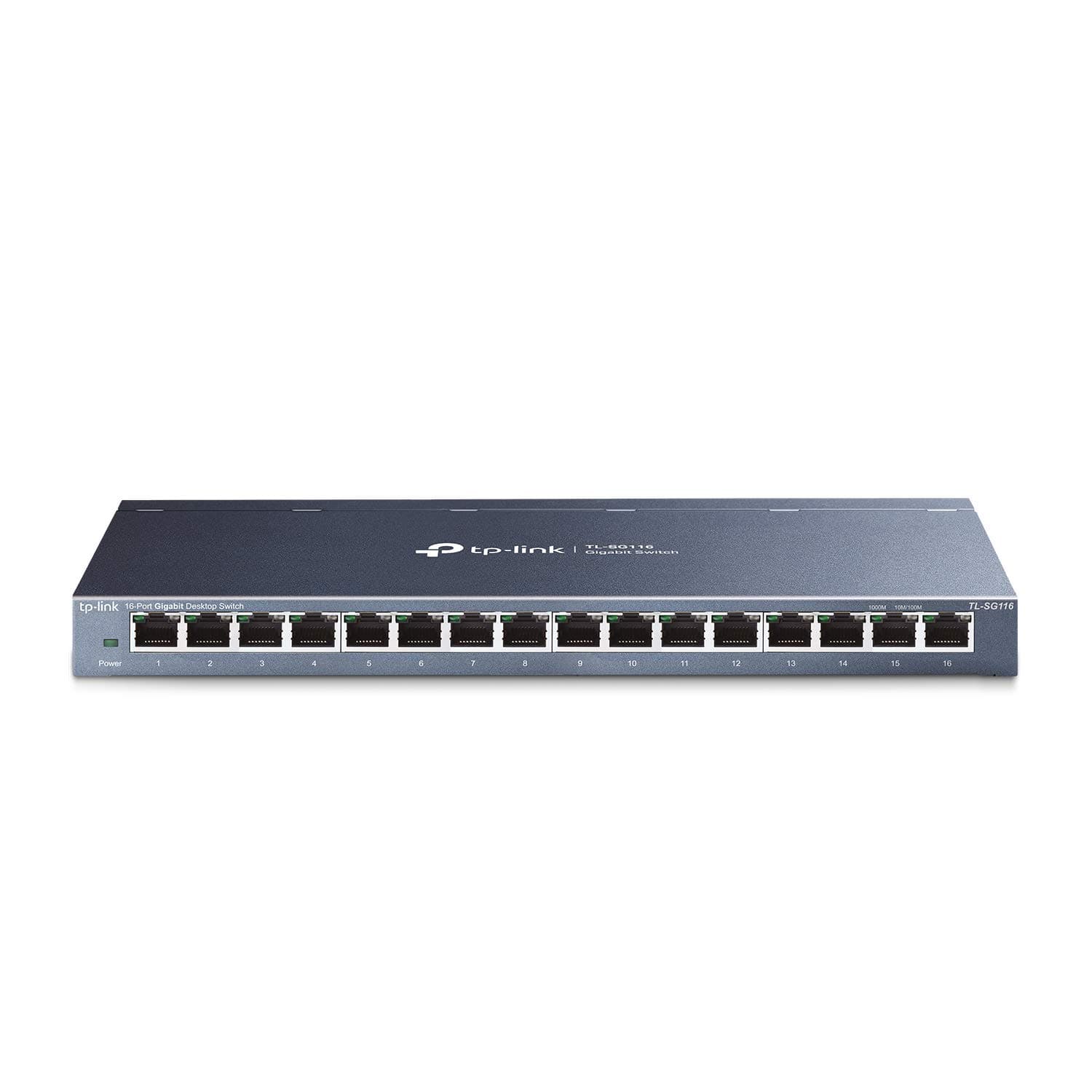
🚀 Elevate your network game with silent, speedy, and smart switching!
The TP-Link TL-SG116 is a 16-port Gigabit Ethernet switch designed for seamless network expansion. Featuring energy-efficient technology, a fanless silent metal chassis, and advanced traffic prioritization, it delivers reliable, high-speed connectivity with effortless plug-and-play setup. Ideal for professionals seeking a durable, quiet, and efficient networking solution backed by a 3-year warranty.













| ASIN | B07GR9S6FN |
| Best Sellers Rank | #1 in Computer Networking Switches |
| Brand | TP-Link |
| Built-In Media | Power Supply |
| Case Material Type | Metal |
| Color | Black |
| Compatible Devices | Desktop |
| Current Rating | 1 Amps |
| Customer Reviews | 4.7 4.7 out of 5 stars (176,763) |
| Data Transfer Rate | 1000 Megabits Per Second |
| Global Trade Identification Number | 00845973084325 |
| Interface | 16 x 10/100/1000Mbps PortsAuto-Negotiation, Auto-MDI/MDIX |
| Item Dimensions L x W x H | 11.3"L x 4.4"W x 1"H |
| Item Type Name | TP-Link 16 Port Gigabit Ethernet Network Switch (TL-SG116) |
| Item Weight | 2.1 Pounds |
| Manufacturer | TP-Link |
| Mfr Part Number | TL-SG116 |
| Model Number | TL-SG116 |
| Number of Ports | 16 |
| Platform | Not Machine Specific |
| Switch Type | Metal |
| UPC | 845973084325 840460604093 |
| Unit Count | 1.0 Count |
| Upper Temperature Rating | 40 Degrees Celsius |
| Voltage | 12 Volts |
| Warranty Description | Limited Lifetime Warranty |
M**L
simple to use
I bought this TP-Link 5 port switch to add more Ethernet ports, and it worked right away. No setup needed, just plug and play. Speeds have been stable on my console, laptop, and TV with no issues.The metal build feels solid, and it runs completely silent since there’s no fan. It also stays cool even after being on for hours.It’s basic with no advanced settings, but for simple home use it does the job well. Good value for the price.
M**K
Excellent and reliable.
I replaced a used Netgear 16 port Gigabit switch that was being extremely finicky. This appears to be highly reliable and has a 3 year warranty! I'm hoping for the best! It was a snap to set up, just plugging in. It's 1Gb and fully compatible with my network. This was so easy to use!
B**R
Superb performance & build quality, nightmare to mount on walls
Its a switch! Does what it needs to do. Pros: * Runs cold to the touch even when under decent load with multiple devices so its probably very energy efficient. * Seems to be very high performance! No latency or bandwidth changes vs direct CAT6a connection on gigabit ethernet. Tested with up to 3 devices under load. Latency was statistically unchanged and bandwidth/QoS was what you'd expect on paper so overhead is super low and on board protocols are implemented extremely well! Grain of salt though... I haven't formally benchmarked or even really used SOHO switches since the 10/100 days. Maybe all makes/models are similar nowadays, but 20 years ago using switches was only a tad better than a hub in terms collision prevention and simple QoS. * Physical build quality is top notch, with one caveat (see Cons) Cons: * Design of metal casing is probably perfect for mounting on the side of standard 1U or 2U racks, warehouse racks, or anything else with standardized screw hole placement and (ideally) the ability to come in from behind or at least see what you're doing. I needed to mount this to a wall in my home office where I couldn't just screw into a rack with standard mounts and slide the switch in place 5 seconds later. There may be a much better way, but the only solution I could come up with (in order to use the rubber feet as standoffs to allow airflow) was to take the housing apart and unscrew/remove the PCB to see what the correct distance between screws needed to be. In theory this would be the last step but unfortunately problem #2 (really the only roadblock in retrospect) was that when wall mounting, the shape of the mounting cutouts are such that you (or at least me?)don't give you enough "turning radius" to get the switch mounted without the offset from the screw head and the wall surface being stupidly long. The only solution where the standoff distance was both far enough to get the screw heads in there while ALSO getting it to mount securely without flapping around loose was to clip the opening a bit with sheet metal snips. This was a tad challenging but doable, mostly because of the cramped areas for maneuver. My recommended wall mount steps (unless someone has a better way) are: 1. Insert the screws in the mounting holes, and position in the narrower "top" area where they loosely stay in place when held in by hand. This will be the distance when mounted. 2. Gently press the switch and screws into the wall just enough to create 2 small dents so you know where to drill. 3. Drill. I didn't need a drywall screw due to wood paneling, but use drywall screws if bare drywall. If you think you don't need to just do it anyway. Its cheap, easy, and a good best practice to prevent yanks from plugged in devices, etc. 4. Screw the screws in 95% of the way. You may be able to just mount the switch ok. If not, you may need to do step 5... 5. (Optional). If necessary AND you know what you're doing, AND you don't care about warranties, open up the mounting cavity with metal snips, but only after you have unscrewed the device housing and have carefully removed all the (guts). Put them aside in an anti static bag to keep them safe. Start by clipping tiny slivers from the two mounting cavities on the bottom device housing piece. Adjust the screw depth until you can easily mount the housing without it feeling loose. You may need to test/adjust a few times, since the screw head will be blocked by sheet metal. This is the core design flaw, otherwise you could just (at worst) unscrew the top housing cover, remove the "guts", and just screw it in by hand, with the final step being to put everything back together (annoying but simple if you own magnetic screwdrivers). Again, only do this if no viable alternatives exist for you, as I'm sure it voids the warranty. Conclusion? Buy this excellent product, just be prepared for a "project" if this is going on a wall in a SOHO setting.
X**R
Simple and functional switch!
What more is there to say about this thing? It's a 8-Port unmanaged gigabit switch that does exactly what any switch should do. This is a functional but quality little product. It's super compact and light, and would probably outlast me if given the chance. As for setup, what setup? Plug it in and connect your devices and you're good to go. I mean it really doesn't get any simpler, it's super affordable, works perfect, you can hang it on the wall or set it on a desk. It's a TP-Link product and I've never had any issue with the multitude of other TP-Link products I own. Also, if you think the price is too low, it's not. That's just TP-Link pricing, great functional products for less.
J**0
Works as it should. No issues
Seems to function as it should. No real issues setting up.
A**H
Plug and Play... that's all there is to it.
I decided to change my wireless home camera set up to wired. Well, my router only has 4x 1Gbps LAN ports and I have my PC + 5 cameras at the moment. I wanted to just turn Wi-Fi off. I mean, Wi-Fi cams are so easy to hack. I've hacked my own and got my credentials + password. So, after having more and more neighbors move in nearby (ughhh), and knowing that I could see everything about their wireless networks, (I am a computer tech guy, I'm not naming software, but I can see who has Ring door bells, smart appliances, cameras and which routers they go to and which extenders are on that LAN). I didn't want anyone seeing me. So, wired, here I come. I have an 8 foot ( I think ) Cat8 (don't ask haha, family member had one) Ethernet cable going from my PC to router. That's port 1. Then I have port 2 going from my router to the TP-Link TL-SG108 8 Port Gigabit Switch. I bought it over the 5 port because... why not? The price was there to just go for the 8 port imo. Plus, I'm gonna fill it up eventually. Then I have the other two 1Gbps ports on my router going out to a camera. Then I have 3x cameras connected to the TL-SG108 Switch. So, so far, 4x connections. 1 from the router, 3x from cameras. Ping to cameras are still <1ms, just like the ones connected directly to the router. I'm using several 30ft and a 50ft Cat 7 ethernet cables from Amazon Basics. They work perfectly. My motherboard has 2.5Gbps Ethernet, so I would have liked to have went with a 2.5Gbps switch, but then I'd also need a 2.5Gbps Ethernet router... so yeah.. 1Gbps it is. Plus, it was way cheaper, anyways. I can't believe how cheap it is. It feels SOLID. Heavy for its size. That is ALWAYS a positive sign in the electronics world. Light electronics are cheaply made. This is not cheap. It doesn't even get warm to the touch. I'm excited and looking for more cameras to add to it haha. Oh, and yes, it's literally plug and play. It's as if all you're doing is adding more ports to your router. There is no other set up involved. To see the devices connected to the switch, you go to your router's admin page as normal. Zero set up other than plugging in the power adapter into it and then the wall. Then just plug your ethernet cable from your router to it. Now... any ethernet devices plugged into the switch will show up on your router and, as such, your home network. I'd buy more. I WANT 2.5Gbps so I'm ready to a 2.5Gbps router, but really, I'll probably have 10Gbps Ethernet on my motherboard by then. Ya can't keep up with the latest and greatest. Besides, my cameras don't come close at all to touching 1Gbps. I use H.264 encoding and they're older. For fun, I used "jpeg" encoding to hit 70Mbps, but it handled it fine. So I went back to H.264 and only run at 15Mbps combined speed. Update: I've now added another Ethernet cable to this TL-SG108 and plugged it into my Samsung SmartTV. Again, zero issues. It's handling everything I throw at it. 110% satisfied with this purchase. If I'm not careful, I'm gonna fill up all 8 ports and have to buy another one haha. Good thing my router is also powerful enough to handle all this (DIR-878). It's nothing special, but it, too, is part of the equation in handling so much data coming through the Ethernet cable that's going to the TL-SG108. I'll stop here... because I'm pretty much saying "I love it" over and over. DEFINITELY recommend it or whichever model you need with the amount of ports you need. I'd recommend future-proofing and going with the 8-port over the 5 port since you will be down 1 port from the get go since you have to plug your router into it. The price is not much more and you don't want to regret not getting the 8 port over the 5 port. BUT that depends on your needs. You may need a 5 port on one side of your house and another 5 port on the other end, I dunno. That's why I went with the 8 port... and then got some 35ft and 50ft Cat7 cables from Amazon Basics. LOVE IT!
S**R
Habe mir den Switch gekauft, um die Datensicherung von zwei Rechnern hinter meiner alten Fritz!Box (nur 100Mbit, bedient aber ein zweites analoges Telefon) zu beschleunigen. Das hat auch geklappt. Jetzt ist nicht mehr das Netzwerk der Engpass, sondern das Finden der zu sichernden Daten und die Ablage in einem langsam etwas zu vollen HomeServer. Genaue Messungen habe ich nicht vorgenommen. Für meine Belange reicht der Durchsatz auf jeden Fall locker. Das Gerät funktioniert bisher einwandfrei. Mir gefällt das Metallgehäuse mit seiner für diesen Preis ungemein hochwertigen Haptik. Eine Erwärmung ist kaum spürbar, was auf einen guten Energiehaushalt hindeutet. Allerdings sind bisher nur 5 Ports belegt. LEDs neben den Ports zeigen an, ob ein Gigabit-fähiges Gerät oder etwas Langsameres angeschlossen ist. Hier bevorzuge ich persönlich meine anderen Switche, die hinten die Ports und vorne die Anzeige sowie ein eingebautes Netzteil haben. Je nach Aufstellung/Montage kann man das aber auch umgekehrt sehen. Es gibt für beide Lösungen Argumente dafür und dagegen. Am Ende entschieden hier der Preis und die sehr guten Bewertungen für ein Produkt, das mir technisch auf der Höhe der Zeit scheint, sodass es unkompliziert und energiesparend hoffentlich lange betrieben werden kann. Wahrscheinlich werde ich mir bald noch ein oder zwei Geräte dieses Typs für anstehende Erweiterungen bzw. WLAN-Ablösungen zulegen!
A**R
The cable plug is not Saudi standard The cable for the USA.
E**N
Harika. Hızlıca kolayca bağlanıyor. Bir anda kablolu internet bağlantımı çoklayabildim. Teşekkürler
M**X
Works perfectly, ideal for those with many devices to connect to a wired network. Sends 1Gb without any problems to all my devices.
I**9
Prima le cose importanti: attaccati i cavi a router (che non e' Gigabit), Nas e PC, e' andato subito bene senza bisogno di configurazione. I trasferimenti dal NAS al PC ora sono moolto piu' veloci... ma non mi sono messo a fare benchmark comparativi scientifici, la vita e' breve. Poi le questioni cosmetiche: finalmente un dispositivo di rete che e' anche un bell'oggetto, tuito metallico e sodo, niente plastichina leggera, da un bel senso di robustezza, non semba cheap ma al tempo stesso non spara come certi router coloratissimi tedeschi :-) La forma regolare e non panciuta aiuta anche ad organizzare meglio gli spazi, apprezzo molto la nuova estetica TP-link.
TrustPilot
1天前
2 周前