We remain fully operational. Our teams are working around the clock to ensure your deliveries continue safely.

下载应用程序


🚀 Plug in. Power up. Stay connected like a pro.
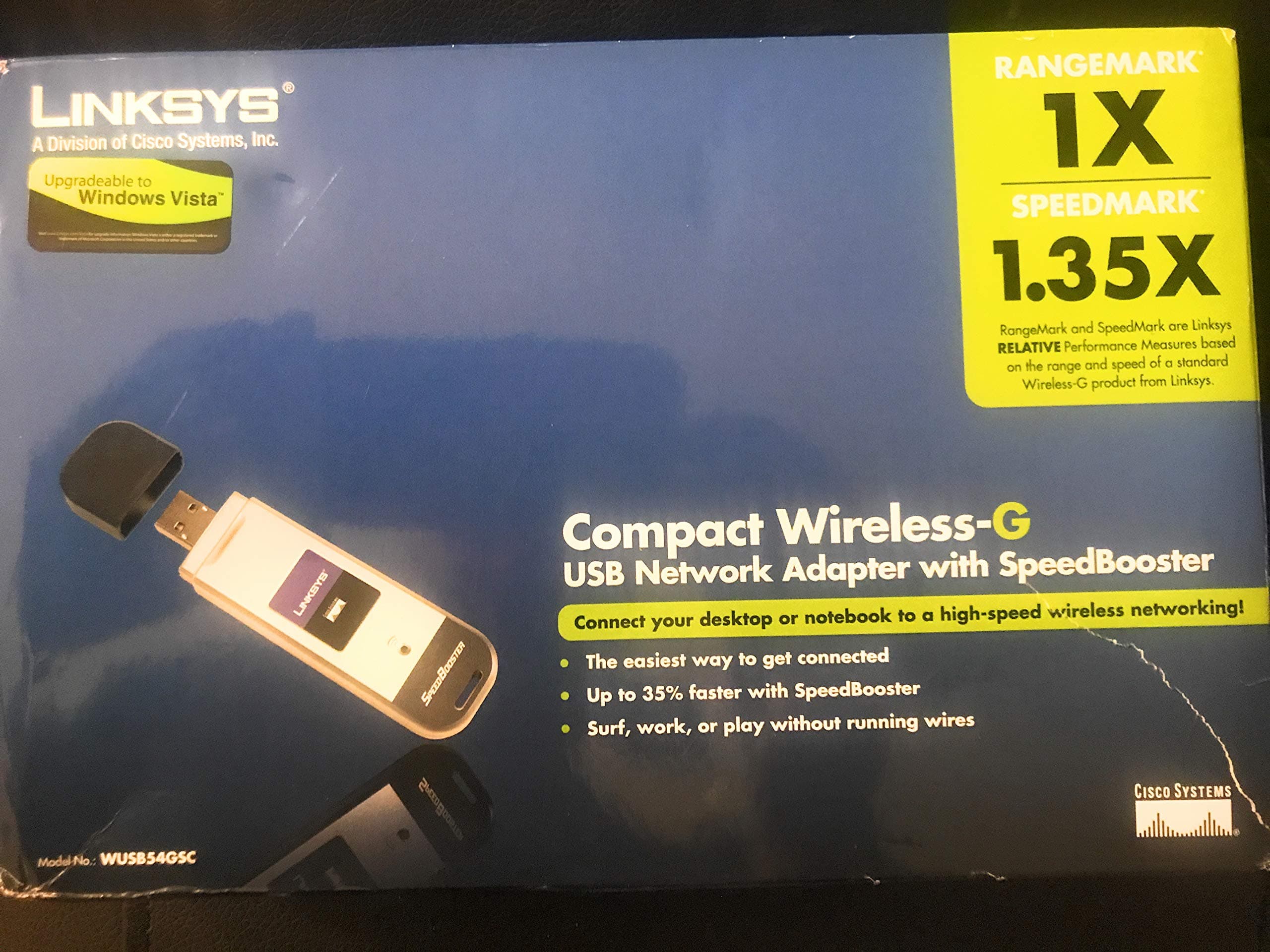
The Cisco-Linksys WUSB54GC is a compact Wireless-G USB adapter delivering up to 54 Mbps data transfer via USB 2.0. Compatible with 802.11b/g standards and Windows XP/Vista systems, it offers strong 128-bit encryption for secure wireless networking. Lightweight and easy to install, it’s designed for professionals seeking reliable, high-speed wireless connectivity without opening their PC case.
| ASIN | B000CRFI8A |
| Best Sellers Rank | #2,289 in USB Computer Network Adapters |
| Brand | Linksys |
| Color | Old Version |
| Compatible Devices | Desktop |
| Compatible Operating System Family | Windows |
| Customer Reviews | 3.6 out of 5 stars 223 Reviews |
| Data Link Protocol | USB |
| Data Transfer Rate | 54 Megabytes Per Second |
| External Testing Certification | FCC, IC, UL, CE, Wi-Fi (802.11b/g),Wi-Fi Protected Setup (WPS), Windows Vista |
| Global Trade Identification Number | 00745883568598 |
| Hardware Interface | USB, USB 2.0 |
| Item Weight | 10 Grams |
| Manufacturer | Linksys |
| Mfr Part Number | WUSB54GC |
| Minimum Required Operating System Version | Windows XP |
| Model Number | WUSB54GC |
| UPC | 745883575268 745883568598 745883588558 |
| Warranty Description | 3 years |
M**K
Absolutely awesome once you wrangle the software in.
As you might expect from the shape, you have to watch out and make sure you don't knock it out of your USB port, because obviously, it sticks out. However, this thing works great! I'm connected within a couple of seconds after I plug it in. Speed and range are good. I'm using it with Windows 8, but I did have to install the driver manually. And get this - I left it in my shirt pocket when I did laundry... it's just fine. It only went through the washer. I don't know if it would have survived the dryer. But after it came out of the washer, I soaked it for one minute in distilled water, and then rinsed twice with distilled water (that's a trick I learned that sometimes rescues water damaged electronics). It still works great. It's a very nice little adapter. EDIT: A few days after I wrote this review, My laptop was knocked over and landed right on the adapter. The outer casing came off, and the inner card was exposed, the USB connection was bent sideways - pretty much what I expected. What I didn't expect was that I could just bend the USB connection back, snap the casing back on, plug it in, and go back to amazon.com to update this review. AWESOME. EDIT 2: OK, eventually, I knocked and bent it again, and then later, my son basically stepped on it and bent it to the point of breaking some of the connections. And yes, eventually, you definitely can break this thing - rather permanently. It should be treated with care... So I bought another one. I've kept it a little better protected.
M**A
Beware, display image is misleading!
The image displayed above is not what they send you. That model in the photo is actually the WUSB54GSC with SpeedBoost model. What you DO get is the WUSB54GC, as indicated, which is a black usb model. You can confirm this on the linksys website, as there are two versions of this. I was a bit let down by how I was deceived, however the product works great. For Windows 7 users, you have to manually download drivers from the linksys website, as the drivers on the cd it comes with do not work for the Windows 7 operating system. Somewhat of a hassle, but after successfully installing the drivers, it becomes plug and play thereafter anytime you use it. Signal strength is great; I'm using it right now and have no problems. All in all a great product for the price, but I wish they'd change that image to the correct one, as to not deceive future customers.
S**N
Don't Get Too Excited if It Works the First Time!
This is an absolutely frustrating piece of crap. Sure, it was easy to install, and it worked perfectly right out of the box...for about a WEEK. At first I thought it was our network (Comcast is not always very reliable!), but my husband's laptop, our Wii, our Roku player - everything was working effortlessly with the network. It was just the desktop with which we were using the adapter that couldn't get onto the internet. I restarted the computer, reconfigured the adapter, then yay! it detected the network, showed "excellent" signal strenth...BUT IT WON'T LOAD ANY PAGES!!! Why on earth would it tell me I'm good to go, and then not load anything at all? The troubleshooting on the CD-ROM's user guide is a joke - just tells you to remove the adapter then put it back again. Even when I went to the trouble to get the wireless router literally within SIGHT of my desktop, the adapter wasn't working (I was afraid the router was originally too far away, but that doesn't seem to be the problem). This thing is just a total piece of crap. So, so frustrated with it! **edited to add: So now it's a week later, and the LED light doesn't even light up. When I try to reinstall the adapter, it says it's not installed correctly. I've checked the adapter on 4 different USB ports, nothing. I've check other peripherals on each of the USB ports, they all work fine. This piece of junk has literally just STOPPED WORKING altogether. Nothing, nada, a little black plastic piece of garbage. I will be contacting the seller to return immediately.
S**N
Don't use their software
I would lower this review to two stars if I could. I am not sure whether I need our Fast User Switching -- I spent so much time trying to get the adaptor to work with our router's wireless security, that I didn't notice that the welcome screen was gone. But also, if you go to Linksys' site, it gives you instructions for installing the drivers which are totally different from the included instructions (which you can also download). One says to install the software first, the other says to plug the adaptor in first. It shouldn't remove functionality without warning, just to install a USB driver. I think the wireless bridge is safer, because it connects with an ethernet cable and doesn't install anything. I bought two of these for my kids' computers because I didn't want to deal with the WET54G. The WET54G is a wireless bridge which would need to sit on top of each computer, each one would need to be plugged in, and it would consume power. The USB adaptor plugs in or hangs from a supplied USB cord (make sure you get the one with a cord). You are instructed to insert the CD and install the software prior to plugging the device in the USB port. Then it connects to your router's wireless. The problem is that the software is not capable of dealing with the router's security, so you don't get assigned an address -- and it doesn't work when you assign yourself one. I have a WRT54G and I am only using WEP 64-bit, so it shouldn't be this hard. After fooling around with this for two days, I realized that the router has a button you can press to easily set up the security. This worked, but the software got stuck at "scanning 50%". When I closed the software, I was back where I started. Fortunately, the software's tray icon allows you to use Windows wireless zero (the built in wireless). It immediately asked me to choose a network and input the key. THAT WAS IT. THE STUPID LINKSYS SOFTWARE could not handle something that simple. The USB adapter is fine -- install the drivers and switch to Windows and you will be fine (SO FAR - one post complained about bad memory leaks). Oh, and when the software tray icon disappears and you can't find it anywhere in All Programs, just look in C:\Program Files and double-click on the executable. Sheesh, these guys should stick to hardware.
H**S
Plug-and-play from far away
Four reasons why this is a great buy: 1. Wireless-G is still faster than you need, and a great value compared to comparable Wireless-N devices. The 54 Mbps speed of Wireless-G is more than double the speed of anyone's home Internet be it cable, phone, satellite, or fiber. Increasing your wireless speed beyond 54 Mbps will have zero effect on your Internet response. 2. Linksys is the industry standard brand for home networking. It's fully supported by every PC brand, every operating system, every version. There is zero chance of incompatiblity. 3. You just plug it in, and it works. There is no need to use the installation disk or otherwise search for drivers to install. Windows already has drivers for this standard device, and can update them automatically if a newer version is ever required. 4. This device works from a distance with no issues. For my latest purchase (I have installed others in the past), this Wireless-G adapter is plugged into a rear USB port in my daughter's bedroom upstairs - up against the rear wall of our house. The WAP router to which it connects is located at the front corner of our house on the first floor. Even with doors closed, there is plenty of signal strength for full speed connectivity.
S**Z
Does the job it was meant for!
I ordered this and received it a couple of weeks ago. Contrary to some of the negative views here, I was able to run the CD and install the driver easily. Then all there was left to do was to plug it into a USB adapter. I do not understand how an adult could not work this product as it is childs play. The product is reliable and receives a good enough signal that is also dependent on how far away your router is. In my case 30 feet still provided a low signal but had enough juice to work easily on the Internet for surfing the web and checking e-mail. I recommend this product to those looking to connect their desktop/laptop to the Internet via a connected router.
T**G
my wireless
I've been online since 92 with one ISP provider.This summer we Finally got broadband. Only problem was that we could not hook up 2 computers without punching holes is ceilings and walls, which was not acceptible. I than started researching and speaking to my "tech savy" friends(IT types)about how I could work around this house demolishing problem. They all came up with a "wireless router" solution, different brands depending on whom you listened to. The name that came up more often was "Linksys wireless G". Well I thought ok, this is the RIGHT one to get, since I beleive in staying on budget these things came one at a time. "No sense putting in a corvette engine into a Model T". Point taken,I had to get a new computer!!!(working with upgraded (Win98SE).Then I got the router, had it for several months before my research turned up this adapter,originally looking for good prices on PC Wireless Cards" as I had been instructed. Printed the info I found about this Wireless-G USB Adapter for me and emailed it to my friends. Needless to say they all agreed that this was a great find and even better than the cards they'd spoken with me about. It's been instramental in aiding my supervision of my grandchildren(10&5) online. They can't get online unsupervised without it being plugged in. I have TOTAL control. This is a great addition to my computing world. Wish I could tell you all the "techie speak" I heard about the installation of it,however I will tell you that it took less than 30 min.to get it up and running I have had no problem with it and of course it arrived in a timely manner. I recommend this for anyone that doesn't want to remodel their house for wireless. TMG
S**N
Says it works with B networks but it doesn't. Installation on Windows 7 was Hairy.
I. Obviously it's easy to stick the little dongle into a normal USB plug. But Installing the driver on Windows 7 was Less Than Simple. a) auto-discovery failed to install a driver; b) CD install gave errors and said that the software wasn't installed; c) download of driver from website gave same error; d) just happened BY ACCIDENT to go to control panel / system status and discovered a message waiting there for me that said "there's a new driver available for this hardware", and the driver download file had the word "stable" in it, which was frightening. That is the only installation that succeeded, but how was I supposed to find that download?!? it was pure luck that I happened upon it. II. Right after that final installation (and using the linksys connection software, NOT the Windows network connection thingy in the system tray) is the only time that the adapter ever connected successfully (i.e. with "internet access") to my B network, but I never got a chance to try it; I pulled the dongle out to try something else and it never connected again. The rest of the time the linksys software gives an error that it can't connect. And the Windows 7 system tray network icon just connects and disconnects, over and over and over, each time only getting "limited access" with no internet. III. I took the dongle and my Windows 7 machine (laptop) to a different location (big modern nearby complex with high-throughput wireless network and an IT department) and the dongle connected to the network just fine. I'm only keeping it because I'm going to use it outside my house; at my house I guess I'm relegated to my 50-foot ethernet cable unless I want to spring for a new updated router (which I don't). If you have a B network and Windows 7, don't waste your time.