
下载应用程序



⚡ Power up your VR game — never miss a move!
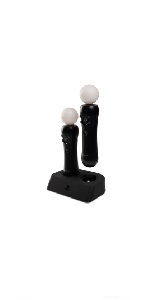
The PowerA Charging Dock is an officially licensed dual charger designed for PlayStation VR Move Motion Controllers. It features a compact design with non-slip feet, LED indicators for charge status, and includes an AC adapter compatible with PS4 and PS3 Move controllers. Fast, smart charging ensures your controllers are ready when you are, making it a must-have accessory for immersive VR sessions.




| ASIN | B07HGVVK7K |
| Best Sellers Rank | #2,467 in Video Games ( See Top 100 in Video Games ) #6 in PlayStation VR Accessories |
| Customer Reviews | 4.5 4.5 out of 5 stars (5,838) |
| Date First Available | September 18, 2018 |
| Item Weight | 10.4 ounces |
| Item model number | Black |
| Language | None |
| Manufacturer | POWER A |
| Product Dimensions | 1 x 1 x 1 inches; 10.4 ounces |
| Release date | August 20, 2018 |
| Type of item | Video Game |
S**Y
For the tiny price, a NICE charger!
I needed a separate charger, as other accessories keep my PS4 USB ports tied up. This unit solved my problem. It works well! Some reviews complain about various problems that are actually the result of either ham--handedness or a lack of understanding of how PS accessories charge. First, the move control must be lined up correctly and GENTLY pressed down into the charging recepticle until it SNAPS down into place. The next complaint is that "it won't charge my move controller". Here's a little nugget of info: the move is microprocessor controlled...the MOVE will NOT take additional charging if its charge level is above 80%! So run the controlller down for a few hours and THEN try charging it. If you place the MOVE into the charger at BELOW 80% charge level, it will then charge up to 100%. (If your MOVE battery hasen't died, in whixh case the battery IS replaceable)
J**N
Works very nice / effective
Product works for all four of my motion controllers and charges very fast . After about 2 hours of charge the controllers were done and fully charged. I thought the controllers were automatically dead but found out that when it wasn’t charging it will blink as if it’s still dead but that only happens when it’s not sync to the PlayStation. So after you sync it the constant blinking stops. So it will just telling me to sync it to my ps5 rather then it’s dead. I was worried for a second. This is way faster then using a usb 2.0 Mini cable. After two hours all 4 were full and I like that it stops the charging when full. Thank you for the order which I chose overnight shipping and came to my house about. 4 hours later. Overall, very excellent
T**R
Great controller charger!!!
I finally got to play my copy of just dance 2014!! This product is amazing makes charging two controllers at once easy!!!! And it’s very durable!!!
D**N
Finicky
Pain to make it stay, but I dont know if that's a dock issue or a wand issue. Works.
B**N
Play Station Brand
Works great! Takes up very little space.
J**R
Amazing!
Very useful! This is SO much better than getting a single cable! Most people will avoid this kind of charger because people are scared it will damage the battery and make it last shorter. Not with this charger! It will charge both of them simultaneously and at the same pace as each other! The cable is about 10 inches long and the actual charger itself is 5 1/2 inches long. Very practicable size. Overall, it's a very good charger. Would recommend it to any/every psvr1 user!
G**B
Works pretty good for the proce
Wanted an easy way to charge up and store my VR remotes. Works great as intended but kinda not user friendly, at first I thought it was broken as the charging lights wouldn’t go on to inform me they were I dead charging. So after some trip and error I realized they only go on when the remotes are pretty low on battery and then they blink informing you they’re charging. Kinda weird it looks likes it’s doing nothing otherwise!
A**N
Super Easy to Use
When I got the Motion controllers originally , I found problems trying to charge them. I'd plug them into a wall USB and that didn't work at all. After looking online, I found that it's because it needs to detect that it's in a PS4 or a PC to charge, so I had to charge the 2 I had through the PS4, which to be honest, was annoying to have them hanging out if I wasn't using them. Then I found out that only one of my USB ports would work with them, not the other... no clue why... I needed a better solution... So... I have a Power A charger for my DS4 controllers and liked it so much that I figured I couldn't go wrong with a Power A charger for these controllers, too. I was right. I'm not sure how much easier you could make this product to use. You stick the wand into the base and it basically practically aligns itself. They both immediately started charging and boom, I was good to go a few hours later. Power A products are interesting as they feel a little cheap because of how light they are, but I've had no issues with this whatsoever. It's attractive, unobtrusive and does exactly what I need it to do. I'm a fan.
F**.
Die PowerA Ladestation für PS VR Move ist ausgezeichnet und erfüllt ihre Aufgabe perfekt. Sie lädt die Move-Controller schnell und zuverlässig, und das Design ist sowohl funktional als auch stilvoll. Der einzige kleine Nachteil ist, dass der mitgelieferte Stecker nicht für alle Steckdosen passt. Allerdings konnte ich das Problem schnell lösen, indem ich einen Adapter verwendet habe. Trotz dieses kleinen Mankos bin ich mit der Leistung und der Qualität der Ladestation sehr zufrieden und kann sie jedem PS VR-Nutzer empfehlen
L**Z
A caixa do produto chegou com alguns amassados e um pequeno rasgo embaixo, mas fora isso tudo ok.
J**R
Product appears to have been used by the state of the box upon opening the amazon box. Torn in multiple places and small scratches on the unit. Still works fine so gets the stars for the charger working, just maybe a gently used one.
C**N
Exactement ce que je voulais.
M**E
I have the PowerA PS4 controller charger, which is great as well so you know PowerA makes decent quality products. This is a great charger for your PSVR controllers. It has a nice sleek design that can match your PS4. Unlike some of the newer chargers that come with just the USB wire and no adapter, this comes with an AC adapter so you can plug it and charge. The controllers are not that sturdy in place when charging so you can easily knock down your controllers by accident. Although, I'm not sure how this can be fixed. I just leave the controllers charging behind my other chargers. Overall, I am happy with this purchase. Would recommend.
TrustPilot
1 个月前
4天前