We remain fully operational. Our teams are working around the clock to ensure your deliveries continue safely.

下载应用程序


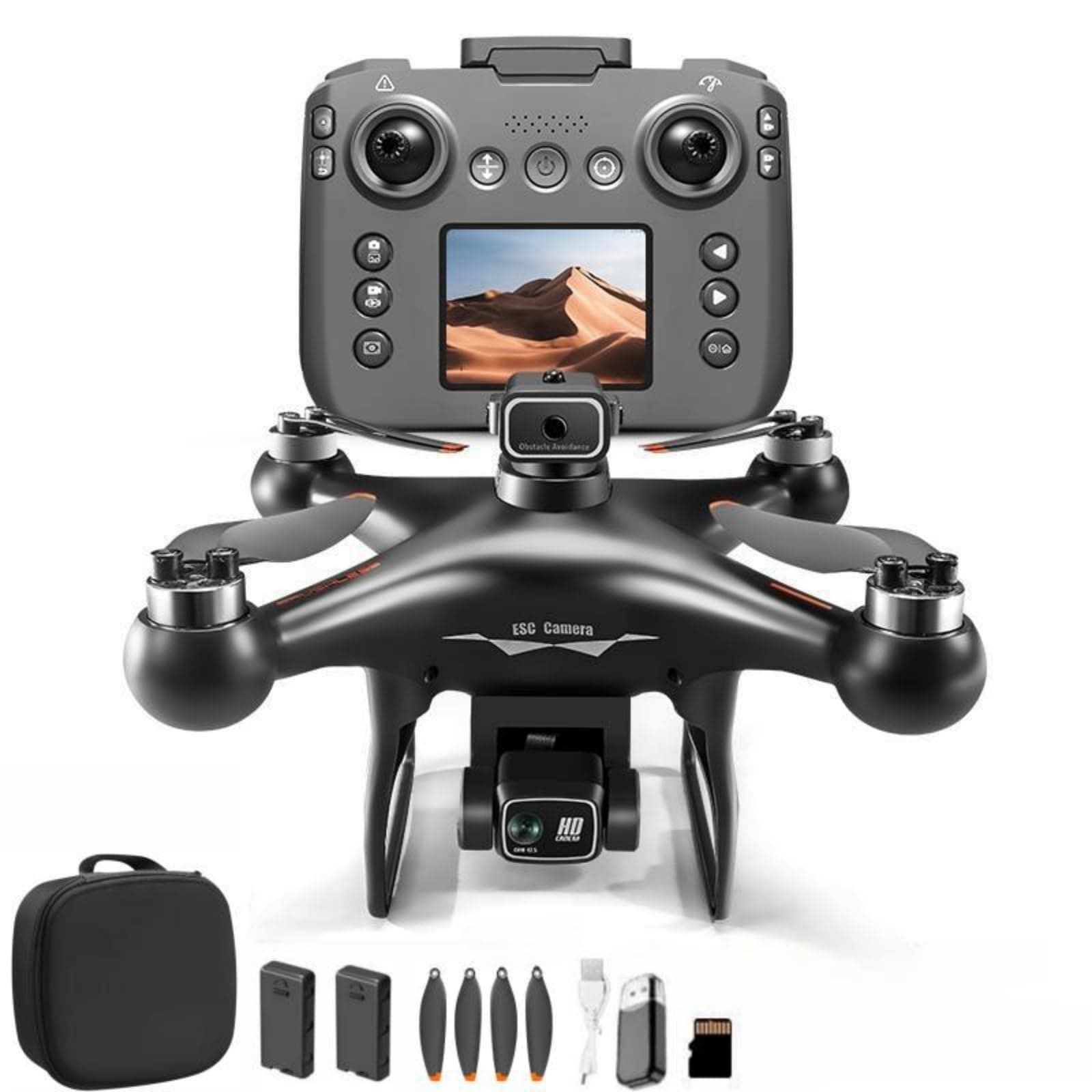
🚀 Elevate your drone game with pro-level control and epic views!
The EcuFlyAi-S116 RC Hobby Drone combines a built-in screen remote control with 1080P dual cameras and a brushless motor for a seamless flying experience. Designed for adults and beginners alike, it features speed adjustment, altitude hold, one-key takeoff, 3D flips, and LED lights. With two rechargeable batteries included, this lightweight drone offers extended flight time and versatile control via remote or app, making it perfect for immersive FPV flying and aerial photography.


| ASIN | B0FJ2F3LSX |
| Age Range (Description) | Adult |
| Age Range Description | Adult |
| Are batteries included? | Yes |
| Battery Cell Composition | Lithium Polymer |
| Best Sellers Rank | #208,998 in Toys & Games ( See Top 100 in Toys & Games ) #730 in Hobby RC Quadcopters & Multirotors |
| Brand | EcuFlyAi |
| Brand Name | EcuFlyAi |
| Color | Black |
| Connectivity Technology | Wi-Fi |
| Control Type | Remote Control, App Control |
| Customer Reviews | 4.2 out of 5 stars 15 Reviews |
| Included Components | Four spare propellers |
| Includes Rechargeable Battery | Yes |
| Includes Remote? | Yes |
| Item Dimensions L x W x H | 9.06"L x 9.06"W x 4.72"H |
| Item Weight | 160 Grams |
| Manufacturer | EcuFlyAi |
| Material | Plastic |
| Model Name | EcuFlyAi-S116 |
| Optical Sensor Technology | optical flow |
| Part Number | S116 |
| Skill Level | All |
| Special Feature | Speed Adjustment |
| Special Features | Speed Adjustment |
| Video Capture Format | MP4 |
| Video Capture Resolution | 1080p |
| Wireless Communication Technology | Wi-Fi |
S**2
Great Product
Great item. Performed as advertised
B**S
Decent controls, poor camera, still an overall good buy for a practice drone
Drone control is amaizing, However there are some things that need improving Camera fov and quality is very poor, even when viewing from SDcard Landing usually results in tipping when using the auto land buttin Auto avoidence system does not function well But for a small drone, its control is vey good.
B**R
Nice drone for the price point
This is our second drone and compared to the first one we bought months ago, this one is a clear winner. It is so much easier to control and the one key takeoff and landing is awesome. My son loves the built-in screen on the remote as he can now fly it without having to come and ask to borrow mom or dad's phone to see through his drone's "eyes". He tends to ask at the most inconvenient times, so heard a lot of "not now" in the past. This is giving him the control to fly it when he wants to. Granted, the built-in screen quality is not great, but serves the purpose. For better picture/video you will need to use a phone. The built-in screen also allow the pilot to view the flight status and information. The battery life is okay and standard for drones at this price point. The drone is definitely also sturdier than the older one we have. Due to this and with the better control and takeoff and landing, will be used a lot more, and my son is treating this one with a lot more respect which will hopefully make it last longer and limit the need to replace blades and perform other repairs due to accidental collisions with trees, walls, and the ground! We have not tried the mobile App yet as that will again require a phone and our 11 year old does not have a phone yet. The case is acceptable. Overall a good buy for the price.
J**Z
Seems to be a durable drone for beginners
If you like controlling things that sometime act like they have a mind of their own, the RC Hobby Drone MAX S116 may be the perfect item for you. I have never flown a drone before, and of course, I crashed it on all my initial attempts to fly it. That is purely me. What this has shown is that the drone is quite durable. I have run into walls, straight into a tree trunk, it even tried to dig into the sod when it landed on its side, yet it is still 100% intact. No visible damage, though there was some sod on the frame. I feel the controls are well laid out but flying the drone takes practice. This is expected and I am getting better. The drone is economical as a learning drone with camera. It has a protected 1080p camera and other flying features. If using the RC UFO phone APP, all the controls can be accomplished via an iPhone instead of the controller. Google bombards you with advertisements. They eventually fall off once the drone is attached via Wi-Fi. I find there are different combinations using the APP and the controller. The controller can be in command and the video on the controller works is turned on, or if the video on the controller is turned off, the APP can display video at a much better resolution using the Phone APP In this situation the APP will not control flight of the drone, even if the controls pop-up on the screen. If the controller light is flashing and the APP is started, all controls are on the phone APP. I have not found out how to adjust the camera angle using the APP, only when the controller is in charge. I need to play with it more. Some of the icons on the APP are still a mystery to me. Example “Gesture” is a 3 second delayed picture that shoots every 3 seconds until Gesture is pressed again. The S116 ships with extra set of A and B blades should these get damage. My question is how do I purchase more, or are they standard? The drone comes in a zippered soft side case which the drone fits into with the Avoidance Detection unit attached to the top, but I recommend removing it to avoid potentially damaging it since it is a soft sided case. Instructions of the controls with the drone are pretty good. Nothing made me go HUH? There is a QR code on outside of the soft sided bag that links to a very important You Tube video. Be sure to watch it as there is information not in the instructions, specifically about replacing blades correctly (A blade with an A blade (vs B) for example). It also goes into deeper detail on some of the items in the manual. It is very understandable English spoken by someone obviously from Asia. I look forward to playing with this more when the weather warms up. The picrure was shot from the drone camera to my iPhone while sitting stationary on the table.
Z**R
Hide your kids, hide your dog. Marginal design.
Auto-takeoff/-landing is awesome, but once it takes off be aware that it may become completely unstable without any user input and attempt to murd3r you or your dog. I don't mean it drifts, I mean it acts like someone is actively steering it in a random direction and randomly raising/lowering altitude. My professional guess as an engineer is that the control loops for attitude were vibe-coded and tested on a single instance of hardware prior to mass production. Also, there are no guards on the rotor blades, and they will break skin readily, so this is NOT for 8-year-olds as claimed. Adults with low risk-aversion only.
D**D
A small price to pay for family fun
I ordered this drone with the intent of taking video and photos on my property, but it's too much fun not to share. The drone is so light and portable, I take it to gatherings without worrying about breaking something expensive. My friends are older, so it's usually the first time they have ever tried a drone. Like me, they can't believe how easy it is to maneuver, with the one click take off and landing making things even easier and safer. All the features are easy to use, but I did need an adapter for my computer for the SD card. I appreciate having 2 batteries, so all day outings are no problem. Away from home, I can charge one with my power brick and fly with the other. Because of obstacles, I have only used the drone to about a 50' Range, so it may go even further. Bottom line for me is I have a neat, lightweight drone that brings lots of fun and joy to my friends and family at a price I didn't think possible. It's quite a bargain. Highly Recommended
R**R
A Good Starting Point, But Don't Expect Perfection
The Ecu Fly Ai RC Hobby Drone is a decent entry-level quadcopter for adults who are just getting started in the RC hobby. One of the biggest advantages is the remote controller with a built-in screen—no need to mess with phone apps or external devices. Being able to see the flight status and real-time camera feed directly on the controller definitely adds convenience, especially for beginners who just want to get in the air quickly. The drone comes well-equipped for the price: two batteries, an SD card, card reader, spare propellers, a Type-C charging cable, and even a carrying bag. Features like one-key takeoff/landing, altitude hold, speed adjustment, hovering, and headless mode make it easy for newcomers to learn the basics. The 1080P dual camera is fine for casual flying, though it’s not going to impress anyone looking for higher-end footage. That said, it’s important to keep expectations realistic. This is a beginner drone, not a professional aerial photography tool or a high-performance hobby-grade racer. While the brushless motors help with smoother flight and better durability, the overall flight performance and camera quality still feel very “starter level.” It’s great for learning and casual backyard flying, but more experienced pilots will likely outgrow it quickly. Overall, the Ecu Fly Ai is a solid choice for first-time flyers, but its limitations keep it firmly in the beginner category—hence the 3-star rating.
T**H
Fun Drone for Beginners
I just tested out the EcuFlyAi RC Hobby Drone with Screen Display and dual cameras, and for a first drone, it's really a lot of fun, casual flying or light hobby use. The onboard 1080p cameras let you get video or photo footage (front + down or second angle depending on how you set it up), which is a nice bonus if you want more than just basic flying. One-key takeoff, altitude hold, and 3D flips make it straightforward to control even if you're a beginner, and having two batteries included is great-you get more actual time in the air with your session without waiting forever to recharge. What I like is how feature-rich it is for the price: brushless motor, LED lights handy for low-light flying, adjustable speed modes good for beginners vs. more experienced, and screen-display remote control so you don't have to eyeball your phone for FPV. The option for App control gives you a little more flexibility if you want to experiment with mobile control. The hovering is acceptably stable-not so super free of drift as with the high-end drones, but good enough for casual photography or just fooling with. Overall, though, it feels pretty solid, and for a beginner/teen-targeted small quadcopter-airplane hybrid, it ticks many boxes. To be honest with you, there are a couple qualifications: the build feels quite light, almost toy-grade, so I would avoid crashing or flying in too much wind-not really heavy-duty at all. The camera is good enough for casual shooting and fun FPV flying, but not professional in terms of video sharpness. Also, battery life per flight is modest-more than a toy drone, but less than a dedicated photography drone-and if pushed pretty fast or trying aggressive maneuvers, it can get a little shaky. Long story short, for beginners, younger users, or anyone just searching for a cheap, entertaining drone to learn the ropes on and grab a few shots from the sky-the EcuFlyAi drone is a great bargain. Sure, it won't be replacing those high-end camera drones, but it's a decent entry point compared to its price.
TrustPilot
1 个月前
1 周前