We remain fully operational. Our teams are working around the clock to ensure your deliveries continue safely.

下载应用程序


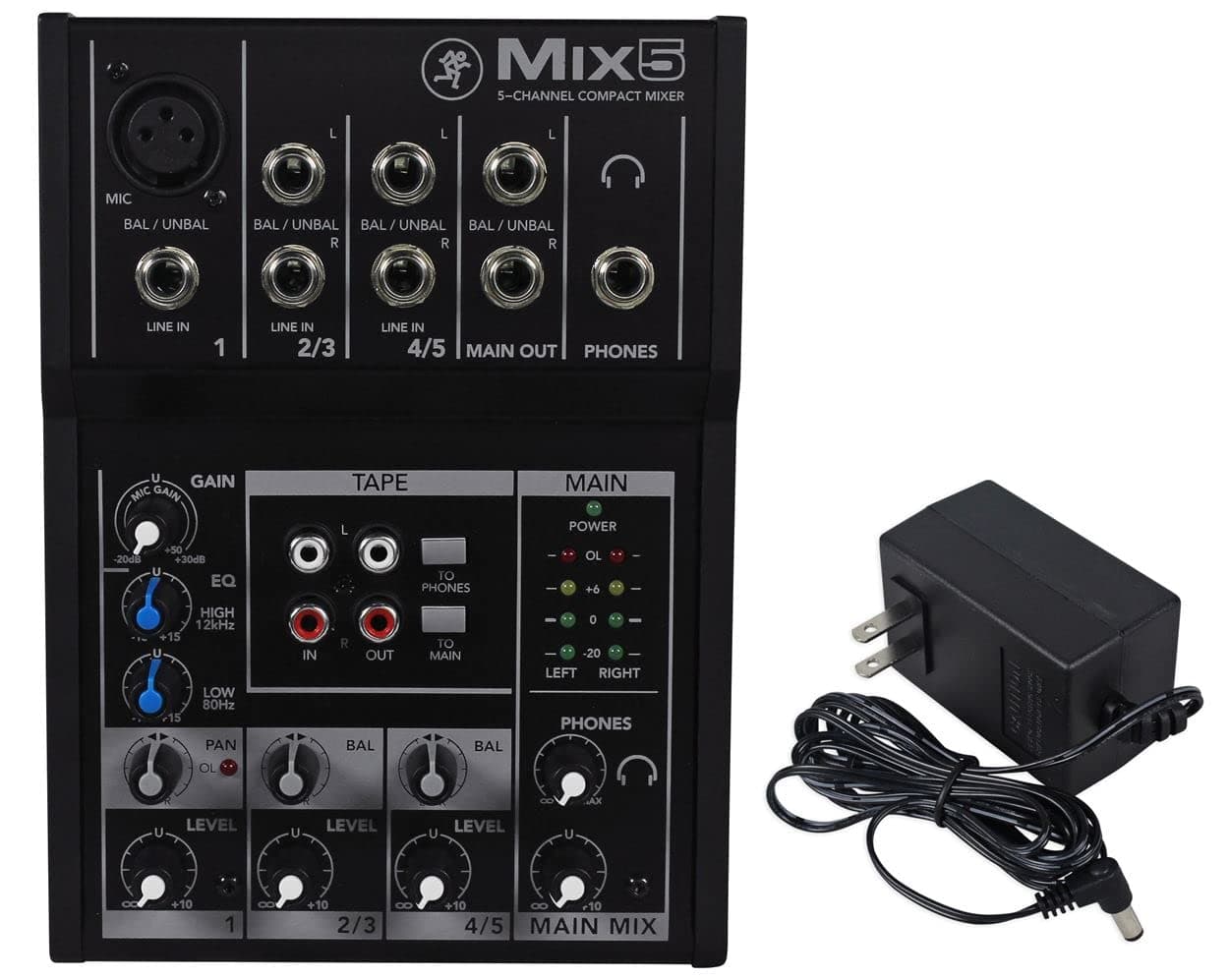
🎛️ Mix like a pro, wherever you go!
The Mackie Mix5 is a compact 5-channel audio mixer delivering studio-quality sound with low noise and high headroom. Featuring 1 mic/line input with phantom power, 2-band EQ for precise tone shaping, and multiple stereo and RCA inputs/outputs, it’s built with a rugged metal chassis for durability. Ideal for streaming, DJ setups, and small studios, the Mix5 offers professional-grade mixing in a portable, easy-to-use package.


| ASIN | B00ND1K8T6 |
| Audio Input | RCA |
| Best Sellers Rank | #922 in Musical Instruments ( See Top 100 in Musical Instruments ) #3 in Unpowered Recording Mixers |
| Brand Name | Mackie |
| Connectivity Technology | Auxiliary |
| Customer Reviews | 4.4 4.4 out of 5 stars (2,485) |
| Frequency | 192 GHz |
| Global Trade Identification Number | 00642892763917, 00663961044898 |
| Item Dimensions D x W x H | 7.7"D x 5.5"W x 1.7"H |
| Item Type Name | A-B Box |
| Item Weight | 2.24 Pounds |
| Manufacturer | Loud Technologies, Inc. |
| Number of Channels | 5 |
| Output Connector Type | RCA |
| Power Source | Corded Electric |
| UPC | 642892763917 613815621928 663961044898 |
| Unit Count | 1.0 Count |
| Voltage | 110 Volts |
| Warranty Description | 1-year all inclusive, nontransferable. |
H**O
Mackie Mix5 (5-Channel) Perfect for Streaming Setup
Let me tell you about this Mixer. If you're looking for a device that will mix together 3 devices for monitoring or output, without any audio noise, this is the device you want. The price point is a little high for some, but you get what you pay for, especially if you want an introductory sound mixer. It has all the useful features you'd need to mix your audio together for monitoring or output, and requires hardly any tuning once you set it up right. Since it is a 5-Channel mixer, you basically only can plug in 3 devices total (and can cheat in 2 audio devices with the Tape setting with no sound control). Device one is set up to be your Mic (XLR) / Line in (1/4 or 6.35mm), Device 2 (2/3) is Left Mono (1/4 or 6.35mm) & Right Mono (1/4 or 6.35mm), and Device 3 (4/5) which are the same as Device 2. You have your Main Out which would mix the 3 Device above to a L and R Mono to (1/4 or 6.35mm), Then you have Phones (Headphones) which you can use to Monitor in Stereo with a (1/4 or 6.35mm). Of course there's also the Tape Setting which you can mix out or listen too with White and Red RCA and you can slot in 2 tape devices, but the mixer has no control over the audio volume or levels, and you can press a button to output to Phones or Main Out. The drawback to this devicve is that it controls both L and R audio at the same time on the device you slot into, if your trying to control the audio levels seperately you'd have to slot into a different device slot, but after that everything works perfectly out of the box, once you adjust the settings to how you like it. This compact mixer doesn't have a power switch, but for anyone thinking about unplugging it when not in use, you really don't have too, the device doesn't get too warm, and unplugging a device like this that doesn't have a power switch can actually lead to damage over time if you keep power cycling it that way. I bought this for streaming to mix down my Computer Audio and my TV audio into one device for my headphones and its worked like a charm. If you're looking to do the same you'll have to buy a few adapters and extra cables, but its well worth it. This was the third mixer I tried and a lot of the cheaper mixers I found on Amazon had weird audio hum/distortions that you couldn't remove even by adjusting the settings. This device worked out of the box with no distortions or audio interfearence. I highly recommend this device if you're looking for an easy to set up entry mixer.
J**J
Nice Quality!
Used this for a 2 DJ setup where we could mix between controllers so both DJs were performing at the same time and matching the other's beats and music while mixing. The item itself has pretty good heft and weight to it. I'm not sure if that means it's higher quality but it sure does feel like it. The controls are smooth and accurate. The 3-band EQ provides excellent control, and the entire unit adds a cleaner and amplified output stage. Basically it's able to amp the signal coming out of the controllers to a higher output level. This is good because we were able to add in Microphones, and get all the levels perfect and clean. The 8-channel version adds a lot of versatility for a DJ setup - you can run external mics, feed out to your main speakers and also to a separate area using the Control Room (CR) outputs while being able to adjust levels on both independently. You can also run your audio out (Tape Out) to a recording device, or to a videographers rig pretty easily. Overall, flexibility, control, and sound quality was very nice. I see complaints about the lack of a power button, but for DJs or for a band, at what point would you want this turned off and on during a performance anyway? Also keep in mind that this doesn't have XLR outputs, but according to the manual the 1/4" outs are TRS (balanced).
A**Z
Nice mixer FX
Works really well, fx are mostly similar but enough variety for most cases.
N**2
It's a Mackie
I bought this to replace my old Mackie portable which finally died after 25 years. The first thing is that it is not as solid as the older unit and is built from plastic instead of steel. This is not an issue if you don't abuse it, but that goes without saying. As for the chips inside, it seems to be pretty good. Mackie mixers are known for being of pretty good sound quality, and at these prices you don't sweat the issue of servicing, since they are inexpensive enough to replace easily. The mic pre's are pretty good for basic work. Personally, I use it for remote mixing without FX, and to feed my Bi-amped monitors, it is well up to both tasks. The bottom line: the simpler your needs, the better it is. Keep it basic and it works pretty well. At this price it is a good value.
D**S
Small, portable, easy. Great for keyboard, mic and backing tracks
This is small and inexpensive. I use it to connect an electric piano, XLR mic and iPad audio for small performances. It provides 48V phantom power to the mic and lets me control all the input volumes separately. I also control the headphone volume separately from the speaker volume. It has a limitation that all mixers seem to have. If you turn down the main output, you can't use the headphones. I wish the volume control for the headphones could be entirely independent of the volume of the main output.
F**R
Great for jam night.
Surprised at the quality, works for my purposes
P**E
Great Sound Quality
Solid product and great sound quality. It's a keeper.
B**G
First unit was DOA out of the box. Second one seems to work ok, but nothing to shout about.
This is DOA. Doesn't accept or pass signal. I'll try a replacement but apparently Mackie doesn't have any QC at all pushing this out the door without CHECKING TO SEE IF IT WORKS. It's a shame too, I have Mackie gear that works great but I now know they can't be trusted. *** Recap: Amazon replaced it overnight. This one works ok but there are a few things to know before you buy. It does not like TRS cable, stick to TS and you should be ok. Signal pass is more or less straight through if you max the volume of the channel and the mains and control your levels at the source, otherwise you'll hear a significantly compromised tonality at the output. Kinda strange but it seems to work best with that approach. I don't think the pres are the same as the ones in my Mackie 12FX model, not even close to pro recording grade. Simple machine for a simple job, I'd give it a 7 out of 10. The next step up is the baby SSL.
J**S
I needed a mixer that would allow me to hook my laptop and two keyboards up to a stereo receiver and this does the trick perfectly. I wanted something that I could expand upon down the road as well hence the 12 channels instead of something smaller. Eventually I will get an audio interface and plug this into that which will allow me to do some digital recording but that's not the priority at the moment. I was surprised by how easy and fast this was to set up. My only complaint is that there's no power switch. Once you plug it in it is on 24/7 unless you rig it up to a surge protector that has a power switch you can turn off. I'm receiving one today by Belkin for just this purpose. It will allow me to shut down all of my setup and turn it all on all at once instead of flipping a bunch of switches and potentially putting wear and tear on those. That said hey power button would have been ideal but this isn't big issue and apparently is a common thing
H**N
Resolví la necesidad de una mezcladora y de muy buena calidad
M**E
100% tudo
D**K
Mackie Kalitesi Hİssediliyor Fakat Kablosu Hariç Adaptörü mixere girince tam iyice otuturmak gerekiyor tam oturmuyor hareket edince güç kesiliyor benimki mi sorunlu anlamadım kablo yan açıdan gelince tam girmiyor hafif dışarıda kalıyor sallantıda bazen kesiliyor tam iyice ayarlamak gerekiyor onun dışında Sahnelerde Kullanmak İçin Aldım Davulcuyum Metronome Girip Aynı zamanda in ear kulaklıklarıma ana Mixerden Ses Almayı Planlıyorum Yeni Geldi Deneyimleyip yorumlayacağım
M**I
Ottimo lo uso per gli in ear live
TrustPilot
2 周前
3 周前