We remain fully operational. Our teams are working around the clock to ensure your deliveries continue safely.

下载应用程序


![Elgato Stream Deck + [Parallel Imported Item]](/_next/image?url=https%3A%2F%2Fm.media-amazon.com%2Fimages%2FI%2F519jbgbd1sL.jpg&w=3840&q=75)
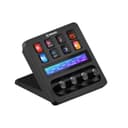
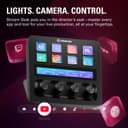
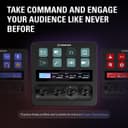

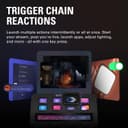

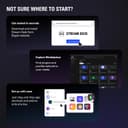
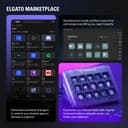
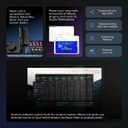
🎮 Elevate your stream, command your desk, own your workflow.
The Elgato Stream Deck+ is a premium USB-C/USB-A connected control pad featuring 15 customizable LCD keys designed for seamless shortcut execution and audio management. With a 4.6-star rating from over 3,400 users, it’s a top-tier choice for streamers and professionals seeking to optimize their digital workspace. Note: This parallel imported item is not covered by the manufacturer’s warranty.


| ASIN | B0BJL8SJ59 |
| Amazon Bestseller | #22,187 in Computers ( See Top 100 in Computers ) #1,750 in Computer Keyboards, Mice & Accessories |
| Audio Input | USB-C |
| Brand Name | Elgato |
| Connectivity Technology | USB-C, Usb-a |
| Customer Reviews | 4.6 4.6 out of 5 stars (3,433) |
| Frequency | 20 KHz |
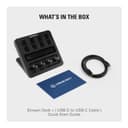
| Included Components | Stream Deck +, USB-C to USB-A Cable, Quick Start Guide |
| Item Weight | 470 Grams |
| Manufacturer | Corsair |
| Output Connector Type | USB-C, USB-A |
| Power Source | Corded Electric |
| UPC | 840006645146 |
| Voltage | 1 Volts |
| Warranty Description | 2 Year Manufacturer Warranty |
変**士
機能性もあってかなり使いやすい!
T**O
ワンボタンでショートカット、ヘッドホンからスピーカーの切り替え、トグルで音量の調整などでかゆいところに手が届きます。discordのサウンドボード機能もボタンに登録できます。もっと色んなことできますが、持て余してます。私には贅沢品でしたがPCデスクに置いてるだけで満足してます
そ**る
ボタン&タッチパネル&コントロールノブという全種盛りな見た目に惹かれて購入いたしました。 ボタンは前作と仕様が同じと思われますので、使い方は無限大!使いやすいです。 ただタッチパネルとノブでできることがだいぶ限られています。 発売当初は後々アップデートで増えていくだろうと思ってましたが今のところあまり 目新しいものは増えてません…(私が使いこなせていないだけかも) 今となっては音量調整専用のノブになっております。 そしてノブとタッチパネルにストリームデック全面のスペースが半分使われている為、ボタンの数が8個しかありません。(ページ切り替えなどを使えば8個以上のボタンを作れます。) ノブでこれがしたい!ノブじゃないとできないことがある!という方以外は、 前作のボタンがいっぱいついているストリームデックをおすすめいたします。
ナ**ア
はじめてのストリームデックです。勢いで買いましたが、非常に満足しています。 ボタンでのショートカットはもちろん、ダイヤルが素晴らしいです。 ゲームやブラウザ、通話など様々な音量を調節するときに、ダイヤルでサッと調整できるのが嬉しいです。人によってはこれだけでも買う価値があるかもしれません。 問題点は ・単純に机を圧迫する ・高さがあるためじゃまになるかも ということくらいです。 写真を見て想像できるくらいの大きさですが、置き場所を確保してから購入するのが良いと思います。
C**R
ボタンのみのStream Deckを使っており、かなり便利なので買い増ししました。ダイヤルは動画のシークやボリューム調整に便利ですし、タッチストリップのおかげでキーアサインのページめくりも楽です。 使い道がフィットする人には手放せなくなる製品です。というか買ったら多様な使い道が見つかると思います。
さ**く
値段は高いですが見合ったパフォーマンスを発揮してくれます。 ゲームの起動、ブラウザの起動、Excelのショートカットなんでもできます。 自分だけの設定を構築してる段階も楽しいです
S**I
ダイヤル部分の拡張性」はかなり限定的で現状割り振るのはソフトごとの音量調節ぐらいにしか使えない〜とレビューがありますが、公式サイトにある通りスタックによりショートカットキーを割り振ることは可能です。 押し込みごとに実行したいコマンドを変更 システムホットキーを選択すれば左右の回転ごとにコマンドを指定することが可能です。 1ダイアルに3-4個のホットキーであれば問題なく利用できそうです。 各2つのコマンドをを割り振ることが可能なため実質8このコマンドを1ダイアルで実行できると考えれば これまでのXL並み・それ以上ののボタン配置が期待できそうです。
ぷ**ん
使いやすい ただ使うために色々調べないと行けない
D**P
Llegó muy rápido, fue vendido por un externo (VENTROTEC). Grabé incluso video de la apertura de la bolsa para evitar problemas con relación al producto, pero fue el correcto, nuevo y al 100. Llevo un par de semanas de uso y ha mejorado la parte de mis clases (cambié de un streamdeck de 15 botones), pues me permite tener los botones que más ocupo, a mejor disposición, más grandes, con knobs específicos para mi micrófono y mis lámparas, lo que me permite encender todo y cambiar rápidamente (aún no lo uso con XLR diferentes al Wave, para probar la fusión con otra interfaz).
J**M
Great stream deck. Highly recommend
B**D
Ett mycket uppskattat komplement till mina övriga Stream Deck's! Jag gillar att jag kan styra ljud ut och in i min dator på ett enkelt sätt. Jag överväger att köpa ett till! Det är ett väldigt smidigt och bra komplement till min mixer när jag digitaliserar mina gamla VHS-videos och lägger på ljud och en speakerröst. Att det har många möjligheter till att underlätta mitt arbete, vid datorn, är suveränt. De programmerbara tangenterna är bara så fantastiskt bra. Det var ett bra val för att jag använder det dagligen till andra saker också. Det är ett av mina bästa inköp!
S**.
Top
S**A
J’utilise le Elgato Stream Deck+ depuis quelques semaines et c’est un vrai gain de productivité pour le streaming et la création de contenu. Les 15 touches LCD personnalisables permettent de lancer des scènes OBS, d’activer des effets, ou même de contrôler des logiciels de montage d’un simple appui. L’installation est simple : le logiciel Elgato est intuitif et permet de créer des macros très rapidement. Chaque touche peut afficher un symbole ou une image, ce qui rend l’interface très visuelle et facile à mémoriser. Le design est compact mais robuste, et l’écran des touches est net et réactif. La personnalisation est très poussée, on peut même programmer des suites de commandes ou des actions complexes sur une seule touche. Pour ceux qui streament sur Twitch, YouTube ou qui veulent simplement automatiser des tâches sur PC, c’est un accessoire qui change vraiment la vie. La qualité de fabrication est au rendez-vous, et le Stream Deck+ donne l’impression d’un outil professionnel à portée de main. En résumé, c’est un investissement un peu cher mais largement justifié si vous voulez gagner du temps et améliorer votre flux de travail.