
下载应用程序


🔴 Redefine Your Workspace with Style!
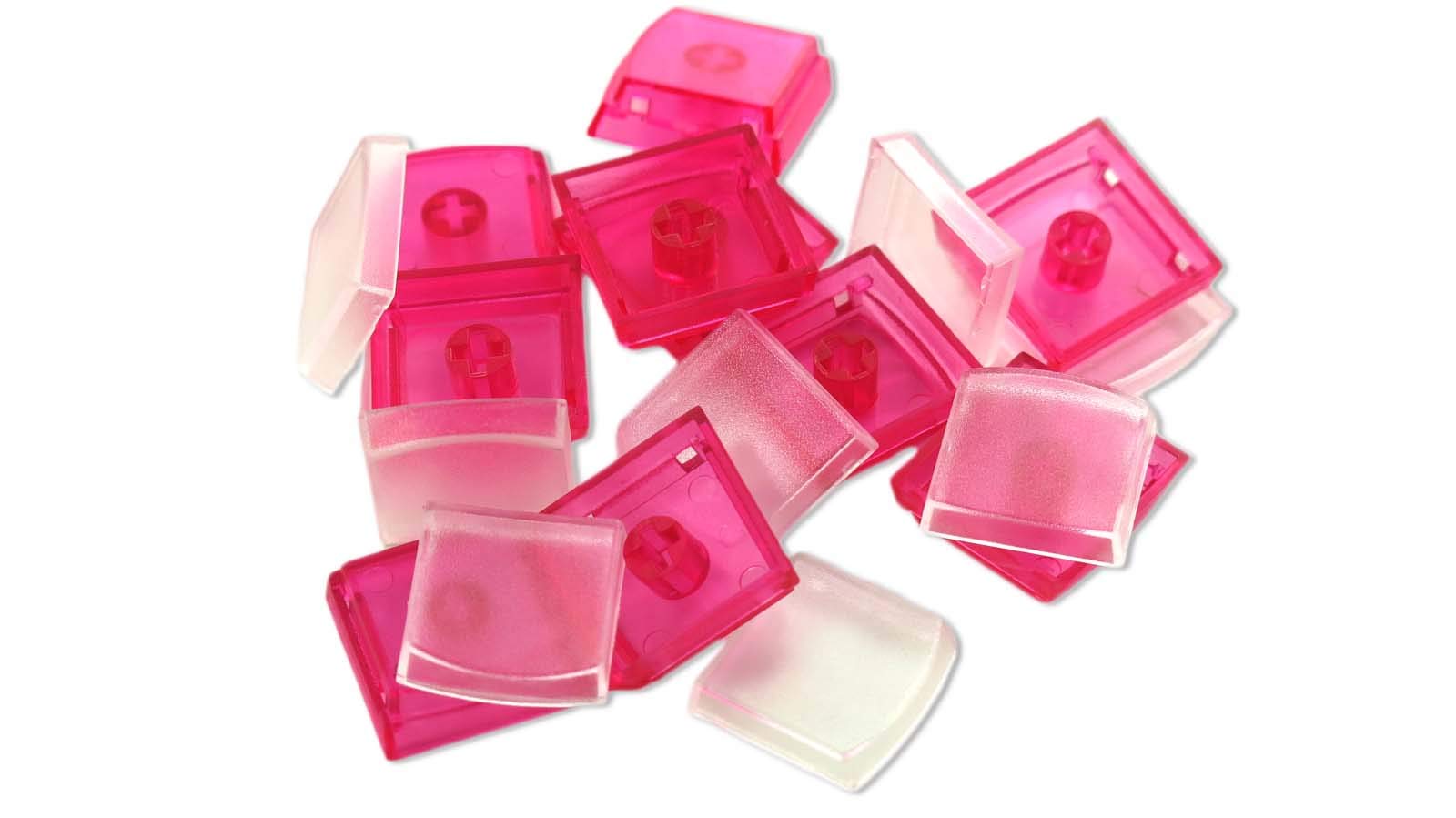
The X-keys Keycap Cherry MX Compatible pack includes ten vibrant red keycaps designed to fit all X-keys with MX compatible stems, perfect for enhancing your keyboard's look and feel. Note: These keycaps do not fit X-keys Stick models.
A**O
Great keys for custom keyboards, but not so much for gaming
I purchased these keycaps to work on a MAX KEYBOARD Falcon-20 keypad, acting as a low-cost stream deck type of device, along with acting as the 10-key keypad missing from my recent keyboard upgrade (it's a 60% or whatever, so no keypad).These keys are designed to work on the Cherry MX keys, however while they work great, the overall shape is much different from your standard keys. There is much more surface area, and the keys are more akin to the chicklet-esque keys you get on a laptop... while giving the travel you'd get from a traditional keyboard. This provides a few interesting scenarios.First, Amazon notaes Sheerness as a feature - they are not very sheer. The plastic is pretty solid, and pretty opaque. If you use these in a keyboard with LED backlights it won't be particularly great at shining the light through (as with many other keys). I'd love a semi-transparent (in line with those early see-through game console and controller colors that took the late 90s and early 00's by storm) keycap. I tried drilling tiny holes, in the hope that the paper inserts would do good to diffuse the light... no, it didn't. It just made reading the labels harder. All well, you can't win 'em all!Ergonomics are alright. They're not terrible, but these keycaps definitely would feel better on a laptop rather than a standard keyboard. The larger top surface lends itself to larger labels, making it easier for custom graphics and writing on labels, but it throws off using the keys like normal; I've never found myself fumbling over a keypad when using it as a keypad than with these key caps - and I didn't experience this with the original keys that came with it. That said, they work PERFECTLY for my needs, whenever I stream, so I can't complain; I also don't use a 10-key much at home (at work... that's another story, but that's why I use a normal keyboard there!) so it's no big deal.As for gaming... your mileage may vary. Because the ergonomics aren't the best, this can result in a learning curve for using the keys for fast paced games - that might not be good for you if you need quick, twitchy-friendly action. Secondly, depending on how you label the buttons, if your keyboard has a backlight, it may not do anything for visibility, but if you're in a better lit room (and you use the white keycap inserts that I did), you can probably view the labels without any issue.Overall, they're good. They're great for utilitarian purposes, but the term "function over form" definitely rings in my head when using these. If you need traditional shaped keycaps, these are not for you. If you want a keycap that has a wider top surface area and lends itself for slightly nicer keycap inserts? These are for you.
J**A
Not ideal for normal key use, but great for special keys.
I have to rate these four out of five because overall they really aren't ideal for normal key use and a lot of people may not understand that just from the way they're marketed. Now, that said, for more specialized purposes they're actually quite good. Their primary intention is for you to print labels to put inside so they can be used for specialized purposes such as macros, however, I've found them to be useful for other things. I use them for "Fn" style keys (layer toggles and such) as well as for WASD keys on a gaming pad. The lower profile makes them stand out so they're easier to feel versus the keys around them. As WASD keycaps they actually have a good feel in gaming, so while this may not be their intended purpose I actually love them for that. As Fn style keys they have an extra side benefit that they show the light from the underglow LEDs through them just a tiny bit (I haven't soldered individual key LEDs to my PCB, so that's the only lighting it does but I use the underglow to tell which layer I'm on.)Of course, their intended purpose is, probably more than anything, to go on a macropad with printed labels. I can't see any reason whatsoever that they wouldn't actually be great at this. In fact, I'll bet if you invert the label (black outline, white character or symbol) they'll shine light through that part and look even better if you have LEDs for individual keys in your board. For their intended purpose I do think I can absolutely recommend them -- as well as potentially for other more specialized purposes.
D**N
Perfect with clear caps
It works perfectly with my project!
A**4
Decent. Get does what you want but i ended up buying better quality ones later
Pretty good for quick labeling of keys.I ended up buying better quality ones from ada fruit.
S**S
These are good but MELT under sweat
I bought these to use for a custom button board with brown switches. One of the things I use it for is osu. My hands sweat a bit and I found that after a week of playing it almost daily, the keycaps I pressed had gotten very foggy. I scratched one of them and it acted like some sort of rubbery material. I used it for another week and at that point I was able to *heavily* deform the plastic.However, the build quality is very nice and there is a nice template document they provide on their website so you can make your own labels. The plastic is transparent enough and barely glares because of its noisy texture.Overall, these are a good set of keycaps, but don't expect to be using them for gaming.
R**L
Way better than expected
I bought a Genovation CP24 off of eBay and was looking to customize the pad with the macros of my choosing. I was looking everywhere for custom keycaps and found these. I know these are for the competitors keypad, but they are so much more cost effective than Genovation's option. I was expecting something that was lower than the pre-existing keys and have a cheap feels to them, but no, these things it right in and are great.If I were to have any complaint, it would be that their (X-Keys) software doesn't let you customize the labels without one of their keypads connected. To circumvent this, I found a blank template and just added icons to it and printed that out. I would like if I could use the software to do this without the need for an actual keypad connected.
C**M
Best re-legendable switches I've used.
I've used these on MX and Gaote switches and it fits both. It says they are clear but their is a slight haze to the caps. The caps stay on well though and are easy to take on and off. Anything you put underneath will be easy to read, but there is a slight curve to the bottom of the keys so make sure to take in account of that.
H**T
Nice Customizeable Keycaps
The only problem was that my set was short 1 cover, so UI got 9 1/2 useful keys, but I liked them enough to order another set.
J**J
Terrible quality, half missing, just broken junk
Only 5 keycaps received in the 10 pack and the quality control is abysmal. Cheap inconsistantly printed plastic, squished and broken. In disbelief someone thought this was good enough to sell to someone and use on a keyboard. It's just pieces of junk plastic and totally unusable. Avoid these.
Q**O
高さ7ミリキャップ
12個入りが欲しかった。
TrustPilot
2天前
4天前