We remain fully operational. Our teams are working around the clock to ensure your deliveries continue safely.

下载应用程序


🖨️ Elevate your workspace with smart, stylish printing that keeps you connected.
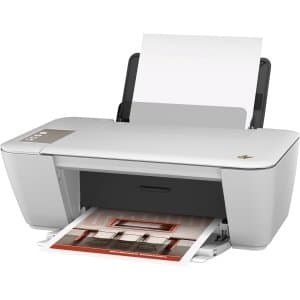
The HP Deskjet 2540 is a sleek, all-in-one inkjet printer designed for home and small office use. It offers wireless printing, scanning, and copying with a compact footprint, delivering vibrant color prints at up to 16 pages per minute and sharp black-and-white prints at 20 ppm. Featuring a 50-sheet input tray, 4800 x 1200 dpi resolution, and an easy-to-use LCD touchscreen, it balances affordability with dependable performance and energy efficiency.
| ASIN | B00TP47LIQ |
| Additional Printer Functions | All In One |
| B&W Pages per Minute | 16 ppm, 20 ppm |
| Best Sellers Rank | #255,836 in Office Products ( See Top 100 in Office Products ) #229 in Inkjet Computer Printers |
| Brand | Generic |
| Built-In Media | HP Deskjet 2540 All-in-One, Ink Cartridges, Software, Power Supply, Power Cord, USB Cable |
| Color | black |
| Color Depth | 24 bpp |
| Color Pages per Minute | 16 ppm |
| Compatible Cartridge | HP 61 Black Ink Cartridge, HP 61 Tri-color Ink Cartridge |
| Compatible Devices | PC |
| Control Method | Touch |
| Customer Reviews | 3.8 3.8 out of 5 stars (9) |
| Display Type | LCD |
| Dual-sided printing | Yes |
| Duplex | Manual |
| Hardware Interface | USB |
| Initial Page Print Time | 17 seconds |
| Ink Color | black, cyan, magenta, yellow |
| Manufacturer | HEWLETT PACKARD - DESK JETS |
| Maximum Copies Per Run | 25 |
| Maximum Copy Resolution Black and White | 600 dpi |
| Maximum Copy Resolution Color | 600 x 300 dpi |
| Maximum Copy Speed Black and White | 20 ppm |
| Maximum Media Size | Legal (8.5 x 14 inches) |
| Maximum Print Resolution Black and White | 4800 x 1200 dpi |
| Maximum Sheet Capacity | 50 |
| Maximum print Resolution Color | 4800 x 1200 dpi |
| Model Name | 2540 |
| Model Number | 2540 |
| Model Series | DeskJet |
| Number of Drivers | 1 |
| Number of Trays | 2 |
| Other Special Features of the Product | Wireless |
| Paper Size | 8.5 inches |
| Print media | Envelopes, Paper (plain) |
| Printer Connectivity Type | wireless |
| Printer Output Type | Color |
| Printer Type | Inkjet |
| Processor Count | 1 |
| Resolution | 4800 x 1200 |
| Scanner Type | Flatbed |
| Series Number | 2540 |
| Specific Uses For Product | Home |
| Total USB 2.0 Ports | 1 |
| Total Usb Ports | 1 |
| Warranty Type | limited warranty |
| Wattage | 10 watts |
A**R
Dependability
I have had this printer for maybe 8 to 10 years, and it works just fine. The wifi is great since my pc and printer are across the room from each other. every now and then technology does it's thing but for the most part, I'd recommend it. It's not that fast but it's dependable.
J**E
I can even print from my phone.
Does what I need it to do.
H**N
Good little printer if you have a USB cable. Connecting to wireless network is a nightmare.
I have had this printer for 10 years. It works well and prints nicely. My issue is every single time I have had to try and connect it to a wireless network it has been a total nightmare. It sucks hours of your life trying to figure out how to get it work, downloading apps (HP Smart app is an exercise is circular futility), reading message boards, community boards, calling customer service, only to hit brick wall after brick wall and it never tells you what the issue is so you hunt around more. What a waste. This latest time I finally gave up and went and bought a USB cable and even with the cable I couldn't get it to work. So it's no longer a wireless printer in my house. Now it's a USB cable printer. Oh well. If you want an actual wireless printer go buy another brand.
M**S
Beware of omitted items.
Did not work.
J**A
I have 2 of this model and can't get either to work
I've done all the troubleshooting. I've tried everything. Spent over 20 hours total working on them. Both printers have the hardest time being recognized by computers and showing up and printing when they should. Neither printer will connect to WiFi or let me print on my iPhone or Android devices. It's impossible to setup either to the WiFi through all methods available.