We remain fully operational. Our teams are working around the clock to ensure your deliveries continue safely.

下载应用程序


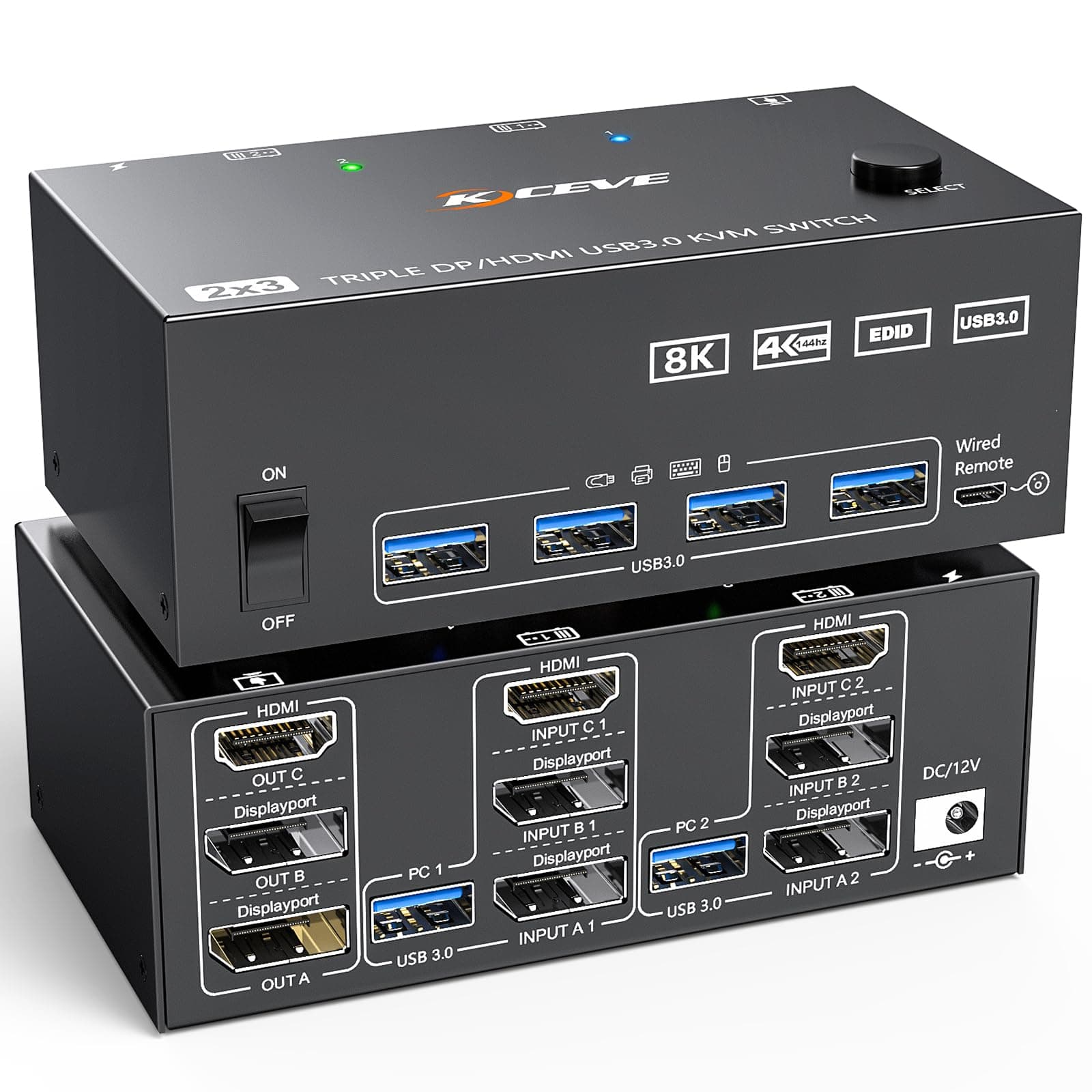
🚀 Triple your screens, double your power, zero clutter!
The Camgeet 4K@144Hz Triple Monitor KVM Switch lets professionals control two computers with one keyboard and mouse across three ultra-high-definition monitors. Featuring HDMI plus dual DisplayPort inputs, four USB 3.0 ports with 5Gbps speeds, and support for extended and mirrored display modes, it streamlines multi-device workflows. Its wired remote and broad OS compatibility make switching seamless, while its sleek metal design keeps your workspace tidy and efficient.


| ASIN | B0CL9Q4VF2 |
| Actuator Type | Push Button |
| Best Sellers Rank | 37,216 in Computers & Accessories ( See Top 100 in Computers & Accessories ) 113 in KVM Switches |
| Brand | camgeet |
| Circuit Type | 3-way |
| Colour | Black |
| Connectivity Protocol | Wired interfaces |
| Connector Type | Plug In |
| Contact Material | Metal |
| Contact Type | Normally Open |
| Control Method | Remote |
| Controller Type | Push Button |
| Country Of Origin | China |
| Current Rating | 2 Amps |
| Customer Reviews | 3.5 3.5 out of 5 stars (37) |
| Item Dimensions | 11.9 x 6.5 x 4.3 centimetres |
| Manufacturer | camgeet |
| Material | Metal |
| Model Number | KC-203DHKDEU |
| Mounting Type | Surface Mount |
| Number of Positions | 6 |
| Operating Voltage | 12 Volts (DC) |
| Operation Mode | Manual |
| Specification Met | CE |
| Switch Type | DIP Switch |
| Terminal | Physical |
| UPC | 793288776780 |
J**N
Sick customer service and item
Does the job, others probably have issues as they're not supplying enough power to their usb hubs that sends the signal to this switch. No issues and customer service is really good.
J**S
Almost good
Very promising build quality and smooth functioning switch, much more sturdy construction than other brands I've used, however the third monitor output did not work. I've requested a return and purchased another so maybe second time lucky. Shame as this seemed to be very promising until the disappointment with monitor 3!
R**S
Perfect for my needs
Working great for my dual machine triple monitor setup. I did need to do a little work to find an appropriate DP to HDMI adapter as two of my monitors only allow HDMI input. Be sure to get an "ACTIVE" signal converter and it works great. Got great support from the seller also.
A**Y
Didn't work, no response from either PC or peripherals.
Sadly this is a bad review from me. I used all of the supplied cables with my PC and work laptop, plugged into mains power and nothing seemed to work. No display from either machine, peripherals not working when connected to the front and no amount of changing the configuration of display cables made a difference. Maybe I got a bad unit, but sadly I will not be getting another one of these and have to leave a negative review on this occasion.
L**A
Works - mostly
The switch works perfectly after Windows boots up; Before that, the Display Port causes flickering. E.G. You'll see flickering images of your BIOS screen before Windows comes up. I know it's the KVM because if I connect the PC to the monitor directly with the same exact cables (1 to connect the Desktop to the KVM and 1 from the KVM to the monitor), I have no issues at all. This is quite inconvenient as in case of need, one needs to be able to access the BIOS (or any other screen before Windows) for recovery reasons without hiccups. I couldn't find any working solution online, I'm opened to try things out if the seller has a fix for it.
M**S
Junk
I don’t normally leave reviews but this is junk! Save you money and time
K**A
Mniejsze niż się wydaje, ale wtyczki mieszczą się bez problemu. Działa niezawodnie.
M**G
Läuft wie es soll. Bildschirme erkennen immer ihre zuvor eingestellte Position, dank integriertem EDID. Aber achtet auch auf die Kabel die angeschlossen werden. Die unterstützen oft nicht alles. Hab gleich noch ein paar gute DP Kabel dazu bestellt.
S**U
The package contains everything you need to complete the for 2 computers. In my case one PC is a work computer and the other PC is a gaming computer. In de game I'm reaching 160 frames per second, with the cables provided. This product is really good value for money.
A**D
La bascule de Linux (Ubuntu) à Windows se fait avec une latence élevée (3 s d'écrans noirs) alors qu'instantané avec un KVM TESmart. La bascule de Windows à Linux laisse les écrans noirs malgré mouvements de souris ou touches clavier. Il faut utiliser l'interrupteur du PC (impulsion brève) pour avoir le message demandant confirmation de l'arrêt du PC et réveiller les écrans (précision : clavier et souris sont bien fonctionnels sous Linux). Les définitions au démarrage ne correspondent pas à celles des écrans, elles sont correctes après lancement complet (ce n'est pas le cas avec d'autres KVM). C'est dommage car pour le reste le produit est intéressant et cette configuration peu courante.
C**K
.... das Gerät auch so funktionieren würde wie man es erwartet. Aber weder werden Maus und Tastatur angesteuert, noch werden drei Bildschirme wiedergegeben sondern der "Switch" gibt lediglich den HDMI Ausgang wieder. Die beiden DisplayPorts werden ignoriert, genauso wie eben Maus und Tatstatur was das bedienen des PC schwierig macht. Der Hersteller wird sicherlich eine Vielzahl von Gründen/Ausreden angeben weshalb das so ist aber die simple Wahrheit ist wohl ... das Teil funktioniert halb nicht.
TrustPilot
1天前
3 周前