We remain fully operational. Our teams are working around the clock to ensure your deliveries continue safely.

下载应用程序



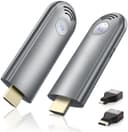
🚀 Cut the cords, not the quality—wireless HDMI that works as hard as you do!
The TPUFO Wireless HDMI Transmitter and Receiver Kit delivers plug-and-play wireless streaming up to 98 feet using dual-band 2.4G/5G technology. Supporting 4K decoding and 1080p@60Hz output, it enables seamless screen mirroring and extension from laptops, PCs, and TV boxes to HDMI displays or projectors. Compact and travel-friendly, it eliminates cable clutter and setup hassle, making it an essential tool for professionals seeking high-quality, flexible video transmission.


| ASIN | B0CKXC7X2R |
| Best Sellers Rank | #15,835 in Electronics ( See Top 100 in Electronics ) #86 in Wireless Audio Receivers & Adapters |
| Brand | TPUFO |
| Built-In Media | Wireless HDMI Receiver and Transmitter |
| Color | grey |
| Compatible Devices | Laptop/PC, TV Box, Projector |
| Connectivity Technology | Wireless |
| Connector Type | HDMI |
| Controller Type | Remote Control |
| Customer Reviews | 4.5 4.5 out of 5 stars (1,206) |
| Form Factor | TV Stick |
| Item Dimensions L x W x H | 5.12"L x 5.12"W x 1.85"H |
| Item Weight | 0.3 Kilograms |
| Manufacturer | TPUFO |
| Mfr Part Number | TR30 |
| Model Name | TR30 |
| Model Number | TR30 |
| Other Special Features of the Product | Screen Mirroring |
| Supported Internet Services | YouTube |
| UPC | 860010838211 |
| Video Codec | H.264, H.265/HEVC |
| Video Output Resolution | 3840x2160, 1920x1080 |
| Warranty Description | 3 months |
A**M
Excellent Wireless HDMI Solution – Easy Setup, Great Performance
I purchased this Wireless HDMI Transmitter and Receiver Kit to mirror my laptop screen to a projector across the room without running long HDMI cables—and it has delivered exactly what I needed. Setup was truly plug & play. I connected the transmitter to my laptop and the receiver to my projector, powered both up via USB, and within about 15 seconds the signal was live. No drivers, no apps, no hassle. The video quality is surprisingly good. I tested both 1080p and 720p video streaming, and there was no noticeable lag when watching movies or doing presentations. The 5GHz band really helps with stable transmission—though you’ll get the best results when both devices are in line of sight or within a reasonable range. Audio is also transmitted cleanly, with no dropouts or sync issues. This is perfect for streaming Netflix, YouTube, or giving PowerPoint presentations without any annoying delay. Overall, this wireless HDMI extender saved me from running long cables across my office and has been rock-solid for meetings and home use.
L**H
ABSOLUTELY IMPRESSIVE! 100% RECOMMENDED!
I'll save you the extra pictures since people have already posted. Listen! this thing is amazing! Here's what I like: - Setup, so easy and simple. It's truly plug and play. Plugged the tx to my laptop and rx to my monitor and connected the power for both and baam!!! turned on and connected. I didn't have to press anything. It was literally a 5 second connection process. Just FYI, when you connect to the laptop portion to your laptop, it turns on a blue light even if you have not plugged in the power cable. It won't work without the power cable, so connect it please - The contents that come with the box! literally saved me. My monitor used a mini hdmi so I got discouraged, looked in the box and oh wow, they thought about it. There is was, a full hdmi to mini hdmi dongle! I was so happy - Speed: There was literally no lag(I'm using a macbook pro by the way). Connection was seamless, it connected simply and everything worked so great! No lag, literally no lag. It was surprising considering it's wireless and it's a display projection. Overall great product. it's going in my tech bag permanently. I'll be using it for projection when I visit somewhere. Hotels, airbnbs, I'm happy with it truly and I 100% recommend it! Technology has come so far...yeesh!!
D**.
Much easier than running a cable through my house
This is so much easier and faster than running a 25 ft cable from my laptop to my TV. Connection is easy and the transmitter and receiver are already paired right out of the box. I don't experience any delay in transmission of the signal and the video quality is excellent.
M**N
FAN-FREAKING-TASTIC!! BRILLIANT!! AMAZING!!! --- *** FIOS CABLE BOX TIP ***
First, I've been involved in broadcast television IT for 30 years. Very familiar with video and audio setups. I've run hundreds of miles of video,, audio, HDMI cables. So I was VERY skeptical. My setup/problem: I have a Verizon Fios Cable TV box in my family room. Large screen TV wall-mounted. Since I was lazy, never got around to fishing the HDMI through the wall to the TV... so its a cable you can clearly see going from the box, up the wall, to the TV. Wife hates it. She's not wrong. In addition, we have a large-screen TV mounted in our screened-in patio. I connected an HDMI splitter to teh FIOS cable box, one HDMIL cable runs visibly up the wall to the family room TV, the second HDMI cable (75' long) is snaked under the house out to the patio and to the patio TV. I simply wanted to mirror the inside TV to the patio, primarily for football... wander in or out and the game is on. The splitter and setup works great. Along come this product. I was very skeptical. I unboxed it, Plugged the TX into my HDMI port on my laptop... the laptop provide power. The RX I connected to my office TV. The HDMI port did not provide power, so I used the provided USB-C cable to connect power to the RX. Before I could get back to my laptop... the devices sync'd and my laptop was on the TV (seconds). Did some testing, including sports and YouTube high quality videos and concerts... flawless. Micro-second delay between the laptop and TV... but no lip sync issues... audio was perfect, as was the transmitted picture. Testing passed with flying colors. Onto the family room/patio resolution. I plugged the receiver into the TV's HDMI port, it provided power! I disconnected the HDMI cable that runs to the wall-mounted TV from the splitter... and plugged in the transmitter. It lit up, we had power! The TV indicated it was waiting for connection, but nothing happened. So I simplified. Removed the HDMI splitter altogether... plugged the TX directly into the Verizon bow. Same issue. Then it dawned on me... any time I've had TV issues, it always comes back to the Verizon boxes! So I connected USB power directly to the TX... and it instantly connected to the RX... and we were working perfectly! Point is... their box apparently provided enough power for the TX to light up... but not enough to transmit. I moved the TX back to the splitter (with external USB power still connected) and reconnected the splitter to the FIOS box. It worked perfect. I then reconnected the patio TV hard-wired HDMI cable to the splitter... and everything works great! Any the cable in the family room is gone and I'm a hero! This thing really is amazing! 12 stars out of 10!! Just be aware of the power issue I ran into! Mike
R**O
Fast, reliable and compact
This HDMI wireless transmitter is super handy and saves me from dealing with long messy cables. Setup was really simple, just plug it in and it connected right away. The picture quality is clear, and the sound stays in sync, which makes it great for watching movies, streaming mostly for me. The range is solid too, and it even worked fine through a wall without heating up or lagging. For gaming, there’s a tiny bit of delay, so it’s not perfect for fast-paced play, but for everything else it works really well. Overall, a convenient and reliable device that makes life a lot easier.