We remain fully operational. Our teams are working around the clock to ensure your deliveries continue safely.

下载应用程序


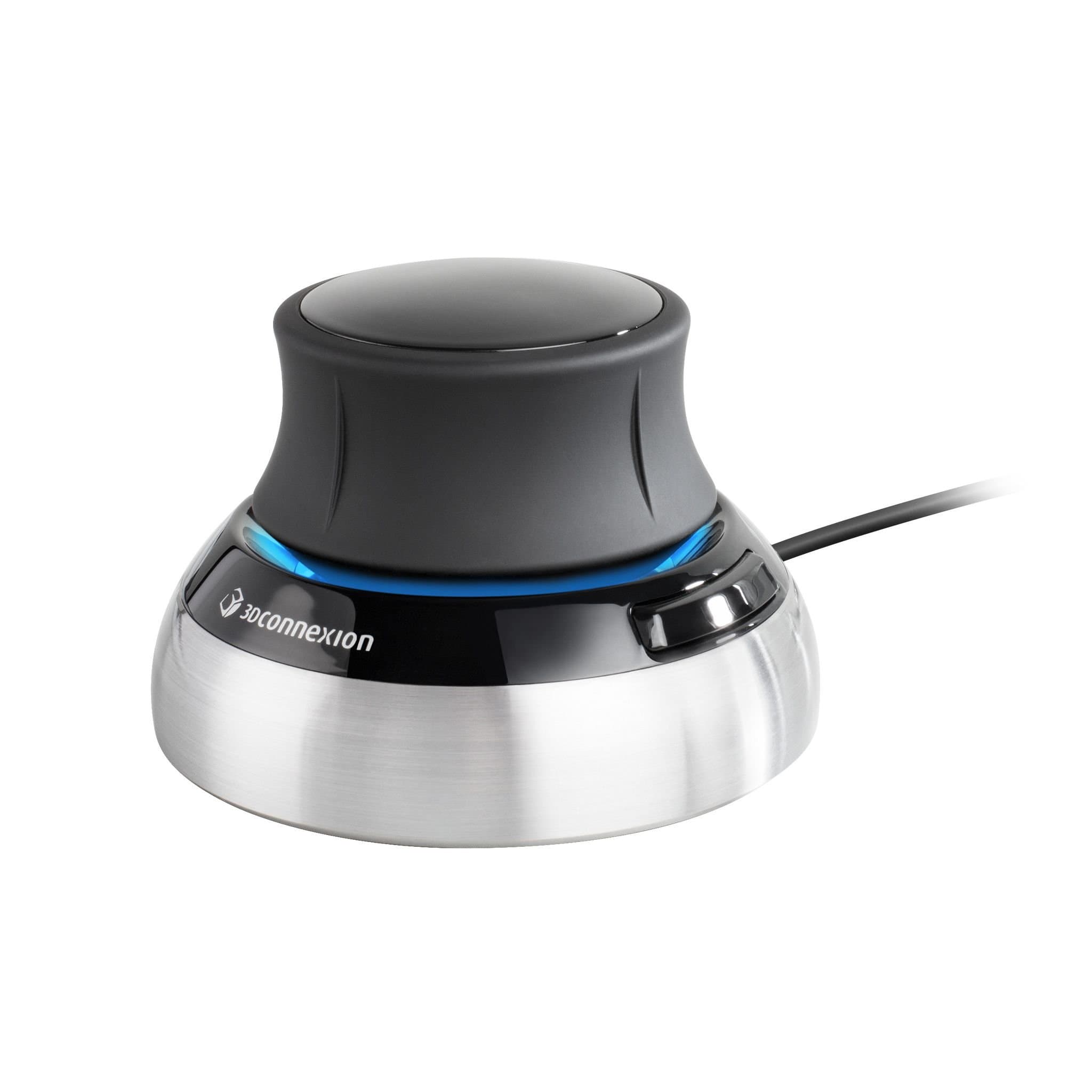
🚀 Elevate your CAD game with precision and style — don’t just design, dominate!
The 3Dconnexion SpaceMouse Compact is a precision 3D navigation device engineered for CAD professionals and designers. Featuring a patented 6-degrees-of-freedom sensor, it enables intuitive manipulation of digital models by pushing, pulling, twisting, and tilting. Compatible with Windows, macOS, and Linux, it integrates seamlessly into diverse workflows. Its compact design with a brushed steel base ensures stability and minimal desk footprint. Two programmable buttons provide quick access to customizable radial menus, enhancing efficiency. Ideal for engineers, architects, and 3D artists seeking to elevate their design experience with ergonomic dual-handed control.


| ASIN | B079V4PXYD |
| Additional Features | Each of the SpaceMouse Compact's two buttons opens its own 3Dconnexion radial menu. They provide direct access to up to 8 of your favorite application commands. |
| Antenna Location | Office |
| Are Batteries Included | No |
| Are Batteries Required | No |
| Best Sellers Rank | #410 in Computer Mice |
| Brand | 3Dconnexion |
| Built-In Media | 3Dconnexion SpaceMouse Compact |
| Button Quantity | 2 |
| Color | Black |
| Compatible Devices | Desktop, Laptop |
| Connectivity Technology | USB |
| Customer Reviews | 4.6 4.6 out of 5 stars (1,036) |
| EU Spare Part Availability Duration | 2 Years |
| Enclosure Material | Steel |
| Global Trade Identification Number | 00821123700598 |
| Hand Orientation | Ambidextrous |
| Hardware Platform | Laptop, PC |
| Item Dimensions L x W | 30.31"L x 30.31"W |
| Item Weight | 480 Grams |
| Manufacturer | 3D Connexion |
| Model Number | 3DX-700059 |
| Movement Detection | Trackball/Sensor |
| Operating System | Linux, Windows 10, Windows 7, Windows 8.1 |
| Power Source | Battery Powered |
| Range | 5.0 meters |
| Style Name | Mouse |
| UPC | 821123700598 |
| Unit Count | 1.0 Count |
| Warranty Description | 1 Year Limited Manufacturer |
A**.
A must have for CAD users
I've spent the last 35 years using CAD systems for work and I've always considered space mouse/space balls as a must have. It allows you to utilize both your hands for model manipulation instead of just one hand using a standard mouse. It reduces having to memorize mouse button pushes for model panning, spinning and zooming for different CAD software. I was constantly switching between Catia and NX which did not utilize the same button operations on the mouse. Some of the NX mouse operations are awkward and would give me wrist tendon pain but I can avoid that by using a space mouse. I've been using this compact version since it's release. It's solidly built with less plastic than previous versions and doesn't take up much desk space. I'm now retired but wanted my own space mouse at home to use with Solidworks Maker when designing parts to print on a 3d printer. It works great with SW and I've also used it with FreeCad. An added bonus is that it also works with Cura which can be finicky when rotating the parts. I will note that every space mouse I've ever seen eventually develops a stick layer on the rubber portions of the mouse. I'm guessing it's a side effect of oils from people's hand. They usually get sticking when they haven't been used for months.
C**P
Nice tool, very intuitive
Just got the the entry level SpaceMouse from 3DConnexxion, and I'm actually quite impressed with it. It is not a substitute for a regular mouse, but is actually an augmentation to same. It lets you pan and/or tilt on all three axes simultaneously. The driver software comes with a short (2-3 minute) tutorial that is surprisingly effective. I am told the SpaceMouse does not work with all software, but I can tell you that with Solidworks and RoomArranger (the reasons I bought the SpaceMouse), it works beautifully. I honestly do not miss all the buttons that are not present on the entry level SpaceMouse; I use the keyboard and mouse on those anyway. The only niggle I can find is that it is very sensitive, so, until you have really mastered it, use small increments and subtle changes. It is very easy to completely overshoot your target. That said, this SpaceMouse is a terrific value if you do a lot of 3D work.
E**C
Invaluable tool for CAD
I purchased this at the recommendation of a book author while learning CAD, and now I cannot imagine CAD design without it. Whenever I don't have my SpaceMouse with me, I feel like I'm designing without the use of one of my hands. The design is near perfect, and the functionality learning curve is steep but quick: the movement feels natural in quick order. There is a heft to it, with the weight keeping it firmly planted on the desk - this also adds to the already high quality feel of the construction of the device. The default sensitivity will be quickly outgrown by many, but it's fully adjustable. This is truly one of my favorite tools for CAD and 3D printing. I have also been pleasantly surprised by the software; it's super configurable and allows a lot of flexibility, allowing different settings on an app by app basis. One can even configure this tool for non-traditional apps like browsers and such!
R**R
Great for 3d cad
Perfect for 3d cad work, works great with FREECAD, I use one at work for CMM programming and decided to get one for at home.
R**S
Takes a little getting used to, but works
The install process was a little rocky: first the plug-and-play part has you reboot, then installing the actual drivers asks you to reboot again. The device works without the second reboot but is very very slow. Second reboot fixed that. Then came actually messing with the settings. The device has separate settings for each app, and the setting app modifies the profile for the app you were using before you switched to that app... But Explorer counts as an app, so it's easy to be modifying settings for an app other than Fusion 360 (or whatever). Figured that out, and I was able to actually change settings and see things change. I reversed all the axes, so the device moves the camera around rather than the model, which is more intuitive for me. There's also a checkbox for "dominant," which seems to make it only move along one axis at a time, which makes it somewhat easier to control. Physically it's very well-built. Heavy enough that you can shove the little knob around and it won't slide across the desk. The knob is just the right level of springiness and motion. It has an annoying bright blue LED but there's a checkbox to turn it off. If you're willing to spend a few days getting used to it, I bet it would be worth the effort.
R**K
Very cool once you get the hang of it
I can't really think of anything negative about this - it doesn't have a ton of features, but it really isn't meant to. It's largely metal and very heavy (a good thing), but it's NOT a joystick - treating it like one will make your model fly away. You move it like you are holding the item (gently). It's simple, but very useful for what it is supposed to do.
J**E
Worth every penny.
It was easy to install, easy to learn, and very intuitive to use. Works with tons of different programs like zbrush, fusion, shapr, blender, rhino, and many more. The moment I held it I understood it was a high quality device made with usability and precision in mind. My work quality and speed has increased drastically so it has already paid for itself. I don't forsee it ever breaking on me, but even if it does I'll go straight here to buy another.
や**ご
慣れるまでは効率下がるが、 慣れればたぶん、効率的に3D CAD操作を行えるはず。 1か月後に期待。
H**7
I'm using this with Fusion 360 and it is awesome. Once you get used to using it (and it doesn't really take very long) you can move your CAD part into any position you like with ease, it doesn't require any thought, your hand knows exactly what to do. It is like the knob on this mouse is attached to your part and you can turn the part clockwise/counter-clockwise, tilt the part left or right, tilt the part towards you or away from you, move the part up or down, bring the part closer towards you or further away from you. I didn't find any online Tutorials on exactly how to use this device before I bought it, but it does come with some really useful interactive applications that will show you exactly how to use the 3D Mouse to manipulate (move in any direction) your design. The USB cable is not removable and the cable is approximately 6.5 feet (78 inches) in length. Because this is a stationary device, I can't see any advantage to buying the wireless device, in fact there is a disadvantage due to the battery charging. I highly recommend this Device.
G**A
Há uma curva de aprendizado para mexer no mouse, mas depois de aprender, ele é muito melhor para modelar 3D. Em versões mais moderna do driver seria bom adicionar um Hall maior de programas que poderiam utilizar esse tipo de mouse.
M**A
Ottimo mouse 3D
T**O
Couldn’t use my company credit card in first go and frozed account but for a security side of the view, that was good to be.
TrustPilot
2天前
2 周前