We remain fully operational. Our teams are working around the clock to ensure your deliveries continue safely.

下载应用程序


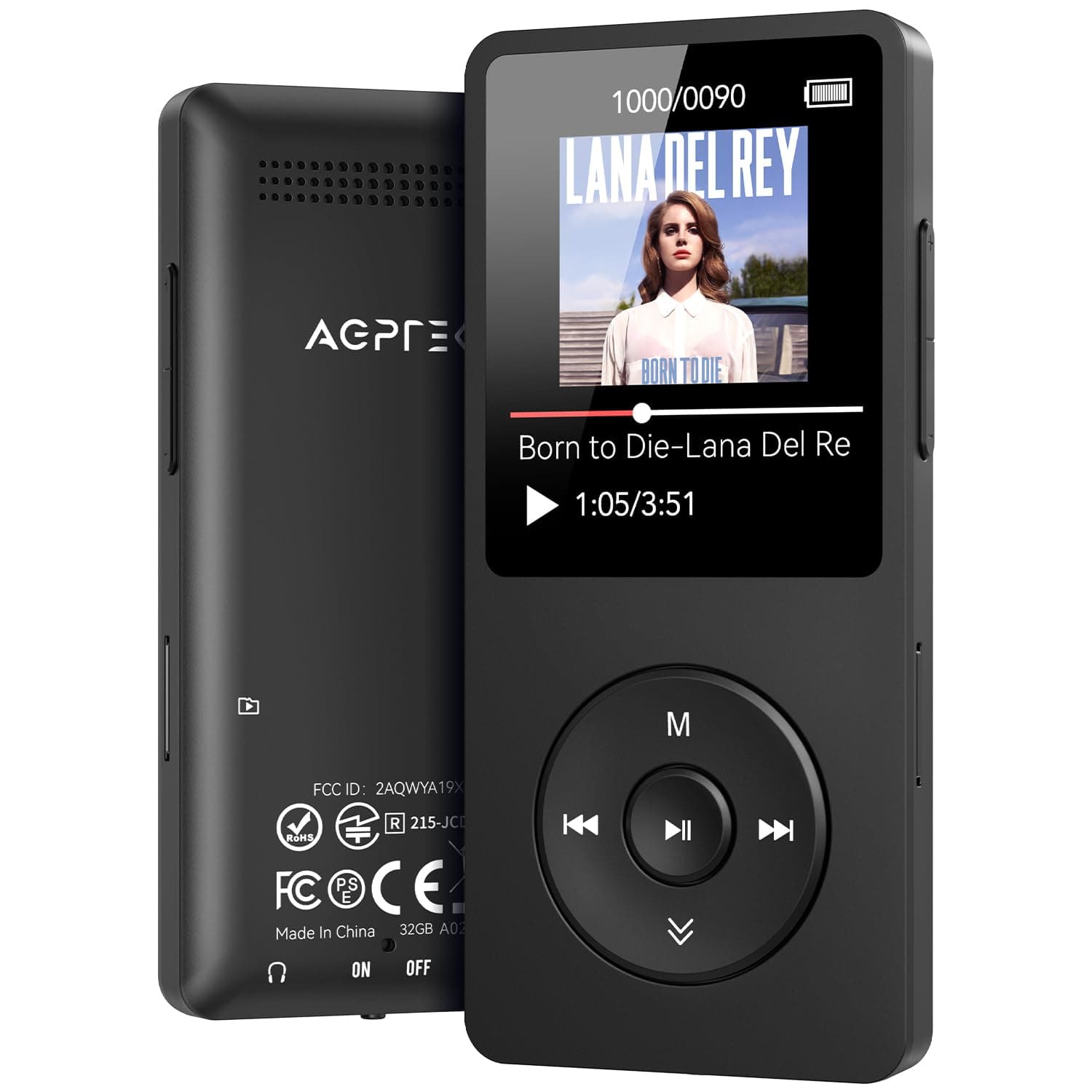
🎧 Elevate your soundtrack—wireless freedom meets marathon battery life!
The AGPTEK A02 MP3 Player is a sleek, portable music device featuring Bluetooth 5.3 for reliable wireless audio, 32GB internal storage expandable up to 128GB, and an impressive 40-hour battery life with fast Type-C charging. Its 1.8-inch screen and classic button interface offer easy navigation, while support for multiple audio formats, FM radio, and voice recording make it a versatile companion for active professionals seeking a lightweight, durable music player.


| ASIN | B0CH9WWWHN |
| Additional Features | FM Radio, Voice Recorder |
| Battery Average Life | 40 Hours |
| Best Sellers Rank | #2,356 in Electronics ( See Top 100 in Electronics ) #8 in MP3 & MP4 Players |
| Brand | AGPTEK |
| Built-In Media | MP3 Player |
| Color | Black |
| Compatible Devices | Laptop, Personal Computer, Headphone, Earphone |
| Component Type | Memory |
| Connectivity Technology | Aux, Bluetooth |
| Customer Reviews | 3.9 3.9 out of 5 stars (6,040) |
| Display Technology | LCD |
| Item Weight | 0.12 Kilograms |
| Manufacturer | AGPTEK |
| Memory Storage Capacity | 32 GB |
| Mfr Part Number | SMPA02 |
| Model Name | A02 |
| Model Number | A02 |
| Screen Size | 1.8 Inches |
| Supported Media Type | Micro SD |
| Supported Standards | AAC, APE, FLAC, MP3, OGG, WAV, WMA |
| Warranty Description | 1 year warranty |
C**S
Small, lightweight, improved BT MP3 player.
This is a great inexpensive MP3 player! I was looking for a wireless MP3 player to use with Bluetooth earbuds at the gym to replace my ancient iPod nano and wired headphones. I also own a non-Bluetooth version A02S. This player is labeled A02XT on the back, and appears to be a newer version of the model as it had several additional side buttons which do not show in the pictures on the Amazon webpage nor on AGPTEK's website. There are now Volume Up and Volume down buttons on one side, and a Back button on the other side in addition to the 5 buttons shown on the front. These make changing volume and going back one screen so much easier and intuitive than with the prior A02 player on which you needed to manipulate several buttons on the front to go Back one screen or change volume. Bluetooth setup was very easy and haven't had any random disconnects. Sound quality is excellent. Be aware that the volume maxes out when using Bluetooth at a medium loud level, not super loud. You can copy songs from an iTunes playlist to this player, and have it play in the same order by doing a copy and paste (not drag & drop) of songs in the iTunes playlist into one of the Playlists in the folder on the MP3 player which can be seen in the Finder. If you select that Playlist to play songs on the MP3 player, the songs will play in exactly the same order as in your iTunes playlist with no change in sequence. It does take some time to transfer songs from your computer to the MP3 player especially you try to fill all 32GBs with songs. I did cause the player to freeze up when I erroneously pressed the Back and Vol down buttons together. To unfreeze, hold Play/Pause button about 10 seconds, screen goes off, then powers on, and all is good, no loss of files. I haven't tried any of the other capabilities (voice recordings, photos, etc) but I only purchased the player to play songs, and it does this perfectly.
A**N
New and improved player in my favorite Agptek A02 line of products
I've had several versions of Agptek since about 12 years ago, when I purchased Agptek A02 (non-bluetooth). Sice then I also bought Agptek A02ST (with bluetooth), and now this one, Agptec A02XT. I also bought Agptek A09X, which I did not like at all, mainly for being too big and too heavy. All of my Agptek A02 models share identical body, and very similar controls and operating system (with minor tweaks). The noticeable improvements from ST to XT version are change from micro USB to USB-C, much more reliable bluetooth connection, and internal memory increased from 16GB to 32GB. I paired 5 different bluetooth headphones and earbuds with it on first attempt, and they all communicate properly with the player to control volume, pause/play/ skip forward or back etc. What I love about Agptek A02 line of products is their small size and light weight (perfect for running and gym), reliability, durability and storage capacity with added external SIMM card. By the way, I stuck a 256GB card full of music in this player, and it read it flawlessly, so the manufacturer's recommendation of up to 128GB is very conservative. All of my music files are in mp3-320kbps format. It can play lossless flac files too, but I see no reason to do it on a portable player of this class. Sound quality is very good, but not HiFi, with some barely audible electronic hiss in the background. I like the controls wheel (it's not a scroll wheel), that you can feel with your fingers, so you can easily operate it in total darkness. And the battery life is absolutely amazing. I find the user interface easy to use, although definitely old school. So, if you are not comfortable with organizing your files in folders, copying them from a PC, and browsing through them, this player may be not for you. In summary, for under $30 (plus whatever you choose to pay for the SIMM card), it is a bargain.
J**S
Great mp3 player, terrible interface
I had to struggle a lot before I was able to make up my mind on a rating for this player. I've mostly used Phillips brand players in the past because I refuse to put up with the monstrosity of a piece of software that is iTunes and I think Apple products are ludicrously overpriced, which rules out most of the market. But Phillips isn't really doing the mp3 player market anymore, so I had to look elsewhere. Here's what I wanted out of an mp3 player to replace my aging Phillips 8GB: better battery life, higher song capacity, good audio quality, better playlist functionality. I definitely got the first three and only narrowly missed the last one, which is not a reflection on Phillips having good playlist support so much as AGPtEK somehow managing to make playlist functionality WORSE, which I wasn't aware was possible. This mp3 player has fantastic battery life, is very small and light, can be upgraded if I choose to buy a memory card even though the 16GB capacity is pretty roomy already, and has no problems with audio playback quality that I can find. I was able to use Windows Media Player for the initial import of music, which was nice and simple, but that's where my good experience with this player ended. I knew that in order to use the playlist capability I would need to build the playlist in a separate media program (they suggest Media Go or MediaMonkey- I chose the latter) and then import it if I didn't want to be stuck with only the three basic slots on the player for playlists-on-the-go and add each song individually through the player menus, which I have been stuck doing on my Phillips players and is a terrible way to pick out the 75 songs you want on your running playlist from the 150 albums on the player. Anyway, just take my word that this mp3 player has a horrible user interface. If you access your albums through the "music" function it scrambles the order of songs in the album, regardless of title or listed order. It will display them properly if you access them through "folders" but doing that breaks the repeat function and it will immediately go to the next album in the list when you reach the end of the album. My initial import was sorted alphabetically but albums I've added since then immediately go to the bottom of the list in chronological order. I manually created a folder within the folders for playlists and manually made a folder for each playlist, which works pretty well except that, to my great perplexity, the SECOND playlist I synced to that folder (songs in playlists need to be duplicate songs on the player, which I knew going in and was fine with because the player is roomy enough to handle it) also dragged along duplicate album folders for every song in the playlist and dropped them in roughly chronological order at the bottom of my album listing, so now I have 50 or so junk album folders with one or two songs in them cluttering up the bottom of my actual album list. But hey, at least I got the playlists to work, even though any changes to it need to be made by deleting it, editing it in MediaMonkey, and then re-syncing the whole playlist. In the end, I had the presence of mind to realize that this player is really doing everything that I wanted. The folder-album interface problem is not intuitive, but I understand it and can work around it and it isn't THAT inconvenient. It would be inconvenient if I was trying to walk someone else through the process of finding an album or making a playlist, but since I understand it and I'm the only one who uses the player, that's not a problem for me. As it was, I spent probably a solid forty minutes trying to get the playlists to work and not screw up the rest of the interface and only marginally succeeded at the latter part. But still, it was a low-cost player and like I said, it does everything I want it to do with very little actual inconvenience, which is why I decided it was worth four stars.
M**L
Buen reproductor a buen precio. Buena capacidad y ampliable con micro sd. Radio, video, fotos, grabadora.... Pequeño y muy ligero. Muchas horas de autonomia. Lo pedi un sabado y el martes ya lo tenia por envio normal gratuito. Tiene buen sonido y varias ecualizaciones a elegir. Su punto debil pueden ser los auriculares, son normalitos, a mi se me caen de las orejas al ir caminando y le he puesto otros mas comodos y que ademas realzan los graves, lo de los cascos seria cuestion de gustos de cada uno y del tipo de musica que escuches.
P**A
Está bastante bien el mp3, la verdad si me sorprendió. El sonido se escucha muy bien con los audífonos, ya sin ellos la calidad si no es la mejor, pero es aceptable. Pensé que sería un poco más grande, pero está perfecto de ese tamaño. Si lo recomiendo si no quieres gastar en productos tan caros como los de Sony :v, además de si solamente quieres escuchar música sin tener que pagar nada. Eso si, no he probado el bluetooth porque la verdad no me interesa ya que prefiero audífonos de cable.
C**N
Il prodotto si presenta con una confezione curata e completa. Una volta aperta troviamo il lettore con una consistenza robusta e bella da vedere. Dotato di un vasto assortimento di funzionalità e in ognuna di queste appare molto fluido. Come comandi risulta abbastanza intuitivo e dopo pochi minuti ci si muove già agilmente tra le varie funzioni disponibili. Semplice anche il caricamento di file sul dispositivo, con un'ampia disponibilità di spazio di archiviazione, con anche la possibilità di aggiungere eventualmente una memoria aggiuntiva. Il suono è nitido e di discreta qualità anche con le cuffie in dotazione. Ottimo rapporto qualità prezzo. Consiglio il prodotto a chi desidera un dispositivo economico per ascoltare la propria musica o la radio in libertà, senza rinunciare alla qualità.
M**U
国産の某商品しか使ったことがなく、安すぎて不安でしたが今のところ問題なく使えています。 手にとってあまりの軽さに笑ってしまうレベルですが、再生や操作に問題はありません。 こちら本体から音が出ないタイプなので安心です。本体にスピーカーがついていると音が漏れる心配があるので…。 再生中の音量変更が一癖あるタイプなのですが慣れます。 ロック機能もありますが側面スライドボタンなど誤操作しづらい機構ではなく普通に前面のボタンなので、姿勢によっては勝手にロックされたり解除されたりもあります。 クセはありますが慣れますし、何より安くて普通に再生出来るので満足しています。 音質に関しては特に気にしていません、普通です。
R**9
Bit small but my 9 year old loves it, ear phones aren’t any good for kids , recommend to buying headphones. Easy to handle, good products and fast delivery
TrustPilot
1 个月前
1 个月前