
下载应用程序


客户支持

Desert Online General Trading LLC
Warehouse # 7, 4th Street, Umm Ramool, Dubai, 30183, Dubai
下载应用程序
客户支持
Desert Online General Trading LLC
Warehouse # 7, 4th Street, Umm Ramool, Dubai, 30183, Dubai
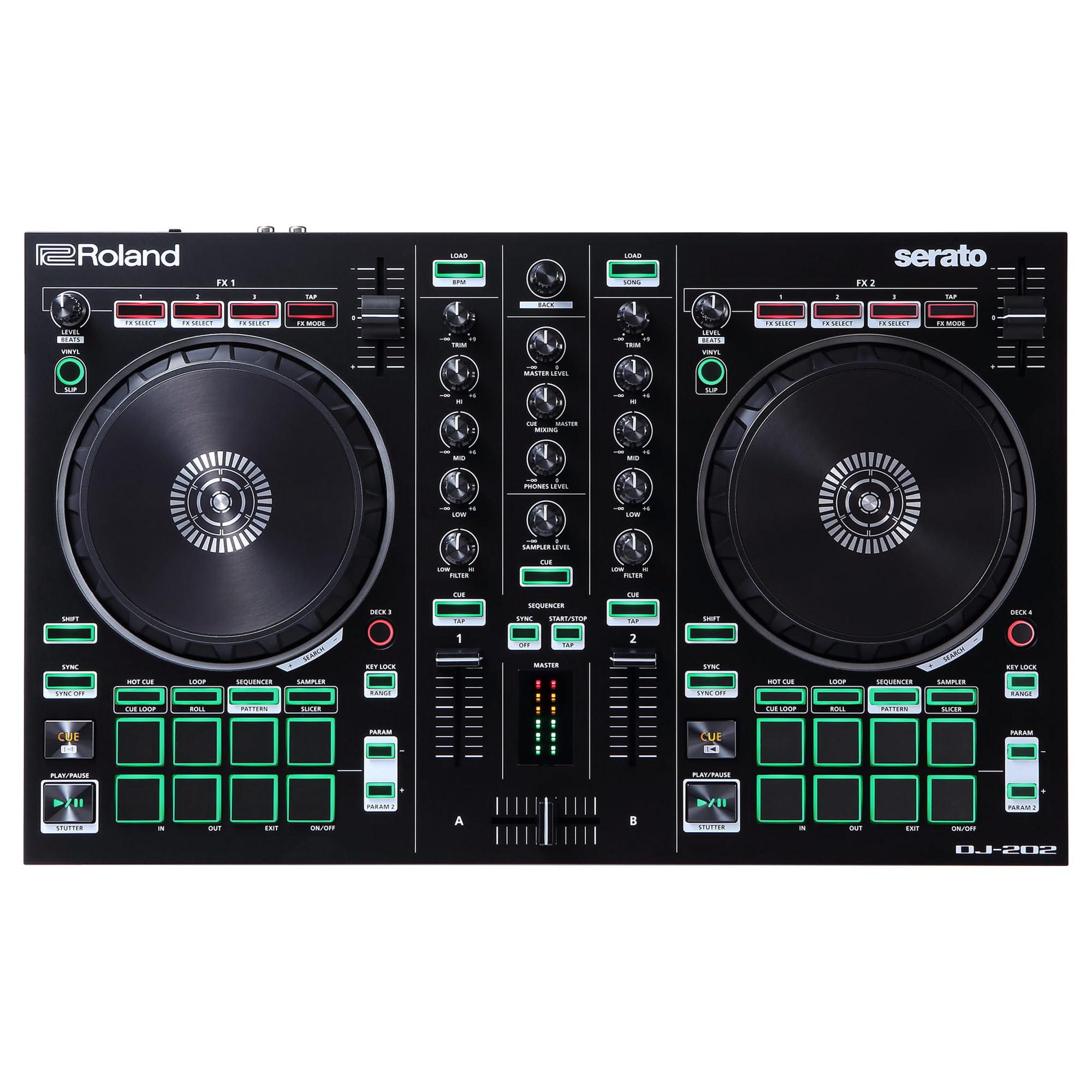
🎧 Elevate your mix game with iconic sounds and pro-level control—because your crowd deserves the best.
The DJ-202 is a compact, 2-channel, 4-deck DJ controller designed for Serato DJ Lite (with a free Serato DJ Pro upgrade in the U.S.). It features large, low-latency platters for precise scratching, legendary Roland drum kits powered by Analog Circuit Behavior technology, and an onboard 16-step sequencer for live beat creation. Lightweight and portable, it offers professional-grade audio quality with 24-bit/48 kHz resolution and versatile connectivity, making it the perfect tool for millennial DJs seeking to elevate their performances anywhere.


| Style | DJ-202 |
| Color | BLACK |
| Platform | Windows, Mac, Windows 10 |
| Human Interface Input | Buttons |
| Total USB Ports | 1 |
| Control Method | Touch |
| Noise Control | None |
| Mixer Channel Quantity | 2 |
| Supported Software | Serato DJ Lite, Serato DJ Pro |
| Connector Type | RCA |
| Hardware Connectivity | USB |
| Control Type | Audio manipulation, sampling, and synchronization |
| Connectivity Technology | USB |
| Additional Features | Lightweight |
| Compatible Devices | Devices with USB port and RCA input, and software Serato DJ Lite and Serato DJ Pro |
| Size | Two-Channel, Four-Deck with Serato DJ Pro |
| Item Weight | 4.6 Pounds |
P**S
Great controller for what you get
I recently decided to get back into doing DJ sets after a 15 year hiatus (I play mostly Drum n Bass) and was looking for a way to practice at home without spending $2k+. Last time I went behind a DJ booth, I noticed they don't even use turntables/records anymore, just CDJ's. So a DJ controller seemed the best way to go (for now) to get me back in the game. Eventually I'd prefer a standalone system that doesn't involve a laptop (and latency), but they can get pricey and im not ready for that kind of commitment...yet. I looked at alot of different controllers. My first instinct was to look at Pioneer, as they were always the industry standard for digital turntables back in the day. The FLX4 and Rev1 looked like great products, and I was going to go with the Rev1 as I like the bigger jog wheels and the battle style layout for scratching. The FLX4 supports both Rekordbox and Serato (Rev1 is only Serato, which will eventually involve a subscription or a $250 purchase for the software), but the jog wheels were kinda small at first glance (they are 4.4"). Then I saw the Roland DJ 202...It has the bigger johwheels, about the same size as the Rev1. [EDIT: the jogwheels are NOT same size as Pioneer DDJ Rev1. They are 5" and Rev1 are 6.5"] Just about all the controllers in the $300 range do pretty much the same thing as far as controllers go. The Pioneer ones have some adjustments you can do to the crossfader, and I don't think that's available on the DJ 202. [EDIT; you can adjust the crossfader curve (or reverse it) and volume/upfader curve in the Serato Pro software]However, the DJ 202 also has a built in drum machine with 606, 707, 808, and 909 samples and a built in sequencer; which is crude and involves menu diving. But it can also be used via MIDI and used just as a drum machine. And would totally work in a DAWless setup (there's a standard MIDI out port on the back). Which could certainly be useful in the future as I also produce music. Then the biggest reason I pulled the trigger with the Roland DJ 202 was the free Serato Pro upgrade. Serato Pro requires a subscription (like $10 a month), or you can purchase it for $250. It's a great program for what it does, but $250 is a little more than I would want to spend on top of a controller. I registered the product on the Roland site, and they just emailed me the Serato Pro product key, no other actions required. So once I got it set up and working (it took a little while to get everything working right), I was surprised at how well the DJ 202 felt. They jog wheels have a nice heaviness/drag to them. I tried scratching a lil and it's certainly very different than using records. The crossfader felt kinda cheap and was pretty "clacky" when using it, especially scratching. But it wasn't too bad and can definitely get used to with practice I think. Overall I was very impressed with how it felt and performed. Like I said before, I'll probably end up with a Pioneer XDJ RX3 (standalone system; no laptop/PC required) or something like that in the future, but I think the DJ 202 will work great until that time. One thing I was really concerned about with the DJ controllers was the latency. Especially for scratching. But it wasn't as bad as I thought. You can adjust latency to some degree in Serato by changing the sample rate, but was able to get it to about 4ms with a sample rate of 128 and it still sounded great. On all the reviews I read about all these controllers, no one ever touched on the latency part. So if anyone is wondering, it's very workable. I hope this answers any questions someone considering this product may have. In conclusion, it's a great controller for $330 and the included Serato Pro makes it a REALLY great deal. And then Serato Pro is yours forever and will work with just about any DJ controller these days. The added drum machine/sequencer is certainly unique and makes the DJ 202 stand out from the other controllers in the same price bracket. I haven't tried any of the other controllers so I can't really compare how they feel in relation to each other. But for what is is and what it does and what it costs and what you get (controller + Serato Pro), it's certainly worth it and a 5 star rating. Thanks again, Roland!!!
T**Y
Serato Pro - Here Is How
I was skeptical about the Serato Pro being free with purchase of this controller. After researching forever, here is the easiest way to do this. Be in the USA, go to Roland website and make an acct w/email address, register the controller, they will then send you a code to use on Serato’s product voucher page. It will unlock Pro and you are in. Again. I was skeptical but…..it worked. The manual does not explain this process, actually there is no clear cut explanation anywhere how to do this. I emailed Serato, the replied to do what I explained above. The controller is free, with Serato Pro. Or its $300 with free Serato. either or. its a no brainer. Hope this helps, good luck!
C**N
Most fun I've had in a while; I recommend this for beginning DJs
This is my first DJ controller. I was looking for something that has native iTunes support and Serato does, so I went with this controller. I must say that I am quite pleased with this - at first I was very annoyed at the fact that Serato can't play M4A files (what iTunes uses when you buy music), but after installing Quicktime on my laptop the issue was resolved and now I can DJ my entire iTunes library with no issues. As for the controller itself it is actually quite easy to pick up the basics, especially for those with a background in music production. I like the feedback on the pads - they click so you know that your hit is registered. Although a few of the sliders/knobs feel too loose (the horizontal A/B mixer on the bottom for example) I haven't had any issues with these while mixing, so it's not really that much of an issue. The main gripe I have with this thing is, believe it or not, the startup manual (emphasis on startup!) . It teaches you how to install and use the software/hardware, but it is extremely surface level. You're on your own to figure out how to use the functions/buttons. For example, I have very little clue on how to use the loop tool, so I read the manual, and on the section for the loop tool it just says "Press this to use the loop function." Okay, but...how do you actually use it? Most of the content in the manual is this level of vague. Still, outside of that using this controller has been a blast as I've been inside all day mixing. I definitely recommend this to beginning DJs like myself!
TrustPilot
2 周前
1天前