We remain fully operational. Our teams are working around the clock to ensure your deliveries continue safely.

下载应用程序


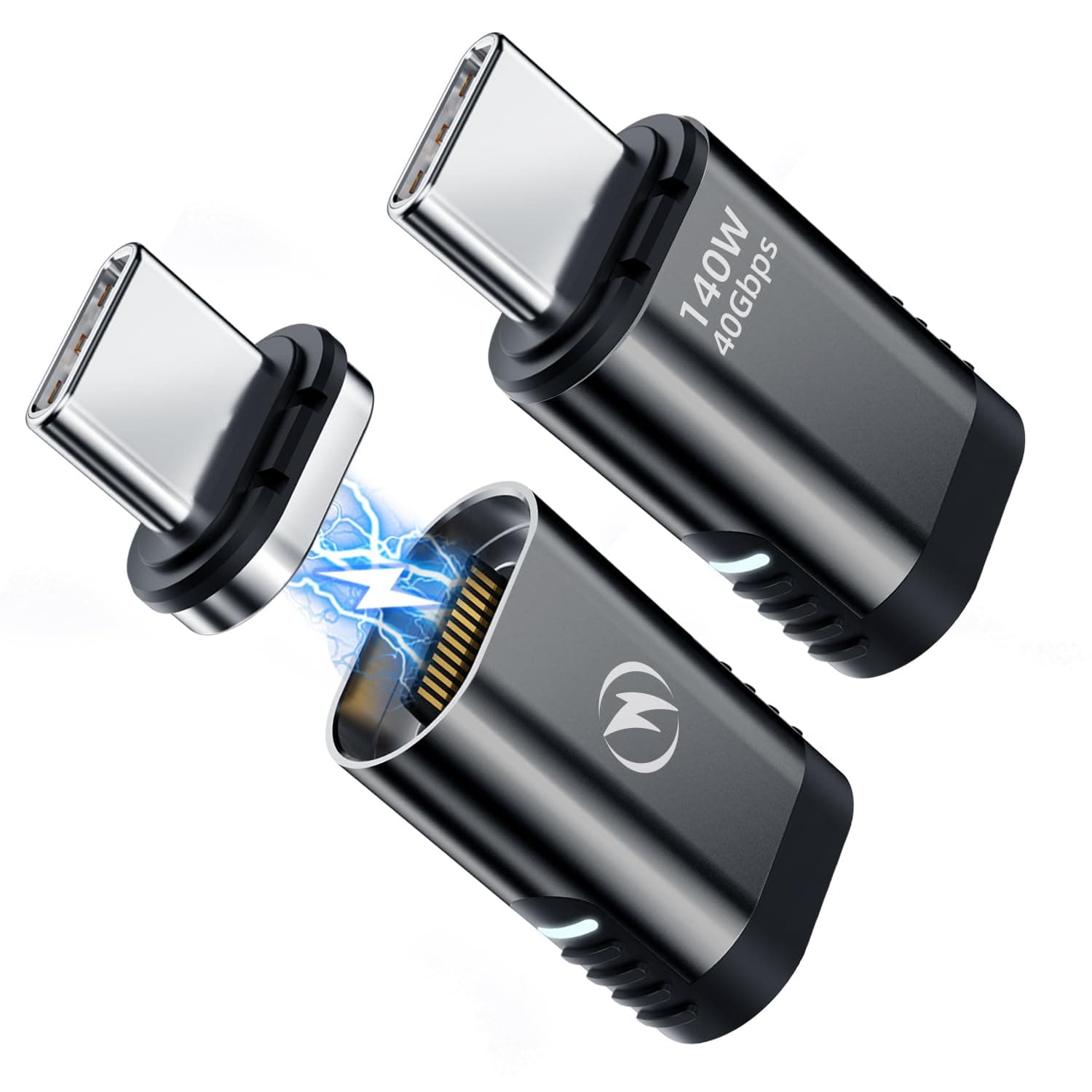
⚡ Charge Fast, Connect Smart, Stay Ahead.
The DuHeSin USB C Magnetic Adapter 2-Pack combines cutting-edge USB-C 4 technology with a powerful 140W charging capacity, 40Gbps data transfer, and 8K@60Hz video output. Its magnetic design safeguards your device ports from damage while enabling effortless one-handed connection. Compatible with MacBook Pro/Air, Thunderbolt 3/4 devices, and a wide range of USB-C gadgets, this adapter is a must-have for professionals who demand speed, safety, and style in their tech accessories.


| ASIN | B0BMX53FF9 |
| Best Sellers Rank | #56 in Cable Gender Changers |
| Brand | DuHeSin |
| Color | Black |
| Compatible Devices | Laptop |
| Connector Type | USB Type C |
| Customer Reviews | 4.2 out of 5 stars 705 Reviews |
| Finish | Magnetic |
| Finish Type | Magnetic |
| Item Weight | 0.02 Kilograms |
| Manufacturer | DuHeSin |
| Model Number | d5480f81-d5ff-4e0a-82aa-d946f9d7d51a |
| Nominal Power | 140 Watts |
| Number of Items | 2 |
| Number of Ports | 2 |
| Package Quantity | 1 |
| Power Plug Type | No Plug |
| Unit Count | 2 Count |
K**N
Unobtrusive, works well and protects my devices
I use these for my headphones, phone, laptop, kindle, blue tooth speaker, tablet and charge cords. The fit and function are great, and have kept me from yanking pretty much all of them off the table or desk at one time or another. They also make switching which device is getting charged or powered easy and quick.
K**R
Great to save you type C port
I had to replace my Dell laptop that charged through the type C (thunderbolt) connector, as it would no longer take a charge, nor would it transfer data. From what I have learned this is a rather common issue if there is any strain put on the charging cable when plugged in. My new MSI also uses a type C thunderbolt connection and I was concerned that I would have the same issue. This works well has sufficient holding power to maintain a good connection for both charging and data transfer. However, it does separate if something happens that puts a strain on it. So far I am very happy with the performance and time will tell if it truly saves the type C port.-- Update: I am ordering a replacement. Purchased in January, failed in October. It's a lot easier to replace this adapter than a type C charging port. A plastic piece broke off internally where the two magnetic bits connect together. I think this was a result of an unintentional and abrupt disconnect. Without this attached, the type C port would have likely been damaged.
D**G
It works, but can be tough to remove.
It is an attractive little adapter. It appears to work just fine, but I can see why people think the magnet is not strong enough. It holds the connection in place, and separates safely when pressure is put on the side. This eliminates the chance of damage to the port, however it can be challenging to remove the device from the port because it will separate and it fits snugly into some ports. You have to grip a very small surface to pull it out. I think it could have a stronger magnet, allowing removal without separation more frequently while still separating when lateral pressure is applied. I currently have no way to test the USB level yet, since I only have 3.0 ports and cables. I am so far happy with this device as it could save me from damaged ports. Time will tell if I find it annoying.
S**A
Works great for sharing Thunderbolt monitor between two PCs
After trying multiple options (KVM, switch, hub) to share a Thunderbolt monitor between two laptops, with mixed results, I decided to give this a try to minimize wear and tear on the ports form swapping the monitor cable back and forth. Works great, no issues with data transfer to the Thunderbolt monitor and connects faster than the KVMs or switches.
J**N
NIce option to protect your USB-C ports
Designing laptops to use USB-C ports to charge seems to be one way that manufacturers are planning in obsolescence: they are far less hardy than the old style round power plug inputs. They are very easy to inadvertently pull out, and fairly easy to damage. These magnetic connection devices help protect your ports. I had the 90 degree version from the same manufacturer that stood out about a half inch from the body, and they lasted a few years, but finally got damaged a week or so ago. This version, that more closely follow the side of the laptop, and mount the USB-C power cord vertically, seem to be less fussy and more resistant to getting inadvertently detached than the ones I previously had. It's easy to recommend a purchase of less than $30 to protect a laptop that would likely cost $1500 or more to replace that would become useless if the charging port is damaged.
M**S
Magnet too weak for some uses
I intended to use this on a wired USB game controller so the cable would break away if someone tripped on it. I found that the magnet was too weak for this; just the weight of three feet of USB cable was enough to make the connector separate. Works fine on a desk, though.
E**M
It just works
These make any USB-C connection work like the apple magnetic power plugs. The cord will pull away with gentle pressure. Less risk of damaging the socket in the device, but the cord can fall out if tugged.
B**S
Does not provide 40 Gbs bandwidth
Bought these over a year ago and they were fine when I was pushing a single monitor with them. They are easy to use, but I wish the magnets were a bit stronger. I recently updated my workstation to push all video thru a new Thunderbolt 5 dock via my laptop. Prior to the dock, I was running USB C and HDMI directly from my laptop out to an ultrawide monitor. The two outputs were then connected to the monitor and 'split' (kinda like picture in picture) into two side by side virtual monitors. My output was 2560x1440 at 120Hz with 8-bit RGB x 2. After installing the dock, only a single Thunderbolt/USB 4 cable connected my laptop to the dock. The dock was then connected to the two inputs on my monitor via two separate cables. The magnetic adapter is only on the laptop's USB C. I noticed the colors on each virtual monitor were different (see image). After investigating, I noticed the Windows color settings were reporting different for each virtual monitor: Left: 2560x1440 at 120Hz with 8-bit YCbCr 4:2:2 (requires ~8.85 Gbs bandwidth) Right: 2560x1440 at 120Hz with 8-bit RGB (requires ~11.05 Gbs bandwidth) Because there is no gap between the monitors and I often run one app across each, the color differences are extremely noticeable. The text is also harder to read on the left because the lower bandwidth of YCbCr 4:2:2 causes 'fringing' around fine text. If you add the current display bandwidths together, you get 19.9 Gbs which is half of what is claimed here. The problem goes away if I remove the adapter and plug the USB C cable directly into my LT, so the problem was not introduced by the dock or any of the new cables. Thought I would share, as this product will likely work fine of a lot of people, but those that intend to use USB/Thunderbolt 4/5 to simplify their setups will be disappointed.
TrustPilot
2 周前
1 周前