We remain fully operational. Our teams are working around the clock to ensure your deliveries continue safely.

下载应用程序


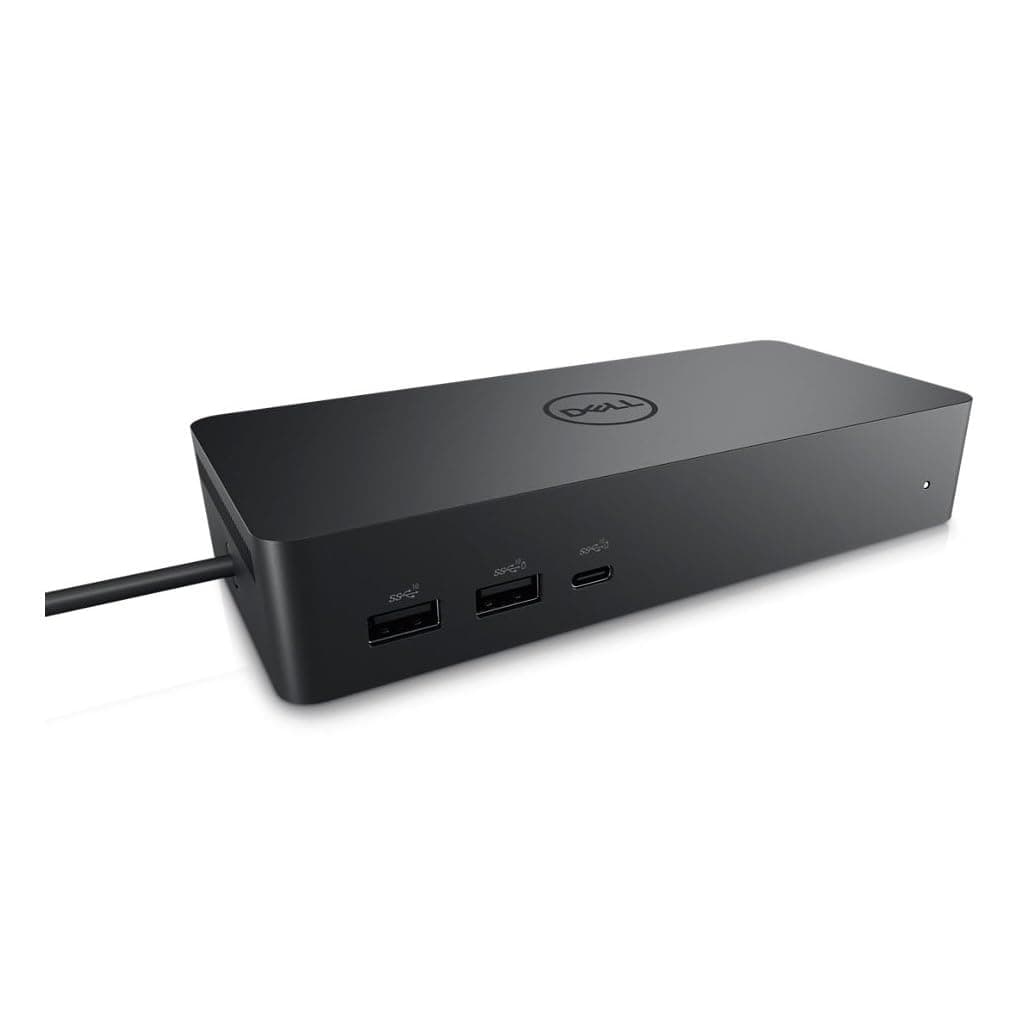
⚡ Power your productivity with Dell’s ultimate universal dock!
The Dell Universal Dock UD22 is a sleek, black docking station featuring 10 ports including HDMI, USB-A, USB-C, and RJ-45, supporting dual external displays and delivering up to 96W power via USB-C. Designed for professionals with modern laptops and all-in-one PCs, it offers robust connectivity and durable build quality, backed by a 3-year warranty.
| ASIN | B0B5YC6TS4 |
| Best Sellers Rank | #5,838 in Electronics ( See Top 100 in Electronics ) #83 in Laptop Docking Stations |
| Brand | Dell |
| Color | Black |
| Compatible Devices | Monitors |
| Customer Reviews | 4.4 4.4 out of 5 stars (535) |
| Hardware Interface | HDMI, USB 3.0 Type A |
| Item Dimensions L x W x H | 6.54"L x 1.26"W x 2.99"H |
| Item Weight | 14.7 Ounces |
| Manufacturer | Dell Computers |
| Number of Ports | 10 |
| Total Number of HDMI Ports | 1 |
| Total Usb Ports | 6 |
| UPC | 884116431442 |
| Unit Count | 1.0 Count |
| Warranty Description | 3 year manufacturer |
| Wattage | 130 |
S**R
This Dock is just what I needed!
Needed HDMI and USB-C ports plus a RJ-45 gigabit. These new superthin laptops have very few ports so a dock like this is really necessary. I've looked at other smaller docks but they need you to buy a 90-100Watt power brick. This Dell dock comes with the power brick that can provide up to 96Watt power delivery via the USB-C port. This fits the bill nicely. Genuine brand new DELL OEM packaging with Dell Service Tag S/N. Looks like the date of manufacture is: 06/05/2024. Lots of connectivity -- tested USB-A, USB-C, HDMI and RJ-45 ports. All working fine. Will be attaching external SSDs via USB-C later. Setup was a breeze and the dell ports and connectors are heavy quality and seem to be durable. Very similar to the WD19tbs I used at work.
T**Y
Great docking station that works well with both Laptops and All in one PC's
Needed this dock for a laptop (Dell PRO TOUGHBOOK) and an all in one PC (All in One). I was a bit skeptic to see if it would work, but IT DOES!!! I did have to tweak some display settings and make sure all the drivers were up to date, but after doing that, it works FANTASTIC!!!! Great quality. The Power supply charges the laptop perfectly every time and it connected right up!! Highly recommend!!!
9**J
Solid performer
Thunderbolt 4 on my laptop has never worked correctly. I finally gave up and bought this TB3 device. It works perfectly as a dock, and it performs so well I don’t care about losing the TB4 capabilities. Runs a bit hot in an enclosed space, you might want take a cabinet door off or cut a vent hole in the back of your desk.
A**V
Good quality dock. Works well with Mac.
Got it for my 2019 MacBook pro. Works better than previous older Dell dock I had. Plenty of connection options. Enough power output. The only problem is sometimes Mac doesn't see my external display immediately after power on. The display is connected via DP2 port. Same issue happened in the previous dock as well. Perhaps it is issue with Macbook and not the actual dock
E**.
Great dock
Very pleased. Works well and easy to set up.
A**A
Works majority of the time.
My original review is below but some updates as I have been using this dock for sometime. I have replaced the keyboard and mouse, but still the mouse won't turn on no multiple times a week. It doesn't matter which mouse I use so it must be the dock. Everything has been updated and performed factory resets just to see and still doesn't solve anything. Also, now my speakers won't switch over sometimes and this is with multiple computers. New cords and all but this dock has performed worse. My cheap dongle at work performs better than this and it only cost around $50. Its a great dock...when it works. I use this everyday for my work computer and personal which are both Dell. At least once a week either my monitor or mouse (usually) won't turn on while connected. I have to unplug and restart everything and it'll come back on. I'm constantly verifying everything is up to date and settings are correct, but it still happens constantly. I should have returned it and upgraded but I stuck with it for the cost and 5 months later regret it.
K**D
Perfect Docking Station for Dell Inspiron 16 Laptop
Perfect docking station for my Dell Inspiron 16 laptop. My workstation has a separate HDMI monitor, Ethernet connection, 60 W laptop charger and USB dongles for cordless mouse and keyboard. The docking station allows me to simply use the provided USBC connector on my laptop to do all these functions from the dock with a single cable from the laptop. Perfect and reasonably priced.
S**Y
Favorite way to have my desk setup
Honestly one of the most useful things for my desk set up. I've used it with a Dell Inspiron and an Alienware gaming laptop. While the Inspiron could be charged from it, the Alienware could still use it to increase the amount of ports despite not charging. Very handy if you're on the go frequently or don't want a tower setup.
D**N
Had multiple scuffs on the exterior, but functions well as intended so far. It seems likely a refurbished set or rejected set due to minor defects (exterior scuffs) rather than brand new in perfect condition, though not unexpected given the price.
U**K
This is fantastic - high resolution, supports up to four monitors simultaneously, but take care to note that the way you connect to the dock dictates how many, and which of, the four monitor ports will work. In driverless mode (Display Port Alt Mode - found on most laptops that have a display icon next to the USB-C port or that advertise "USB-C with data and display" for the connecting USB-C port) only the HDMI port - and - EITHER DisplayPort #1 OR the USB-C Port will work. If you want to use more ports than this (up to and including all four ports simultaneously) you'll need to install the DisplayLink driver. I got this dock because my employer won't let me install software on the work laptop, so I can't install the DisplayLink driver, therefore I'm stuck with two screens maximum. If I change jobs and the new job lets me install the DisplayLink driver, then I'll be able to move to a three or four monitor setup. This has been a major step up from my previous Dock (which only supported 1080p resolution) and, as advertised, works driver-free with my work Dell laptop and my personal Asus laptop, as well as working with DisplayLink drivers with my Mac laptop. This is the only dock I've found that lets you connect BOTH DisplayPortAltMode and DisplayLink computers to the same dock. The cable length is good (80cm) which was enough to mount the dock in a cable tray hidden under the desk while still allowing enough length to comfortably reach up to the top of the desk to plug into the laptop. So after getting over the confusion of which ports work in which mode - it's a great bit of kit.
J**N
Quedo genial para la laptop, tengo una dell, por lo que solo conectarla la leyo, ahora ahi tengo conectado mause, teclado y monitores, ademas carga la bateria de la lap
P**D
Content du produit
J**E
Funciona perfectamente. Hay que tener presente que llega sin el cable de alimentación. Por lo demás, todo bien.
TrustPilot
2 个月前
1 周前