We remain fully operational. Our teams are working around the clock to ensure your deliveries continue safely.

下载应用程序


🚀 Elevate your home network to pro-level speed and coverage—because buffering is so last decade!
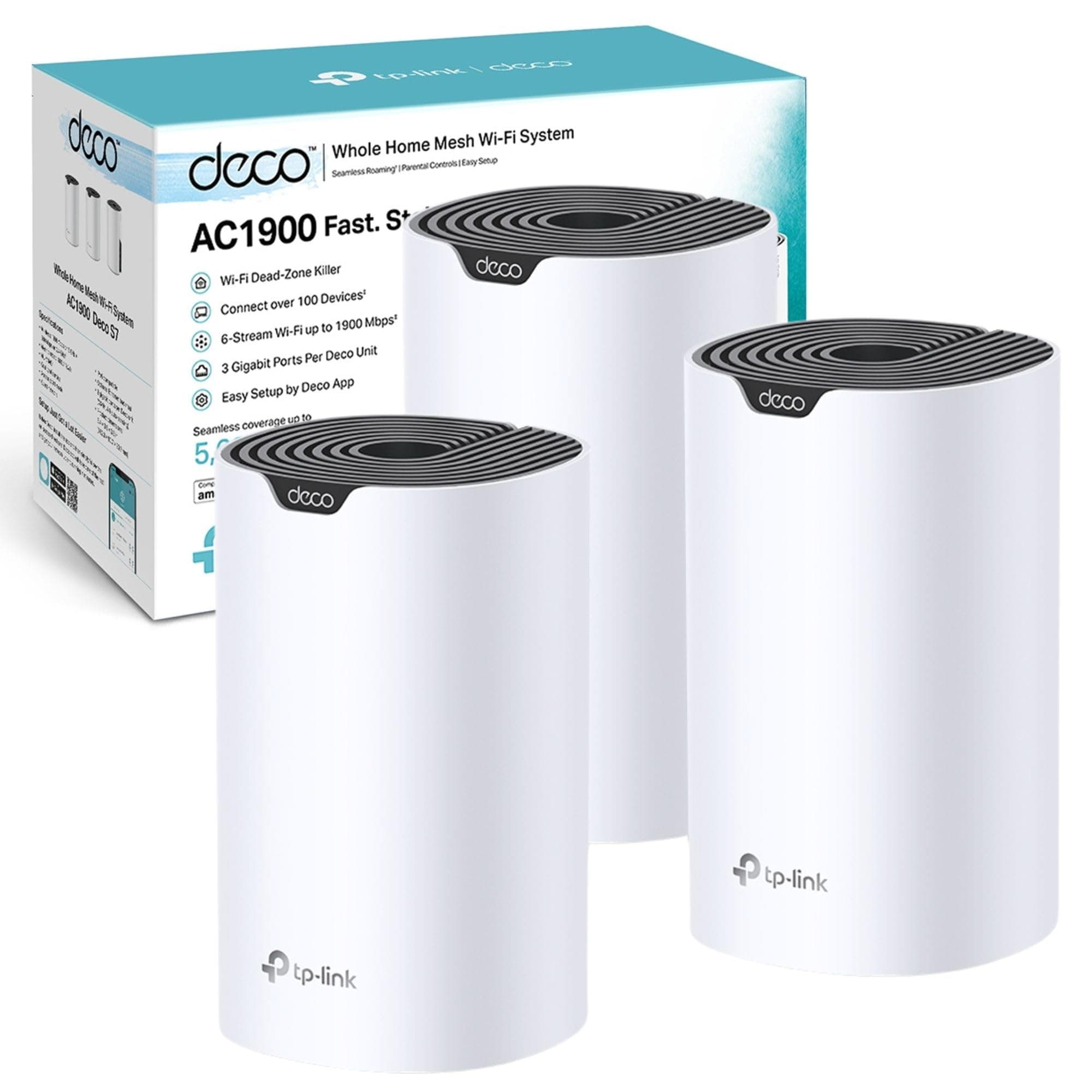
The TP-Link Deco S7 (3-pack) is a powerful AC1900 dual-band mesh WiFi system designed to deliver ultra-fast speeds up to 1900 Mbps and seamless coverage across 5,600 sq ft. Supporting up to 150 devices simultaneously, it features 3 gigabit Ethernet ports per unit for wired reliability, advanced parental controls, and easy app-based setup. Ideal for smart homes and professionals demanding stable, high-speed internet everywhere.


| ASIN | B0B644N72G |
| Antenna Location | Gaming, Home |
| Antenna Type | Internal |
| Best Sellers Rank | 588 in Computers & Accessories ( See Top 100 in Computers & Accessories ) 3 in Whole Home & Mesh Wi-Fi Systems |
| Box Contents | Deco S7(3-pack) |
| Brand | TP-Link |
| Brand Name | TP-Link |
| Colour | white |
| Compatible Devices | Personal Computer, Mobile Device, Gaming Console, Streaming Smart Home IoT Device |
| Compatible devices | Personal Computer, Mobile Device, Gaming Console, Streaming Smart Home IoT Device |
| Connectivity Protocol | Wi-Fi, Ethernet |
| Connectivity Range | 5600 Square Feet |
| Connectivity Technology | Ethernet |
| Control Method | App |
| Controller Type | App Control |
| Country of Origin | China |
| Coverage | Up to 5,600 sq ft (520 m2) |
| Customer Reviews | 4.5 out of 5 stars 827 Reviews |
| Data Transfer Rate | 1300 Megabits Per Second |
| EU Spare Part Availability Duration | 3 Years |
| Frequency | 5 GHz |
| Frequency Band Class | Dual-Band |
| Frequency band class | Dual-Band |
| Has Internet Connectivity | Yes |
| Has Security Updates | Yes |
| Is Modem Compatible | No |
| Item Dimensions L x W x H | 9.1L x 9.1W x 16.2H centimetres |
| Item Weight | 1200 Grams |
| LAN Port Bandwidth | 1000 Mbps |
| Manufacturer | TP-Link |
| Manufacturer Part Number | DECO S7(3-PACK) |
| Maximum Upstream Data Transfer Rate | 1900 Megabits Per Second |
| Model Name | Deco S7(3-pack) |
| Model Number | DECO S7(3-PACK) |
| Model name | Deco S7(3-pack) |
| Number of Antennas | 2 |
| Number of Ports | 3 |
| Operating System | Linux |
| Other Special Features of the Product | Parental Control |
| Router Firewall Security Level | high |
| Router Network Type | mesh |
| Security Protocol | WPA-PSK, WPA2-PSK |
| Special feature | Parental Control |
| Wireless Compability | 802.11ac |
| Wireless communication standard | 802.11ac |
D**K
Simple to install - even for a 52 year old
I liked that this had a good spec with a gigabit Ethernet port meaning that there theoretically should be no loss of my gigabit internet signal as opposed to a previous version which had an ethernet port capped at 100Mbps - there was no point in having gigabit internet without upgrading my deco system. As my old 100mbps system was becoming very sluggish, i decided to upgrade to a newer faster deco system. Set up is really simple, virtually plug and play with a little bit of knowledge needed regarding your current wifi password and details or maybe some internet specific settings but these are readily available from your Internet provider. Once the first base unit is successfully attached the the internet, adding the satellite stations really is plug and play using just the Deco app which you will need to download. We have just these three units giving reliable 1 gig internet to a standard semi detached house which is rich with smart tech. Lighting, plugs, alarms, door sensors, motion sensors, ambient lighting, tv's, Sonos, Blink, Ring, Spotify and an internet enabled garden room. The Garden room is approximately 30 meters from base unit two - which in turn is around 10 meters from the main Deco - it really suffers no drop-outs and is reliable for all gadgets. The app gives the ability to implement parental controls and other controls which to be honest, we don't use. Simple hassle free internet around your property. Great for garden usage or for covering any blackspots.
J**O
Finally - Full WiFi Coverage
Thought it was important to give a review on this, as this product really helped solve our problems. We are Virgin Media customer, with a Hub3 and the M500 tariff. We live in large 3 bedroom cottage. The cottage has old and new parts and walls of varying age and thickness. WiFi has been awful and Virgin have been useless at sorting it out. They provided us with 2 of their Mesh Pods and seem to refuse to give us a third. One of the Mesh hubs constantly had to be switched off and on again as it seemed to regularly make the problem worse rather than better. And we still had WiFi black spots all over the house. We have a lot of connected devices (door bell, Virgin media tv boxes, PlayStations, phones, iPads, sonos, nest, etc etc and on top of all of that I also work from home and really rely on good internet. The last call to Virgin had me nearly in tears with frustration - something about changing WiFi signals and some other rubbish. So we decided to give this product a go. The setup of the actual devices is ok, fairly easy to to work through as a competent amateur and it just sets up a brand new WiFi network in your house with the old one also still being available. The app is cool as it allows you to monitor the network for problems and it shows you what devices are connected and what the signal strength is. Haven’t stressed tested this fully yet however. What isn’t so great about the setup was the aftermath of having to set up all your devices on the new network. A simple task for some but the sonos system was a complete pain. I ended up having to reset nearly all of the devices as they just wouldn’t migrate across. The 3 pods are big (15cm I guess) and do stand out, they need to be plugged in away from large electrical appliances. They do come with Ethernet ports though - but again not tested that functionality out yet. It’s been 2 weeks since we set this up and so far so good. No black spots, speeds of at least 250/40 in areas near the pods and still around 80/40 in places we previously had no coverage. I look forward to a time when I genuinely can go back to WiFi not being at the top of my mind every day. And without wanting to jinx anything I think I am nearly there.
G**N
Good upgrade
Bought these to replace an aged and troublesome UniFi home network. I was slightly dubious about the switchover and setup with multiple devices connecting to the network – smart plugs, smart bulbs, smart speakers, etc, but it was an absolute dream and went smoothly. Assigning the same name and password as the old network ensured a smooth handover between devices and the new network. The coverage seems to be much improved on the old system, the mesh even reaches smart plugs situated in a cabin and workshop at the end of the garden (approx 90ft). The DECO App is somewhat limited in features but using third-party software on my Mac allows me to overcome this.
A**S
Good speeds
Not easy to set up initially but I was trying to set this in wireless access point mode, continuing to use my BT Home Hub as the router of the network. The other point was continuing to use the wireless function of the Home Hub as an extra Wi-Fi source. Such greed was punished, however and it would not work, even with the same details for the Deco's Wi-Fi network as the original one. I had been unwilling to cut the cord with BT but finally had to. Once this was done, the first Deco node became the router for the network automatically when connected to the BT ONT box (which is the modem for FTTP; who knew?) and set up was easier, though the node furthest from the router deco kept dropping out. After a couple of goes it stated connected and all is well. As with the BT network, the speeds are around 200mbps around the house except near the router deco where it is around 500mbps, which is what we are paying for. If you are changing from BT, remember that the Home Hub is their property so keep it to return if requested. I'm giving it a 4 star rating because the problem with the last node, though it should be 4 and a bit. UPDATE - I've had an Ethernet network installed at home , with wired backhaul for each node. Two of the nodes have Ethernet cables running to desktop computers. The results are spectacular. We are getting close to 500mbps on Wi-Fi everywhere and on the desktops. After years of relying on mesh Wi-Fi alone, this is the better way of doing things. Even a cheap mesh system works really well when it has wired backhaul, you only need to be sure that there are enough ports on the back of the nodes for all the cables. In that respect, Google mesh Wi-Fi does not seem to have any ports for those nodes which are not acting as the router, so give it a miss. Also v expensive. The S7 seems to have more ports than any comparably priced mesh system.
J**S
Great
After much rumination on which mesh system to get, I ultimately decided on the AC1900. Thankfully this was a good call. With three units I’ve been able to ensure lossless WiFi speed around my house, with the units set up to connect wirelessly- I didn’t need to connect them via Ethernet to yield satisfactory results, either. Setup was super easy and I didn’t run into any issues throughout the whole process. The app is also pretty cool and offers a nice level of control and a good overview of the network- it looks nicely designed and feels snappy. This resolved poor signals in key areas of the home such as the living room which prior to installing these units was struggling to load even low quality content reliably. Now, 4K content can be streamed with ease. Over the past month I’ve had no network issues- this has been reliable so far. Numbers-wise, I’m hitting around 100-140 mbps speeds comfortably around the house. My ISP package offers up 140 mbps. So in terms of noticeable bandwidth loss from using these wireless units, there is virtually none. I can run a speed test next to the main router, and it would show basically the same speed as if I were to run it next to a secondary unit down in the kitchen. Pretty good! One thing to consider when setting these up is of course placement and minimising jumps between the main unit and the secondary ones. Make sure each secondary unit is connected to the main unit, rather than another secondary unit.
T**R
TP Link Never Fails to Impress
After 7 years of sketchy wifi in this house I finally decided to take the plunge and get mesh wifi and picked this TP Link as I have other TP Link products I trust and they were reasonably priced. You have a few options to get these working you can either put your existing router (likely supplied by your broadband provider) into modem only mode and then connect one of the TP Link units into the via the supplied Ethernet / network cable. Or like me just leave the router as it is and plug one of the TP Link units into router again using the supplied network cable. You then download the TP Link Deco app for your phone (Apple or Android) in my case a Google Pixel 7. The app tells you exactly what to do and in well under 10 minutes all three units were set up and working. Genuinely the difference is like night and day between using my BT Smart Hub 2 by itself and also with the BT Smart Hub 2 and using after market wifi booster devices. I have included a screenshot of the range the Deco mesh wifi is providing vs the BT hub (in purple) taken using a wifi analyser app. Almost double the range. Our house is like a faraday cage due to the amount of random metal in the walls which previously effected the wifi but not now somehow the mesh just works regardless. Our kitchen was a entire dead spot like not even a little bit of wifi could be picked up at all and now I am getting a consistent 150 Mbps on my phone and tablet all the time. Our back garden would again have been the same not a chance of wifi signal before and now well covered even through it's the furthest point away from any of the Deco devices. Common sense but also TP Link's advice is to keep each Deco device away from electronic devices especially ones that emit radio waves live another router.... my first Deco unit in wedged in-between my BT Smart Hub 2 (still with its wifi on) and a NAS (network attached hard drive) just above a gaming PC and a large 32" monitor and the last of the three Decos is right behind a 60" tv and maybe without these electrical devices beside or near the Decos the range they produce might be even faster but I am getting 150Mbps everywhere in the house now so for me personally that's more than enough. Units themselves if they were to be out in the open look nice and dare I say "stylish". Like every other TP Link item they are very well made and high quality. Very pleased I cannot recommend these highly enough.
P**Y
Brilliant bit of kit
Just had Starlink fitted and struggled to get to middle of the house never mind far side and we only live in a semi, got this TP link mesh system on recommendation of the installer and it absolutely works a treat same speed right next to router as in the opposite side of house and so easy to set up with the app and nice and small as to tuck away out of site! Would definitely recommend
B**T
Easy fast WiFi for seamless connections
I live in a semi rural area and recently installed Starlink for much much faster and reliable internet. I heard other Starlink customers were using TP Link deco mesh so thought I’d try them, replacing a mismatch of routers in AP mode and wireless access points. My main connection to the Starlink router is wired and so are 3 out of 4 deco units. Initially, I had trouble getting them to work as the app kept reporting the ethernet cable as being unplugged, even though it wasn’t. After some net trawling I found that the main deco needs to be directly connected to your modem. Mine went through a switch first, and that was causing the problem. Luckily, having ethernet cables in place already meant I could move the main deco unit to a direct connection with the router and use the network switch elsewhere. Once this problem was solved I’m very pleased with the setup. The most noticeable thing is being able to walk the length of the house and stay connected seamlessly. (My house is long, so needs 4 decos in a chain for best performance). I’m getting 50-60 mbps over WiFi and 150mbps if connected by ethernet cable. They look nice too and it’s very easy to add further units if needed.