
下载应用程序



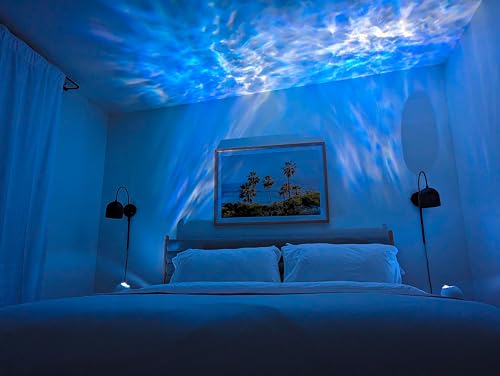


🌠 Elevate your nights—because ordinary lighting is so last decade!
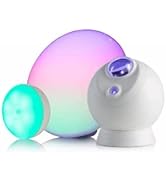
The BlissLights Sky Lite Evolve is a compact, Wi-Fi-enabled LED galaxy cloud projector that delivers customizable, rotating nebula and star projections. Featuring adjustable brightness, color options, and timer settings, it integrates with multiple smart lighting apps for privacy-conscious control. Its sleek matte black design and low 5-watt power consumption make it an ambient lighting solution ideal for creating relaxing, immersive environments in any room.






| ASIN | B0B4VPM54L |
| Are Batteries Included | No |
| Batteries Included? | No |
| Batteries Required? | No |
| Best Sellers Rank | #50,767 in Tools & Home Improvement ( See Top 100 in Tools & Home Improvement ) #746 in Night-Lights |
| Brand | BlissLights |
| Bulb Base | GU10 |
| Bulb Features | Adjustable Rotation Speed, Customizable Galaxy Projector Colors, Dimmable, Sleep Cycle Automation Settings |
| Color | Solid Black |
| Customer Reviews | 4.2 4.2 out of 5 stars (7,990) |
| Date First Available | June 23, 2022 |
| Finish Type | Matt |
| Finish types | Matt |
| Included Components | Tools |
| Item Package Quantity | 1 |
| Item Weight | 1.36 pounds |
| Item model number | SKY-CLOUD-RCWB |
| Light Direction | Adjustable |
| Light Source Type | LED |
| Manufacturer | BlissLights |
| Material | Plastic |
| Mounting Type | Freestanding |
| Number of Light Sources | 1 |
| Part Number | SKY-CLOUD-RCWB |
| Power Source | Corded Electric |
| Product Dimensions | 4.72"L x 4.72"W x 5.31"H |
| Set Name | Sky Lite Evolve |
| Shade Color | Multicolor |
| Shade Material | Plastic |
| Shape | Spherical |
| Special Features | Color Changing, Timer |
| Specific Uses | General purpose |
| Specification Met | CE, ETL, FCC |
| Style | Cloud Only |
| Switch Style | Push Button |
| UPC | 850033680102 |
| Voltage | 120 Volts |
| Wattage | 5 watts |
M**S
Mixed feelings at first
I impulse purchased all three varieties of projector lights when they were on a Lightning Deal. I purchased with the intent of giving them to my kids for their room. However, after setting them up, I ended up keeping two out of the three because one arrived broken. I started off with the nebula cloud projector first then paired it up with the second projector with the blue stars. My first impression was mixed to be honest because of a few issues. 1. The size of the cloud The nebula cloud is quite beautiful and mesmerizing and really creates a serene ambiance. But I was a little disappointed with the size of it in relation the ceiling. It didn’t seem quite big enough to me at the time. I do not have huge ceilings either. After playing with the angles, I managed to get a more than adequate nebula cloud. Be sure to use a somewhat extreme angle, if you can get it to stay, which brings me to my next issue. 2. Housing material (angling and getting it to stay) The housing of the unit and the base it sits on is a smooth, matte plastic with no “grip” at all. When you try to angle the unit to project onto the ceiling it typically slips or moves, altering the angle you want. I found that using the foam inserts that come inside the box serves as a much better base due to the cut outs and the slight grip to it. I highly recommend keeping those! If you already threw them out perhaps try cutting some floral foam to create a base like the insert from the box. Alternatively, stick some double sided tape on the inside of the curve of the smooth base for some grip. The projector is also somewhat delicate, as one of the three I ordered arrived broken. The green star projector still turns on but the motor no longer rotates so the nebula cloud doesn’t “move” anymore. I highly suggest you avoid moving the projector too much or too often and definitely do NOT drop it. Find a good place and leave it alone. 3. App control My final issue has to do with the app. I read reviews so I had an idea of what to expect. You can either search on the App Store or scan the QR code on one of the flaps inside the box. Either way will work. Many users stated that they had problems either connecting the projector to the device or it took a while to respond. Others stated they had no problems at all. It seems to be hit or miss. I personally did not use the BlissHome app because I don’t want any more of my information spread around like confetti. Also, I happen to be a bit more in the camp of you shouldn’t NEED an app to control this thing. Yes, apps are cool but sometimes I feel like they are unnecessary as in this case. But that’s just my opinion. Anyway, I was a bit bummed that I wouldn’t be able to do other scenes and customization to the projector without the app. I seriously contemplated send them all back. That is, until I changed out some regular light bulbs for some Cree Lighting smart LED bulbs and set them up using my Cree Lighting app (that I already had and use). Lo and behold, the projectors popped up in the devices ready for pairing and set up!!! In the end, I was able to successfully pair both projectors (and some LED desk lights I’ve had for over a year now) using the Cree Lighting app without any issues at all. I can now control and customize both projectors and my desk lights. I can adjust brightness, colors, laser opacity, and set “scenes” that are included with the projectors and lights that I didn’t even know were included. My recommendation is if you don’t want to use the BlissHome app or give away your information yet again to the app developers, try another app you already have. You might be pleasantly surprised. If you don’t have an app that works then try the Cree Lighting app or LED Light Controller & Remote app. On a side note, once I was able to customize the settings inside the Cree Lighting app, I realized it wasn’t that much outside of just using the button on projector itself. Sure, I can adjust brightness and star opacity and set custom colors using the Cree app. But beyond that, you can still access the same “scenes” programmed in by simply pressing the button on the projector. Overall, I do like these projectors. The colors are quite beautiful and the laser stars really bring it to another level. The stars come in either blue or green. As stated before, I purchased both. For more contrast, I would suggest the green stars. For a more ethereal look, go with the blue. If you want more oomf to your nebula, then pair the nebula only projector with the cloud and star projector. Are they worth the price? Yes, but only if you are able to buy them on sale. I don’t think the regular price is justified considering they are somewhat fragile. I decided to set up both projectors (nebula only and nebula with blue stars) in the master bathroom to use during my shower instead of a candle. I also play some ambient music. Together, they really create a relaxing atmosphere akin my own private spa that helps relieve stress and unwind from the day. My husband also thinks they are pretty cool and requested one in the bedroom too. 😂
T**.
Nice soothing product.
Love this light aimed at my fireplace. Pretty, soothing colors. No noise. Have it on a timer great quality. Easy set up.
T**R
Use the Feit App, it works like a charm!
I've never come across such a "highly rated" device, that was complete a complete pain in the ass to get operating. I actually gave up on it and gave it a really bad review until I noticed something in the instruction guide. It was a familiar look and it took me just a second to realize that this is the same font and layout as Feit's products. I thought this company had given up on their product support. After having zero luck with the Bliss app itself and their instruction guides I started up my Bliss Evolve Cloud lights using the Feit app, not Bliss's. Voila, success! So this is the same company. American made my ass. Why do companies have to lie to us all the time. Not very logical or transparent but there you go. If anyone's having problems with their Bliss apps and products, use a Feit app instead. Now these lights do what they're supposed to do. Still in the downside is the lack of color, ultimate brightness and what you can actually do with them. They make cloud scenes., and somewhat very realistically too. They are definitely made to be used in pairs... minimum. If they weren't so bloody expensive I would have bought two more because you actually need that many to fill up a whole ceiling or a room. You also have to know how to use your own mind to come up with how to program these things because there's not any instructions. It's fairly intuitive, once you learn how to add additional layers of color to the scenes section you can animate these and make them pulse slowly on and off or do whatever the controls do. I've stopped using the laser function of these lights ages ago because they're kind of annoying and never look that realistic. Also be aware that the actual image spread is small. The more you blow these up the less three-dimensional cloud effect is produced. Still it's an interesting product, like I said though I just wish it was cheaper. It's not worth the money for the one trick that it does. And one more thing, it says the base makes it so he can swivel these in any direction, blah blah, except you can't really unless you back it up with something because this device is heavily weighted on one side of it. So when you move it around it'll keep adjusting itself to this one position due to the weight of the engine itself. Although this is workable, it's still kind of a pain that this happens to an expensive product.
E**N
literally a godsend
literally my favorite thing ever. im on the spectrum, and i cannot sleep in complete darkness. this is so calmimg, so pretty, ive had it for a couple years now and i cannot sleep without it. sometimes lately the motor will stop working, but you just kinda tap it and it fixes itself.
M**A
Se lo he regalado a dos personas distintas y a ambas les ha encantado. Se ve muy bonito, yo compré la versión sin estrellas y se ve increíble. Lo que más me gustó es que puedes cambiar los colores, el brillo, la velocidad de la nebulosa, establecer horarios de encendido/apagado y vincularlo con Alexa mediante la aplicación. Un súper producto por el precio, lo recomiendo.
J**N
The Evolve was impressive right out of the box, and using the included app, you're able to get some beautiful effects projected on your ceiling or a wall. It might be great for a kids room or any space you want to add some ambience to. Physically, the device is a ball with a projector, laser, and a USB-C port for power. It includes a small USB-A brick and an A-to-C cable. The device loosely sits in a little plastic cup that allows it to be rotated to point the light wherever you want it. This is workable, but I wish I could tighten something to make it harder to move by accident. Pairing within the BlissHome app was fairly easy, although you're forced to pair the device with whatever network your phone is currently connected to, which made it slightly annoying since I had to put this on an IoT network, as it didn't seem to work with WPA3. The BlissHome app (or Tuya Smart) allows you to control many aspects of the light, including: - Laser brightness - Rotation speed - Blue, red, turquoise, and white LED brightness. (It's not quite the typical RGB colors) You can also create different presets within the app to easily switch between your favourite looks. I got the version with the green laser. At full power, the laser projects a regular pattern of ultra-bright dots that looks quite unnatural and harsh. However, dial this down between 5-10%, and you get a much more pleasing effect that (sort of) looks like stars... if stars were green. The spinning effect gives an almost psychedelic, watery effect that is very pretty. You can slow down the spinning, but this does cause a very slight, high-pitched whine from the unit, so if you're sensitive to noise and want a completely silent unit, I recommend leaving the motor at full speed or completely off for the quietest operation. (Granted, without the motion, you lose some of what makes the effect so cool.) I'm a HomeKit user, and I wanted to be able to control this device with Siri, but unfortunately, there's no support for HomeKit or Matter out of the box. You can use Alexa and Google Home, but this is much less useful for me. Fortunately, I was able to hack together on/off and partial dimming support via HomeKit by pairing this light with the Tuya Smart app (instead of the BlissHome app). The Tuya Smart app enables virtually the same UI and features as BlissHome and adds the benefit of being able to use Tuya's developer API to control the unit, which then allows you to set it up in HomeBridge with the Tuya plugin. This is an awful lot of work just to be able to use Siri to turn the thing on and off (I'm also able to adjust the brightness of the white part of the light in HomeKit, but nothing else). At least it's possible to get this working if you're nerd enough to jump through all those hoops! Hopefully, a future version will allow for Matter support, which should make this much easier. I really like this light. It's a brilliant little product that is inexpensive and can add some fun, soothing effects to a dark room. If you like cool lighting, you'll have fun with this product.
G**S
I was looking for a way to brighten a room during the dark winter months ahead. Some research kept pointing to the BlissLights Evolve as a good, price-conscious option. I took the plunge and ordered one, hoping for the best. When it arrived, the packaging was good, with good protection for the light and its components (base, light, power supply). Setup couldn't be easier; basically place the light ball on the base, plug it in, turn it on, and it is ready to go. To get the best use out of it, you need to download the BlissHome app, which lets you pair the device to the app and to the network. This took a couple of tries, but probably more user error than any issues with the app. The second try worked perfectly, and it even has additional pairing options, if for some reason you really get stuck. Now to the important part, how it looks. I'm totally impressed. The cloud has rich colours, great mellow motion and makes it feel like you are staring into your favourite nebula (Horsehead, anybody?). The stars are bright and have a nice contrary motion, immersing your room in gently moving lights. The app lets you select scenes/colourways that are predefined, or lets you select your own. You can adjust the colour, motion and light intensity for the cloud and stars separately, really providing you with a soothing customized light. Pros: - Small form factor - Nice design - Great lights/visuals - Easy setup - Easy connectivity to Google Home - Timer feature - Great customizability - Easy to position on the base - Easy to use app Cons: - None that I can think of, but it's early days. - It does seem that if I customize the lights on the fly, turn it off, then turn it on again, it forgets my settings and defaults to full bright/full rotation, but I need to test that out more. Probably user error. In short, I love it. If I were to look for a similar light for another room, I would definitely buy this one again.
A**A
Muy bonita en relación calidad precio me sorprendió
H**N
The BlissLights Sky Lite Evolve is amazing for creating a chill, dreamy vibe in any room. The projections are super vivid and cover a lot of space, and the variety of colors and patterns makes it fun to customize. It’s perfect for relaxing, gaming, or just adding some atmosphere to your space. It connects to Wi-Fi seamlessly, and the app makes it really easy to tweak settings and customize the lighting without having to get up. The only issue is that it moves around too easily. A small nudge, and you’ll lose that perfect setup. A sturdier base would’ve been amazing. Still, the quality of the lights and the flawless Wi-Fi connectivity make it a solid choice.
TrustPilot
1 个月前
1天前