We remain fully operational. Our teams are working around the clock to ensure your deliveries continue safely.

下载应用程序


🚀 Unlock your ultimate multi-screen, multi-device command center!
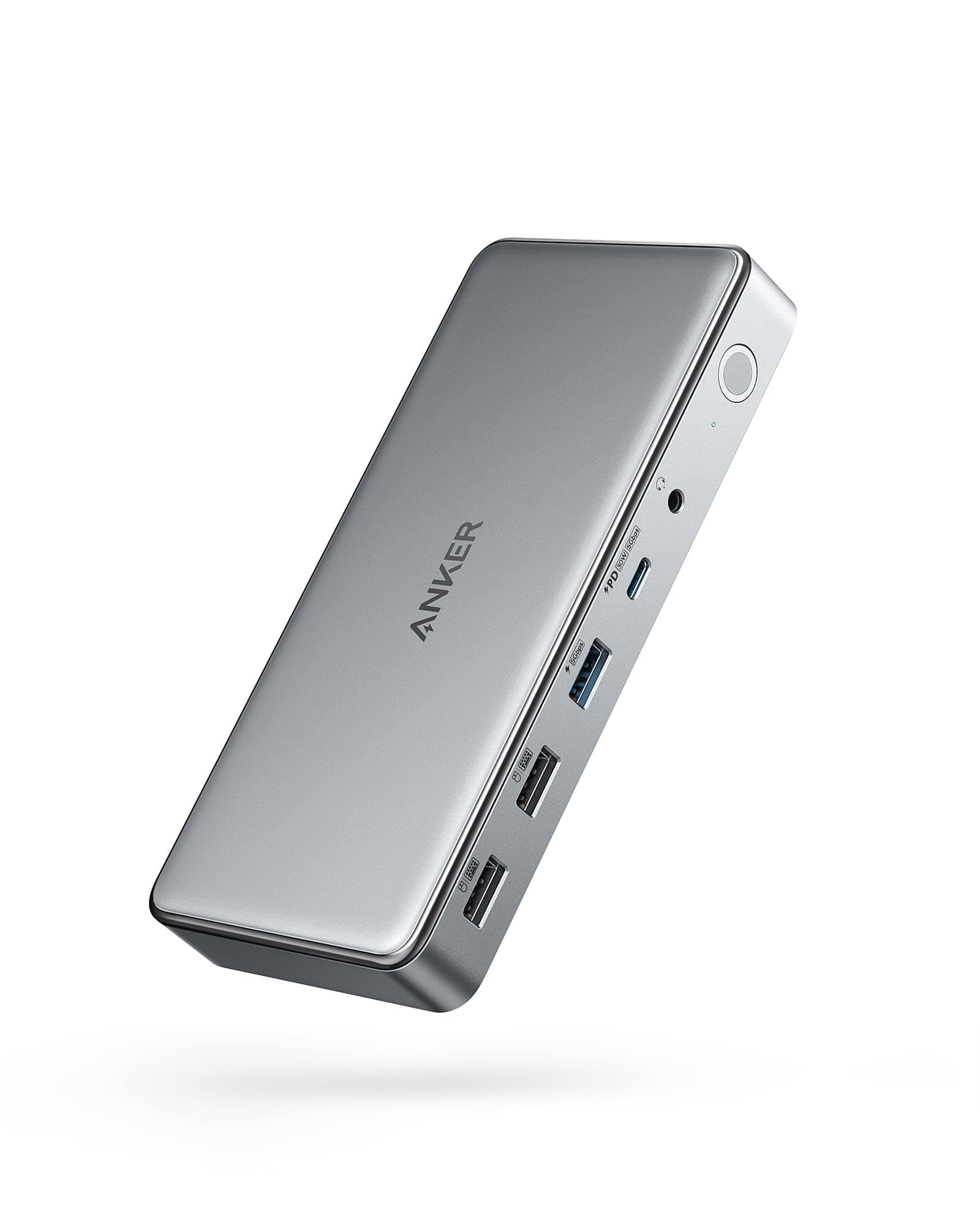
The Anker 10-in-1 USB-C Docking Station is a powerhouse hub designed for professionals craving seamless connectivity. It converts one USB-C port into dual HDMI, DisplayPort, Ethernet, multiple USB ports, and more, supporting up to 100W fast charging and triple monitor setups with DisplayLink technology. Compatible with MacBook Air/Pro and major Windows laptops, it’s the perfect upgrade for a clutter-free, high-efficiency workspace.






| ASIN | B09XH3PD25 |
| Best Sellers Rank | #9,133 in Electronics ( See Top 100 in Electronics ) #123 in Laptop Docking Stations |
| Brand | Anker |
| Color | Gray |
| Compatible Devices | Lenovo ThinkPad,Dell XPS,Microsoft Surface,HP Spectre,MacBook Pro 13,MacBook Air 2020 |
| Customer Reviews | 4.1 4.1 out of 5 stars (335) |
| Hardware Interface | USB Type C |
| Item Dimensions L x W x H | 6.7"L x 3.15"W x 0.96"H |
| Manufacturer | Anker |
| Number of Ports | 10 |
| Total Number of HDMI Ports | 2 |
| Total Usb Ports | 10 |
| UPC | 194644099756 194644099909 |
| Warranty Description | 18 month |
| Wattage | 100 |
K**A
Great Customer Service
So I got this when I upgraded my office set up to have a triple monitor set up and about 3-4 months after I got it the port that controls the output for the video was no longer picking up any docking input nor was it charging my MBA. So I reached out to customer service and after exhausting all the troubleshooting steps I've done, they've done, and Apple has done, it was processed for a replacement. The level of excitement I got when it was confirmed delivered I hooked it back up and everything IMMEDIATELY started working. 10/10 would recommend for anyone looking to set up a triple monitor set up. I have it mounted under my desk along with my MBA docked so all the cable management is sinched back up and neat. GET IT and you won't be sorry!
A**S
Works well forM1 Macbook Pro external monitors
Works just as I needed. I use an M1 Macbook Pro, and this lets me seamlessly connect and use 3 external monitors (2 horizontal via HDML, one vertical via DisplayPort). Requires DisplayLink Manager. I'm also able to connect my mouse, keyboard, and webcam, has just enough ports to hook everything up. This is replacing an older Dell dock that finally failed, this is a solid improvement over that older dock.
N**N
Use the encosed cable with a mac!
I was coming from a 2016 Macbook Pro running an eGPU that used a Thunderbolt 3 cable. When the eGPU finally kicked it, I bought this dock. I plugged in the dock to all my 3 monitors, but only two lit up (the 4k HDMI port did not work). I was tempted to leave a 1 star review and cite another dead HDMI port issue, but it's really my own fault- The Thunderbolt 3 cable I had used to connect my laptop to my dock didn't support the video resolution Anker's dock was trying to put out. When I used the enclosed USB-C cable, magically everything booted up. So, troubleshooting, you need Displayport and the enclosed Cable on a mac if you don't have all your screens set up. My one gripe, though, is that the cord is much shorter than I wish- I use a standing desk with a laptop on the non-standing portion, would be nice if I had a little bit more room to play with when I raise the desk!
C**S
Currently non-functional with OS Ventura
As of a few weeks ago I thought this was a great dock. I constantly cycled between three different laptops (MacBook M1, Dell Latitude, Dell XPS 13) with ease and everything worked perfectly. As of the latest Mac OS Ventura update, the MacBook Air no longer see's the dock. The laptop doesn't see the power feed and no USB device passthrough or displays are detected.
C**X
Revised to reflect Anker's warranty support
Review updates/revisions Sept 2025: For fun, I did a search of my Amazon purchase history and counted Anker products in the dozens. We have been a fan of them since the first started showing up on Amazon - better quality cords and chargers, great prices, and 100% zero fuss warranty support in the RARE intance we had an issue. And it was very rare in the first place. May 2024 I purchased this dock - intended to make it easier to use multiple monitors and also swap between work and home laptops, also use it for hardline access since wifi can wobble during the business day but plugged in never does. Started having issues with it in November 2024, six months after purchase. Contacted Anker Support. Had already done the normal type of trouble shooting - cords, connections, removing other pieces - no luck. Support that was once so fast and painless turned into multiple email exchanges, proof of purchase requirements, a picture of the SN, and eventually a label to mail it back ... with this bold text "Any replacement process will only commence after the inspection is completed and the contents of the package are verified. We strive to process all returns as quickly as possible, and we will keep you updated on the status of your request." Um ... ok ... but what am I supposed to do for the 1-2 weeks while you wait to get it (USPS label), plus a minimum of 5-7 business days (per the email) for replacement shipping (IF approved, because of course it's still not confirmed or promised). I'm missing a daily use product for 3-4 weeks based on Anker estimates, for a dock I paid $150 for less than a year ago. Bottom line: Anker support ain't what it used to be, and they will not be the default answer in my house anymore. Original headline: Worked perfectly on the first try - Anker stuff works! I have a MacBook Air (M3) and an older MacBook Pro (Intel chip) and getting them to consistently do multi-screen properly has been an ordeal ... until today! Went to website Anker listed on the dock sticker, downloaded DisplayLink drivers, plugged in, and voila - three separate screens all working perfectly. Swap cable from Air to Pro and back, three screens just WORKS. So happy to get rid of my old CalDigit thunderbolt unit that was theoretically doing that but was always finicky. Also using https://www.amazon.com/dp/B0B54S58SX magnetic adaptors for USBC to make swapping between my Macs (plus my work MBAir) even easier.
F**T
Unit is surprisingly heavy but very neat. Software download was simple and easy (restart required). Simple and quick to set up, no fettling or faffing necessary. Overall a great purchase and excellent product.
N**R
Solid build quality and very reliable performance. Handles multiple displays smoothly, charges fast, and keeps my desk setup clean with all ports in one place. Works exactly as expected and feels premium.
B**R
Straight forward to connect to the laptop. Like the fact that it doubles up as a power adapter for the laptop. All my connections in one tidy area - well recommended.
J**T
Despite Apple's screen limitation with these earlier M1 MacBook Pros - it seems there is a way around it. You just need this amazing device from Anker - it really works as advertised. The HDMI output is set at 2k (my preferred scale) at 30 fps but can scale up to the full 4k. The DisplayPort output is running at 2k (my preferred scale) at 60 fps, and seems to be limited to 2k. Either way it's perfect for my setup! Haven't tested the other ports, but having ethernet, power etc...makes this just 1 USB-C cord to connect to my laptop...and can even run fine with the laptop closed.
I**U
Totally misleading that the docking station is the only item in the box. The DC charging is a separate item that’s la her and heavier than the docking station itself. Just way more wires ….