We remain fully operational. Our teams are working around the clock to ensure your deliveries continue safely.

下载应用程序


Buy anything from 5,000+ international stores. One checkout price. No surprise fees. Join 2M+ shoppers on Desertcart.
Desertcart purchases this item on your behalf and handles shipping, customs, and support to Malaysia.
⚡ Power your network instantly—no wires, no hassle, just pure speed.
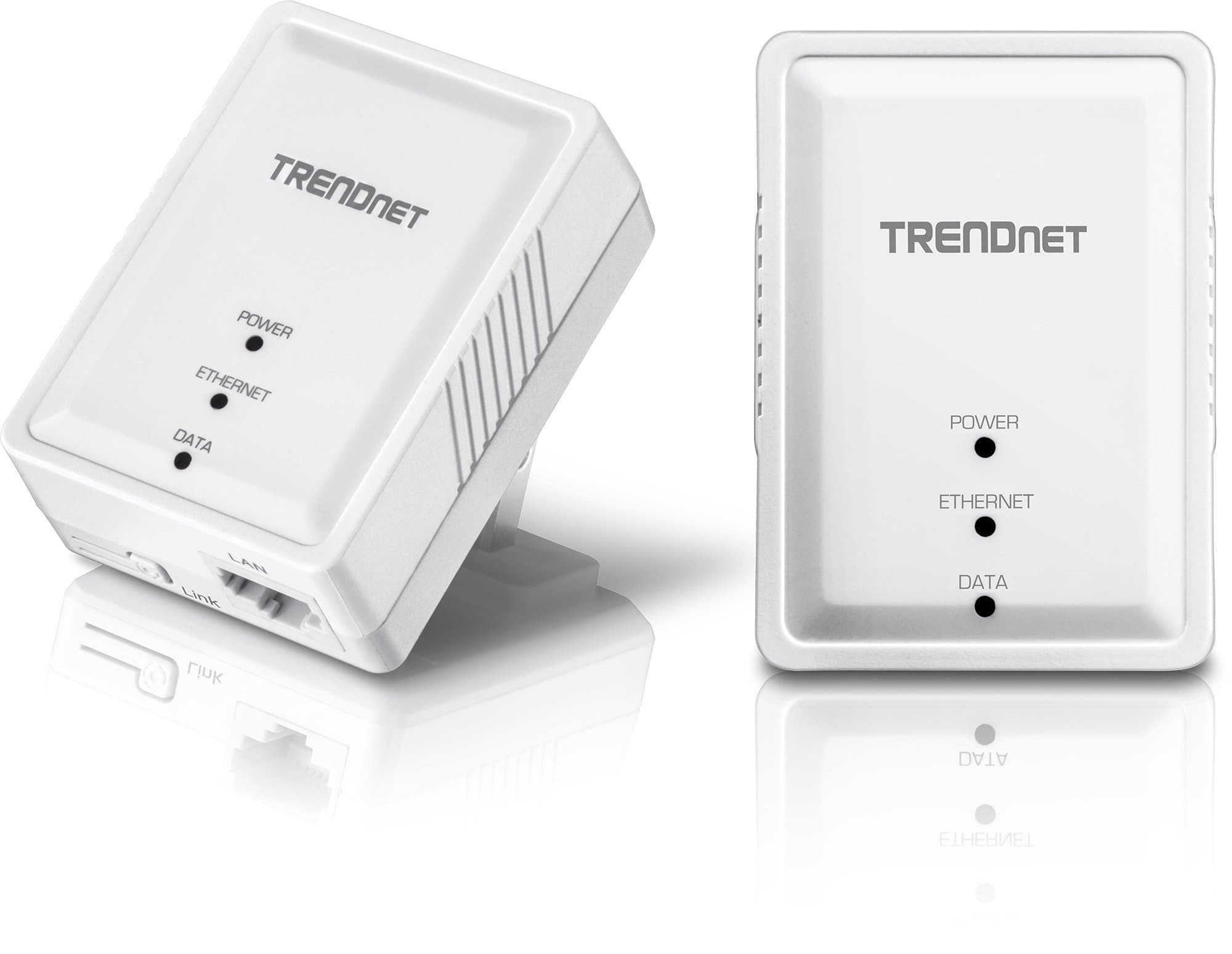
The TRENDnet Powerline 500 AV Nano Adapter Kit (TPL-406E2K) delivers reliable 500 Mbps wired network connections through your home’s electrical wiring. Featuring a compact design, plug-and-play setup, and compatibility with multiple Powerline standards, it’s perfect for expanding your network without new cables. Backed by a 3-year warranty and secure pre-encrypted signals, it’s a trusted solution for seamless, high-speed connectivity across multiple rooms.


| ASIN | B008F537KC |
| Best Sellers Rank | #75 in Powerline Network Adapters |
| Brand | TRENDnet |
| Built-In Media | 2 x Network cable (1. |
| Color | White |
| Compatible Devices | Backward compatible with all Powerline 600, 500, and 200 adapters |
| Customer Reviews | 4.3 4.3 out of 5 stars (1,802) |
| Data Link Protocol | Ethernet |
| Data Transfer Rate | 500 Megabits Per Second |
| External Testing Certification | CE, FCC |
| Global Trade Identification Number | 00710931506587 |
| Hardware Interface | Ethernet |
| Item Length | 2.7 Inches |
| Item Weight | 1.76 ounces |
| Item Width | 2.2 Inches |
| Manufacturer | TRENDnet |
| Mfr Part Number | TPL-406E2K |
| Model Number | TPL-406E2K |
| UPC | 782386486042 631058208416 513871253319 734911114180 001910299317 072090541718 041114202706 710931506587 069991937351 710931506594 163120425068 731215283529 036506628608 021111987370 |
| Warranty Description | 3-year limited warranty |
N**S
Plug-n-Play and work great BUT, you might consider coax
Plug these in and you got an instant ethernet connection. I was able to get between 5MB/sec and 15MB/sec depending on a number of factors. That being said, this was in a condo building with a lot of electrical signal noise so your results may vary. In any case, these tended to be much, much, much more reliable than wifi in our situation. They are very easy to setup and would be FAR easier than trying to get wifi to work in a larger building or perhaps if you live in an apartment or condo where there's TONS of radio interference from other routers. Also good for putting a wifi access point on another floor of your house. BIG THING TO NOTE: You MUST put these on the same "phase" in your electrical box as I believe I read someone else say. This means that to get any decent performance, you want the outlets to be on breakers that are on the same side of the box. Most boxes have two rows of breakers, so if say your outlets are on the left side, you're golden. If the outlets are controlled by breakers on the left and right side - you might have zero to severely degraded performance. YMMV. In my experiments, I did speed tests in the same room (outlet to outlet on the same circuit) and got the same results as living room to office (two different circuits, but same phase). ALL THAT BEING SAID: - YOU MIGHT WANT TO CONSIDER COAX adapters. These are adapters that like these, plug into an existing wiring system in your house (cable lines) and are generally faster and less finicky. They are a little more money though. So if you are looking for REALLY good speed on your local area network (say for media streaming from server in your office to the living room), then maybe coax is worth the extra coin. IF you're just expanding internet access or something, then these are good enough. As far as bandwidth, if your internet connection is slower than 50MBit (as advertised) then this will not add any speed penalty for you. Anything higher, it will. Most residences only have 1.5-30Mbit so you'll probably be just fine.
G**I
Works well and easy to set up.
Bought these to replace my tp link power line adapters due to possible hacker activity news. These were very easy to set up and work really well with my asus wifi7 router which was also used to replace my old tp link router. One of these was used with a smart plug for my Canon laser jet since it isn't used often. The problem that I had with the tp link adapter is when powering up the adapter and the printer, the printer would fail to receive an ip address from my router which would lead to fiddling with the smart plug and tp link adapter. But with these new ones it locks in the ip address immediately and I have access to my printer and its scan function. Very happy with these. Also use another one of these for my solar PV communication and haven't had problems with that either. Highly recommend. I've been able to get speedtest rates of 200-300 mb/sec speeds. More than I need for what I use them for.
J**S
They work great!
**5 month update!** These are still working great and I have good news! I was able to use my existing desktop (an iMac) to send my internet connection to the first adapter in my office which is much closer to the breaker and I now have no loss in speed. So morally of the story is to try different outlets if possible if you are seeing a drop in speed like I was. I am even more pleased with these, especially since they are still the cheapest powerline adapters. So let me explain a few things before the review. I live out in the country with a decent internet speed that works well for streaming HD videos on YouTube and Netflix. With the wifi I get about 17Mbps all over my house. Not the fastest but for being pretty far out of town I'll take it. I recently got a garage built right next to my house with a walk way in between the house and the garage and the room with the router is probably 8 feet away but the garage is a metal building so wifi and cell service do not go through the walls into the garage. I like to have parties and such in the garage but with no wifi or decent cell service, streaming music and such takes a planned downloaded playlist. So you can't just decide on a different song or two with out it being a hassle. So I went on the hunt for a solution that wasn’t getting an ethernet line installed into the garage and found powerline adapters. I was a little skeptical with the signal having to go from one end of the house to the breaker box and then all the way back to the garage. I tested the adapters in the house and the speed dropped from 17 Mbps to about 7Mbps. I took them out to the garage and used the closest outlet to the breaker box with an old router I had sitting around to get wifi in the garage and it got me about 7Mbps as well. While the speed did drop it works well and I honestly am happy with it. These were the cheapest adapters I could find and they work well for what I need even though the speed did drop. Streaming music works just fine. Even a video or two works great. Happy I found a solution!
A**E
Teniendo un servicio de 100 Megabits, mi PC recibía una señal de unos 15 Megabits a una distancia de 8 metros con señal de 2.4 Gigahertz y de 40 Mb con una señal de 5 GHz. Eso, con pérdida de paquetes. El adaptador Powerline se sirve de todo el ancho de banda (80 Mb, porque "Telmex") sin pérdida de paquetes. Ideal para juegos en línea y streaming.
S**E
I am amazed with the functionality of this unit. I had reviewed a number of different "powerline" Ethernet solutions, and this unit fell around the middle with good reviews. The shipment arrived quickly ( PRIME reseller) I decided to try it out and I am over the moon with elation! If this is how all the TRENDnet products function, I think I will be considering them in the future for a lot of my requirements. This purchase has two adapters and two good quality Ethernet cables included. I use these within our home network. When testing the speed connection I lost a half a megabyte from when I tested directly from my modem, dropping from 62.5mbps, to 62mbps is not even noticeable. My house is approx. 1600 feet (multi-level) and the adapters are located at separate ends of the house. My house was built in the 60's and the electrical panel was updated 12-15 years ago. Extremely easy to install, no installation software required. This unit is a dream as I have now provided fast connectivity to a previously "dead" coverage in the house. I am going to start to do video reviews, so that the products I purchase can be demonstrated. I like helping people make the decision that is right for them. Only honest and personal reviews from me.
A**D
Didn't want to have to run a ton of cable from my second floor to my basement; these adapters fixed that problem really well. When my computer was connected wired I was getting 80mbps. With the adapter I get roughly 15mbps, which isn't bad for what I'm using it for. Only have two issues with it, which aren't major. When I first setup the adapters I had to mess around in the powerline utility on my computer to get them to recognize each other. Also, probably about once or twice a day my connection will drop for five or ten seconds. It comes back up really quick, so it's not a big deal, but kinda sucks when you're in the middle of a game. Would definitely recommend for people looking for a straight forward solution to getting a connection where your Wi-Fi just can't seem to reach.
A**Z
Muy funcional el producto para el uso en mi caso de un dvr y poder conectarlo a la red, muy útil para evitar tener muchos cables en casa para llegar a un sitio diferente de casa
K**N
Conocía el producto y al fabricante, y por eso volví a comprar el producto. Los powerline solucionan muchos problemas de red y wifi, pero se pierde velocidad de transferencia.
TrustPilot
3天前
1 周前