We remain fully operational. Our teams are working around the clock to ensure your deliveries continue safely.

下载应用程序


💼 Store More, Work Smarter, Stress Less.
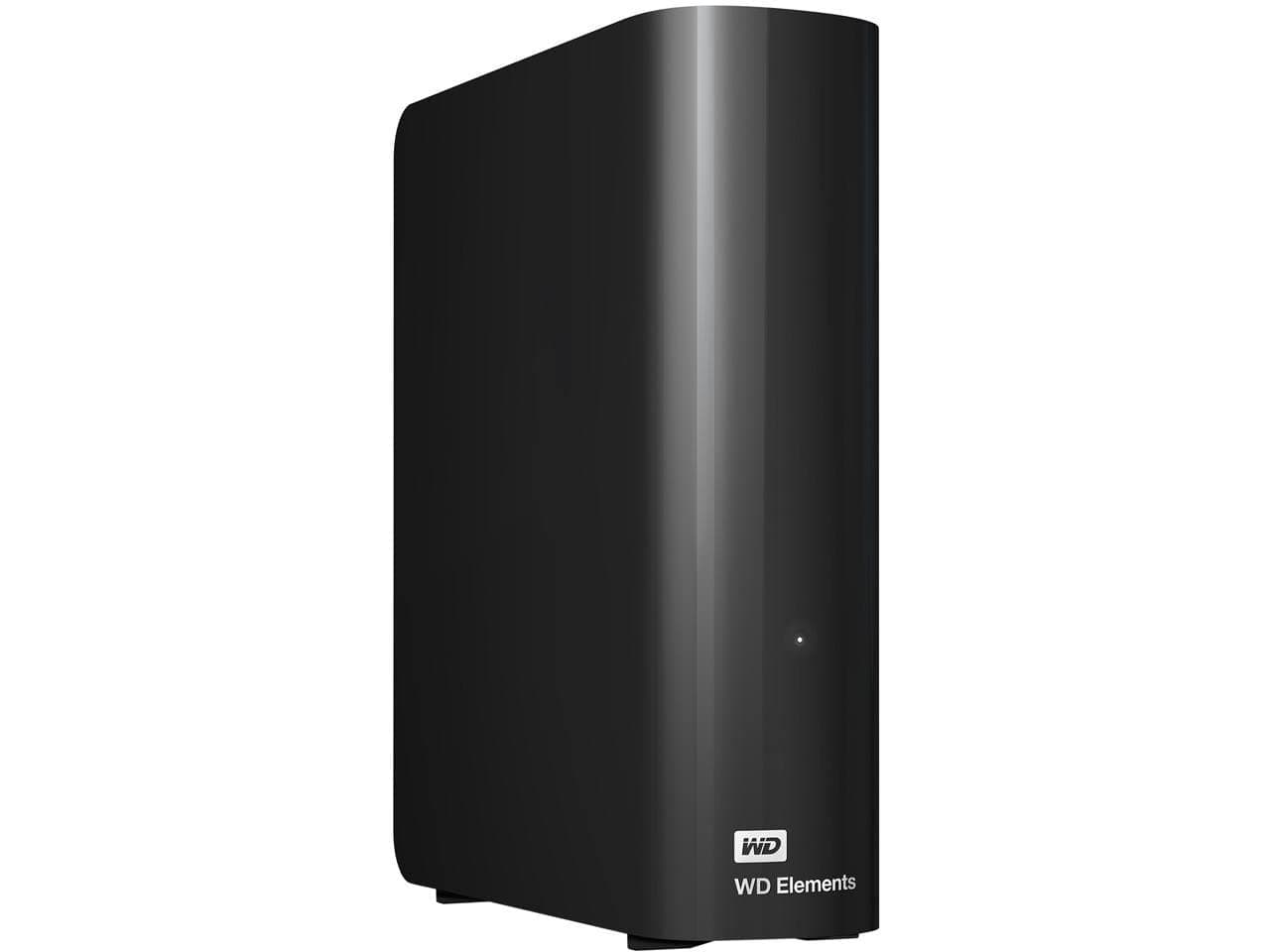
The WD 20TB Elements Desktop External Hard Drive delivers massive, reliable storage with true CMR technology for consistent performance. Featuring USB 3.0 connectivity, it offers fast transfer speeds up to 180MB/s and plug-and-play simplicity for Windows users. Its quiet, durable aluminum enclosure ensures long-term stability, making it ideal for professionals managing large datasets or backups. Reformatting enables Mac compatibility, making this drive a versatile powerhouse for any productivity setup.


| ASIN | B09VCXWPQG |
| Additional Features | Fast transfer rates, Plug-and-play simplicity |
| Best Sellers Rank | #2 in External Hard Drives |
| Brand | WD |
| Built-In Media | WD Elements hard drive, USB 3.0 cable, AC adapter, Quick Install Guide |
| Cache Memory Installed Size | 20 |
| Color | Black |
| Compatible Devices | Mac, PC |
| Connectivity Technology | USB |
| Customer Reviews | 4.4 out of 5 stars 27,534 Reviews |
| Data Transfer Rate | 1 Megabits Per Second |
| Digital Storage Capacity | 20000 GB |
| Enclosure Material | Aluminum |
| Form Factor | 3.5-inch |
| Hard Disk Description | Mechanical Hard Disk |
| Hard Disk Form Factor | 3.5 Inches |
| Hard Disk Interface | USB 3.0 |
| Hard-Drive Size | 20 TB |
| Hardware Connectivity | USB 3.0 |
| Installation Type | External Hard Drive |
| Item Dimensions L x W x Thickness | 9"L x 4"W x 8"Th |
| Item Type Name | External Hard Drive |
| Item Weight | 1.98 Pounds |
| Manufacturer | Western Digital Technologies, Inc. |
| Model Name | Elements Desktop |
| Model Number | WDBWLG0200HBK-NESN |
| Number of Items | 1 |
| Special Feature | Fast transfer rates, Plug-and-play simplicity |
| Specific Uses For Product | Personal |
| UPC | 718037894546 |
| Warranty Description | 2 Year Limited Manufacture Warranty |
C**D
A Tale of 2 drives (WD 20TB Elements Desktop & WD 2TB Elements Portable)
Well, I have to edit this review to include a NEW western digital drive I recently ordered (because amazon doesn't let you leave separate reviews for different drives made by the same company. My reviews here are for VERY different products and we should be allowed to review them separately, but... ¯\_(ツ)_/¯ ------------------------------------------------------------ REVIEW for the "WD Elements Portable External Hard Drive for Windows, USB 3.2 Gen 1/USB 3.0 for PC & Mac, WDBU6Y0020BBK-WESN": Anyway, the TWO terabyte WD drive I bought on January 1, 2026 for $79.99 had obvious signs of use. There was a small but noticeable 'ding' on the right side of the drive, and the CrystalDiskInfo utility software showed that the drive had been used for 3 hours. That's far more than any drive that's fresh & straight from the factory will have accrued for simple testing. I kept this drive because I needed it immediately, but I'm not happy about it having been USED and the 'ding' chipped off on the side that shows it had been dropped. Even so, it's performing wonderfully (so far) on a new Mac & an old Windows computer, but time will tell the true tale. ------------------------------------------------------------ REVIEW for the "WD 20TB Elements Desktop External Hard Drive, USB 3.0 drive, WDBWLG0200HBK-NESN" I ordered the WD 20TB Elements Desktop External Hard Drive in early May 2025, wiped it and re-formatted it as NTFS for Windows, and then transferred a ton of backups to it. (A little note: 20 TB drives have an *actual* capacity of 18.19 TB). This WD drive is reliable, sturdy, and a winner by every metric. It's a very quiet drive (I only ever hear a very soft & short 'brrr' when it's waking up, but then it falls silent and remains quiet for the rest of the time that it's active). My drive is on all day, yet I never hear any sounds while it's working. I actually forget that it's on until I need to search it for something! Even with my ancient PC, this WD drive had smooth transfers of up to 180 MB/sec. When that PC died and I connected the WD drive to a new mac laptop, the transfer speed was even faster. This drive has been in use every single day for almost 8 months and it's still just as quick and quiet as the first day I used it. Of course, if you format any drive as NTFS like I did, and then you use that drive with a Mac, you can only copy files FROM the drive while it's connected to the mac device, and you can't can't copy files TO the drive. I thought I'd only use this with my old windows comp and didn't forsee its overdue demise so I used the NTFS format... but since I can access those files, it's no biggie. I'm about to order another WD drive and I'll format it as ExFat so that it'll have full read & write abilities on both mac & windows. This is a great drive and if you're a dual-OS user like me, just format your drive accordingly. It's nice to be able to have the best of both worlds. :)
T**G
Massive capacity, true CMR reliability, and excellent sustained performance
The WD 20TB Elements Desktop drive is exactly what a large‑capacity external should be: simple, quiet, and built around a proper CMR hard drive that delivers consistent performance across the entire 20TB span. In an era where many high‑capacity externals quietly use SMR, it’s refreshing to see Western Digital stick to a full CMR design that maintains stable write speeds, predictable behavior, and long‑term reliability. Real‑world performance is strong for a drive of this size. Sequential transfers remain steady without the drop‑off or cache exhaustion issues common in SMR‑based units. The enclosure runs cool, the USB bridge is stable, and the drive behaves exactly as expected during large file moves, backups, and long‑duration workloads. For anyone dealing with multi‑terabyte datasets, this consistency matters far more than peak numbers. The 20TB capacity is a game‑changer. It consolidates what would normally require multiple smaller drives into a single, clean volume, making organization and backup workflows far easier. For the price — especially when purchased renewed — the cost‑per‑terabyte is outstanding. If you need a high‑capacity external that prioritizes reliability, sustained throughput, and no‑nonsense operation, the WD 20TB Elements is an easy 5‑star pick. It’s a workhorse drive with real CMR performance and the kind of long‑term stability Western Digital is known for.
T**S
What integrity counts, it has to be WD
I work with hundreds of hard drives per year. I also recover data from hard drives, so I have a decent idea of what we're dealing with here. To put it bluntly, all consumer level hard drives are not great, but WD (Which bought out Hitachi Storage) is simply the best. It's why they cost more, and it's worth every cent. I've had brand new Seagate drives dead, right out of the 20-count boxes we get. Speed wise, I am not really sure how fast these are compared to other brands, but with SSDs, I view hard drives as a cheap/slow storage space. And 1 TB is a LOT of data if you think about it. I'm writing this on the 14TB drive, but that can be hundreds of thousands of pictures for example. So the real question is "What would you do if you lost them all?" Take it from me, it is always "When" is it going to die and not "if". The drive will fail, no matter what. So you should always have a backup drive. If this is your backup drive, then you're all set. If this is your "main" drive, then consider buying a second, even if the second one is a Seagate - point being you are covered when the main one breaks. I have taken these apart before (Not the more modern very large ones) and those drives did work as internal drives, but I would hesitate to do that simply because you're probably going to trash your warrantee when you try and return a case that has a bunch of broken tabs (The cases for these elements drives are terrible and fall apart when you try to take them apart). My drive shipped with a rather small power brick, which was a nice touch. I think the cable length was something like 5 feet, so it's not a super short cord. Used the USB to connect to a Windows 11 laptop and it found the drive right away without any issues at all. If you use this as a permanent drive, e.g. a home network share, then you can go into Windows Device Manager and switch the drive type to include caching which speeds up the drive a bit (At the expense of data loss if you do not eject the drive before you yank the plug). If data integrity is essential, then for consumers, I would recommend the Red series drives as they are made for home network storage units. For corporate, the Enterprise drives (Which are usually SAS and not SATA) are the way to go. Of course none of those are USB drives, but I'm throwing this out there in case you have the option of going with an internal drive. At the end of the day though, like I started with, data integrity is the most important thing for me, and it doesn't get better than Western Digital.
D**N
A Good Mix of Reliability, Storage and Performance For an Affordable Price
Hello, I have recently purchased an external hard drive from Western Digital and I have to say, I have been satisfied with the product. This product is great for anyone that needs to clear space off their main storage devices or make backups of info. This device also works well as a storage option for people with an Xbox or PlayStation, as a way to store extra games. Also, it's good for business settings as a way store extra files or reports. The performance to price ratio is quite good for this product. With 8TBs of storage for $ 140, the price per gigabyte is very low (~2 cents per gigabyte). Also, the build quality seems good and had no physical defects/marks. I have been using the hard drive frequently over the past month and have had no issues with overheating or data transfer issues. The read and write speeds on the hard drive are decent (for an HDD) at around 150-170 Mb/s. However, the disk does run at 5400 rpm as opposed to 7200 RPM making the product slower than other drives. But the slower RPM does mean that the disk will run cooler and in turn prolong the life of the hard drive (in theory). Another positive is the plug and play aspect of it, allowing for easy setup if you are using windows. Unfortunately, if you are on Mac OS you will have to reformat the drive before use. When running the noise of the product is noticeable but not too loud usually just the typical “whirring” noise hard drives make and the occasional data clicks. If stored in a closed area the noise isn’t that bad. It matches that of your typical computer fan. Another nice feature about this external hard drive is that it will go into sleep mode if the hard drive is not actively being used. This helps by conserving energy use and should help in prolonging the life of the hard drive. But it should be noted that it takes around 20 seconds for the drive to “wake up” after being in sleep mode so if you need to frequently be accessing flies in the drive this should be taken into consideration. As a quick summary, I would rate performance a 3.5/5, price 5/5, build quality 4/5 and reliability 4/5. Overall, I would say this is a good product if you are looking for cheap data storage, while still having the reliability that is commonly seen in Western Digital drives.
M**O
Favorite External Back-up drives.
I use these as back-up storage drives for my Sample libraries. I use them in pairs using the second drive to manually back-things up as needed. I like the large storage capacity and the price point. I have a couple dozen external drives including SSD. The speed of these via USB 3 gets the job done. The security factor, knowing if something happens my work is safe & backed-up, is worth the price of admission. That said in the last 15 years I haven't a single external drive fail. I'd like to think it's because I take of my equipment and don't move these around. I use SD cards when I need to transport my Beats, Samplea and DAW sessions. But it's more likely down to chance. I got thumb drive that was DOA once (irrelevant) Anyway, I make/produce music for a living, if something happens to my files there's no insurance that will make-up for the 1000s of hours I spend chopping/flipping and editing Samples or stacking/layering and Sound designing. Latet the files are used during beat creation. I have a system that depends on having reliable drives I also have over 100K Rare Vinyl LPs digitized on other drives. WD is my go-to for externals but I've used multiple different brands over the years. Okay let's run through the tags. These are not portable drives. I guess you could put them in a case but nah. Power source is an adapter with a barrel that plugs into the drive. My project studio at home is all Win/PC but I also use Mac's at a commercial studio. Compatibility depends on how you format the drives. The Mac computers at my commercial studio are connected to Lacie & Glyph drives for the most part. When I transfer files back & forth, I use an SD card reader/writer and my Akai MPC Files are universal. If you use these with a Mac format the drive for Mac OS. Using a PC format the drive for Windows. These aren't backwards compatible. You can't plug one into a Mac, eject the drive and plug the same drive into a Windows PC. It's one or the other. Is it technically possible with dual boot and all that, probably but you should format the drive for the system you're using it with. Format accordingly. Drive size 12TB or 24TB it's up to you. I like the lego style drive design, those are the coolest drives I have style wise. These are fingerprint magnets. But they look fine. See included photos. Hopefully that covers the tags, The drives are good I'll continue to grab these as needed. Good luck.
E**S
Dependable, High-Capacity Storage That Just Works
Dependable, High-Capacity Storage That Just Works I’ve used the Western Digital 8TB Elements Desktop Drive for several years now, and it’s been one of the most reliable pieces of hardware in my setup. It’s the classic “plug-and-play” device—connect the USB cable, power it on, and it’s ready to use. I primarily use it for long-term file backups, media storage, and archiving older projects, and it’s handled everything from large video files to entire system images without complaint. Transfer speeds over USB 3.0 are solid for a mechanical hard drive—around 150 MB/s in real-world use—and it stays stable during long copy sessions. It does require an AC adapter, so it’s not meant to be portable, but for a desktop-based system or home server it’s perfect. Noise is minimal, just a soft hum when spinning, and the case runs only slightly warm after hours of use. The 8TB capacity offers plenty of room to consolidate multiple smaller drives, and the cost per terabyte remains one of the best values on the market. The drive came pre-formatted for Windows (NTFS) but can easily be reformatted for macOS or Linux if needed. WD’s build quality still holds up—mine has survived more than four years of continuous operation without any hiccups. A few small notes: this is a mechanical HDD, so it’s not SSD-fast, and it needs external power. If you want a travel drive or instant-access performance, a portable SSD is better. But for dependable, affordable mass storage, this is tough to beat. Bottom line: a workhorse external drive that delivers excellent reliability, quiet operation, and tremendous storage capacity at a great price. Perfect for backups, media libraries, or anyone who just wants a lot of space that “just works.”
C**C
There goes my trust in WD
I have owned a lot of hard drives over the years. WD has been my go-to for quite a while now. I still have a 1TB WD external that is running. It's from when 1TB was a lot. It's still fine. This was my latest, and my worst hard drive purchase of all time. I ordered this on March 1st, 2025. I'm sitting here, trying to recover data off of a dead drive on June 18th, 2025. It's still under warranty, but the warranty is void because of how things happened. I usually back up everything. I keep a file with a bunch of passwords on it. It gets backed up to several locations. I updated that file today with some new passwords that I need to keep. This hard drive became inaccessible within minutes of me updating that file. I didn't have time to back up anything. I have an the old version of that file several times, but not this version. The drive simply disappeared from windows. I thought that was odd, so I checked to see if it somehow was unplugged. It wasn't. I listened to it, and it was spinning just fine. I thought that was odd, so I checked disk management and it said the drive was not initialized. That's...bad. Windows didn't even know the size of the drive. That's usually a physically dead drive. I thought it was rather odd that a 3 months old drive would go from functioning perfectly to completely dead instantly. None of my other drives were having any issues. So began the fun. First, I unplugged the drive and plugged it back in. It spun up, but windows couldn't recognize it. I tried that on several different computers, both windows and otherwise. I tried to connect it to my phone and tablet. They would see it, but couldn't connect. I went back to my main computer, and it still couldn't even see the size of the drive. This left me with a massive problem. I could warranty the drive, and definitely lose my data, or pay $1,000 for data recovery to potentially find out that the external enclosure had failed, or I could void the warranty, pull the hard drive out of its enclosure and connect it via SATA. I went with option 3, because I don't have $1,000 to spend right now, and I need that file. After getting it out of there, I connected it via SATA to my computer. Well, now it knows how large the drive is, but it's still not initialized. That's what's going on in my picture. So, that's where I am. I'm staring at a $300 brick. I'm trying to figure out how to get my data off of it. Normally, when a drive dies, I have some warning. Even when it actually goes, I can still get most of the data off of it. This one died catastrophically 3 months after I installed it. I have had some regrettable hard drive purchases in the past 30+ years of working on computers, but this one stands at the top of that unfortunate pile. Was it the right decision to take the drive out of the rather flimsy enclosure? If I can't recover anything, then all I did was cost myself the warranty. That is something to consider though. If the enclosure and the USB-SATA adapter goes bad in warranty, you are out of luck. You can't take it out to recover data. Your warranty is gone if you do. You data is gone if you don't. Good policy! Update after some testing Every single block is bad. All of them! I'm fairly certain it went to sleep, and when it tried to power back up the read/write head smashed into the disk. That is all that makes sense, considering it spins just fine but all the blocks are bad. This drive was always loud. It was considerably louder than the older 8TB Elements that is sitting right next to where it was. I just thought that was how it was supposed to be, but I think the actuator was having problems from day one. Removing the hard drive was definitely a waste of time and money. Buying this drive was waste of time and money, actually. Update after tearing it apart The head definitely crashed into the platter. It did that while sitting on my desk. It's a 10 platter design, so the head is quite complex. I think there was a minor flaw in the actuator from the factory. Either that, or it got moved around in shipping. Whatever it was, it probably explains why it was so extremely noisy from day one. The flaw slowly got worse over the next 3 months, and then it catastrophically failed. WD definitely has done nothing to make this right. I guess I'm just out $300 and some data that I didn't have time to back up. I wasn't too worried about it since the hard drive was basically brand new. Well, that was a mistake, just like buying this hard drive.
K**M
Good value, easy install, no problem after initial weeks
Good price for large amount of storage. Runs quietly. Much smaller foot print than the older 4TB Lacie drive it replaced. Very happy with it after two weeks. Install as Time Machine for my MacBook Pro was plug and play simple.