We remain fully operational. Our teams are working around the clock to ensure your deliveries continue safely.

下载应用程序


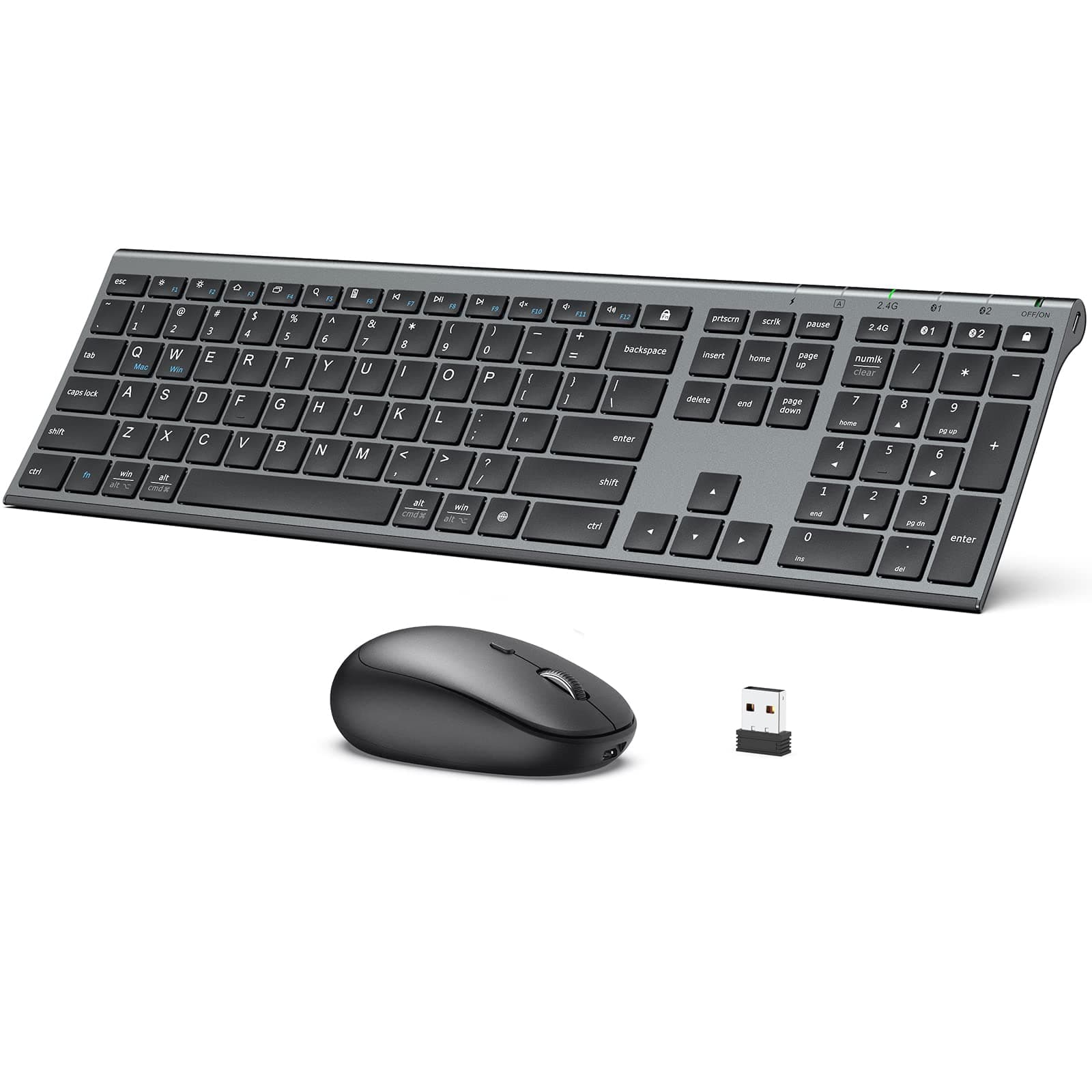
⌨️🔋 Work smarter, switch faster, and stay charged in style.
The iClever DK03 is a rechargeable, dual-mode wireless keyboard and mouse combo featuring Bluetooth 4.2 and 2.4GHz connectivity. Designed for professionals on the go, it supports seamless switching between three devices, offers up to 90 hours of battery life, and combines a full-size ultra-slim keyboard with a durable aluminum alloy base. Compatible across Mac, iOS, Android, and Windows, it’s the perfect blend of portability, functionality, and sleek design for the modern multitasker.


| ASIN | B08KZXLTM6 |
| Best Sellers Rank | #526 in Computer Keyboard & Mouse Combos |
| Customer Reviews | 4.1 4.1 out of 5 stars (2,425) |
| Date First Available | October 10, 2020 |
| Is Discontinued By Manufacturer | No |
| Item Weight | 15.2 ounces |
| Item model number | IC- DK03 Combo |
| Language | English |
| Manufacturer | iClever |
| Product Dimensions | 16.8 x 4.92 x 0.62 inches |
E**T
My favorite full-size portable keyboard for mobile office
This is a review for what I view to be the best PORTABLE keyboard out there, not necessarily the best FIXED DESKTOP keyboard. Like any proper digital nomad, I have been trying to assemble the perfect mobile office set-up. Keyboard, mouse, second monitor, headset . . . they all have to be light-weight, wireless, compact, long battery life and easy to re-charge, but also minimal sacrifice of office features. I looked at maybe 20 keyboards, and ended up actually buying three (!), and this is my favorite. First of all, it just works. Bluetooth connects instantly and the battery lasts a long time. So far I have not had any key jams or connection problems or bugs or anything. It also charges via USB, no need to ever switch out batteries. Second, at least speaking for myself, I had to have a full keyboard (a real number pad, PgUp, PgDn, Home, End, Delete, proper cursor movemnt keys, etc), but it also had to be as light and slim as possible. This is my favorite of all the ones I looked at online and of the several that I physically tested. There is an obvious compromise between functionality on the one hand, and weight and space and battery life on the other hand, and this one threads the needle the best. Third, I never thought I would need it, but the ability to switch between two bluetooth-paired devices is awesome! I use it constantly (because I have a "work" computer and a "personal" computer side by side, which I admit may be unusual). And, again, it just works. Fourth, it was reasonably priced. There is the ability to switch to yet a third connection via wireless USB dongle and the only con I can think of is that there is no place to hide away the dongle when you're not using it, which is annoying if you are an obsessive like me. (My iclever mouse does have a place inside its battery case for its dongle, but that mouse and this keyboard are not connected.) I really like this keyboard because it is light and compact for my MOBILE needs, but is still a proper full keyboard for my OFFICE needs. Definitely recommend. UPDATE: I have been using this keyboard (including extensive travel) and I still like it as much as I did when I first got it. This is the one to choose if you want a real keyboard that will also fit in your briefcase.
G**.
Amazing quality
I wrote this now because I accidentally dropped the keyboard four feet off a table, and it's fine. The 2.4G USB receiver needs line-of-sight, but that's common; the Bluetooth connections are very strong, with no issues. Battery strengths show in Windows, which doesn't always happen with all devices. The keyboard's front might be metal, or it much be plastic (I can't really tell), but it looks fine after the drop, and the MacBook Pro's sensor magnets pull pretty hard on this keyboard when I rest it on it (for temporary typing on my desktop), so if it's plastic outside, it's definitely metal inside.
M**R
Small (But NOT Small) and Light - Sturdy
INITIAL IMPRESSION: I have only been using this unit for one day so, so I may have to update this review later with more experienced information. When I opened the box, my first impression was that the keyboard was really small, almost tiny. But the fact is, it is NOT! The actual keyboard layout (the size and spacing of the keys) is virtually identical to other full-sized keyboards that I have. Measured edge to edge on the keys, including the number pad, this keyboard measures only 1/4" less. But the FRAME is much smaller, and the function keys are small and mounted very close to the main keys. I think it would have been better if they had added just an extra 1/8" or 1/4" spacing between the function keys and the main keyboard, but that is a REALLY minor issue. The keyboard also comes with a thin silicone cover that can be left on top of the keys to protect them from any dirt or grime. Although I do not have a real need for this, I tested it and was impressed with how perfectly it stayed in place while using the keyboard. It did not impair the function of the keys in any way other than giving them a non-slip rubbery feel. The overall keyboard is very light, but also super sturdy (aluminum, not plastic), so it is quite easy to use on my lap if I want to interface it with my TV. On my desk it seems super flat, but is comfortable so far. And despite the lightness, it has not moved at all while I have been using it. The keys have a short throw (necessitated by the ultra thinness of the keyboard), but they also a very nice tactile feel to them - not a chicklet-type keyboard. Setup on Windows 10 with Bluetooth was VERY easy, and all of the defaults seem to be just fine. I did fully charge both batteries yesterday before use, and today after only a few hours, the system Bluetooth settings is showing batteries down to 64%. This is a bit concerning, but no way of knowing yet if that display is accurate and they are really draining that fast - there is no keyboard/mouse configuration app to report on these devices, just the normal Windows settings. I suspect that Windows is simply calibrated to use the nominal voltage of normal alkaline batteries and not the slightly lower voltage of rechargeables. The specs do say that the keyboard battery should last for 90 hours of uninterrupted work, so I do not really trust the W10 reported number. There is a quick way to check the keyboard battery level with just one button, and it is still showing 4 flashes for 100% charge. I am not as pleased with the mouse. So far it functions perfectly, but it doesn't seem to fit my hand as well as I like. This may only be a matter of muscle memory and simply getting used to the new shape, since my previous mouse was somewhat larger and sculpted. Although this mouse seems to be a perfectly normal shape and size, the scroll wheel just seems to always be too far to the left when I am using it. I hope I adjust to the feel soon. I actually wanted this Bluetooth keyboard/mouse setup to make it easier to move my laptop around without having to fiddle with so many different cords and plugs on the desktop. In addition, I specifically did NOT want to always have a dongle in one of the limited USB ports. The fact that this keyboard is designed to be used with up to three different computers or devices without reconfiguring it is just a bonus. So far, that feature seems to work fine, but I have one very minor gripe: When switching between devices, you have to press buttons on BOTH the keyboard and the mouse. It would be so much better if just pressing the button on the keyboard above the number pad would cause BOTH the mouse and the keyboard to switch to the new device. That would make working with two computers side-by side (which I regularly do) almost seamless, instead of also having to pick up the mouse to find the small button underneath to also switch it over. I think I'll work around this annoyance by just leaving a separate wireless mouse always connected to my desktop computer (where there are plenty of USB ports), and only switching the keyboard back and forth. I did find one minor quirk with the keyboard so far - thought it was a bug, but it's not. The instructions tell you to first select your desired system with either fn+Q for Apple stuff, or fn+W for Windows and Android. I never bothered with this step since the keyboard was working perfectly with my W10 as soon as it was paired. But later I found that the fn key was not working at all. The fn-lock key was fine, so I could switch the function of those keys that way, but not by just holding down the fn+ a key. This was solved by my simply following the setup instructions! After I did select fn+W one time, the fn key now works exactly as expected. Overall, I think I like this keyboard/mouse combo a lot, and I would highly recommend it. UPDATE: After a week or so of use, I am finding a few small quirks. All of my use has been with the Bluetooth connection. Twice I have had keys stick on the keyboard (one of them was a shift key), but the key throw is so small that it is impossible to see if one is stuck by looking at it. I sure hope that does not continue. More annoying is the times when the mouse seems to temporarily disconnect - only last for about 2-3 seconds, but when you are editing something and need to make quick and frequent movements, it can really be a drag. Lastly, it is hard to tell when the keyboard is going to go to sleep, but when it does, if I just start typing, it totally misses the first 5 keystrokes or so while it wakes up - I am learning to watch for that first key response before I just start working. The instructions say that it will go to sleep after 30 minutes, but I just now had it happen after only 1 or 2 minutes; although that is not usual so far, I know it often happens much sooner than 30 minutes. In addition, I have had the fn key stop working again, and it took a lot of diddling with multiple attempts to use fn+W to finally get it back to normal. So the initial shine is becoming a bit tarnished, but I still like this unit. On the plus side, the batteries do seem to be lasting as long as expected - hardly any drop at all yet in the % shown by the W10 settings screen.
C**S
Excellent, versatile keyboard and mouse combination
For many years, I used only the "HP Wireless Elite" keyboard and mouse combination as it worked flawlessly for me. I discovered the iClever combination once my preferred from HP was no longer available. This keyboard / mouse combination offers a couple of advantages over the HP offering. The first is that the keyboard and mouse are both rechargeable. Perhaps even more noteworthy, you can use this with the provided USB dongle or via Bluetooth with two unique Bluetooth connections. Switching between devices or computers couldn't be easier. The HP elite had a dedicated key to make the computer sleep that this one is lacking, but this is easy enough to work around. Since discovering the iClever combination, it's all I've used now for years. An added bonus, the seller provides unparalleled, remarkable customer service that is appreciated.
F**H
Ok, first off, I am not a regular computer user. I am 25 years experience developer that punches tens of thousands of keys daily, if not a million. I bought this pair on sale for less than 200 AED. Oh Boy! The best purchase I have ever made: - Connectivity: you can connect to 3 devices (2 bt, 1 wireless) at the same time and switch between them with a key-press! Connects like a charm with any BT enabled host (Computer, Phone, iPad, you name it) - Batteries: these beauties have rechargable builtin lithium batteries that last long... very long per charge (more than 2 months so far on a single charge, shows 80%!!!) - Design: slim, lightweight, and SILENT. You cannot go wrong with this pair with 200 AED.
N**K
Brilliant little keyboard. Works seamlessly with every device I have connected with, keyboard is quiet and responsive, mouse is ergonomic. Battery on both last forever. Highly recommended
A**N
Really liked the multi device connect option, it was very useful as I work in multiple devices at the same time. It was working fine for around one year, but after that random keys gets fired some keys don't work at all and some keys act like kept in long press. it was 3.5k when i bought and not worth the money, I expected the product would last at least for 3 years. Wrote a email to the support and to my surprise got immediately response. After a couple replies, they have refunded the full payment and I ordered a new one, loved the support
A**M
Does not have Arabic letters and mouse is not very smooth
R**R
connected easily with my tablet
TrustPilot
2 周前
1 个月前