We remain fully operational. Our teams are working around the clock to ensure your deliveries continue safely.

下载应用程序




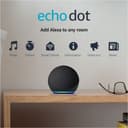
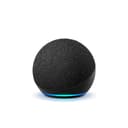







🎙️ Elevate your space with sound and smarts — Alexa’s always ready to impress!
The Echo Dot (4th Gen, 2020) is a compact smart speaker featuring a 1.6” speaker delivering crisp vocals and balanced bass. It supports dual-band Wi-Fi (2.4 & 5 GHz) and Bluetooth streaming, enabling seamless multi-room audio playback. With Alexa built-in, it offers hands-free voice control for entertainment, smart home devices, calls, and routines. Designed with multiple privacy safeguards including a mic off button and voice recording management, it’s the perfect blend of style, sound, and security for the modern connected home.
| Size | 3.9” x 3.9” x 3.5” (100 x 100 x 89 mm) |
| Weight | 12 oz (341.3 g) Actual size and weight may vary by manufacturing process |
| Wi-Fi connectivity | Dual-band Wi-Fi supports 802.11a/b/g/n/ac (2.4 and 5 GHz) networks. Does not support connecting to ad-hoc (or peer-to-peer) Wi-Fi networks. |
| Amazon Sidewalk | A shared network that can simplify Echo device setup and can help your device reconnect to your wifi router when you update your password or network name. Sidewalk uses a small portion of your internet bandwidth to provide these services to you and your neighbors, and is enabled on your device unless you have previously disabled the setting. You can disable Sidewalk at anytime. Learn more here. |
| Bluetooth connectivity | Advanced Audio Distribution Profile (A2DP) support for audio streaming from your mobile device to Echo Dot or from Echo Dot to your Bluetooth speaker. Audio/Video Remote Control Profile (AVRCP) for voice control of connected mobile devices. Hands-free voice control is not supported for Mac OS X devices. Bluetooth speakers requiring PIN codes are not supported. |
| Audio | 1.6” speaker. 3.5 mm line out for use with external speakers (audio cable not included). |
| System requirements | Echo Dot comes ready to connect to your Wi-Fi. The Alexa app is compatible with Fire OS, Android, and iOS devices and also accessible via your web browser. Supported operating systems. Certain skills and services may require subscription or other fees. |
| Setup technology | Amazon Wi-Fi simple setup enables customers to connect smart devices to their Wi-Fi network in a few easy steps. Wi-Fi simple setup is another way Alexa is always getting smarter. Learn more about Wi-Fi simple setup |
| Warranty and service | 90-day limited warranty and service. Optional 1-year, 2-year, and 3-year extended warranty available for U.S. customers sold separately. Use of Echo Dot is subject to these terms. |
| Accessibility features | The Alexa app and Alexa-enabled products include several features for customers with accessibility needs related to vision, hearing, mobility, and speech. Learn more about Alexa accessibility. |
| Included in the box | Echo Dot, glacier white power adapter (15W), and Quick Start Guide. |
| Generation | Echo Dot (4th Gen) - 2020 release |
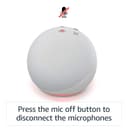
| Privacy features | Wake word technology, streaming indicators, microphone off button, the ability to view and delete your voice recordings, and more. Visit the Alexa Privacy Hub to explore how Alexa and Echo devices are designed to protect your privacy. |
| Language | Alexa speaks English and Spanish |
| Alexa Skills & Features | Alexa makes your life easier, more meaningful, and more fun by letting you voice control your world. Alexa can help you get more out of the things you already love and discover new possibilities you've never imagined. Discover and learn what Alexa can do. |
| Software Security Updates | Learn more about these software security updates. If you already own an Amazon Echo, visit Manage Your Content and Devices for information specific to your device. |
S**E
Got It For Setting Up Stereo But Really Like It By Itself As Well.
I got a Dot with clock to try out the new shaped Echos and really enjoy it. I enjoy it so much I decided to buy a second , without clock , to make a stereo effect when using Alexa for music. Little did I know I can incorporate my full size Echo to enhance the bass , like is a sub woofer. Does it rattle the windows ? No. Does it sound very nice ? Yes About this particular Dot . I got black because of where it'll be located so it would basically disappear but if you're not trying to hide one the other colors are really nice as well. The white isn't bright white but isn't bordering cream either. I really liked the sky blue color of my first one (until I discovered a black Sharpie worked well to make it black while not blocking out the clock ) so it's a nice way to go as well. My last full size Echo was the blue and it is a nice color choice for just about any color scheme room , unlike the white and black that can really become an unwanted drawing of the eyes point but I digress. The buttons on the unit are easy to find and work well . Set up was darn near automatic , much much better than Echo devices just a year ago. The volume can easily fill a room by itself but at a cost of sound quality if its trying to do things by itself. For a large room a big brother Echo will have a lot more oomph and punch whether music or vocal . This Dot will work but sound cheap and Tinny at higher volumes . The 3rd gen Dot doesn't get as loud as this one but was really a little too much in my daughters bedroom when she set it above 5 (50% volume ) . For that size room the 2nd gen Dot was just right. She has a smaller (15'x 15' ) room by far than my 28'x30' den . This one , just like the other 4th gen devices have the microphones near the volume buttons and work very well unless trying to compete with my sound bar they sit on top of . Then they just ignore my attempts to talk with Alexa. At that point I can just talk to the full size Echo by my sofa (across the room ) . You ask any smart device to discern my voice from a tv voice when the tv is inches away and I'm yards away isn't fair so I won't give it a knock but when the sound bar isn't on the Dot can hear me easily even if I speak just above a whisper and the one closest to my den door can hear commands when I first enter the house so by the time I get to the den my lights are lit and I can have music playing if I so choose . Alexa software has really come a long way in 2020 from clunky and not able to discern me from my dog to being able to understand what my 4 year old granddaughter is trying to get to happen and myself practically having a 2 way conversation with it. Catching it on sale and using the interest free 5 payment plan made this one an easy choice that is very budget friendly. The only Echo device cheaper is the Flex but I'd recommend that one only for using Alexa features and routines. The sound and volume on it are not room filling and rich at all . Fine for voice searches and such but not so much even for audio books. For that the Dot more than suffices . If I had to choose 1 Echo device and only 1 it'd be a Dot for it's value and usability . Since I could choose more than 1 ,my most used is the full size 4th gen Echo but I really like the new Dots shape , sound quality , light bar on the bottom , button user friendliness and color choices . If you want a great value , don't need a clock and oomph in your music /audio books listening isn't a must you can't go wrong with this one unless you don't like a device the size of a baseball sitting on your furniture or shelf .
D**E
With this Echo you'll hear loud & clear!
The Echo Dot 4th Gen 2020 release was a gift for my chiropractor. He loves it! It definitely "echos" through his office and it is clear sound. Very good product, very happy with this purchase!
B**D
Echo is better than Google
One of the main features I’d like about alcohol over Google is that they allow you to change the name you used to call them up. I don’t like seeing Alexa or hey Google, I’d like to be able to use my own word and in my case are used the word computer. Yes that sounds like I’m a geek but I like seeing computer and then stayed in my commands much better than Alexa or hey Google. That just makes me feel like one of the sheep in the herd. It does seem to interface very well with all the devices I have but of course you will eventually find something that is difficult to pair it up with especially when you try to get different manufacturers to work together. Sometimes it can be as difficult as getting Windows 95 to work online. That was a joke back then. Down side to heaven a customize name is when you use a name that is brought up in normal conversation it can activate for no reason. For instance, I have one in my living room not too far from the TV so when someone mentions the name computer once in a while it will activate but no big deal as it only happens some of the time. just remember the Echo Dot is the smaller one. I have had only one issue which is real easy to correct but I still have not figured out why it occasionally happens. Sometimes I look at it and I see a red lighted ring on the bottom lit up. That indicate someone turned off the listening capability so it is not listening or story what you say. For some people that is done deliberately when you don’t want it listening. In my case there are only two people in my house and no one is turning it off. There is a button on the top when you push it muted and turned the light red so correctly this means just pushing the button on the top to turn it back on. The only annoying thing is that I do not know why it turned off several times on me so far and I have not been able to related to any activity in the house so maybe there is a voice command and it is picking up the command from listening to the TV. It’s sort of like if you remember the old device sold a long time ago called the clipper, which would turn your lights on or off when you clip your hands. I often wonder what would happen if their device was near your TV and on the TV the audience was clapping , will the lights flash on and off in your house. LOL.
TrustPilot
5天前
1 个月前