We remain fully operational. Our teams are working around the clock to ensure your deliveries continue safely.

下载应用程序


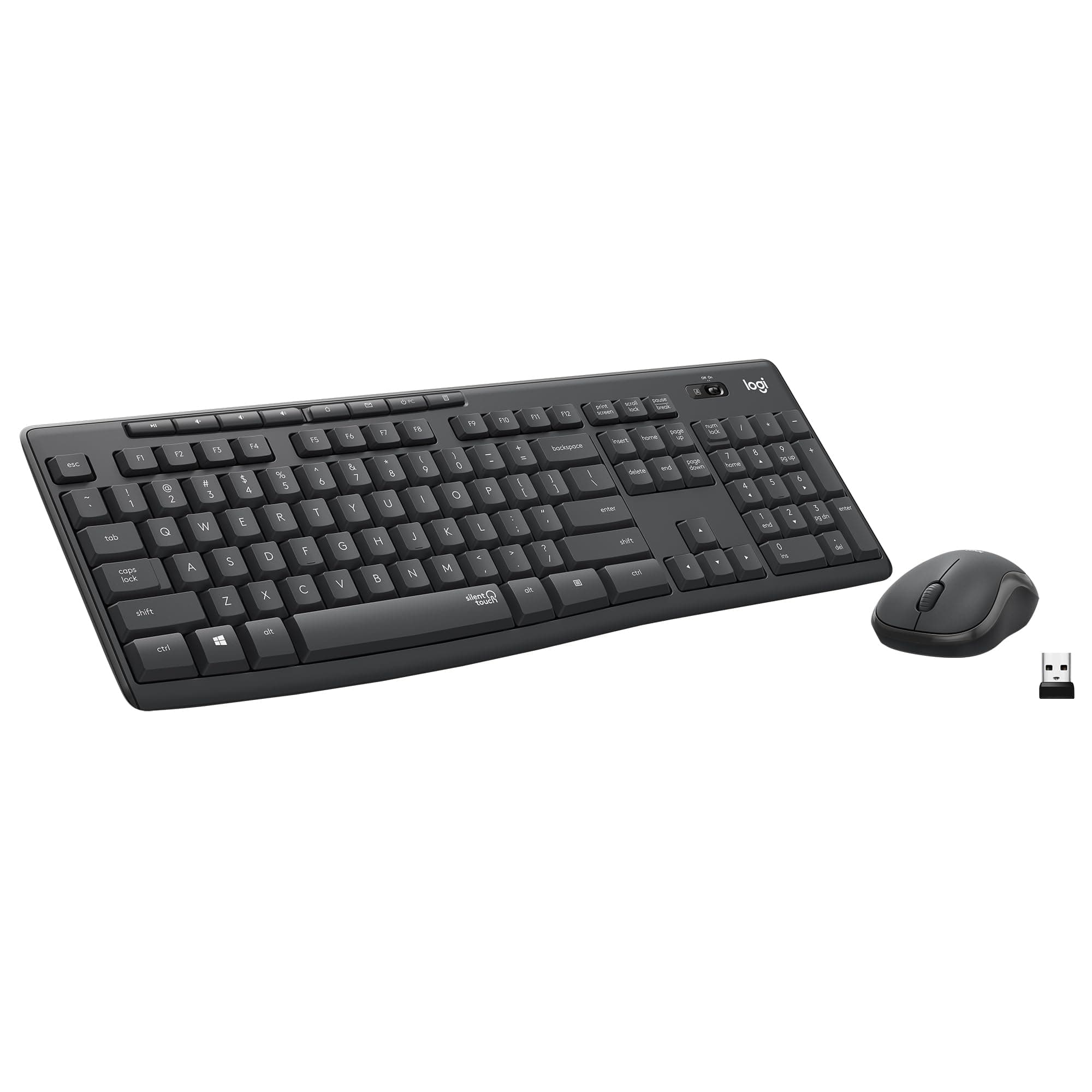




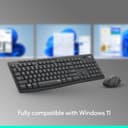

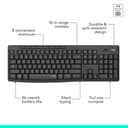

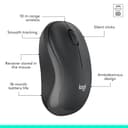
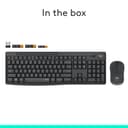

🔕 Quiet meets power: Work smarter, not louder.
The Logitech MK295 Wireless Mouse & Keyboard Combo features innovative SilentTouch technology that reduces typing and clicking noise by over 90%, a full 104-key keyboard with numpad and media shortcuts, and a reliable 2.4 GHz wireless connection with a 10-meter range. Designed for comfort and durability, it offers spill resistance, adjustable tilt legs, and an impressive 36-month keyboard battery life. Compatible with Windows and Chrome OS, this eco-conscious combo includes recycled plastic components, making it a sleek, silent, and sustainable choice for professional workspaces.


| ASIN | B089KV4YYX |
| Additional Features | Wireless |
| Antenna Location | Everyday work |
| Best Sellers Rank | #11 in Computer Keyboard & Mouse Combos |
| Brand | Logitech |
| Built-In Media | User Manual |
| Color | Graphite |
| Compatible Devices | Laptop |
| Connectivity Technology | USB |
| Customer Reviews | 4.4 out of 5 stars 13,647 Reviews |
| Enclosure Material | Plastic |
| Hand Orientation | Ambidextrous |
| Item Type Name | Wireless Mouse and Keyboard Combo |
| Item Weight | 1.6 Pounds |
| Keyboard Backlighting Color Support | Single Color |
| Keyboard Description | Multimedia |
| Keyboard Layout | QWERTY |
| Manufacturer | Logitech |
| Model Name | MK295 |
| Model Number | 920-009782 |
| Number of Keys | 104 |
| Power Source | Battery Powered |
| Recommended Uses For Product | Everyday work |
| Special Feature | Wireless |
| Style Name | MK295 |
| Switch Type | Clicky |
| UPC | 097855160966 |
| Unit Count | 1.0 Count |
| Warranty Description | Manufacturer’s warranty can be requested from customer service. |
M**G
Most Keyboard for the Money
I purchased my MK295 Combo in May 2021. It has worked faithfully all the time I’ve owned it. It is still quiet, and the only issue is I recently purchased a new computer with WIN 11 and an AMD chip. There seems to be a lag as I'm typing this review. I blame the new microsoft Windows. It was, and is, easy to set up because there really isn't any set-up to speak of. Just plug and play. The product quality is exceptional amd it came in the right color, black. Buy it and enjoy it now, before they discontinue it like they did the K470.
P**S
Is the best back
When I test a product and review it I don’t usually use superlative words and I will only rate something five stars if it truly deserves it, and not every product does. This one does. I’ll try to explain briefly. I am a prolific writer and I have actually worn more keyboards out than some small stores sell in a year. Not that I am rough on them, they just don’t last long, and this brand has been my nemesis for as many years as I can remember. While I think they often make the best of class, sometimes, they also sometimes make things I believe are calculated to not last long. But that aside, my other goal this round in addition to durability is I need my keyboard and mouse to be silent, not quiet but silent. Almost none are and currently it’s even trendy to own keyboards with varying degrees of clicky sounds. Not me. IS THIS SILENT My gold standard for keyboards in Logitech’s own K740, which practically every source has called the best keyboard ever made. Unfortunately due to an incredible lack of understanding, they discontinued it with no suitable replacement. Their current high-end offerings are wrong in every way but they don’t think that way which means I have zero interest in them. I like the K740 so much that I bought a second one as soon as I heard they were discontinuing them and I still have it sealed away unopened. Read back a couple of lines and you know what happened to my beloved keyboard, it reached that predicable end of life when the enter key broke and then the letter vee stopped working properly. Both can be fixed with time and patience, which I don’t have so I started shopping and it came down to this model that they call silent and the model K650 which is also claimed to be silent and in fact I couldn’t see way it was going for twice as much, and this one even included a basic but decent mouse, which I thought I would just keep in the box. I had low expectations but I ordered this anyway. From the moment my fingers touched the keys it was love, it is actually very slightly quieter than the K740 (which makes it almost impossible to hear) and the keys are as high quality, solid and non-rattling, perfectly shaped, ideal key travel, in short it’s like this is the long awaited replacement for the best keyboard on the planet. So keep it a secret between you and me, this is its twin brother with a couple of exceptions, which I’ll list below. IS ANYTHING PERFECT I am going to be nitpicking to try to come up with any flaws and there aren’t really any. They are just things to know about, for example this model isn’t illuminated. I used to like that feature but now I’m not sure I miss it. The other has to do with the shift lock light which is in an inconvenient location and hard to see with the glossy clear cover over it. I miss having the on-screen reminder. As far as the mouse, it’s actually better than I though and I put my MX series away for now. If I would improve anything I would say it’s a little small for my hand and a trifle light so when I touch it I’m always wanting to lift it up. Oh and one more thing. Why did they feel it was necessary to print the annoying ad message printed on the space bar with the words silent touch? It’s distracting and completely destroys the professional restrained look of the rest of the unit. Someone is just not thinking at Logi. YES NO MAYBE When I couldn’t find what I wanted I thought I would look for a K740, of course they’ve been long gone for years. There are a lot of people offering them used at as much as $500 bucks and I even saw one for a thousand. No thanks, I know it’s hard to believe but this one is just as good. End of story.
R**C
Silent, Slim, and Surprisingly Comfortable
I recently upgraded to the Logitech MK295 wireless keyboard and mouse, and I’m extremely happy with the purchase. The SilentTouch technology makes a huge difference — the keyboard is impressively quiet, and the mouse clicks are nearly silent. Typing feels smooth, comfortable, and effortless, even during long sessions. The design is slim, lightweight, and modern, which makes it a pleasure to use and a nice addition to my desk setup. The mouse is fast and responsive, with a noticeably smoother cursor movement compared to my old combo. The overall experience feels like a major step up — truly night and day. Battery life is another strong point, and the wireless connection has been stable and reliable. Even though this isn’t a full ergonomic keyboard, it’s still very comfortable for extended typing. Overall, the MK295 delivers excellent value with its quiet performance, slim design, and reliable wireless functionality. I’m very pleased with this upgrade.
P**T
Good value and function for my needs
One of very last Logitech wireless keyboards that you can find in full-standard layout. Otherwise (with the new branding) “Logi” almost exclusively went to multi-device “flow” keyboards. What’s wrong with that? ; it tries to please every platform and you end up both with confusing labels on accustomed keys (like Start – Alt – Ctrl etc) and you have missing/sacrified keys (like print screen, scroll lock, pause/break) or usual functions are hidden under some combination keys – totally in different places. I’m a Windows PC user and has absolutely no multi/flow need with my keyboard. I’m coming from wonderful K800 wireless illuminated keyboard. It served me for about 10 years – quite respected life. But of course, Logitech killed its manufacturing – while there is still a loyal demand for it. I get the urge for coming up with multi-platform niche devices. But I don’t get why you have to kill your best seller and not offer both of them. Alas, corporations like hurting themselves sometimes, for absolute no reason. Illuminated wireless function was my first priority on new keyboard search. That brought me to new MX Keys S series and I was about to hit order button (although quite steep price). Then after reading many reviews my attention came to those non-standard/missing key issues (for Windows users) and some connection issues as well. So I had to drop that model and focused on unknown Chinese illuminated KBs (which there are quite a few). But reviews revealed; high failure rate, connection/battery issues etc. Then I dropped illumination function and focused on standard PC layout with “quiet” feature. This MK295 came up. Extremely reasonable priced KB, very good tactile feel (to my taste) and almost completely quiet typing. It even has those 8 media control/quick function keys on top that I always use. Its full standard PC layout – yet quite compact size. No palm-rest (which I didn’t need anyway) to keep it compact. Yet bundled mouse (M220) has very small toy-like size and rattling top plate. So I’ll never be using that mouse, as I already have two quiet Logitech mice (M330 and M350 “pebble”) and a trackball+mouse M570; all on “unifying” platform. Now we come to connection subject (USB dongle and its utility software), which is quite a mess in Logitech realm. All previous logitech KB and mice simply worked on one single USB dongle type; Unifying. But today all new logitech products are shifting to Bolt USB dongle (which is a modified version of bluetooth). And in between; there is 2.4 GHz USB dongle (which this MK209 uses). None of these 3 dongles work with products from other camp. This is the hardware side. Then we have utility software side; that small SW you load to pair & manage your devices. There is old unifying SW, current Options+ SW and in between Options SW. Options+ SW sees (and only sees) all 3 dongle types. It lists all my my existing paired mice and K800 KB under unifying dongle. But I can only manage the mice and NOT my K800 keyboard! Yet, it doesn’t even show my new K295 keyboard at all! When I do “add” under 2.4 GHz dongle; it says that the SW is not compatible with this new K295 KB. But keyboard itself works at all times – since its factory paired. I found logitech support pages for both Options+ and Options SW – which lists all “compatibe” products. And this K295 keyboard is not even listed under any software! I still uninstalled Options+ and installed Options SW; such a nightmare, as it constantly push you to “login to Logi Web Connect” (otherwise basically it doesn’t let you do anything). But it also does NOT see this new K295 KB! So yes; Logitech is essentially selling this K295 keyboard that NONE of its 3 connection software works with! Isn’t that wonderful? The bottom line is; its factory paired to that 2.4 GHz USB dongle and if your dongle dies; so does your keyboard! Good job Logi! Bottom line; I decided to keep this MK295 combo (and only use K295 keyboard). That means I’ll be having two USB dongles on my PC; old unifying dongle for rest of my existing mice and 2.4 GHz dongle only for MK295. So far I’m OK with that, as I couldn’t find any other keyboard (which satisfies my full PC layout and silent typing demand, as I had to drop illumination feature). Price is quite low on this “transitionary” combo, that I’ll probably buy one more as backup. Why backup? The standard answer is; as with all cheap keyboards, this is a membrane type keyboard (as opposed to individual mechanical switches). That design is inherently prone to early oxidation. But this KB even has an extra “feature” (whether intentional or not, I’m not sure). Check out my pics (against lighted background) to see “air-holes” between front or back. No, they are not intended for cooling down this high-performance keyboard (sarcasm intended). They might speed up that oxidation process, after all. Otherwise why do you put holes both on top and bottom? There is an earlier version of this KB (K270) which has unifying dongle, spill-proof feature and is even cheaper than this. So it should probably last longer than this K295. But it doesn’t have quiet typing feature. Unfortunately, there is no other trusted OEM (amongst HP, Lenovo etc) when it comes to wireless keyboards with full standard layout. Logitech is the only brand that mastered enough key mechanics, tactile feel, reliable wireless connection etc. I wish Apple made PC keyboards for even better quality and functionality! Till then; find your Logitech that is best suited for your current needs.
J**C
I like it. It's good as a gift!
I reordered the same item our company had purchased and gave it to my daughter as a gift. I like the color, how soft it feels, and that it isn’t noisy. This brand is one I trust for computer mice. After a month or two, since it’s white, the areas where your thumb and index finger often touch can get stained or dirty. I clean it frequently, and although it takes a bit more effort than a black one, it makes the desk look brighter and more stylish. My daughter was extremely happy and loved it! For reference, the mouse USB receiver is not inside the mouse—it is plugged into the side of the box. At first, you might think a part is missing, so be sure to check the packaging carefully.
K**K
Actually quiet!
Great keyboard mouse set - both are truly quiet and not just for the first few times you use them. Considering purchasing a backup I like it so much.
S**.
Amazing
I have tried like 3 different keyboards in search of a very quiet one. As an AUTOCAD user, the spacebar on other keyboards would drive me nuts because of how clacky & sharp they sounded, but this one?? The keys feel amazing & it is so dang quiet. I wanna shake the hand of whoever designed this keyboard. I've only had it for a few days so hopefully it doesn't lose its quietness anytime soon as it gets more use, but yeah, this the one in terms of true "silence" & its a very reasonable price. Definitely getting another one for my home office. Notable mention: Logitech M650 mouse, its very very quiet as well, but I will say I prefer the large size even though I have child size hands because I found the regular size made my hand hurt due to using software that requires me to be very dexterous when selecting things.
P**E
PLUG INTO USB 2.0 PORT NOT THE BLUE USB 3.0 PORTS IF YOU WANT IT TO WORK RIGHT
UPDATE: I went and bought AAA batteries (I still hate them very much) and plugged the receiver from the USB 3.0 slot to the USB 2.0 and now the keyboard works, I'm typing on it right now. Just sucks that it's USB 2.0 even though 3.0 is compatible and would have been a better choice. But at least it's working now, typing feels pretty good for a membrane keyboard, I'm used to my mechanical keyboard but sometimes you just need to type quietly when everyone is sleeping. This thing is SUPER DEAD SILENT, you can only hear the keys press but absolutely no sound. Also the mouse actually is pretty precise now that I have it plugged into USB 2.0, it's no longer being weird, no more freezing or glitching. I am updating my star rating on this product. ====================================================================================================================================================================== OLD REVIEW: Great product however.... My keyboard refuses to work. Mouse precision is really terrible, I end up clicking things I didn't mean to. Giving 3 stars because the keyboard is truly is silent but is not working. Pros: Keyboard is super super clocks - no audible clicks Mouse is super silent - no audible clicks Cons: * AAA batteries (I hate them) * Batteries are super cheap not name brand like Logitech used to provide before (Duracell). * Mouse randomly freezes when I move the mouse from one side of the screen to the other. (UPDATE: Plug into USB 2.0 to fix this issue.) * Mouse is pretty tiny comparing it to the M510, this is most definitely a children's mouse. * Wireless receiver is easily easy to miss upon opening the packaging it's right at the very top when you first open the box it's stuck through the cardboard box itself SO DO NOT THROW AWAY YOUR BOX!!! * Precision of the mouse is absolutely terrible (UPDATE: Plug into USB 2.0 to fix this issue.)
TrustPilot
2 个月前
1 个月前