We remain fully operational. Our teams are working around the clock to ensure your deliveries continue safely.

下载应用程序







🚀 Elevate your home WiFi game—because buffering is so last decade!
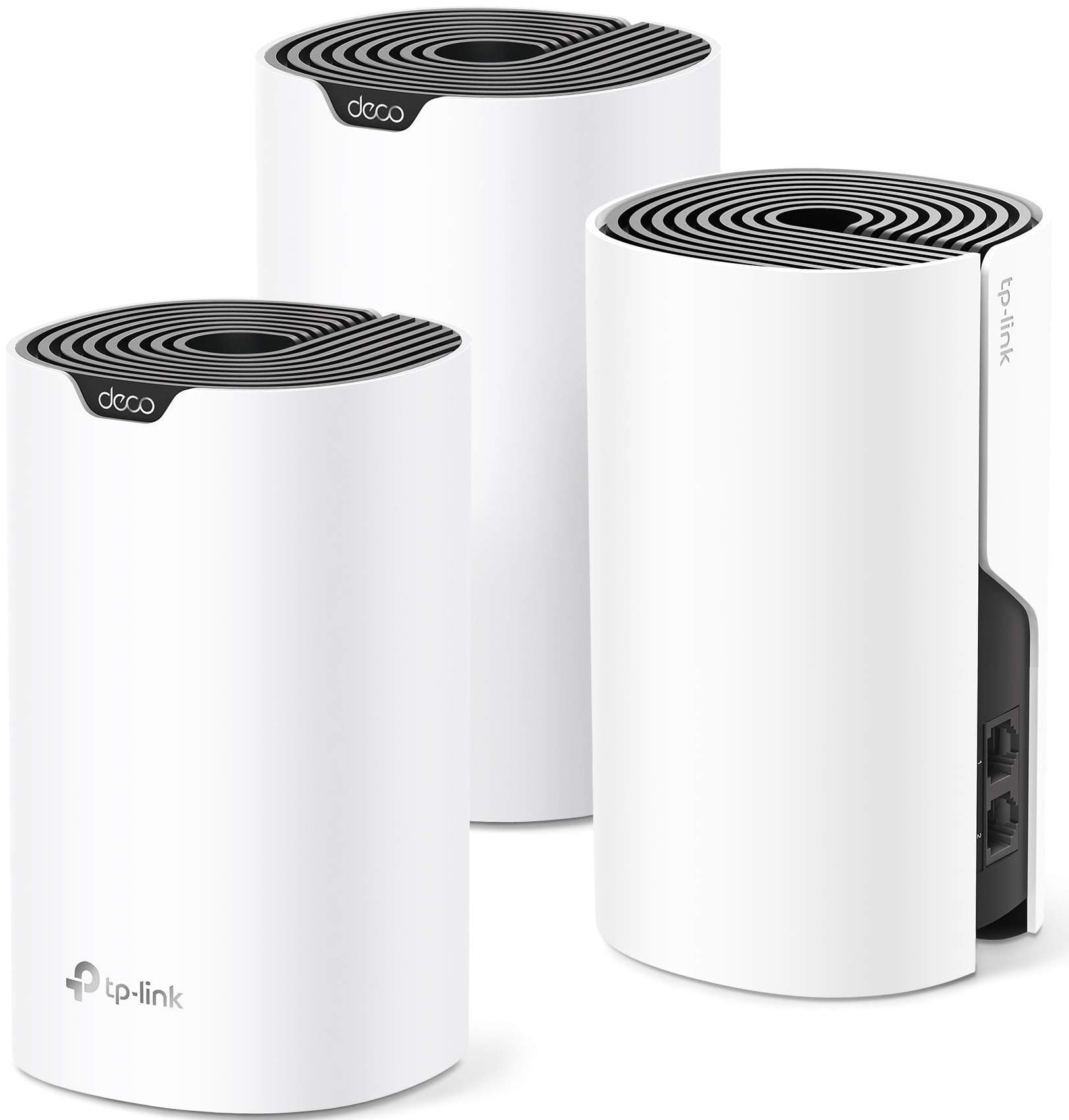
The TP-Link Deco S4 Mesh WiFi System (3-pack) delivers robust, seamless WiFi coverage up to 5,500 sq.ft. with AC1200 speeds and gigabit Ethernet ports. Designed for busy households, it supports up to 100 devices on a single unified network, featuring easy setup, advanced parental controls, and Alexa compatibility. This renewed model is professionally inspected to perform like new, ensuring reliable, high-speed connectivity throughout your home.
| ASIN | B089QW9957 |
| Antenna Location | Home |
| Antenna Type | Internal |
| Best Sellers Rank | #57,783 in Electronics ( See Top 100 in Electronics ) #236 in Whole Home & Mesh Wi-Fi Systems |
| Brand | TP-Link |
| Built-In Media | Mesh body, Power Supply, Ethernet Cable |
| Color | White |
| Compatible Devices | Personal Computer |
| Connectivity Protocol | wi-fi |
| Connectivity Technology | Ethernet, Wi-Fi |
| Control Method | Voice |
| Controller Type | amazon_alexa, vera |
| Coverage | up to 5,500 square feet |
| Customer Reviews | 4.5 out of 5 stars 2,057 Reviews |
| Data Transfer Rate | 1200 Megabits Per Second |
| EU Spare Part Availability Duration | 2 Years |
| Frequency | 5 GHz |
| Frequency Band Class | Dual-Band |
| Has Internet Connectivity | Yes |
| Has Security Updates | No |
| Is Electric | Yes |
| Is Modem Compatible | No |
| Item Dimensions L x W x H | 3.57"L x 3.57"W x 6.39"H |
| LAN Port Bandwidth | 1000 Mbps |
| Manufacturer | TP-Link |
| Maximum Upstream Data Transfer Rate | 1300 Megabits Per Second |
| Mfr Part Number | jingtouu-016 |
| Model Name | Deco S4(3-Pack) |
| Model Number | jingtouu-016 |
| Number of Antennas | 2 |
| Number of Ports | 1 |
| Operating System | Android |
| Other Special Features of the Product | WPS |
| Router Firewall Security Level | basic |
| Router Network Type | mesh |
| Security Protocol | WPS, WPA2 |
| Smart Home Compatibility | Smart Home Compatible |
| Special Feature | WPS |
| UPC | 753575513191 |
| Unit Count | 3.0 Count |
| Warranty Description | 90 days limited warranty |
| Wireless Communication Standard | 802.11ac |
| Wireless Compability | 802.11ac |
D**N
Effortless Superfast Wi-Fi !!
This mesh Wi-Fi system is the best internet Wi-Fi investment I have ever made.....period! The set up is a breeze. I now have a very strong Wi-Fi signal throughout my entire property, and beyond. I have a 13,000 square foot lot and I can literally walk the perimeter of my property and still get 5 bars on my iPhone. I can go next door and still get a signal. Let me go over my set up. Just be sure to have all three units and your router near you. Download the app and follow the on screen instructions. You will be up and running in no time. The placement of the units is crucial for optimal coverage. I have all three units sitting up high and equally spread throughout the house. Avoid microwaves and large appliance if possible. I ran Wi-Fi speed tests before and after. I went from 10 mbs to 200 mbs. Unbelievable!! The Ethernet ports are a huge plus. I have a Mesh router sitting in the Living Room above our entertainment center. I have our 75" LG TV and our Roku Ultra plugged directly into this Mesh router via the Ethernet ports. I can not believe the difference, I now absolute zero buffering, and a crystal clear picture. So much more enjoyable to stream. If you Super Fast Wi-Fi throughout your home, Look no further!! I highly recommend!
S**C
works great - many factors involved though.
i have sb s6782 ac (Arris surfboard) connected to xfinity high speed. Unit manufactured in 2014 and as of sort of recently I think, I can no longer log in to device at 192.168.xxxxx. But the device still works. But my 5ghz wifi speeds dropped to about 70-80 mbps and seemed intermittent. Youtube tv doing lots of buffering and chromecast devices constantly disappearing from network. 2.4 ghz speed also dropped (to about 25-30 mbps). I plugged ethernet cable to mac computer and got speeds of 220-230+mbps from the old Arris. So I figured if the device could still pull that speed from xfinity I would try to continue using it. Remember In order to see how well a new device works you need to know how good the signal is that you provide. So I suggest testing current modem/router or whatever set up you have via ethernet as place to start, as well as test the speeds of both bands of your current modem/router. So I Bought the 3 pack TP-Link Deco Whole Home Mesh WiFi System (manufacturer refurb). Set up was not difficult. I have an open loft townhouse. First device sits next to the Arris connected by ethernet cable. Second device in living room about 45ft away. 3rd device in loft about 25 feet from second device. My 5ghz speeds are now 200-250 mbps depending on time of day regardless of unit (you can see which is used). 2.4ghz speeds are 45-75 as well. If you are wondering why the 2.4 ghz speeds matter...i have 2 chromecast speakers and a chromecast audio that run on 2.4ghz, so my phone also has to use that network. Moreover, casting to all of my chromecast speakers has become stable. No device has ever disappeared from the cast view (i cast amazon HD music from phone every day several times per day). Additionally my google tv (the usit google tv sent to subscribers due to roku fiasco) works so much faster on this 5ghz connection. Important: The Deco S4 comes equipped with only wpa security and all of my computers were suddenly warning about the security level (or lack of security). So I was not thrilled. But there is a firmware update for the deco s4 (update is v1.5) and it has the option to switch to wpa2-psk (AES). But the user forums were full of complaints that the update caused their speeds to crash. Yikes, and there were many complaints. I waited for a few days and decided to to the firmware update and if my speeds crashed I would simply return to amazon. The update was easy to install, and my speeds did not crash, and it seems as though the addition of the "network optimization" feature (which i ran) helped get the speeds up. So all in all it is a massive success. One more important note (which is a negative item with a solution)...the deco does not display both network frequencies. So my devices with 5ghz will all grab 5ghz, which means my samsung note 8 could not get onto the 2.4ghz that is required for casting to the 2.4ghz chromecast devices. The solution is to set the guest network up and so now there are 2 networks. And each network can be set to either be 2.4&5ghz, or 2.4ghz only, or 5ghz only. So I made one network 2.4ghz, and one 5ghz. It works great. Eventually I'll replace the Arris with a modem only device.
J**A
Excellent range and speed!
Works perfectly, setting it up was really easy as you only need to plug it in and follow some instructions, the app is also very easy to use and user friendly even if you don't know much about networks. the size is not bad, it could look as part of the decoration of the house. speed and range are very good considering that my house has thick concrete walls, it reaches every corner.
M**T
Great entry-level mesh system, but it has real limits — especially with backhaul setups
The Deco S4 is a great starter mesh Wi-Fi system. It’s simple to set up, the app is easy to use, and adding nodes takes seconds. Speeds stay consistent as you move through the house, and it handles normal home use—streaming, browsing, basic smart-home devices—just fine. The newer S4 units even add nice touches like an IoT network option and the ability to manually assign which satellite connects to which main node. That said, the S4 definitely has hard limits, and knowing them up front makes all the difference. Where the S4 works well: Small to medium homes Moderate device counts Wi-Fi backhaul setups People who want simple controls, not advanced networking For that crowd, it’s a solid, budget-friendly choice. Where the S4 struggles: Large homes or multi-building setups Homes with a lot of smart devices (40–80+ range) Faster internet plans (gigabit or higher) Users who want more control over their network Anyone planning to scale up long term The hardware just isn’t built for heavy loads or bigger environments. IMPORTANT TIP for Ethernet Backhaul Users If you’re planning to run Ethernet backhaul, your switch hardware matters more than you think. Do NOT use unmanaged switches. You need managed switches with proper loop prevention (STP/RSTP) enabled, or you’ll run into endless problems—Decos going offline, app changes failing, firmware issues, devices randomly dropping, and the whole system taking forever to recover if one unit loses power. And here’s the part most people miss: Cheap managed switches can be just as bad as unmanaged switches. If the switch has sloppy STP/RSTP behavior or cuts corners internally, your Echo devices will struggle, Decos will wander or desync, and wired backhaul will be more trouble than it’s worth. You need a quality managed switch—something with stable loop prevention—to avoid a pile of Echo-related headaches. Once I replaced the cheap managed switches with reliable ones, every one of those problems disappeared instantly. Bottom Line: The Deco S4 is a good, reliable entry-level mesh system when used within its limits. For basic whole-home Wi-Fi, it’s easy to recommend. But if you have a large house, tons of devices, faster internet, or any plans to expand, you’ll outgrow the S4 quickly and should look at a higher-end system. Still, set up correctly—with the right switches—the S4 works exactly as advertised.
R**N
No more wi fi glitches!
Amazing and affordable product that has helped us with our glitching wi-fi, for all our internet needs! Easy set up and very durable! So glad we bought these!
D**S
Wi-fi Goodness!
I've used these for a several years in my house and they work great to extend a consistent wi-fi signal while walking around and even for connecting cameras on the outside of the house. No more worrying about if I'm close to the router or using a different wi-fi in the front of the house versus the back. Easy to set up, easy to reboot after the power comes back on.
L**Y
Outstanding mesh system. Easy setup, solid software and rock solid stability.
I've installed three Deco systems and have a fourth on the way. The software is great. You can quickly swap between different networks and monitor all of the networks and hardware remotely. One of the units is in an office with a warehouse. The other two are in homes for people that are not tech savvy who were having problems with weak signal in areas of their homes that were resolved after installing Deco. All three networks have been rock solid, zero reboots required. This is important. The app is great. You can log in remotely to check the status remotely and switch between multiple networks. It's feature rich, and there are no paywalls. I'm a big fan of the Deco series of Mesh routers. Before buying Deco, I had a system from Amplifi. I liked it, but it became unstable after a couple years. I currently have Eero in my home. I was attracted to the advertised benefits of adding Eero to a home with several Echo devices. My Eero mesh sucks so hard it's impossible to describe how bad it is. I'm looking forward to replacing it with a Deco unit.
R**5
Solution to a difficult problem
I live in a two story log home with a 10 ft wide fireplace made of cinder blocks and stone dead in the center. To add to the signal obstructions the first floor has wire mesh attached to all of the ceilings. I guess this was installed to hold the stucco finish to the ceilings. It makes a pretty good likeness of a Faraday cage for wifi. I had to install my cable/wireless router by the tv and connect to the tv using lan cable to get an effective connection. I have tried using various wifi extenders over the years but they do not provide a reliable connection when moving through the house. I finally gave up a decided to try this mesh solution with three Deco units. I tried different locations but couldn't get a good reliable signal on both floors. The fireplace was effectively blocking a good signal. In frustration I ordered two more. I know have a very good signal throughout the house and have had no problems. My three grandsons are gaming on their ipads, my wife, my son, his wife and I can use our smart phones at the same time as the grands are gaming while the Tivo is streaming a movie. All with no problems. It took more of a purchase than I had planned but I am extremely happy. Oh, both the three and the two set of renewed units looked brand new. The three set were in the original boxes and looked brand new. The two unit order were not in individual boxes but also looked unused. I am very satisfied with this purchase and the performace of these units.