We remain fully operational. Our teams are working around the clock to ensure your deliveries continue safely.

下载应用程序


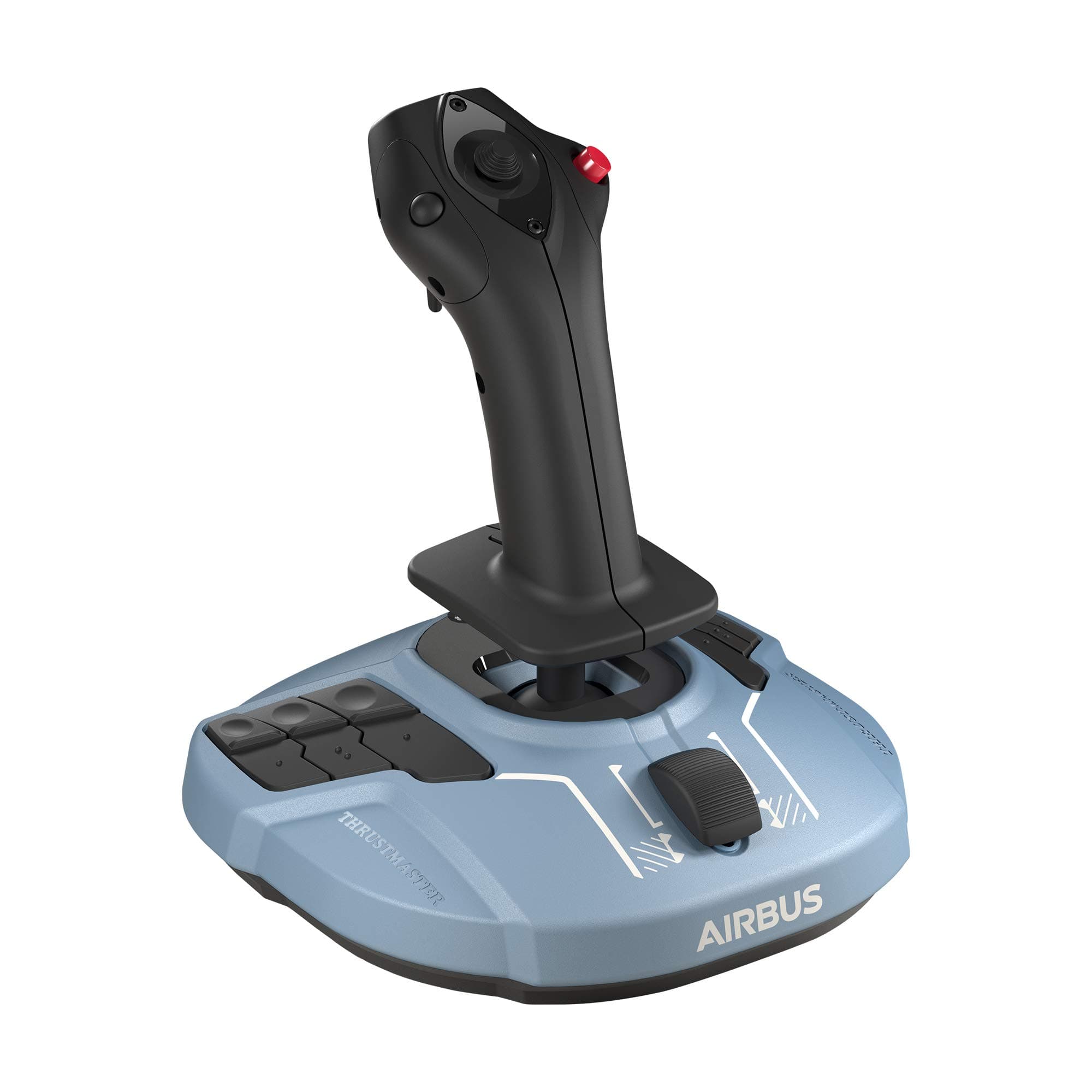
🛫 Elevate your flight sim game with Airbus-grade precision and control!
The Thrustmaster TCA Sidestick Airbus Edition is a high-precision, ergonomic flight stick designed as an authentic replica of the Airbus A320neo sidestick. Featuring 12 remappable buttons, an 8-way POV hat switch, an integrated throttle with thrust reverser, and advanced H.E.A.R.T magnetic sensors, it offers unparalleled realism and customization for PC flight simulation enthusiasts seeking professional-grade control and comfort.


| ASIN | B086J5Y814 |
| Batteries | 3 AA batteries required. |
| Best Sellers Rank | 1,129 in PC & Video Games ( See Top 100 in PC & Video Games ) 45 in PC Game Controllers |
| Country of origin | China |
| Customer reviews | 4.4 4.4 out of 5 stars (3,485) |
| Is discontinued by manufacturer | No |
| Item model number | 2960844 |
| Language | English |
| Product Dimensions | 20.8 x 19.8 x 24 cm; 920 g |
| Rated | Ages 3 & Over |
| Release date | 25 Jun. 2020 |
T**I
Excellent joystick for the price
This is a really good joystick, it has a smooth and firm action in all 3 axes with a medium strength spring. I am using it with X-Plane 11 with the B737-800 and had no issues installing and configuring it. The only small downside as others have said is that the throttle slider came installed upside down on my unit, it was sticking out below the front of the unit at minimum throttle. Also the detent arm for reverse was not even touching the cut-outs intended for it so it had no feel at all. I fixed both these issues myself with little effort. You can lift off the black plastic throttle button by carefully and slowly rocking it up and down as you lift. Then remove the screw holding the plastic detent arm and lift it off. Cut a couple of thin strips of electrical tape and place directly underneath where the arm sits, as close to the screw as possible. Replace the arm, press it down on the tape and tighten the screw. The arm ends should now sit about 2mm higher than before. Add another layer of tape if needed. There is a very good guide on Reddit to do this, just google "Detent Fix for Thrustmaster Airbus Stick". I'm not going to knock off a star for this problem even though this should have been done correctly at the factory as it was a very easy fix and I otherwise love this joystick. Hope the above is helpful to someone.
B**Y
SO GOOD!!!!!!!!
The best joystick for this price range, literally no complaints at all, proper quality
J**N
Great controller / Terrible throttle implementation
So what can you say about a joystick??? I was quite excited about trying this stick after my previous Thrustmaster T.Flight broke.....those potentiometers don't last forever. This stick however uses a totally different system for sensing movement which is so much better. As a heavy X-Plane user I was hoping the control of the A319/A321 would improve ever so slightly. Here's my opinion... -- Installation on Windows 10 -- Install the drivers as it makes switching between mode1/2throttle easier. Don't install the SMART software unless you really need it. -- Pitch/roll/yaw axis -- Much better than the potentiometer models There is plenty of travel in all directions Yaw can be locked if you have pedals -- Buttons -- Loads of buttons and all work well although you sometimes need to be very positive and press in the centre of the buttons located on the base. -- Left / Right handed switching -- This is easy to switch. Personally I prefer right handed mode. A small screwdriver is needed to swap the buttons. Remember to switch the button underneath the base to left or right -- Throttle -- Where do I start. Thrustmaster have tried to make this "clever" and failed miserably. There are 2 modes. Mode1 is a standard throttle so the bottom stop is idle and the top stop is full throttle. Mode2 is designed for aircraft with reversers and moves the idle position about 5mm forward of the bottom stop as well as adding an additional button to the bottom position. The idea is that you map "toggle reversers" to this extra button. So you reduce the throttle to idle passing over the threshold, then move the slider to the bottom on touchdown to trigger the reversers, then slide all the way forward for full throttle reverse......then to idle, then to the bottom to turn off the reversers....then back to idle. This seems like such a great idea but it's actually rubbish for one simple reason. Thrustmaster didn't engineer the physical idle detent point correctly so you can't actually feel the stop point. You can see in the picture the recess for the detent, and also the piece of plastic which is supposed to provide resistance at the idle point. It just doesn't work as it needs to be sprung. What ends up happening is you're constantly trying to work out if you're are at idle, or if you've set the reversers off. I went back to mode1 and assigned the reversers to a button and have no issues. The throttle range and sensitivity in mode1 is excellent. In summary, a great controller with a terrible (mode2) throttle implementation.
J**S
Must have if you use airbus aircraft in flight sims
I bought the Thrustmaster TCA Sidestick Airbus Edition specifically for Microsoft Flight Simulator and Xplane 12, and honestly, it has completely changed the experience for me. If you are still using an Xbox controller or an old, jittery joystick, this is a massive step up without breaking the bank. What I love about it: Precision (The H.E.A.R.T. Tech): This is the biggest selling point. The magnetic sensors make the stick incredibly smooth and accurate. There are practically no "dead zones" (simmers will know the pain), making manual landings and small adjustments feel buttery smooth. The Airbus Feel: It’s a 1:1 replica of the A320 sidestick. If you fly the FlyByWire A32NX or the Fenix A320 in the sim, holding this stick adds a layer of immersion that is really cool. It just feels "right" for modern airliners. Ambidextrous Design: It comes with swappable button modules so you can set it up for the Captain (left hand) or First Officer (right hand) side. It takes about 2 minutes to swap them with the included screwdriver. Plug & Play: MSFS recognized it immediately. The default mapping was already set up perfectly for the A320neo, so I was flying 5 minutes after opening the box. Things to keep in mind: The Throttle Slider: There is a tiny throttle slider at the base. It does have a reverse thrust detent (which is a nice touch), but it has a very short travel distance. It works fine for casual flying, but I will probably want to buy the separate TCA Quadrant throttle to go with this. It’s Light: The base has rubber grips that hold well, but the stick is lightweight. If you get too aggressive during a crosswind landing, the base might lift off your desk slightly. I learned to be gentler with my inputs, which actually improved my flying! Twist Rudder: The twist function for the rudder works great and can be locked if you have pedals. However, if you have big hands, you might accidentally twist it while banking hard. Verdict: For the price, this is arguably the best "mid-range" stick on the market. It feels much more precise than the Logitech Extreme 3D Pro I used to have. If you are a flight sim enthusiast—especially if you love Airbus planes—this is a no-brainer.
H**.
Für Flugsimulatoren Freunde... (Airbus Piloten) ein toller Flight Stick. Sehr gute Verarbeitung / sehr gutes Handling. Für PC und X-Box. Viele Einstellmöglichkeiten und das leichte Handling machen den Stick zum perfekten Airbus Flight Stick. Umrüstbar für Pilot oder FO Seite. Werkzeug und Tools alles dabei.
F**.
El Thrustmaster TCA Sidestick Airbus Edition es una joya para los entusiastas de la simulación de vuelo. Su diseño inspirado en los controles de Airbus proporciona una experiencia de vuelo auténtica y envolvente. La construcción robusta y los materiales de alta calidad garantizan durabilidad y precisión en cada movimiento. La sensación ergonómica del Sidestick es excepcional, ofreciendo comodidad incluso en sesiones de vuelo prolongadas. Los botones y controles están perfectamente ubicados y son fáciles de alcanzar, lo que permite un acceso rápido a las funciones clave sin sacrificar la inmersión. La compatibilidad con una variedad de simuladores de vuelo y plataformas lo hace versátil y adaptable a las preferencias de cada usuario. Además, su sistema de calibración y configuración permite una personalización completa según las necesidades individuales. En resumen, el Thrustmaster TCA Sidestick Airbus Edition es una elección sobresaliente para los aficionados a la simulación de vuelo que buscan una experiencia auténtica y de alta calidad. Su diseño, precisión y funcionalidad lo convierten en una inversión que vale la pena para llevar la experiencia de vuelo virtual al siguiente nivel.
O**Z
Seti tamamlamanız gerekiyor. Tek başına çok cılız oluyor.
K**L
İstanbul içi 13 saat gibi mükemmel bir sürede teslim edildi, kutusundan ithalatçı garantisi ve gamepass hediyesi ile çıkıyor. Buton ve joystick hissiyatı güzel, fiyatına göre tamamen plastik olması biraz üzücü ancak genel olarak sağlam ve kaliteli. Ben xbox’a takıp kullanmak için aldım, msfs2024 için hiçbir ayar yapma gereksinimi olmadan doğrudan çalışıyor. Kesinlikle tavsiye ederim. Throttle lever olarak çalışan kısım yetersiz daha keyfili bir kullanım için gaz kollarınıda almak şart…
R**W
Best stick with the rudder and throttle function comined together in rhe joy stick.
TrustPilot
1天前
3 周前