
下载应用程序



⌨️ Elevate your Surface Go game—because your productivity deserves the spotlight!
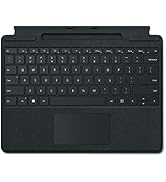
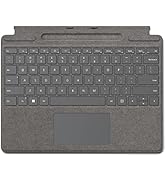
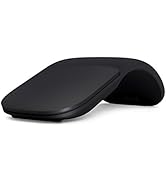
The Microsoft Surface Go Type Cover in black is a sleek, compact keyboard designed specifically for Surface Go 1 and 2 devices. Featuring a full keyset with backlit keys and a large precision trackpad, it magnetically attaches for seamless use. Its battery-powered design ensures wireless convenience, while the durable black rubbery finish offers a smudge-resistant, comfortable typing experience. Perfect for professionals on the move who demand style and function in one essential accessory.





| ASIN | B086QCKTMZ |
| Best Sellers Rank | #6,456 in Tablet Cases |
| Brand | Microsoft |
| Color | Black |
| Customer Reviews | 4.6 4.6 out of 5 stars (2,751) |
| Date First Available | May 6, 2020 |
| Is Discontinued By Manufacturer | No |
| Item Dimensions LxWxH | 7.48 x 9.76 x 0.18 inches |
| Item Weight | 10.9 ounces |
| Item model number | KCM-00025 |
| Language | English |
| Manufacturer | Microsoft |
| Operating System | Windows 10 |
| Power Source | Battery Powered |
| Product Dimensions | 7.48 x 9.76 x 0.18 inches |
| Series | Surface Go Type Cover |
| Standing screen display size | 1 Inches |
S**E
The Microsoft Surface Go 1 or 2 companion you must have. Too bad ther'es no Fingerprint ID
If you already have a Surface Go 1 or 2 or considering buying one, then consider this Type Cover keyboard, because it will look lonely without it. ;) It's just too bad that the Surface Go Type Cover Keyboards don't come with the Fingerprint ID that exists in the newer Surface Pro Type Cover Keyboards. The keyboard is overall great. The material, the spacing of the keys, their travel and the trackpad. Adding to that the backlit light, the magnets patent and the textured feel and it makes a great companion for the Surface Go. I picked the black version which is slightly cheaper than the other colors, but the price wasn't the factor of my decision. The factor for me was the material; the black one is more of a rubbery feel where you lay your hands, which is less difficult to clean. While the other colors have the Alcantara luxury material which is more challenging to clean. But I think that the back is the Alcantra luxury material because it's different from the top, but I'm not certain. Picking the black version also led me to pick the black Surface Pen and Mouse over the other colors, and I must say that looking on them all together is very satisfying. If you're in doubts regarding the colors, maybe the picture of the entire set I added to this review will help you to decide. :) Above the pros above, below are a few matters I find as cons: - No Fingerprint ID. - There is no Right-CTRL key, only left one. - There is no right-click key, which I find very useful if you're navigating only with the keyboard. - There is no fingerprint feature. - You can't use this keyboard when it's disconnected from the Surface. - The FN-Lock to make the F1 through F12 keys be the default than their alternative behaviors is a little tricky to activate; you have to press and hold the FN key for a half second to a second until its led turns on. The second problem on this topic is that the PrtScn, Home, End, PgUp, PgDn keys are the alternate behaviors of the F8 through F12 keys. And to use then while the FN-Lock is activated you need to also hold the FN key. But it could be nitpicking. I'm satisfying with it nevertheless.
E**E
Worth it ! Good quality !!
Work good. Quality is very nice. Highly recommend I bought for surface go 3
L**S
OEM is best for responsiveness, action and quality
I tried a different, well-rated keyboard that relied on bluetooth despite magnetically connecting to the keyboard port on the bottom of the surface. Although that was good, it had unexpected lags and was sometimes hard to wake. Even the backlighting on that case was a little problematic becuase it was so much brighter around the keys than through them, making it hard to read the keys. So, despite it being double the cost, I went back to the Microsoft OEM product and have not been disappointed! It feels lighter, never lags, has perfect keyboard action and the backlighting is exactly what it should be - you can see the letter/symbol on the key well instead of just the key outline. It is worth the extra cost.
M**D
Wonderful add-on
Full disclosure, I've only had it about 2 days! I love the look! Yes poppy red is a weird red/orange color but I have the MS pen in the same color, so it matches. And I found a hard case with a little of this color, so it works. But the keyboard has nice suede like aesthetic. I felt better about spending $90, rme. So I noticed that buying MS add-ons mean you don't have to have additional chargers etc. And of course it fits perfectly. But not only that, when I use my Go in tablet mode by flipping my ⌨️ over, it does not accidentally type. The other brands will do this, you'll have to switch them to off in tablet mode. You also may not be able to flip the other brands over comfortably, someone I know just disconnects her ⌨️ to use in tablet mode. It connects automatically as soon as you attach it. And it matches all the MS products. I love it!
W**2
Touch pad has good response
I purchased this after trying a lower price competitor. I replaced the cheaper brand because the tough pad was too sensitive and reacted during typing and could not be adjusted. I have used the new one for over a year and am much happier with the performance and sensitivity.
M**L
Excelente, llegó una semana antes de lo previsto. Es NUEVO y funciona a la perfección para la Surface Go 2.
R**A
Excelente producto el mejor para conectar a la surface go
R**N
Great Quality
2 years of service and still working great! This is a good product that is durable and works well!
U**1
غير عملي بالمرة وسئ جدا فصل بدن سابق إنذار ولا اعرف السبب أو العلاج
M**M
It fits nicely to my surface go and even though it was used, the keyboard was in a very good condition. So far, I am very satisfied with the product.
T**K
Easy to install. Clicks on the surface go 2, and works very well. Fits it perfectly
A**R
Snapped right onto the tablet and worked perfectly. Adds a cover to he screen. Very lightweight. Love it
J**N
Funciona sin ningun problema
TrustPilot
1天前
3 周前