We remain fully operational. Our teams are working around the clock to ensure your deliveries continue safely.

下载应用程序


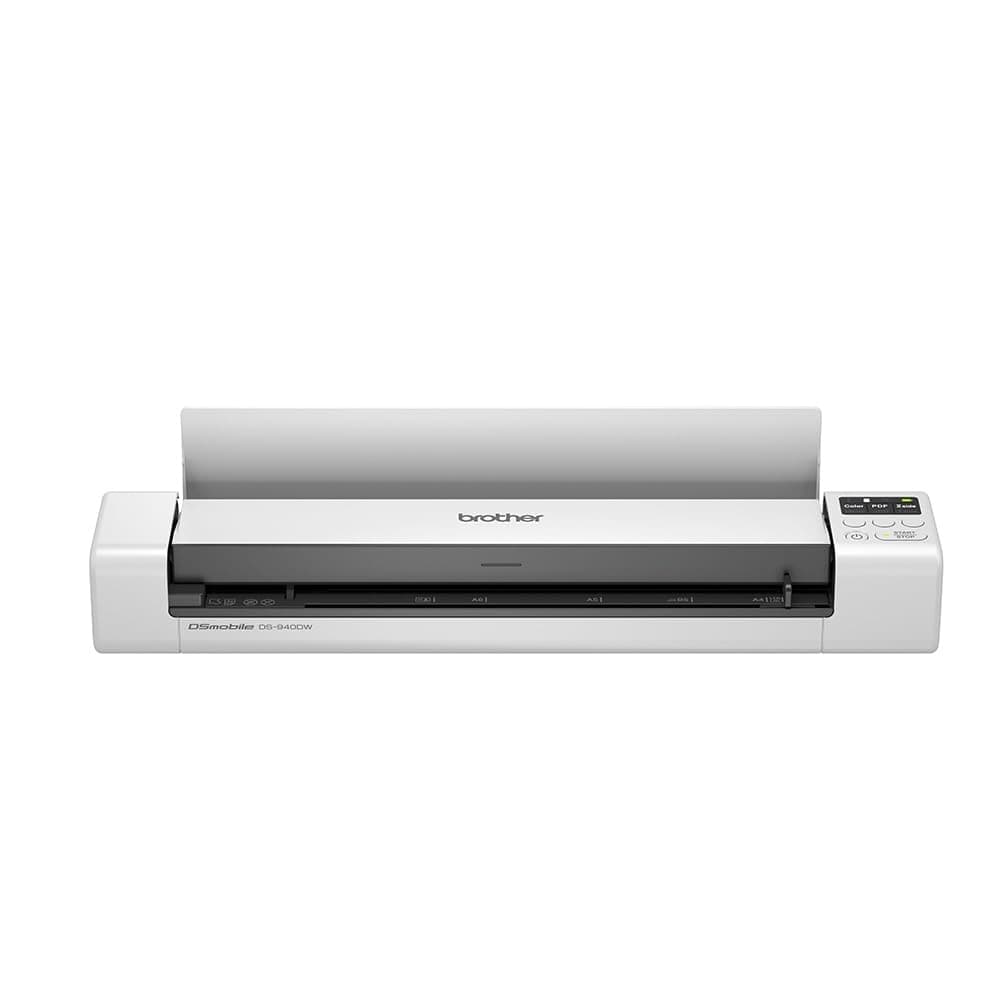
🚀 Scan smarter, work faster—your portable office powerhouse!
The Brother DS-940DW is a sleek, portable document scanner designed for professionals on the move. Featuring wireless and USB 3.0 connectivity, a built-in rechargeable battery, and 2-sided scanning at 15 pages per minute, it delivers high-quality 600 dpi scans of A4 documents, receipts, and ID cards. Paired with Brother’s free iPrint&Scan app and advanced software, it streamlines document management and sharing, making it an essential tool for flexible, mobile workflows.


| ASIN | B083ML5KQZ |
| Best Sellers Rank | 5,438 in Computers & Accessories ( See Top 100 in Computers & Accessories ) 4 in Document Scanners |
| Box Contents | 1 Stück |
| Brand Name | Brother |
| Color Depth | Input: 48bit, Output: 24bit Bits |
| Customer Reviews | 4.0 4.0 out of 5 stars (867) |
| EU Spare Part Availability Duration | 2 Years |
| Global Trade Identification Number | 04977766800631 |
| Greyscale Depth | 8 bits |
| Item Dimensions D x W x H | 7.6D x 16.2W x 37.7H centimetres |
| Item Type Name | Portable Document Scanner |
| Item Weight | 590 Grams |
| Manufacturer | Brother |
| Media Type | Business Card, ID Card, Paper, Photo, Receipt |
| Minimum System Requirements | Windows 7, macOS 10.12, Linux SANE |
| Model Name | DS-940DW |
| Network Connectivity Technology | USB, Wi-Fi |
| Optical Sensor Technology | Other |
| Paper Size | A4 |
| Resolution | 600 dpi |
| Scanner Type | Sheet-fed scanner |
| Standard Sheet Capacity | 1 sheets |
| Unit Count | 1.0 Count |
| Wattage | 3.6 watts |
A**R
What an amazing little scanner.
I was fully prepared to be shipping this unit back if it did not live up to expectations but it is staying with me. I’ve had a number of portable document scanners over the years with a varying degree of success with each. I did a great deal of research into this type of scanner prior to ordering which included the ScanSnap, Doxie, canon and Fujitsu equivalent models. I am a prolific archivist and detest paper so any paperwork given to me gets scanned in and stored electronically. With the MFD shortage brought on by covid I struggled to get a worthy replacement MFD for home with an ADF when the ADF on my Canon just wore out. Over the recent year my job has changed to that of a more flexible worker either from the Office, home or client sites so a portable unit that can be added to my office in a rucksack was the best fit. Anyway enough about my situation. This unit can scan to a machine over USB, Wi-Fi and via a memory card you insert into the back of the device. Whilst the memory card does not petrude it would be nice if there was a clip or cover over it to stop it from being accidentally ejected. This may after all contain sensitive information or the remains of sensitive information after deletion. Scanning to the memory card is OK and just OK. Each page is saved as a separate document, even when selected PDF and 2 Sided each side will be safed as a separate document and not combined. You just put another piece of paper in the feeder and it scans and saves. There I no method, that I have found documented to continue a scan to the memory card into one file. The scans require assembly into a single file after the fact in the included software. I use this feature only for documents of one page. Only when there is no other practicable choice do I use this for multipage scans as it is a bit of a ball ache. Quite why they didn’t make use of the “WStart/Stop” button is anyone’s guess. The Wi-Fi functionality is OK, it is a bit slow in my experience. There is also no “known” Wi-Fi settings listed on the device’s settings so it just remembers the previous network it is connected to. It would be useful it it retained the settings for a number of networks to allow it to move between home, work and Mi-Fi adapter without having to repair the thing by the WPS button each time. As you can tell I mostly use my device over USB, its plug and play and fast. The built-in blank page detection is brilliant and the Brother iPrint & Scan software really is very good. This has a continuation feature so you can just keep stuffing pages into the feeder and they become one document. Automatic page rotation is also a good feature that works well as does deskew. The ability to insert a few pages at once would be nice but it isn’t worth sacrificing the extra size needed to support this. As a portable unit it would have been nice if it included even a cloth carrying case to stop it from being marked in my bag but this is an extra purchase. On th front of the feeder there is a peper guide for the feeder of the slidy piece of plastic type but there is no resistance to moving it so it is pointless. I may well gluee mine in position at somepoint. Despite these shortcomings it works well, the scans are good and it chewed through a massive backlog of scanning in a short period of time and will be taking up its place in my Office in a rucksack.
D**3
Sony CECHZA1 USB AC power adapter will charge this scanner from the wall
A lot of criticism from this scanner is the requirement to have to charge it via a PC, with the inability to charge via a regular cable into a plug socket. After some trial and error I have found this scanner can be charged from the wall using a Sony AC charger adapter, which is designed for the PS3. These adapters can be sourced online for around £15 and whilst not as streamlined as a simple USB cable into the wall, it’s not far off and makes life a bit more convenient than having to plug into a PC, if it’s something that is important to you. Should Brother have supplied something similar with the scanner? Well it would have been no bad thing... Much has been said of the scanner, so I wont repeat much of what has been said. The bonus feature for for me was 2 sided scanning which saves a bit of time and similar units at this price point and less do not offer this. A couple of reviews have mentioned that tatty paper with creases and folded corners can make for the feeding mechanism to suck the paper in at a slight angle which makes for a slightly wonky scan. If you feed it carefully it can largely be avoided. There are 3 media transmission options; tethered to a PC, send to micro SD card, send to wifi device (needs connecting to a wifi network broadcast by the scanner, not your home wifi). I’ve not tried tethered scan in but image capture works well via SD card and via wifi to app on phone. The scanner scans quick enough, the limitation on speed is having to manually feed additional sheets in. I can’t comment on battery life as I’ve not used it that extensively yet. My only observation is the battery light moves from green (fully charged, high charge) to orange (less charge) quite quickly. Now I have the Sony adapter I am less bothered.
I**G
Dropped 1point for complicated instructions.
Instructions need to be more clear otherwise this is a 5 star kit use it a lot having sorted the instructions into understanding script I can fully recommend this device .. well pleased
S**E
Not for Surfacepro
Avoid this product if you have a Surfacepro 11 and rely on a USB hub. It doesn’t connect through the hub. Sadly had to return.
M**O
Scanning on the go
This scanner allows me to get digital copies of documents anywhere here I need to drop down as a road warrior for my job, without needing to beg the hotel to do it, or the customer. I usually use it connected to my MacBook with the cable, but even then the portability is maximal. I did use it already also with my iPad with the same marvellous experience of full mobility.
H**L
Copy's the documents clearly
I used this to copy documents onto a micro-disk so I can print out copies whenever they are needed or just store them instead of having to find a photocopier. I find it works well, it grips the paper and keeps the text on the page level. The power light is always red, not sure if this is right as it only seems to turn green when I plugged it into the electric
O**T
It worked then it didn’t
Was going so well then it started to stop start A shame because I liked it
A**G
Great scanner
Fantastic A4 and card scanner. Works off WiFi or USB cable (supplied). Download the software click on scan and away you go. I've not had any issues with mine. Card, A4 and other document scanning does both sides automatically and in colour. Not sure what has caused others issues with this product, but I haven't? Very compact and handy for me when travelling on business or at home in the office.
M**M
This is so easy to use and the phone app is crazy good. Saves having a chunky scanner and results are almost better
M**E
Kan ook geheel zonder snoeren en zonder verbindingen werken. Slaat scan op SD kaart op. Laadt interne batterij wel alleen op via laptop USB A uitgang of Monitor USB A uitgang. Heeft wel zeldzame Micro USB B 3.0 stekker ingang. Kabel wel meegeleverd.
J**N
Vamos por partes : tiene cosas buenas y malas, pero las "malas" debemos verlas en el contexto de que es un aparato portátil pequeñísimo. Con el móvil haces cosas básicas : escaneo blanco y negro / color, dos caras /1 cara, algún tamaño y ya. En Windows ya tienes muchas más configuraciones. Pero la gracia de esto es tenerlo encima de la mesa, escanear lo que sea, DESDE EL MÓVIL, y pasarlo como hago yo a Dropbox directamente. El salto de página en blanco funciona en Windows. En Android no. Da 100 escaneos como dice la página. Para cargarlo : desde brother se dice que sólo se puede cargar desde un ordenador. En la práctica : cargador de 5V y 500ma, haces puente con una tarjeta mp3 ( que vale 4 euros en Amazon) y ya te permite cargar desde ese cargador usb-c. Para. Mí los pros son mucho mayores que los contras.
M**E
It is a nice and compact scanner instead of a big flatbed or multiprinter option. Can scan like one 1200x1200dpi document while connected to computer then it runs out of memory. But lower dpi settings are still solid, not sure what dpi you get with SD card option but nice solution to have. Can be a bit wonky with document feed and say "papper stuck" when it clearly is not. Can happen a few times but easy to just plop it up and then close it again even though I would rather not need to do that. Still a small and compact unit that gets the job done with some quirks :)
G**E
Ho acquistato lo scanner portatile Brother DS940DW per esigenze professionali di scansione rapida e di qualità, soprattutto per documenti A4, con la comodità della connessione wireless e la funzionalità fronte-retro automatica. Ecco le caratteristiche tecniche e qualitative che mi hanno convinto: • Design compatto e portatile: Lo scanner è estremamente leggero e di dimensioni ridotte, ideale per chi ha bisogno di uno strumento da trasportare facilmente tra ufficio, casa o in viaggio. • Connettività wireless: La connessione Wi-Fi è stabile e permette di collegare lo scanner a diversi dispositivi senza fili, eliminando l’ingombro dei cavi e facilitando l’uso in ambienti diversi. • Scansione fronte-retro automatica: La funzione duplex automatica consente di scansionare entrambi i lati del foglio senza doverlo girare, aumentando notevolmente la produttività. La scansione Fronte/Retro avviene in un solo passaggio e l’app suddivide la scansione su due fogli distinti. Funzione molto utile ad esempio per i documenti tipo C.I.E., C.F., patente ecc. • Autoalimentazione tramite USB: Lo scanner si alimenta direttamente tramite USB, senza necessità di alimentatori esterni, rendendo l’installazione semplice e veloce. • Qualità di scansione: Le immagini risultano nitide e dettagliate, con una risoluzione adatta a documenti professionali, garantendo una buona fedeltà nella riproduzione dei testi e delle immagini. • Velocità e prestazioni: La scansione è sorprendentemente rapida per un dispositivo così compatto. Non si inceppa facilmente e trascina bene anche fogli un po’ vissuti. La batteria integrata permette di usarlo anche senza cavi, molto utile quando si è in giro, durata della batteria soddisfacente tenendo conto che è una macchina per carichi di lavoro non continuativi. • Connessione e software: La connessione Wi‑Fi funziona bene, anche se la prima configurazione richiede un minimo di attenzione. • L’app Brother e il software per PC sono intuitivi: permettono di salvare i file in PDF, JPG e altri formati senza complicazioni. • Una volta impostato, diventa tutto molto automatico. Piccoli aspetti da considerare: • Essendo portatile, non è pensato per grandi volumi di lavoro continuo. • I fogli devono essere inseriti con un minimo di precisione per evitare inclinazioni. • La prima configurazione Wi‑Fi può richiedere qualche minuto in più. In conclusione, il Brother DS940DW è uno scanner portatile di qualità, perfetto per professionisti ma utile e comodo anche a casa e comunque per chi necessita di uno strumento efficiente, versatile e facile da usare. È ideale per ricevute, contratti, documenti personali e fogli singoli. Lo consiglio a chi cerca un dispositivo compatto ma performante, con funzionalità avanzate come la scansione duplex e la connettività wireless, senza rinunciare alla qualità e alla praticità.
TrustPilot
1 个月前
2 周前