We remain fully operational. Our teams are working around the clock to ensure your deliveries continue safely.

下载应用程序


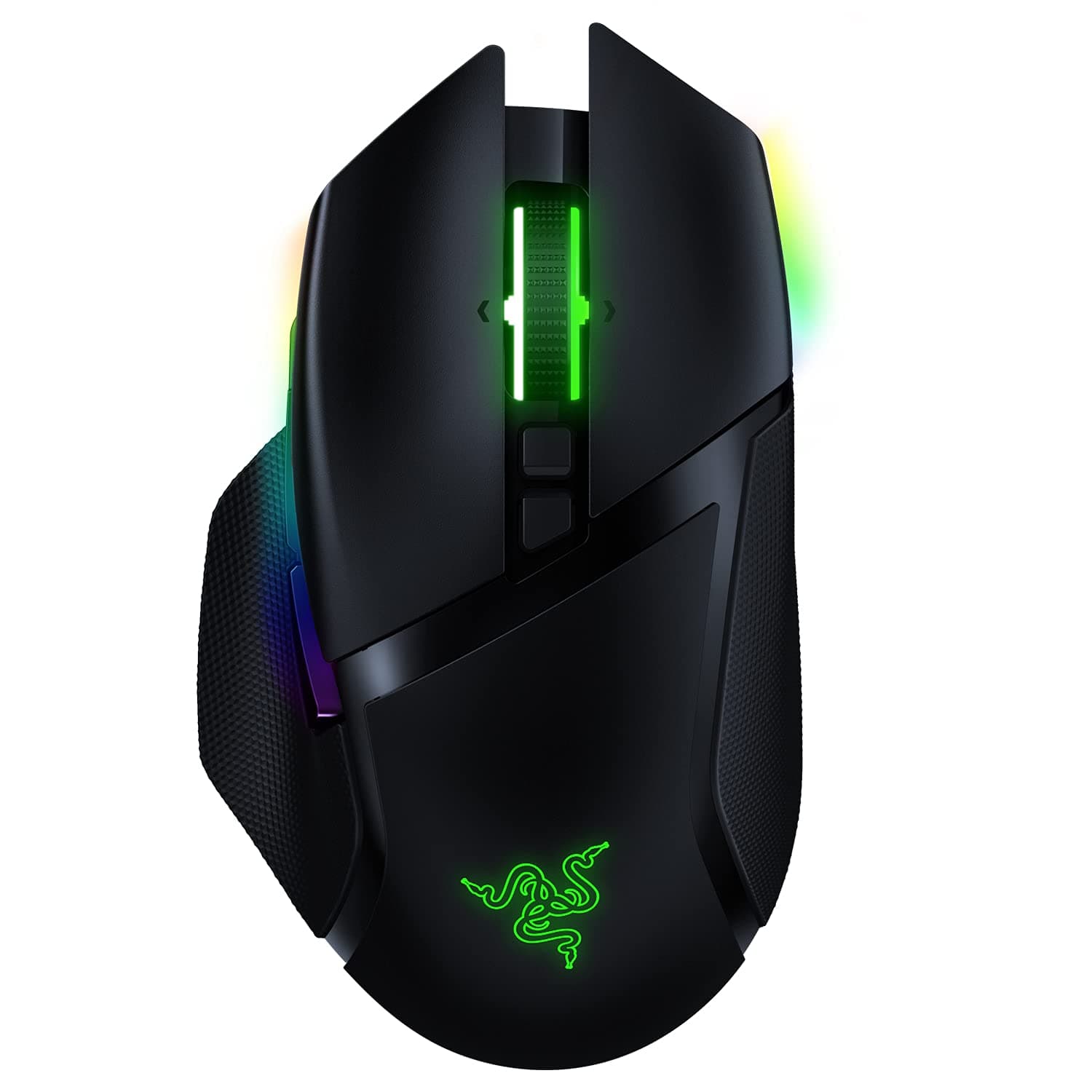




🎮 Own the game with the fastest, smartest wireless mouse on the market!
The Razer Basilisk Ultimate HyperSpeed Wireless Gaming Mouse combines cutting-edge 2.4 GHz HyperSpeed wireless technology with a 20,000 DPI optical sensor and Razer’s lightning-fast optical switches. Featuring 11 programmable buttons, 5 onboard memory profiles, and an industry-leading 100-hour battery life, it delivers precision, customization, and endurance for professional-grade gaming and productivity. Its ergonomic design and adjustable scroll wheel tension ensure comfort and control, making it a top-tier choice for serious users who demand wireless freedom without compromise.


| ASIN | B08564NLZG |
| Additional Features | Wireless |
| Antenna Location | Gaming |
| Are Batteries Included | Yes |
| Are Batteries Required | Yes |
| Battery Average Life | 100 Hours |
| Best Sellers Rank | #24,865 in Video Games ( See Top 100 in Video Games ) #864 in PC Gaming Mice |
| Brand | Razer |
| Button Quantity | 11 |
| Color | black |
| Compatible Devices | Personal Computer |
| Connectivity Technology | Razer HyperSpeed Wireless |
| Customer Reviews | 4.5 4.5 out of 5 stars (3,497) |
| Enclosure Material | Plastic |
| Hand Orientation | Right |
| Hardware Platform | PC |
| Item Dimensions L x W | 5.11"L x 2.96"W |
| Item Weight | 0.24 Pounds |
| Manufacturer | Razer |
| Model Name | Basilisk Ultimate |
| Model Number | RZ01-03170200-R3U1 |
| Mouse Maximum Sensitivity | 20000 Dots per Inch |
| Movement Detection | Optical |
| Number of Batteries | 1 Lithium Ion batteries required. (included) |
| Operating System | Windows |
| Power Source | Battery Powered |
| Range | 10.0 meters |
| Style Name | Basilisk Ultimate - Wireless |
| UPC | 811659035844 |
| Warranty Description | 2 year manufacturer |
R**H
Great Modern Mouse
I have been switching between mice for a while now, and steered clear of wireless mice since my last experience with an older Logitech mouse back in 2014. I was quite happy when I found Mionix, and favoured the Naos 7000 as my daily driver for years until the cable broke. I saw the Castor, and figured that would be a sidestep. It lacked the ergonomics, but had the build quality I loved. At the time, I thought that Mionix with its "perfect sensor" and premium feeling rubberized coating was as high-end as you can get, all without the fancy gamer stuff thrown in. When it came to Razer, I never really thought I would buy another one of their products. I had terrible experiences in the past, with my Tiamat headphones quite literally falling apart from standard use with both the cable fraying and the control box splitting open and exposing the delicate wires inside. Whenever I tested their keyboards during my early mech days around 2015, I thought they lacked the build quality of even cheaper mechs on the market. Many reviews online supported my thoughts that Razer had terrible quality assurance, so I resolved never to buy another of their products ever again. Apparently, that all changed in the past few years. In comes the Razer Basilisk, a very premium feeling wireless mouse that lives up to its claims. Whether I am using it in wireless or wired mode, there is absolutely no input lag and the movements feel silky smooth. If I had any complaint at all, it would be that the 100 hour claim feels a bit overstated. Yes, it will last you all day and the charging time itself is quick. However, after only 6 hours of use from 100% I did notice in Synapse the mouse was already around 74% operating at around 7000DPI with standard polling rates. Beyond that however, the mouse itself feels spectacular. I had previously been using a gel pad for my wrist with the Mionix mice, but it feels entirely unnecessary with the Basilisk. It feels extremely good in the hand, and while a similarly priced Logitech may feel like light plastic, the Basilisk manages to replicate the feeling I got from the Naos or the Castor without the heavy application of rubber. The scroll wheel adjustment is a fantastic feature, and though I wish there were infinite scroll I still enjoy the ability to set the tactility of the clicks or to have no tactile feedback at all. Overall, very amazing mouse.
K**H
Excellent Mouse but wait for a sale
This mouse is fantastic , it is butter smooth when it moves, the battery life is great, and multiple buttons for anything you can think of. The battery life is about five days, without rgb, before a recharge and it only takes about four to five hours to fully charge. It fits perfectly for my palm grip and I can use it for a hours on end with any issues. But there are a few down sides, first is that the razor software that comes with it is a resource hog. Secondly it was a bit buggy when I installed it; synapse wouldn't load unless I went to the system tray and clicked on it there. Third it is very expensive; I managed to pick it up used from the amazon warehouse for about sixty dollars. You really need to figure out what you want from a it, because they hvae other similar model for much cheaper if you are paying full price.
J**1
Mouse is good, mandatory bloatware and account registration is horrible.
This is my second Razer Deathadder (the first was a Deathadder 2013, this one is the Deathadder Elite) and overall both were a great mouse out of the box. Ergonomic, simple, it worked and did what a mouse does. Nothing more, nothing less. However, both eventually developed the same issue. When you left-click once, it is registered as a double-click. This occurs at random by the simplest shift in pressure when clicking, holding and dragging something that you've selected. I reviewed the comments for this same listing and found this to be a consistent issue. It is 100% hardware related, due to a 'fix' in firmware that was released by Razer for the issue on the Deathadder 2013. This firmware 'fix' resolved the double-click issue for the Deathadder 2013 version but is not available for newer Razer mice. Speaking to their support, and some online Razer forum research I found that this is due to a poorly designed mechanism in the newer mice themselves which do degrade over time. They confirmed that when this issue occurs on the Deathadder Elite/Chroma, etc. and is related to hardware. Maybe I lost the 'mouse lottery' when purchasing the product, but for it to happen twice? Idk. I won't be purchasing any other Razer products and cannot recommend this mouse due to the re-occurring experience.
V**O
Practico,se ve muy bonito es para los video juegos de mi sobrino.
A**N
I’ve been using this mouse daily and I’m genuinely impressed. It’s incredibly comfortable to hold—even after hours of work, my hand doesn’t feel tired or strained at all. The ergonomic design makes a big difference. The clicks feel satisfying and responsive, and the side function buttons are very practical, making multitasking much smoother and quicker. But what really sets this mouse apart is its precision—whether I’m doing detailed work or just browsing, it tracks movements perfectly. Highly recommended for anyone who spends long hours on the computer and needs both comfort and performance
Y**S
ürün çok hızlı ulaştı 2 hafta ön görülen teslim süresi 4 günde geldi. ürün güzel paketlenmiş ve sağlam ulaştı. orj ürün kaliteli tavsiye ederim.
T**R
In depth usage review from a gamer: I've used the Basilisk Ultimate and the Basilisk X Hyperspeed for many months now, so here is a brief (but in depth review) of everything you'll want to know. They recently fixed the Ultimate. Previously the lights would come on and kill the battery as soon as you shut down your computer. Now one profile is saved to the mouse, so you can set the lights to black (effectively turning the lights off) and now the battery actually lasts a reasonable length. HUGE quality of life improvement. The ultimate uses a semi-proprietary micro cable. However, you could theoretically cut out the grooves on the mouse (that make it semi-propreitary) after which any reasonably thin micro cable will work to charge it. The software is extremely finnicky on both mice. Sometimes it only recognizes your mouse (in the software) if it's plugged in, sometimes if it's on 2.4. Sometimes if it's bluetooth (for the X Hyperspeed). The software is definitely not my favourite. But after it's configured it just doesn't matter that much. The X Hyperspeed is MUCH better bang for your buck. And would come unanimously recommended by me. At this price point, it's too good to pass up if you like this form factor (and don't need too many buttons). Both the software and windows bluetooth menu are unreliable for battery remaining though. And bluetooth isn't going to be good enough especially for FPS gaming. For more relaxed gaming it's fine. Update: the unreliability of the battery indicator is because most rechargeable batteries are 1.2v and regular batteries are 1.5v. So it shows as already being mostly discharged (due to low voltage) even when it’s fully charged. But then lasts a long time anyways. If you use proper 1.5v batteries it will be much more accurate. If you need the best of the best (or more buttons), get the ultimate. But aside from more buttons, nothing else is a noticeable improvement IMO. Thus I prefer the X Hyperspeed, just be somewhat cautious about letting the battery completely die without a backup on hand). The texture is also more satisfying on the X (has a rougher finish whereas the Ultimate is entirely smooth). CUSTOMER SUPPORT: My X Hyperspeed eventually stopped connecting over 2.4Ghz. I posted on reddit looking for help, and Razer support responded VERY quickly. Kept responding to help out and follow up, and eventually I did have to RMA it and they sent me a replacement. But the prompt responses from Razer support was incredible! I strongly recommend these mouses. Bang for buck, (and mobile versatility of Bluetooth / 2.4) you CAN'T go wrong with the X Hyperspeed. Trust me.
A**.
Amazing mouse