We remain fully operational. Our teams are working around the clock to ensure your deliveries continue safely.

下载应用程序


Buy anything from 5,000+ international stores. One checkout price. No surprise fees. Join 2M+ shoppers on Desertcart.
Desertcart purchases this item on your behalf and handles shipping, customs, and support to Malaysia.
🚀 Upgrade your connection, upgrade your hustle.
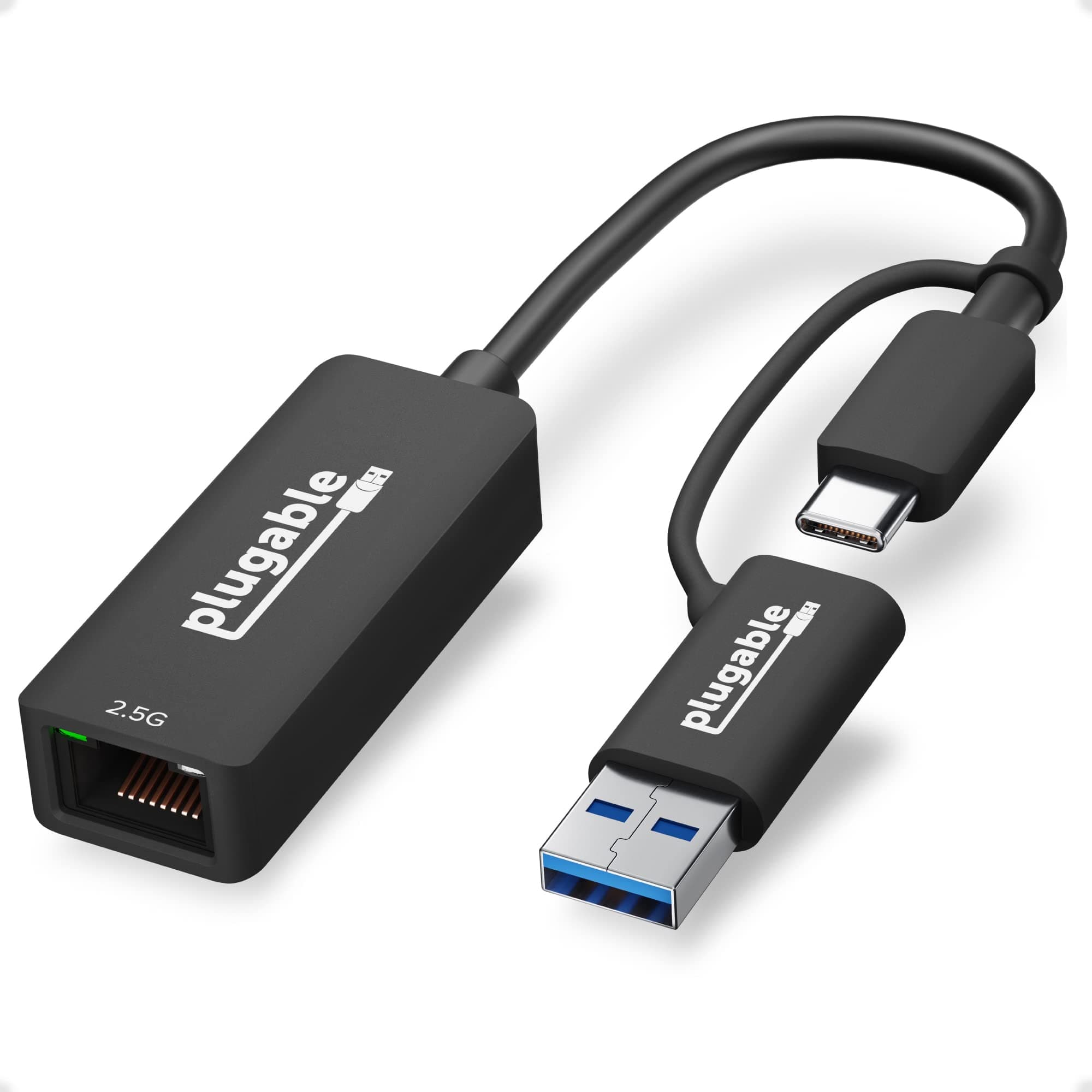
The Plugable 2.5G USB-C and USB to Ethernet Adapter delivers lightning-fast 2.5Gbps LAN speeds over your existing Cat 5e cables, featuring a versatile dual USB-C/USB-A design compatible with Thunderbolt 4 & 5, USB4, and USB 3.0. It supports major OS platforms including Windows, macOS, ChromeOS, and iOS 17+ for iPhone 15 and 16, making it the ultimate plug-and-play solution for professionals demanding reliable, high-speed wired networking with future-proof versatility.
























| ASIN | B084L4JL9K |
| Best Sellers Rank | #69 in USB Computer Network Adapters |
| Brand | Plugable |
| Color | Black |
| Compatible Devices | Macbook Pro 13" / 14" / 15", 16", MacBook Air, MacBook Retina, MacBook M1 / M2 / M3 / M4, HP Spectre x360 / Pavilion / Envy, Dell XPS / Precision / Latitude, Lenovo ThinkPad / IdeaPad / Yoga / Flex, Surface Pro 7 / 7+ / 8 / 9, Surface Laptop 3 / 4 / 5 / Go / Go 2 / Studio / SE, LG Gram, Acer Aspire / Swift / Spin, ASUS Zenbook / Vivobook, Most Windows systems with Windows 10 or newer, Most Chromeb… |
| Compatible Operating System Family | Windows |
| Customer Reviews | 4.4 4.4 out of 5 stars (1,581) |
| Data Link Protocol | Gigabit Ethernet |
| Data Transfer Rate | 2500 Megabits Per Second |
| External Testing Certification | Não aplicável |
| Global Trade Identification Number | 00819927012269 |
| Hardware Interface | USB Type C |
| Item Dimensions L x W x H | 3"L x 1.5"W x 0.2"H |
| Item Weight | 40 Grams |
| Manufacturer | Plugable |
| Mfr Part Number | USBC-E2500 |
| Minimum Required Operating System Version | Mac OS 10.15 Catalina, Windows 10, iOS 17 |
| Model Number | USBC-E2500 |
| UPC | 819927012269 |
| Unit Count | 1.0 Count |
| Warranty Description | 2 Year Limited Parts and Labor |
A**.
Excellent USB network adapter.
Bought a few of those over time as I upgraded my ISP connection speed to 2.5Gbps. Very conveniently comes with USB-A/C adapter and had no failures over the couple of years. The network connection is stable and as fast as advertised when measured with iperf3. Good deal for the money as well.
J**N
Wide compatibility. Great product!
I used this on a QNAP TS-453a NAS (plugged in via USB 3.0 port) and it was easily detected! It has a RealTek (RTK8156) chipset. Connectivity was stable at 2.5Gbps (no disconnects!). Build is plastic. It's slightly warm to the touch as expected but not hot. The only thing I disliked about it was the fact that it makes it a little hard to unplug the Ethernet cable (I used 3 different ones). Worth noting - It uses a USB C and a detachable USB A adapter for versatility I gave it 5 stars mainly because I was happy with the functionality and outcome of this mini project.
A**N
Does the job at a reasonable price
Full disclosure, I used this for a very specific use case. I recently upgraded my entire home network to 2.5 GBe and while all of my computers already had NICs that could handle that, my Synology DS920+ didn't. For the uninitiated, this NAS is actually a great little package that has most of the features of its bigger counterparts, with the exception of native 2.5 GBe support (neither on-device nor through expansion). This adapter was on the community sourced list of 2.5 GBe adapters that would work for the upgrade. I can confirm that it works. It takes a little bit of setup on the device, but once you enable it and install the driver, it works perfectly. I'm actually kinda glad since this probably ends up costing a fraction of what it would be if Synology offered a first party solution. This dongle is small enough to tuck away behind the NAS so that it's completely out of sight and I'm able to saturate it fully with around 200 MB/s transfer speeds, which is definitely an upgrade from the 90 MB/s that I'm used to seeing. I did briefly also test this on my M1 Macbook Pro (since the onboard wifi card is actually kinda terrible) and can confirm that I was able to get full throughput on that device as well.
J**D
Versatile, Well Supported. Just plug it in!
I own three of these adapters. They just work! I've used them to: - Add an ethernet port to my Windows 11 laptop - Add an extra ethernet port to connect my Proxmox server to a SPAN port - Add an extra ethernet port to a Jetson Orin Nano running Ubuntu for software testing The adapter's chipset is widely supported across operating systems and distributions. I've never had to install drivers. Plug it in, and the OS recognizes and configures the interface. Works great!
M**N
Works great once the right driver is downloaded and Jumbo Frames enabled
Using the 2.5 Gbe adapter between my Lenovo Yogo C930 laptop and my QNAP NAS. Immediately after installation I was getting near 2.5G read speeds from the NAS and only 1G write speeds to the NAS. Went into the adapter's driver Advanced settings to make sure Jumbo Frames were on at 9K setting, but that was not available. My next troubleshooting steps were to check my hardware connections (wiring between router, switches, and NAS). Made a few changes and both R/W speeds drop to 1G. After that I went back to my original hardware setup, but R/W speeds were stuck at 1G. So I decided to update the 2016 driver that was pre-installed on the 2.5 Gbe adapter, but Windows stated the "Best driver was installed". So I went to the Pluggable's website and found the recommended 2021 driver. Downloaded that driver which allowed me access to change the Jumbo Frames setting from "Disabled" to "9014 Bytes" and that worked. I now get 2.3G write speeds and 2.5G read speeds between my Yoga C930 laptop and my NAS! I would have scored this a 5 star rating, but it was not plug and play. Users that are not a little tech savvy could have issues out of the box and just return the adapter. My setup is as follows: - QNAP TS-253 NAS which has (2) 2.5Gbe ports - QNAP QM2-2P10G1TA PCIe Expansion Card with 2 x PCIe 2280 M.2 SSD Slots - (2) Samsung 870 EVO 500 GB NVME SSD drives installed in the QM2 Expansion card (RAID 1, Used for caching) - (1) QNAP 6-Port 10GbE & 2.5GbE (QSW-2104-2S-US) Unmanaged Network Switch - Asus AX89X Router with (1) SFP+ 10G port, (1) 10G Ethernet port Please note my setup if for future expansion to 10G networking, but for now I'm only looking for use the 2.5G performance.
R**.
My new go-to USB Network Adapter.
Hits all the right buttons for consumer and IT Pro. Combo USB A and C, MAC address printed on the side, Link and Activity lights bright enough to actually see. I believe windows 11 detected it without going online to find a driver. 2.5G Speeds. Affordable. I don't see a reason to pay less for a 1G adapter anymore with this available.
M**Z
Das Teil ist sein Geld wert. Durch die Standard 10/100/1000 MBit Karte wurde meine Gigabit 1000er Leitung nur zur Hälfte beim Speed Test mit etwa 500 MBit ausgereizt. Nach dem Anbringen mit einem Cat 8 Kabel und dem 2,5er Adapter an den USB-C Port verdoppelte sich bei mir die Leistung auf fast 1000 MBit im Speed Test. Das hat sich also voll gelohnt für mich. Es ist nochmal merklich schneller geworden.Nur der Treiber war veraltet auf der Hersteller Seite. Es gibt einen Neuen besseren beim Chip Hersteller.....
M**R
It's working perfectly fine, I used it with my desktop pc and with tiny pc. I am using it for PFSENSE, Pfsense does detect it on tiny Lenovo pc M93Q, but you have to plug it on yellow usb port, otherwise it won't work, will keep disconnecting. Other option, if you are plugging it to tiny pc, is to install proxmox, this usb adaptor could be put in any USB port, proxmox will detect it and then use it in any VM\CT. Regards, M
P**O
il dispositivo non viene visto dai nap qnap e non è possibile installare dei drive unix con cui farlo rilevare. Testato su un ts251a. E' necessario prendere il prodotto QNAP QNA-UC5G1T che costa 3 volte di più ed ha un chipset differente. Tenete presente che per saturare la banda delle interfacce di serie (gigalan) dovete avere un nas che ha installato almeno due ssd sata in raid 0.
R**O
I picked up the Plugable 2.5G USB-C Ethernet adapter and it worked perfectly right out of the box with my Unraid server. No drivers, no tweaking, no headaches. I plugged it in and the interface showed up immediately and negotiated at 2.5 Gbps. Performance has been solid and stable so far. It’s a great way to add faster networking to systems that don’t have built-in 2.5 GbE, especially if you’re running Unraid or other Linux-based systems. Very happy with the purchase and would definitely recommend it if you need a simple and reliable 2.5 Gb adapter. 👍
Z**N
macOSについて、です。 2020年5月に買っていますが、今(2021-10-29)の写真と外見が違います。もっと幅広の平べったいやつでした。(Amazonなので、このページに「去年あなたはこれを買いました」と表示されますので、商品は間違いありません) 実際メーカーサイトでもこの写真ですので途中で製品を切り替えたようですから、以下のレビューは当てはまるかどうかなんともいえません。 macOS Montereyが出たので、持ち合わせているいくつかの2.5GbE USB アダプターと5GbE USBアダプターを挿してみました。 macBook Pro 2017 TBが4つあってバーのあるやつ。 ただ挿すだけです。それでこの製品はOSのネットワーク設定にちゃんと2500GBase-T (=2.5GbE)と認識されるようになりました。MTUは1500まででJumbo Frameには対応していませんでした。 switchには TP-Link の10GbE対応を使っていますがそちらの接続ランプも2.5GbE と出ます。 元々Monterey対応のインストーラーは有りませんので、ドライバー関係は何もインストールしていません。 これで2日ほど繋ぎっぱなしですが、問題なし。 (基本sleepしてしまいますがPower Napで定期的に起きてTime Machineなど、ちょっと動作を繰り返しています。またアップデート直後ということもあり、しばしばremote desktopで画面アクセスして、OSの設定をいじったり、新機能をみたりしました。) OSアップデート直後に結構なサイズのTime Machineのバックアップが発生しますので、その時間の間連続してファイルアクセスしていて落ちないので、大丈夫ではないか?他にも4GBほどのDVDのコピーしたファイルを10GbEのRAIDのNASに上げたり、落したりを数度繰り返しましたが、問題なし。 適当に選んだ1.67GBのファイルを10GbE接続のRAIDのNASにコピーしましたが、1.6Gb/s〜1.8Gb/s で、少し遅いですが。ちゃんとしたベンチマークではありませんので。けど実使用としてはこういう感じでしょうし。もっと大きなファイルをコピーすると途中で速度落ちます。macのハードとOSの側の問題もあるでしょうか。 ところでこの製品だけが(他に2社2.5GbE USBを試しました)Big Surで2Gb/sほどの速度で、しかも安定して動きました。 ネットワーク設定の表示は1000GBase-Tなのですが。スイッチの側では2.5GbEで接続していると認識されていました。 ドライバーのインストールはせず(そもそも既存のinstallerはBig Sur非対応ですし、無理に入れようにもBig Surに跳ねられたと思いました)。 先程同様1GB強のファイルで2Gb/s越えだったと思いました。ずっとBig Sur時代にはこれを使っていましたが、少なくとも通信が止まるとかkernel panicとかはゼロです。 他某2.5GbE USBアダプターもMontereyで2500GBase-Tと表示され、Jumbo Frameは非対応。さほど長く使っていませんがこの他社製品も多分問題ないでしょう。 他方5GbEのUSBアダプター、2社は5GbEと認識されず。速度も1ギガビットクラスの模様(真剣に測らず)。1社は100Base-T(百ベース・ティー)と認識されてしまい、しかもちょっと使っていたらネットが切れて、10分ぐらい復活せず。 なので5GbE USBアダプターはMontereyでは使えないと思います。Big Surでも使えませんでした(Big Sur 対応のinstallerもありませんでした) ということで: 本製品は、Monterey(とBig Sur)でmacがおかしくなるとか、ギガビット・イーサーより速度が出ないとかいうことはないと思いますので、多少体を張ってみる気がある人にはお勧めします。 私のハードが古い(macBook Pro 2017)ので、最近のmacをお持ちならもっと2.5Gb/sに迫る値も出るかもしれません。なので損はしないと思います。 (蛇足ですがBuffaloの2.5GbE+10GbEのスイッチに本製品を繋ぐと、猛烈にmacが落ちます。これは他社の2.5GbE USBアダプターでも同じ。Buffalo製2.5GbE USBアダプター含む。 このスイッチ、1ギガビットのイーサーを繋ぐ限り一切トラブりません。 2.5GbEを繋ぐと、それこそ30分とかに1回macが落ちます(ドライバーがあったCatalina時代。そして本製品は隠れ対応のBig Sur時代も)。ちなみに、私の合計3台のmacで経験しているます(古いimac 2015、それがこれが古いからかと疑い買い替えた最新のmacBook Air M1、それと上述macBook Pro 2017 touchbar) そして、TP-Linkからでた10GbEのスイッチに繋ぎ変えただけで落ちなくなりました。ちなみにBuffaloは、未だにテレビ、HDDレコーダーのギガビットイーサーを受けて、10GbE部分でこのTP-Linkとつながっていますが、その状態では一切悪さしをしません、多分。)