We remain fully operational. Our teams are working around the clock to ensure your deliveries continue safely.

下载应用程序



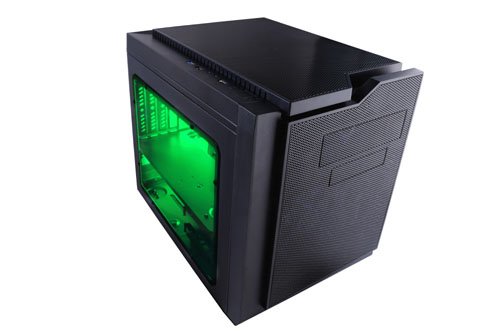
🖤 Cube your gaming style with Apevia’s sleek green-lit powerhouse!
The Apevia X-QPACK3-GN is a micro ATX cube case designed for gamers and professionals seeking a compact yet powerful build. Featuring dual green tinted side windows, a flip-open design for hassle-free installation, and a pre-installed 140mm green LED fan, it supports GPUs up to 320mm and CPU coolers up to 135mm. With multiple USB ports and HD audio on the top panel, plus dust filters and expansion bays, it balances style, cooling, and functionality in a modern, space-saving chassis.
| ASIN | B00ZPU5RHQ |
| Antenna Location | Gaming |
| Brand | Apevia |
| Case Type | Mini-Tower |
| Color | Green |
| Compatible Devices | Micro ATX, ITX, Mini ITX motherboards, VGA cards up to 320mm, CPU coolers up to 135mm, Standard ATX power supply |
| Cooling Method | Air |
| Customer Reviews | 4.3 out of 5 stars 440 Reviews |
| Enclosure Material | Metal |
| Fan Size | 140 Millimeters |
| Global Trade Identification Number | 00837344003363 |
| Hard Disk Form Factor | 3.5 Inches |
| Internal Bays Quantity | 5 |
| Item Weight | 9.5 Pounds |
| Light Color | green |
| Manufacturer | APEVIA CORP. |
| Material | Metal |
| Model Name | X-QPACK3-GN |
| Motherboard Compatability | Micro ATX, ITX, Mini ITX |
| Number of Fans | 3 |
| Other Special Features of the Product | 140mm Front LED Fan |
| Power Supply Mounting Type | Bottom Mount |
| Recommended Uses For Product | Gaming |
| Supported Motherboard | Micro ATX, ITX, Mini ITX |
| Total USB 2.0 Ports | 2 |
| Total USB 3.0 Ports | 1 |
| Total Usb Ports | 3 |
| UPC | 809393876663 837344003363 807034592934 |
| Unit Count | 1.0 Count |
S**.
Excellent cube case on a budget!
Excellent little cube case for one of my kid's PC builds. Easy to work inside of, and plenty of room. I built it with the following components: AsRock H87M Pro4 mainboard, 2x4GB DDR3 1600 G.Skill, Pentium G3258A, Cryorig H7 (plenty of clearance with or without top exhaust fan!), 640GB HDD, DVD drive, a EVGA GTX660OC, and an EVGA 500W KR PSU to power it all. Fit great. I also installed a Cooler Master 120MM fan at the rear exhaust, and have both fans on a quiet speed. The system keeps cool and quiet, is super stable and the case looks neat. My son loves this PC and uses it frequently, shows it off to visitors. Having the case hinged also helps with installing components and getting into hard-to-reach places. Just keep in mind with cable management if you want to be able to use the hinge feature or not. The minor annoyance of the extra screws to unlock the hinged part are actually a good idea, but for someone like myself that builds 100s of systems that's wasted time for a feature I actually like to use. But in the same breath it is also a safety and point of strength to keep everything together. Overall I would highly recommend this case for a nice budget mATX/mITX build. The case is clean in appearance, looks modern without being too over-the-top. It is super easy to work on and in, and has all the decent standard features at a very appealing price point. I've used Apevia for years...back when they were named Aspire...in-fact one of the older mid tower cases from over 10 years ago is still in service today. This is one of my favorite cases from them and I will continue to be using them for builds for some time to come.
C**F
A tale of customer service done right.
I purchased this for a new computer build utilizing a Micro ATX board. The case is an awesome color of orange, and the LED fan runs very quiet. It is very easy to disassemble and the "clam shell" feature helped immensely when installing the motherboard and water cooler radiator to the top of the case. Only "knock" is that the SSD slot is too far away from the DVD-drive slot for a typical SATA daisy-chain connector to connect, but that's probably my PSU's fault for not having enough length, but a cheap extension will solve this problem. Make sure your PSU has at least 3 SATA plug ends or get an adapter or extension as needed. I wanted to write a note about how awesome the customer service is at Apevia. The case was shipped to me with the protective plastic film on the wrong side on one of the windows. I attempted to carefully get it out, but wasn't able to do it all and popped one of the plastic grommets in the process. After an attempt to superglue the thing back on..... yea.... I ended up with a 4in diameter smear of superglue on the window and it looked really bad. I emailed the company's tech support division and after a nice exchange they said that I could ship it to them on my dime and they would replace it and ship it back for free which was really cool of them. After looking them up, I realized their corporate headquarters was only 10 miles away from my house. After telling them this, I was able to simply drop by and they exchanged it on site. After saying hi to some of the workers there, I bid them farewell..... and then went to Disneyland :) Great customer service, great product. Looks amazing and will be a great addition to my computer family!
R**A
Neat little case!
The Good: Design is pretty nifty Clamshell case allowed for easy installation Quiet machine, due to large 140mm intake fan The good (in depth): The case is pretty neat to look at. It's a lot bigger than I was expecting, but I went with a micro-ATX MOBO and this would allow me to expand upon it later. There is plenty of airflow with the intake fan and I ended up investing in an exhaust fan to keep the temps down. The case has rubber grommets to allow water cooling or radiators at the top. I haven't had any issues with the installation of the components due to the open space. I installed a Gigabyte R9 380 video card and it has about an inch of clearance. Because I was unsure of clearance, I didn't buy an aftermarket cooler for the CPU but it looks like it has plenty of space for expansion. The Bad: Cable management is sometimes good, sometimes bad, if you are willing to remove some drive bays due to the PSU Motherboard brass screws were either too tight or spun in place Manual was pretty awful, lacking directions Power button light is EXTREMELY bright, and blue, which doesn't quite match the green light The bad (in depth): With the lower drive bays in place, your PSU is in for a tight squeeze. I found myself having to tug and wind the cables to make it fit around the drive bays, later on realizing that with the tight squeeze, especially since the PSU cables were shielded with a resilient meshing. And I'm not sure if all PSU cables are similar in lengths but stretching the PSU power cable into the motherboard from the holes in the MOBO panel was impossible so the cable had to be run along the side of the case. I had to remove the lower drive bays from the case entirely to accommodate the PSU. Thankfully there was a spare drive bay below the DVD bay which worked in a pinch. Because I removed the lower drive bays, there is a lot of dead space next to the PSU. I wouldn't be too upset but it does make me worry for the future if I wanted to install another hard drive down the road. While I was troubleshooting the OS installation, I left the case open and was shocked by how bright the power button light was. In a really well lit room, you can see the blue light beaming against the ceiling (picture is attached). In start contrast the front light on the fan is nowhere near as bright as I was expecting (I'm kind of glad it isn't as bright). The MOBO panel screws were REALLY scewy (pun intended). Sometimes it went in super tight other times it just spun in place. During my first installing, I wasn't sure if I had done something wrong so I had to reinstall the MOBO and was stymied by how difficult it was to install. In addition to hinky installs, after all of the components were in, I had to somewhat squeeze the clamshell design back in space for screwing. This is going to sound incredibly pedantic, but with the weird geometric shapes this case makes, you will see there is some dead space where there are creases in the case. I'm looking at 1/4'' crevices here and there which is just screaming for dust to get stored in. And because I'm being pedantic, I do think it's weird that a case this current has a diskette drive.
T**1
Cant say enough good things other than I LOVE IT
Cant say enough good things other than I LOVE IT I have been building and modifying personal computers since day one. So I upgrade my son and myself every 2-3 years and also my network of buddies . This case has Looks,well built and relatively easy access to chambers for building and installing motherboard and fans. I used the smart RGB 700 watts regular power supply the MSI Pro Series Intel B250 micro motherboard (9x9)And a Cooler Master MasterLiquid Maker 92 witch is tall but this case is modular and you can lift the top like a car hood for ease access .No problems I must say I am an expert so super easy for me. But even a first time builder should figure this case out and have a full build under an hour. Fan is quiet and RGB COLOR DEPENDS ON MODEL. i slid in a small regular ATX motherboard (12x12) and I could make a build, but not for the newbies. windows have blue tint that with extra RGB light kits will look awesome. I installed the GTX 1070 gray Founders Edition no problem size wise. I don't think the 3 fan GPU'S will fit here. when I finish it I will upload pictures ,I am waiting on some custom fan grills to finalze it It is a very nice cube case,love the round legs. Note" If you a heavy gamer Over clocker this might not be the best choice due to Airflow design . but for savvy experienced builders no problem because the side panels can be modified. I recommend this for CPU's 90-100 watts like the 6700k,7700k or the new sheriff in town the I5 8600k As for the USB front ports and Audio they worked OK from first boot I loaded Windows 10 from a USB DVD external drive with no problems. I was updating MS dll's from a USB WIFI connected in front USB 3.So I had no problems with mine. Did I mention I bought a pair,1 black 1 white. have fun
S**.
Good case, but not a great case
Pros: Horizontal motherboard design. Roomy enough for cpu coolers and large graphics cards Quality, sturdy materials It has 3.5 and 2.5 inch bays on the front for optical drives, etc, making it a better case for a multi-media PC than many of the gaming cases, though the size is a factor. Cons: Pci-e slots are hard to seat cards in. I had to remove the face-plate on a RX5700, install the face-plate first, and the reinstall it to the graphics card. I spent a lot of time trying to get it into place before doing this and there was just no way I was going to be able to do it any other way. The plastic clear sides are incredibly easy to scratch. The power led and the hdd led are extremely bright and distracting when playing games or watching movies in a dark room. I had to put something over them. I can't understand why electronic makers often put these really bright flashing leds on things, its very distracting! Wasted Space - because of the design, there is a large, empty space on the right hand side of the power supply. While I like the horizontal design it feels much bigger than it should be. The extra space would be more welcome if you could actually do something with it. Its too small for 120mm fans, but it could have been at least been used for 2 92mm or 80mm fan vents. But there are no fan vents there unfortunately. Additionally the fan vent at the top of the case is oddly located and could have easily been 2 vents side by side. I guess someone with a little ingenuity and a good drill could modify the case, but its unfortunate that the potential for more airflow is there but wasted. The case is a bit of a conundrum. It works and it doesn't have bad airflow, but for a gaming case, there was certainly potential there for better airflow. It has no space for a 240mm water cooler, though the top of the case could have been used for that and unfortunately was not. I'm not water cooling so it worked for my application, but after seeing it and building it, I think there are better options in this price range.
N**S
When your wife says "Is that for me?" you know you're starting on the right foot! :)
I've built computers for the better part of 2 decades and can say that I enjoyed the experience of using this case. I had to switch to a non-modular design power supply due to the lack of space, but that wasn't a bother as I had one not being used. I would love to see more places to put SSDs as there is currently just one, but I made due. Having the ability to remove both sides is huge in mATX cases, but the fact that the top and front are nearly totally accessible due to a hinged case design is something I could do in all the other cases I've used! It truly made working with it fun :) I do wish the windows were clear instead of blue, but the blue hue does manage to show less of the scratches I've grown to expect on this type of panel so that's a plus I suppose. If you take your time and have some brains/imagination, then you'll have no problems that you can't overcome. Pros: - Small form-factor - Side panels, top panel, and front panel all removable - Top/front also on a hinge which allows easy access to everything - Great airflow due to mesh-type panels - Windowed panels on both sides! Cons: - Crappy included case fan that's too fat to fit in the extreme front - Very minimal amount of space next to the HDD cage where the PSU cables begin - Only a single spot for mounting SSDs - Blue colored windows rather than clear Bottom line here is that if you're looking for a case for a mATX/ITX build, then this is not only please to the eyes, but pleasing to the builder in relation to the process of building. I simply enjoy working in this case. The pros far outweigh the cons in this case, guys and gals! For $60 you can't go wrong!
S**Z
Amazing case, would definitely buy again.
A beautiful case, not too large, but the shape is very intimidating and feels right for a gaming PC. The grates for the optical and floppy are easy to remove or reattach, and the case offers what feels like the perfect amount of space (a little wiggle room, but not so much that the case could be smaller). The flip-top design makes for easy modification of parts, and both sides also detach for easy access. The pre-installed LED fan is not too bright, and while a little loud, not enough to annoy me (for comparison, I have a cooling fan for my bedroom that I set to sleep mode for nighttime, and that is much louder than the case fan). The windows on both sides allow for amazing display of the interior, and the bottom-mounted power supply setup allows for some very easy cord management. I bought a Cryorig H7 for this case, it fits perfectly, as will most CPU fans, provided they aren't gigantic. Only complaint is the top-set USB 3.0 ports; they are a bit inconvenient as I keep it on top of my desk, however, if you keep it on the floor, they would be perfect, so no stars lost.
H**G
... use an itx as well but there'll be some wasted space). Hardly anyone else makes a pink case
Tiny case for a matx (you can use an itx as well but there'll be some wasted space). Hardly anyone else makes a pink case, great for the wife/kids. It's as small as can be. That means cable management isn't all there. I'm used to having space on a side to stuff cables in. Since there's two windows, there's no room on the sides. I can't really nick any points off for that as they're using the minimum amount of space possible. Really the only wire which is sort of inconvenient is the cpu +12V cable as it has to pass the memory and heatsink to get to the rear of the board. Also the psu fits a bit too snuggly. If you have a modular psu, you're going to have to attach all the cables you think you'll ever need and feed it through the top of the bracket on the bottom harddrive area, then slide in the psu and screw it in. You might also have to take out the bottom screws for the harddrive bay to make it a bit easier. The way it opens up is kind of nice. As seen in many other pictures, the whole top can be detached from the rear on a hinge (it doesn't open up all the way, maybe 45 degrees which is good enough to see all the internals). What's also important to note is that for a low priced case, i was happy to see foam in the front and top of the case which i hope will help with noise.