We remain fully operational. Our teams are working around the clock to ensure your deliveries continue safely.

下载应用程序



🖤 Master your airflow with SilverStone’s sleek PWM fan hub!
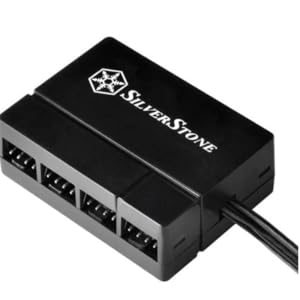
The SilverStone CPF04 PWM Fan Hub expands a single motherboard PWM fan header to support up to eight fans, powered via SATA for stable, noise-free voltage thanks to its 2200μF capacitor. Equipped with speed detection sensors, it enables precise, synchronized fan control, making it an essential upgrade for enthusiasts seeking efficient, quiet, and scalable cooling solutions.
| ASIN | B00VNW556I |
| Best Sellers Rank | #753 in Computer Case Fans |
| Brand | SilverStone |
| Brand Name | SilverStone |
| Compatible Devices | Desktop |
| Cooling Method | forced air |
| Customer Reviews | 4.5 out of 5 stars 1,201 Reviews |
| Global Trade Identification Number | 00844761011741 |
| Item Dimensions L x W x H | 2.13"L x 0.75"W x 1.57"H |
| Item Weight | 0.01 Ounces |
| Manufacturer | Silverstone |
| Noise Level | 25 Decibels |
| Power Connector Type | pwm |
| Product Dimensions | 2.13"L x 0.75"W x 1.57"H |
| UPC | 844761011741 |
| Unit Count | 1 Count |
| Voltage | 12 Volts |
| Warranty Description | 1 Year Parts and Labor |
| Wattage | 4 watts |
D**E
Works well, looks nice, I like it
I like this product a lot, it can split one fan port into 8 and does not draw any power from your motherboard. It also does this while looking sleek, in case you need to put it somewhere visible inside your case. It does not feel cheap but it also doesn't feel like it is of the highest quality. It draws power from a SATA plug. It connects the speed control from the 4th pin on the motherboard to all 8 fans, and it connects the RPM info from the fan plugged into its glossy looking port to the 3rd pin on the motherboard. It does not connect to the power or ground pin on the motherboard's 4-pin fan connector. You can use it without plugging it into your motherboard but your fans may run at 100% all the time time whereas mine run around 40% most of the time, and boy are they quiet!!! It's really nice to be able to use the fan speed control for so many fans, my case has 6 140mm Be Quiet! Silentwings PWM fans. If you have fans of different sizes, like say you have 3 140mm fans and 1 120mm fans, I would recommend plugging the single 120mm fan directly into your MB and plug the 140mm fans into a hub like this. This way your MB can see the speed of each size fans. Not sure if it matters too much or not, but I notice in another computer I have that the 140mm fans spin at ~550RPM and the 120mm fans spin at ~1,200RPM when they're both set to 40% power. I'm glad this uses a SATA power port instead of an IDE power port. I finally have a PC build free of IDE power connections :)
I**T
DOES NOT WORK!
Works perfectly! Plugged the PWM fan header into a designated PWM fan header on the motherboard and set the fan mode to "SILENT" within the BIOS (you can set a higher, more aggressive fan curve if you want), and plugged the SATA power supply to the SATA power lead off the power supply and plugged the three fans into the fan hub. Fans immediately sync up and run at low PWM speeds. Unit is definitely an effective solution for management of multiple 4-pin and 3-pin fans. You can combine both 4-pin PWM fans and 3-pin voltage fans together. The only catch is that you have to use at least one 4-pin PWM fan and plug it into the port that has the glossy look to it with a slight bevel in the plastic that identifies it as the master fan port. You can then plug any kind of fan into the remaining ports and they will slave to whatever PWM signal is sent from the motherboard PWM fan header to the hub itself. Also, make note that most motherboards have multiple 4-pin fan headers, but in actuality only a few of them are PWM compliant. I found this out the hard way and it took me a bit of troubleshooting to find out that there were only 2 4-pin fan headers out of the six 4-pin fan headers on my particular mother that properly supported PWM; the CPU_FAN fan header, and the CPU_OPT fan header. Motherboards vary, so make sure to test the CPU and System fan headers first. the "CHA" and "OPT" labeled fans normally due not support PWM and when you try to use them. They are actually voltage regulated. If you try to use them, the fans will run at full blast 100% speeds. Good luck with this product and let me know if you have any questions!
I**K
Great but don't have full control
I got the 8 way fan hub and it works well. I have been using it to give a little more control over my 3-pin fans by having one fan 4-pin as a control. The only problem is that you can't shut the fans off completely. With just the 4 pin fan plugged directly into the motherboard, I can shut it off completely through software. With the fan hub, even if just the 4-pin is plugged in, it appears that it can't go below ~25-50% speed(Hard to tell exactly where it stops slowing down). That's not a big deal but each of my fans can run silently if you lower the speed enough. Where it is at, there is a constant hum. I guess I could just get a fan controller, but I like having my computer be able to turn up the fans if it's getting toasty. Overall I am happy with the fan hub, just not thrilled.
T**R
Works great
Excellent small PWM controller.
C**E
Simply does the job
- You can connect up to 8 fans. - It has a male SATA connector to power the 8 possible fans and a 2 wire fan connector for monitoring purposes, so you'll need an available fan header and a female SATA power plug. - Includes a two way 3M double sided sticky velcro that is too strong, be aware of where you position your fan hub because is hard to take the tape off. - The device gets the job well done and works as intended. Please read the recommendations I've put below. ***Recommendations*** - The hub regulates ONLY the fan connected to the glossy header and then sets the same speed for the remaining seven. - Since the fan hub only monitorizes one fan it is highly recommended that all the fans connecting to it are exactly the same brand and model. - For those wondering, no this will NOT make your 3-pin fans PWM capable because they're not wired that way. If you want that feature you'll need something that manages the voltage of the fans directly, like the NZXT Sentry 2. Even if the fan connected to the glossy header is PWM and you regulate it, if the other seven are not PWM they'll run at full speed. - Remember this is only a fan hub or you could also say an "8 way powered fan splitter".
I**S
Build-saver
This solved my main issue with having an itx build: the motherboard didn't have enough case fan headers. What I really liked were: The build quality. It's small, but the plastic housing feels durable. The ease of use: I used a non pwm fan as the master, and 2 additional non pwm fans as slaves. I wasn't sure if this would be an issue using a non pwm fan as the master, but all it did was run my fans at Max, which is fine. The versatility: they included double sided 3m adhesive, which allowed me to mount this thing anywhere. My small case has very little real estate left, so the ability to attach it in a small area along the back wall of my case was insanely clutch. I highly recommend to anyone with more than 2 fans. This thing really tidies up your cable management as you really only need to use one fan header on your motherboard, the rest just go into the hub.
J**B
Great PWM splitter
Great way to split a PWM header, especially for boards that have few fan headers (like mITX and some mATX boards). I have this hooked through my CPUFAN header with the CPU hsf plugged into the glossy port (this is the one that the motherboard will read), as that's the only PWM header on my board (another 4-pin header seems to be only voltage control). Right now, I have 3 fans hooked through it - 2x 120mm Arctic Cooling F12 PWM fans and my Cryorig C7 hsf. It works great and it's really small - about 2/3rd of a credit card on the long edge. I didn't bother with the double sided tape, as there was enough room and cord tangle in the front of my Corsair 250D to just shove this thing in and out of the way. 2 things to be aware of: non-PWM fans (eg: 3 pin fans) will run at full speed on this and some 4-pin system fan headers are not PWM (check the motherboard manual, the 4th pin should be speed control if it is PWM).
M**L
Watch What Your SATA Cable Is Plugged Into Besides This.....
It appears as though this is a well enough built product. I am no protege of PC products. I know some brands but I would only recommend those that I have tested personally. I like to take something from both sides (in this case positive and negative reviews) and then base my own opinion of that product. It has been a good amount of time (Nov. 2015) since I have bought and started using this splitter. Unfortunately for me, I had it hooked up to the same SATA cable that my disk drive was on thus resulting in my disk drive becoming dysfunktional. I like the idea of this splitter and I wish it would work correctly/had a longer cord so that I could plug it in elsewhere. The fact is that because I plugged this thing into the same SATA cable as my CD/DVD ROM drive it is now not being used as a result of the disfunction. There was also two big fans running 24/7 at max plugged into it so that might have had something to do with the issues I had. So far, after detaching this splitter, my ROM drive works as well as my SSD so I have to say that one should be careful with what, how many and how powerful the fans are attached to this and also what else is on the same SATA line. This little guy is indirectly responsible for all my headache yesterday and today. Luckily I took precautions and only lost minimal settings data from the OS SSD. If you have an SSD for your OS/Games make sure your actual data is elsewhere. You never know when something in your setup might clash and cause data loss. Plus the dreaded Fresh Install.... Much better velcro attachment for mounting than the previously purchased /ref=cm_cr_ryp_prd_ttl_sol_36 Swiftech 8W-PWM-SPL-ST 8 Way PWM Splitter-Sata MY Rig AMD FX 6-Core Black Edition FX-6300 (OC to 4.0GHZ) MSI GEFORCE GTX 750 TI GAMING 2GBDDR5 TWIN FROZR OC ASUS M5A99FX PRO R2.0 AM3+ AMD 990FX SATA 6Gb/s USB 3.0 ATX AMD Motherboard ASUS Xonar DSX PCIe 7.1 GX2.5 Audio Engine 192K/24bit Kingston HyperX FURY 8GB 1866MHz DDR3 CL10 DIMM (2x8) Samsung 850 EVO 500GB (OS) WD Black 2TB Performance Desktop Hard Disk Drive - 7200 RPM SATA 6 Gb/s 64MB Cache (Storage) ARCTIC Freezer A30 Extreme CPU Cooler - AMD, 320W Ultimate Cooling Power, Direct-Touch Heatpipes (2) 200mm Thermaltake Colorshift Fans (1) 140mm Exhaust Fan (2) Top-Mounted 140mm Cooler Master Fans Rosewill CAPSTONE Series 750W 80 Plus Gold CAPSTONE-750-M Thermaltake Chaser MK-1 Windows 10 Pro EMachines 19" 720p Gateway KX2303 23" 1080p SteelSeries QcK Gaming Mouse Pad Sades Stereo 7.1 Surround Pro USB Gaming Headset Cooler Master CM Storm Devastator Keyboard and Mouse Combo (Green) Audio-Technica AT2020 Cardioid Condenser Studio Microphone Focusrite Scarlett Solo Compact USB Audio Interface Audio-Technica ATH-M40x Professional Studio Monitor Headphones Samson SP01 Spider Shockmount Dragonpad Pop Filter
TrustPilot
2 个月前
2 周前