📺 Big Buttons, Bigger Freedom: The ultimate remote for stress-free TV time!
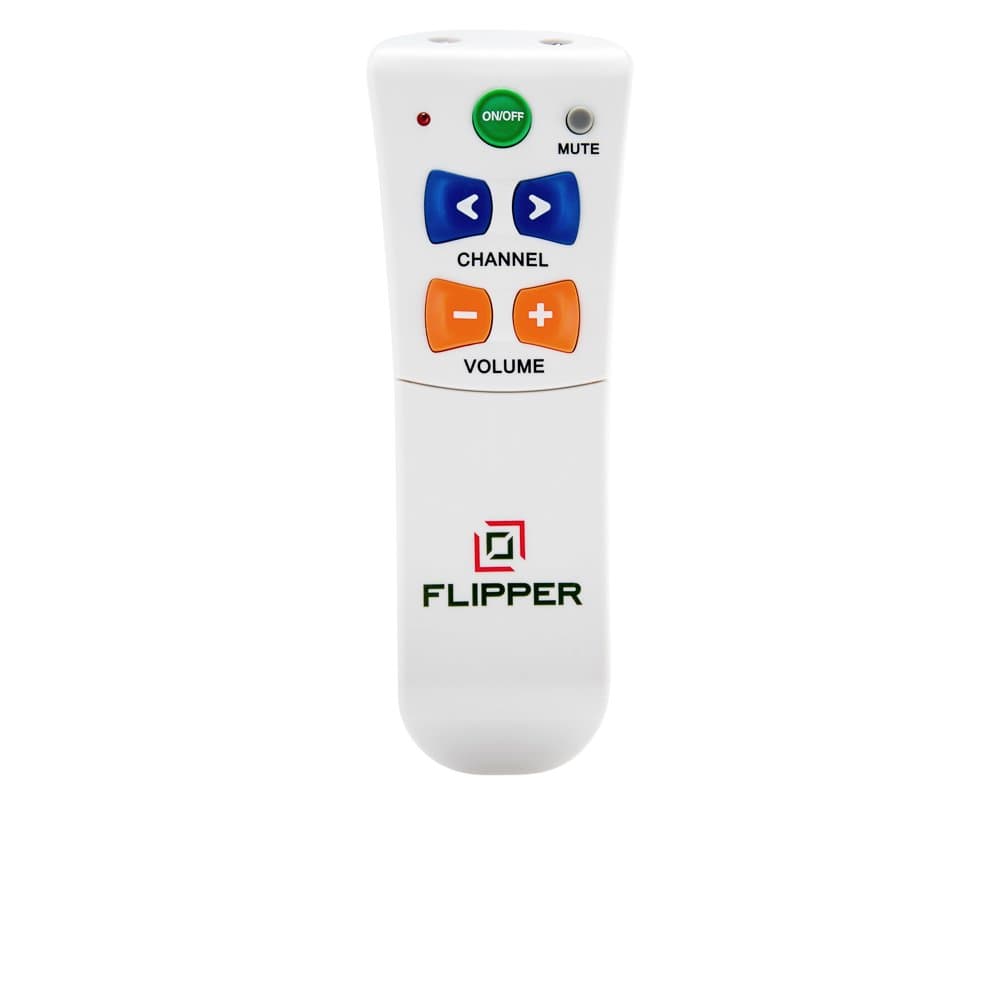
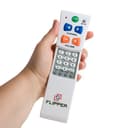
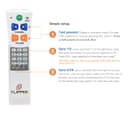
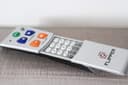
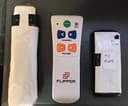
The Flipper Big Button Universal TV Remote is expertly crafted for seniors and those with impaired vision, combining TV and cable controls into one ergonomic device. It supports infrared connectivity for all major TVs and set-top boxes, allows programming of up to 25 favorite channels, and features large, color-coded buttons to simplify navigation. Its unique slide panel locks settings to prevent accidental changes, making it the best-in-class solution for effortless, frustration-free viewing.


| ASIN | B002GR1YZ0 |
| Additional Features | Ergonomic |
| Battery Type | Alkaline |
| Best Sellers Rank | #1,863 in Electronics ( See Top 100 in Electronics ) #94 in Remote Controls (Electronics) |
| Brand | Flipper |
| Button Quantity | 4 |
| Color | White |
| Compatible Devices | Television |
| Connectivity Technology | Infrared |
| Controller Type | Flipper Universal |
| Customer Reviews | 4.2 out of 5 stars 9,402 Reviews |
| Item Weight | 5 Ounces |
| Manufacturer | Flipper LLC |
| Max Number of Supported Devices | 2 |
| Maximum Number of Supported Devices | 2 |
| Maximum Range | 10 Meters |
| Model Name | FBA_A22 |
| Model Number | A22 |
| Number of Batteries | 2 AAA batteries required. |
| Special Feature | Ergonomic |
| UPC | 798304061529 |
| Unit Count | 1.0 Count |
| Warranty Description | 1 year |
V**G
Perfect remote for seniors with cognitive or eyesight issues
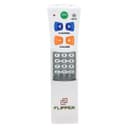
We bought this for my wife's mother who is in early stages of dementia and gets easily confused. The Spectrum set top box remote has about 800 buttons on it (ok, probably more like 50), but they're all very small and most aren't needed for daily viewing. This remote was perfect. It has just the volume, channel, and power buttons, and it was programmable to her TV (TCL with Roku built in) and her Spectrum set top box. There was even an option to have the power button only turn off the TV rather than both the TV and the set top box, which is a nice feature, since turning off both can cause the infamous "sync" issue if they move the remote during the power-on/off sequence for multiple devices. The only nit I had was in the programming. I tried all the codes for the TCL/Roku TV and none worked initially. Later I discovered that after putting it in programming mode, I was pressing the 4 code digits too quickly in sequence. I had to wait until each one made the light blink. Once I slowed down and paused for a second between each number press, the code worked properly. I set it up so the volume button works with the TV and the channel button works with the set top box. It's going to be great for her since she has historically had difficulty with her TV remote due to her easy confusion and her degrading eyesight. The designer(s) did a great job with this -- hiding the keypad so it's out of sight for programming only, and keeping only the basic buttons visible. Also, the volume and channel buttons being different colors just adds to the ease of remembering which color goes with which function, especially as eyesight fades. The instructions were also clear and well written, which is uncommon these days. I also saw a video demonstrating how to program it, and it was concise and easy to follow. This is the kind of device I would design if I wanted to create my own custom remote for someone with my mother-in-law's condition. Thank you for creating it. The price is a bit higher than some other "senior" remotes on Amazon, but the others had extraneous buttons and didn't appear to be as easy to program for multiple devices, or used the same color for all the buttons. Or the buttons were smaller and closer together, making it easier to mis-press. I think this is the "best-of-breed" in this arena, and so I decided to pay the premium price as I was confident it would "just work" the way I expected it to... and it did. I would highly recommend spending the few extra dollars to get this remote over less expensive knock offs. You do get what you pay for in this case, and it's worth it.
T**M
Hisense U7 & Spectrum Cable
AMAZING for seniors. I don't write reviews but this is such an amazing solution for seniors struggling with modern remotes. Parents are in mid 80s and early 90s and just moved to an ALF which required changing their TV and cable tv service. They could not remember how to use the new remotes and basically couldn't watch TV no matter how much we coached them, taped over remote buttons, etc. This remote was extremely easy to program for their new Hisense U7 tv and Spectrum cable box. We programed in the 20 channels (25 max I think) they watch the most and it has been life changing for them. It turns on and off both devices and the up/down channel button runs through their programed channels - so very simple. They can't accidentally hit a wrong button. We took away the "real" remotes. It has been several days with No Problems at all. They are able to watch TV again without problems. The greatest remote ever for seniors struggling with our modern overly complicated remotes. I am buying a second remote to have on hand just in case we ever need it.
T**E
FANTASTIC, with one small caveat...
I've purchased a number of remotes for my mother, and finally, one she can use, hooray! UNBELIEVABLE, the difference it makes in her mood and outlook, to have some autonomy and control. She is legally blind and has dementia, but even if she were totally blind, she could use it (to listen to the TV). Other remotes presented so many buttons that my mom was overwhelmed by them. This one has only six, and by their placement, it was an easy matter for her to learn their functions. I showed her, made sure she knew where the power button was, learned that one. She was confused when I tried to teach her the other buttons, so I told her: "Mom, you can't do any harm by experimenting. Just play around with it- push a button, and if it doesn't do what you want, try another one, until you find something you like" and that's what she did (I don't know if that sank in or helped, that's what she seemed to do naturally anyway. The important thing, I think, was encouraging her to experiment). The beauty of the design is that the buttons have been pared down to only those that actually do something tangible. If she hits mute, it mutes. Or, the channel is changed, or the volume changes. That's it. So learning is nearly automatic, stimulus-response, no thought processes required. She learned the button's functions in a couple of days, on her own, what a BLESSING. We have a large display clock that shows the time, and she knows what time her favorite shows are on, such as Jeopardy and Judge Judy. I programmed in her favorite channels (takes time and patience, but it was worth it), excluding all the foreign language channels that discombobulate her so, along with ones she never watches, and she just pushes the channel up or channel down button until she sees/hears Judge Judy or whatever. The Flipper's makers seem to have thought of everything. Depending on your situation, you can program the Power button to operate either the TV or the STB [Set Top Box], or both at the same time. The volume and Mute buttons work with the TV, the Channel buttons work with the STB and NOT the TV (on our old universal remote half the time it changed the STB's channel, half the time it changed the TV's channel, taking it off of channel 3, impossible). That's if you're using the Flipper with both an STB and a TV. The flipper also has a TV only mode, if you plan to use it with a TV alone, in which case all the buttons work with the TV. Another thing I specifically wanted to mention is that our Magnavox STB's remote doesn't have a dash (-) or dot (.) button, you tune offset channels by waiting a moment until the dot appears after what you've entered, for example, if you enter 56, you wait a beat, a dot appears after the 56 in the corner of the screen, you can then enter a 2 or 3 or whatever to get 56.2 or 56.3. Obviously, this is challenging enough, even for me (you must be quick), totally impossible for my mom. I wondered how this would work in programming the Flipper. The programming keys on the Flipper remote includes a dash (-) key, and using it accomplished the same thing, worked with our STB! When you push that key, it adds the dot or dash and you can then enter the next digit, immediately. I'm talking about the Flipper's programming buttons, when you're setting up the favorite channels. Once these channels are programmed in, no-one ever needs to worry about this issue again. The biggest issue to note is that although generally the owner's manual for the Flipper is specific and detailed, excellent, clear language, occasionally they leave out a step. As I get older I find it more challenging to do these things, I'm less intuitive and must follow instructions to the letter, so a missed step really screws me up. So, when you're doing this, anywhere where it specifies a number of steps in a procedure, just make sure you repeat them all if needed. For example, when you're entering the code for your TV brand, the owner's manual says if the code doesn't work, try the next one. To do that [AS I REMEMBER- I'm not about to do it again, undo all my hard work to double-check], I believe you need to go back to the 2nd step, "Press and hold TV until the light turns solid" before trying the next code. I may be mistaken about this specific example, just bear this in mind when programming, if what you're doing doesn't seem to be working. There were at least two instances in which I got stuck, and it was because steps needed to be repeated and that wasn't specifically stated. One other issue- at least with our Magnavox box, if you hit channel up or channel down too quickly, before the channel has actually changed, it adds the digits to the digits already entered and the box will return with "invalid channel", showing nothing on the TV screen. So I've explained to my mom to wait between presses, wait until the channel actually changes, before hitting the button again. "Slow down, Mom." That worked. Finally, if you happen to own a Homeworx STB and over-the-air DVR (LOVE IT)- I hoped this remote would work with it, but it didn't, unfortunately. If you have one, you might see the end of my Aug. 7th review of it (link below), for an explanation of how one CAN use the Flipper with a different STB AND the Homeworx unit together (along with a ROKU box, provided you have auxiliary jacks), for folks with cognitive or sensory deficits. The Flipper is the best, fantastic, WHATEVER you use it with, has provided my mom a measure of freedom and autonomy so sorely missed, needed- invaluable. Highest recommendation! Mediasonic HW-150PVR HomeWorx ATSC Digital TV Converter Box with Media Player and Recording PVR Function/HDMI Out (Black)
H**N
Great for simple TV and STB IR Control
I researched many remotes for my parents needs and I really like this remote for it's features and simplicity. It's simple to operate and set up. Getting your loved one to use it might be another story. :) I purchased it for my parents to use as their 100+ button remote was getting more difficult to use and I was tired of troubleshooting it over the phone or running over to their place to fix their 'tv' issue. Typically they were hitting an auxiliary/input button by accident. We are using the Flipper with a Cable Set Top Box and Visio TV now. I entered a code for the STB and that sends the signals for the channel up/down. I entered a code for the TV and that sends the signals for the mute and volume button. I believe the Power button sends a code to the STB and TV at the same time. Beware, you might think you found the proper code at first, but continue to test the setup. I'd recommend spending time .. 30-45 minutes setting it up, testing it and making sure you are 100% sure you have it right. I had it working in 5 minutes, but found out later that I still didn't have the right 'code' for the STB as there were 8 codes for the same vendor. Turns out the codes I needed probably were not included in the long list of codes in the setup instructions. But don't fear, you can either have the Flipper 'learn' or go through another process to find the code. I went through the process they document in the setup instructions to discover the correct codes for your TV and STB. Once I did that process it's been running 100% perfectly reliable since then. My point it just because you think you have the TV code correctly selected for ON/OFF, after more testing, you might find that channel up/down might not work. That all said, my parents still like to use their 100+ button cable remote, but over time as they have more difficultly using it or their memory fades, I believe this will be their 'go to' remote. The main reason they like their old remote it the ability to press the channel numbers and then 'enter' to jump directly to a station... I have both remotes sitting on their stand next to them. I did find my dad using it the other day, so I know he's sees the value in its simplicity. Again, over time, being able to enter the channel number and press enter will become harder to do.
C**O
Easy set up and easy to use
I was scared to set this up. It was so easy! Works like a charm. The instructions are well written. Like others have said it’s going to take a bit of trial and error until she is getting the hang of it. I love that there are only 3 buttons instead of a ton that are on the cable remote.
A**R
Controls an xfinity STB which lesser priced alternative could not.
Second senior oriented remote purchased for a relative with Alzheimer’s. The multi button OEM remote for the TV as well as the Xfinity/comcast set top box remote were way to complicated for relative to use. Main issues was accidentally switching the source from the correct hdmi resulting in loss of picture. First senior remote worked as advertised but was unable to change the channels on the set top box. Making it useless. For relatives setup, remote works fine in a different place with non Comcast STB. This remove as hidden keys that include a button to be presses after entering a channel number. It stores a list of channels which will be the only ones reachable. This works great as put favorite programming senior relates stuff like MeTV, antenna tv, the old networks and ion and relative is happy as are the rest of us not being called to troubleshoot a TV that “stopped working”. Talking relative through getting back to the correct hdmi input was at times impossible. No calls since put in service about 3 weeks ago.
B**C
Great concept, lots of potential, but not a panacea
This was bought for my 85 yo mother. Her visual impairment makes it difficult for her to navigate the all-in-one remote that came from Brighthouse, requiring her to largely memorize the position of the buttons she uses frequently. Although this is a functional remote at a good price point, I first have to echo a few things mentioned by other reviewers. The fit and feel of the unit is in line with the cost of the remote, which means it's not that great. The tactile feel of the large buttons doesn't seem consistent (dependent on what part of the button is pushed), and the shape of the buttons itself can be confusing. The setup is fairly straightforward for someone already experienced, but was too intimidating for other members of my family to attempt. When trying to add additional channels to favorites, the unit became unresponsive and something in memory was corrupted, requiring me to reset to factory defaults and start over. The response of favorites was so slow (..1.....2......3..) that it lead to a lot of errors when my mom was trying to scan up or down. After watching my mom using this unit, there's a few things I haven't seen mentioned - the channel and volume buttons are oriented horizontally, whereas most remotes are oriented vertically (up channel/volume is up; down channel/volume is down). The side-to-side may not seem like a big deal, but after watching my mom for a few days, I noticed this made it hard for her to move from her other remote. There were more than a few times she thought she was moving down channel, but pressed the lower button and nothing changed on screen. Likewise when she tried to raise the volume and instead the channel changed. The IR also seems fairly weak, which means the user has to pay closer attention to the aim. A larger print version of the instructions would certainly help as well, given the audience this is aimed at. The manufacturer seems responsive and the concept behind this remote is solid. They do pack a lot of value into this product given the price. I've been using multi-device remotes myself for awhile (currently a Logitech Harmony), and I'm pretty certain there are others like me that would be happy to pay for a more upscale version of the Flipper.
R**.
Highly simplified remote for older people.
I purchase a Samsung TV for my 96 year old mother. Great TV, but the remote is cluttered with too many buttons all of different colors. Not very usable. The Flipper remote is extremely simplified and very easy for my mother to use. Highly recommend it. Issue: the written instructions are so painful to understand I had to call up the support number to figure it out.
TrustPilot
1 个月前
1天前