We remain fully operational. Our teams are working around the clock to ensure your deliveries continue safely.

下载应用程序


Buy anything from 5,000+ international stores. One checkout price. No surprise fees. Join 2M+ shoppers on Desertcart.
Desertcart purchases this item on your behalf and handles shipping, customs, and support to Malaysia.
🐾 Stay connected, secure, and in the know—because your home deserves the best view.
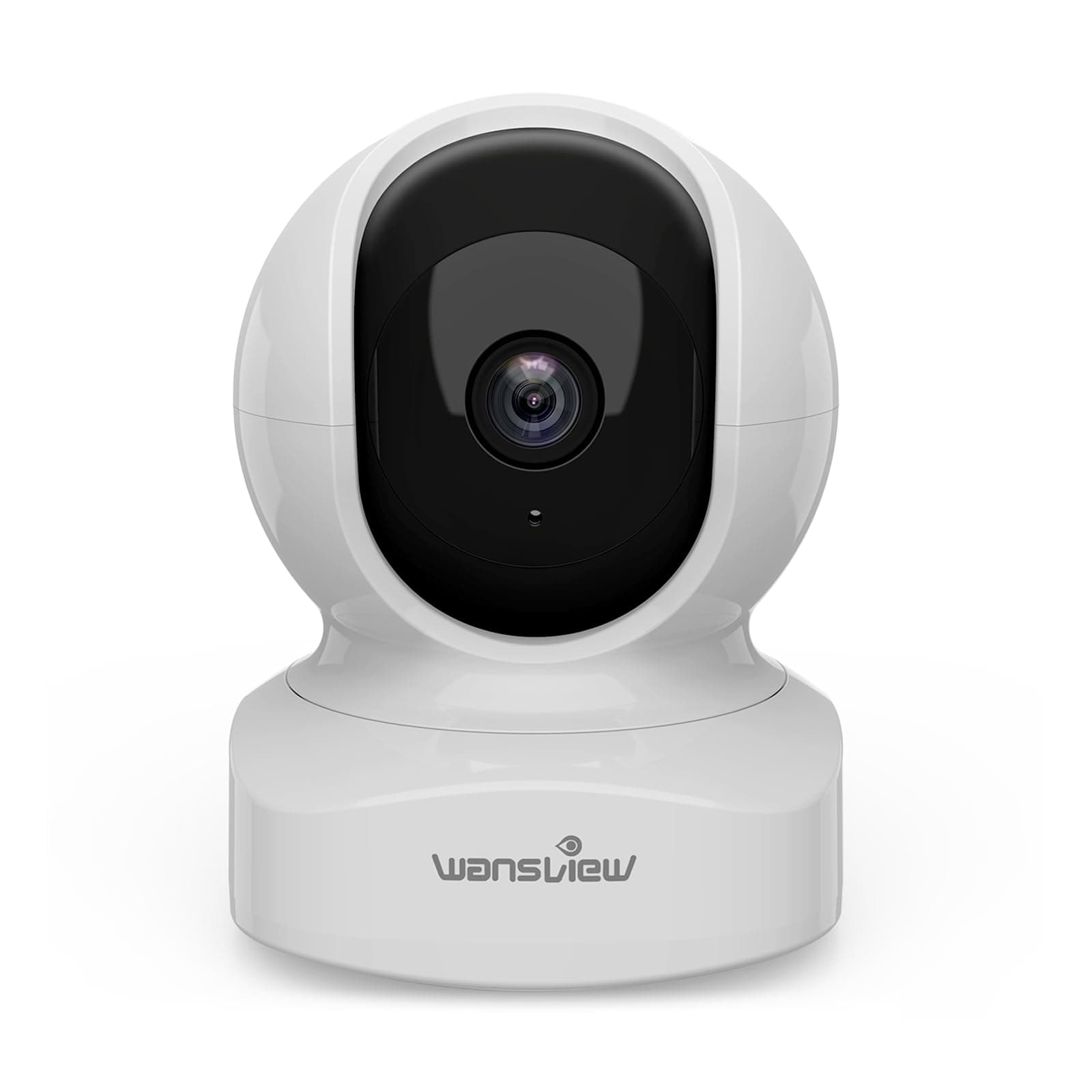
The Wansview Q5 Indoor Pet Camera delivers sharp 2K video with 360° pan and tilt, infrared night vision, and real-time motion alerts. Easy app setup on 2.4GHz WiFi lets you monitor pets, babies, or home remotely. Two-way audio and flexible local or cloud storage options make it a versatile, reliable security solution for modern homes.


| ASIN | B07QLR94S1 |
| Alert Type | Motion Only |
| Antenna Location | Baby Monitoring, Indoor Security, Pet Monitoring |
| Batteries are Required | No |
| Best Sellers Rank | 655 in Electronics & Photo ( See Top 100 in Electronics & Photo ) 19 in Dome Cameras |
| Brand | wansview |
| Colour | White |
| Compatible Devices | Smartphone |
| Connectivity Protocol | Wi-Fi |
| Connectivity technology | WiFi |
| Control Method | App |
| Controller Type | Amazon Alexa, Google assistant, Android |
| Country of Origin | China |
| Customer Reviews | 4.4 out of 5 stars 19,069 Reviews |
| Effective Still Resolution | 3 MP |
| Effective Video Resolution | 1296 |
| Field Of View | 360 Degrees |
| Focus Type | Auto Focus |
| Form Factor | Dome |
| Included Components | Charging Cable, Instruction Manual, Mounting Screw, Power Adapter, Stand |
| Indoor Outdoor Usage | Indoor |
| Indoor/Outdoor usage | Indoor |
| Installation Type | Surface-Mounted |
| Item Dimensions | 7.2 x 7.2 x 10.1 centimetres |
| Light Source | Infrared |
| Manufacturer | wansview |
| Material | Plastic |
| Model Name | Q5 |
| Model Number | Q5 |
| Model name | Q5 |
| Mount Type | Wall Mount |
| Network Connectivity Technology | WiFi |
| Night Vision | Infrared |
| Night Vision Range | 8 Metres |
| Number of Channels | 2 |
| Number of IR LEDs | 4 |
| Number of Items | 1 |
| Optical Zoom | 4 x |
| Other Special Features of the Product | Local Recording, Motion Sensor, Night Vision,HD Resolution,2-Way Audio,Pan & Tilt,Real Time Alert |
| Photo Sensor Technology | CMOS |
| Power source | Corded Electric |
| Recommended uses for product | Baby Monitoring, Indoor Security, Pet Monitoring |
| Room Type | Office, Store, Bedroom, Living room, Baby room, Pet room |
| Shape | Dome |
| Special feature | Local Recording, Motion Sensor, Night Vision,HD Resolution,2-Way Audio,Pan & Tilt,Real Time Alert Special feature Local Recording, Motion Sensor, Night Vision,HD Resolution,2-Way Audio,Pan & Tilt,Real Time Alert See more |
| UPC | 715444933721 |
| Unit Count | 1.0 count |
| Usage | Baby Monitoring, Home Security, House Security, Indoor Security, Pet Monitoring |
| Video Capture Format | MJPEG |
| Video Capture Resolution | 1296p |
| Video Encoding Format | H.265 |
| Viewing Angle | 125 Degrees |
| Voltage | 5 Volts |
| Water Resistance Level | Not Water Resistant |
| Waterproof Rating | IP65 |
| Wattage | 5 watts |
| Wireless Technology Type | Wi-Fi |
| Zoom Type | Digital Zoom |
S**5
Excellent, good value camera
I was sent this camera as part of a free test, but with no obligation to write a positive review. However, the camera is fantastic and value for money is excellent. Picture quality is high both in the daytime and using nighttime infrared mode. I did have a small problem with the camera consistently flicking between daytime and nighttime mode, however a quick reset sorted this out and we’ve had no problem since. No need to subscribe to any form of cloud storage service, video record recordings can be stored on a microSD card that slots into the camera. The app works well, and integrates with other cameras that I have around the home. Settings are useful but not overcomplicated and set up was very quick and simple. There are options to adjust the motion detection, frequency and type of alerts, and the intelligent tracking is particularly useful if you intend to use this for pets who are likely to move in and out of the camera frame. The mounting arm supplied is also useful, as it has a rotating and bendable arm rather than a static mounting point, allowing for extra adjustability. Overall fantastic value for money and very easy to use. I would happily purchase another in future.
K**T
Great camera, great customer support! 10/10
Bought this to keep an eye on my poorly kitty when not home, and i cannot fault it!! Exceptionally easy to set up. What can I say? It just worked!! So far I haven't had any issues with the app. Super easy and straightforward to set up. It connects instantly, even after camera has been unplugged. No memory card needed unless you want to record and store direct from the camera. All features seem to work perfectly with next to no latency. Camera is crystal clear. Good functionality. The IR nightmode is nice and clear. If I was to nit pick, it would be nice to have a nightmode toggle on the app, as i find it prematurely activates when the room is still quite bright (edit: turns out this option was there all along), but that's more than made up for in the clarity of the IR picture, of which I can't fault! I did have a minor manufacturing issue with my initial camera, however the Wansview customer service were brilliant and couldn't have been more helpful, offering options to rectify the issue, in a way that suits me. Very friendly and prompt replies! All in all, I'm glad I spent the extra (£1-ish) to get this brand instead of a knock-off!!! If I need more cameras in the future, I won't think twice about using this brand. Its certainly good value for money, particularly when you factor in aftercare & customer service.
S**N
Amazing Camera
Easily the best feature of this camera is the setup process. The cameras speaker gives you feedback over the process. The App uses a QR Code to pair with the camera, so hold your phone in front of the camera and seconds later the pairing is completed and speaker tells you. I also used the WiFi Setup Option, with this, you connect your phone to the camera WiFi and Then follow the on screen prompts, for me it was 2 clicks and the camera set it self up. You can save Positions almost like short cuts so you can easily move the camera pan and tilt position into a previous favourite spot at the touch of a button. Would be nice if you could set it to move through these positions at an interval. Maybe a future update will have this. The night vision mode is really impressive and clear, takes maybe a second to switch from IR to normal mode. The speaker is prob 7/10, but the microphone is insane. It was picking up the clicking of my gaming keyboard from 4 meters away. This can lead to feedback if you use the phone too close to the camera to view it. I haven't used the bracket / clamp that came with the camera, but it comes with a camera tripod size wall bracket, so you can mount it. You can also fix the camera so other things like a camera tripod too. The only negative I can find is, the inbuilt microphone picks up the sound of the motor when you are panning or tilting,but that's purely down to the small size and price of the device. Ultra Sonic motors are expensive, and sound deadening is bulky. For under £20 you cannot get better. I have now put an SD card in, on 24/7 record (it only records when there's motion) it uses around 2.2gb on busy day, and around 1.4gb on a slow day. So the 128gb card I put in, should manage about 2 months. Update: The memory card didn't used to be able to connect to remotely, this has now changed, the main account holder can access the memory card remotely. For the price, and ease of setup, and features you really can't find any better.
D**N
Another great Wansview camera
This is my second Wansview camera, but the first time I have received an item free for writing a review. All my reviews are honest so I will give the good and not so good. My first Wansview camera is the W5 outdoor camera. Just like that camera the build quality, image quality and motion detection are superb. You can adjust the sensitivity of the motion detection. To remotely control the direction the camera points in, you download the Wansview app to your phone. Using this you can move the lens up, down and side to side and get a live view. This is very easy indeed. I'm using a micro sd card to store when movement is detected. You then use the app to scroll back through information. There is a pull down calendar so you can go back to images stored earlier. There is a timeline bar showing at what time recordings took place. You can scroll through this to find recording and then play them back. At the moment this camera points through my downstairs window, to capture any blind spots the outdoor camera misses. At night it uses LED lights to give night time images. I have turned this off inside the app, so the LED lights don't reflect off the window. I get excellent images using the street light. Setting up the camera was much easier than previously with the outdoor camera, simply because I learnt a lot from doing it the first time. Nevertheless, set up was still not easy. For some reason, on set up, their cameras seem to struggle to pick up the router, even if the camera is right next to it. I checked my WiFi password each time, but it took 5 attempts for it to connect. However, once it is connected, it stays connected. All setting up is done via the app. Scanning the QR code on my phone with the camera was easy. If you don't want to store images on an sd card, you also have the option of using the subscription cloud service. It comes with a free trial. The camera comes with a basic instruction booklet. A more detailed one can be downloaded from their website. Areas that Wansview can improve on are as follows: - it would be good to zoom in on the timeline scroll bar so that you can get better placement of the clip you want to see. - when playing a clip it would be better if a bar comes up as on most videos so you can scroll back to something you have seen, even when the image is paused. At the moment you have to replay the clip. - at the moment you can only take a picture if the video is playing. It would be better if you can pause the video at exactly the point at which you want to take the picture. - downloading images and video clips is the most frustrating thing about these cameras for me. With the other camera it took me a long time to find out where the clips were being saved. In fact, they are saved withing the app. When you first go into the app there is a menu and you select 'Me'. If you then want to download this to your phone, you need to select download on the images. Also you need to do this one at a time. You cannot select all the images you want to download. What I would like Wansview to do is create a folder 'Wansview' in the phone's Gallery so that images and videos are downloaded to this immediately when finding clips. - to download images from your phone to your pc is not too straightforward. If you use a usb to connect your phone, you need to find the WansviewPlus folder. This has subfolders . You will have to look through these subfolders to find the images. I couldn't find all the images I downloaded, but this may have been because my phone is short of memory. The main issues are with the app, which I'm sure they can improve. The cameras are excellent, and I won't have any hesitation in buying another one in the future.
B**S
Really good, but
This camera is really easy to set up with the app on your phone, one set up you can share it with other users as well. As long as there is a WiFi signal, you can view this camera from anywhere, for example I currently have this one sitting in my parents living room due to the falls risk they have at 89 years young (it's not designed for this but I have a working solution) The intelligent person tracking is good once set up and the picture quality is brilliant, it can even track through glass. Recording motion events is easy with either local storage on an sd card or cloud storage, which is how I use it. I have the camera just sitting on a shelf but you can mount it almost anywhere due to the supplied mounting solution, it can be upside down as well, you just tell the app is reversed. Overall, this is one of the better cameras I've used. Only drawback I can find is if the tracking loses the object it's following, it stops where it lost the object, it would be nice if it returned to a set locating just like the favourite positions you can set,. Apart from that, it's well worth the money. Also, if you have it set too sensitive, it can pick up off reflections also moving images from a television screen/pc monitor.
H**E
Clear images with incredible audio. VERY IMPRESSIVE
I bought this camera as I was curious to find out what my dogs did whilst left alone in the house (turns out it's nothing exciting!) and I wasn't prepared to pay big money for a camera if it wasn't going to work. Here is what I found... Firstly You need to have a power socket nearby for the camera to function. The set up was easy. Although, I had an issue where the app on my phone (android) wasn't showing me any images or connecting to the camera, and it gave me a couple of error messages. However on my husband's phone (apple) it was all running smoothly. I sent a couple of messages to customer support about the issues, but whilst waiting for a response (about 5 days over a weekend) I upgraded my old phone, and installed everything onto my new phone (Android again) and it works fantastic with no issues. Customer support couldn't have been any nicer. The advice they gave me wasn't relevant anymore as my new phone was working well with the app and the camera, but they still took the time to check in on my progress to see if any other issues had occurred (which they haven't so far) . PICTURE QUALITY The image is so clear and smooth, but there is a just little lagging if an object/person/dog is moving at a quick speed, however for this little camera it is still an impressive quality, and unless someone comes to the door then everyone seems to move at a normal speed which the camera is more than capable of playing back to you in real time. The camera moves side to side, up and down allowing me to follow the dogs around the room to see what mischief they are trying to cover up. Whilst you are sat in the room, unless you are watching the camera intently and that the camera is being moved all the way to one direction - then you aren't aware that you are being monitored or that it is moving. It makes no sound. From the spectator on the app however, you can hear and see very clearly that the camera is working it's way around the room. The night vision on this Q5 was quite the unexpected surprise. We have no street lights to give off any light in the room where our camera is set up, so when all the lights in the house were switched off and we checked the camera, the image again was very clear you would think a light was installed in the camera to aid with the image feedback. You could pick up every detail in the room so clearly. Again, surprising great quality from what I thought was a budget camera. The audio on this camera, for me, is very impressive. It's so sensitive that I can actually hear the dogs on the move before I see them on the camera (I have wooden flooring). Today when I checked in, I could hear some sort of feedback only to realise that where I have positioned the camera, it was picking up the sound of the rain hitting the house and windows! Super hearing! I try not to use the audio feature as it upsets the dogs (1 knows the voice is coming from the camera, the other can't figure it out) However the audio is clear, but bear in mind that there is a delay when using this feature as you have to record your message first, then it will send it through the camera. I also noticed that if having a two-way conversation via the camera, if you choose to record a message whilst the other person is also trying to speak to you through the camera, the sound is cut off so all you are receiving is the image feedback with no sound. Again, for what I thought was a low budget camera, the quality of it all is impressive. The app can allow for up to 4 cameras - needless to say I WILL be adding additional cameras to cover a couple other areas in and around the house. I fully recommend this camera to my family and friends and anyone considering this camera - purchased one for my mother so she can keep an eye on her oven and cooking hobs (funny story involving her nearly burning down the house twice in one week) MY ADVICE IS BUY THE CAMERA. At this price you cant go wrong with it. The quality far outweighs what you'd expect to pay for, and it certainly gives us peace of mind knowing that we can yell at the dog anytime he even things about chewing something he shouldn't be!
M**.
Excellent Little Camera for Guaranteed Peace of Mind
I just wanted some peace of mind that my puppy wasn’t destroying the furniture, or discovering new and exciting ways to chew things, while I was out. After browsing through a mountain of options on Amazon, I ended up going with the Wansview Q5 indoor security camera. First impressions were great. It arrived well-packaged, and the camera itself feels sturdy and well made. It’s compact enough to sit on a shelf without drawing too much attention—unless your puppy thinks it’s a toy (mine hasn’t… yet). It can also be wall mounted and the fixings are included. Setting it up was refreshingly easy. The instructions are clear, and the app walks you through the whole process with voice prompts. I had it up and running on my iPhone in just a few minutes. The video quality is excellent—both during the day and at night. I went with a memory card for storage, which works without a hitch. One feature I really appreciate is the ability to pan and tilt the camera from the app. It gives me a full view of the living room, which helps when my pup decides to wander. Even with the camera set up a fair distance from the router and a couple of walls in between, the Wi-Fi connection has been rock solid. No dropped signals, no lag—just smooth streaming of whatever puppy chaos is unfolding. Although I bought it mainly to check in on my puppy, it would easily work for other uses too—keeping an eye on kids, elderly parents, or even just seeing if you remembered to close the back door. Overall, I’m really happy with it. It’s reliable, easy to use, and gives me that bit of reassurance that my little pooch isn’t tearing the place apart when I’m not home. A great price too. Definitely recommend.
I**D
Good value for money, but camera does require internet access
Within it's limited use-case it is reasonable quality, hence the 3 star rating. I dropped a star for the fact that it requires a paid subscription to their own cloud service to work at all (even if using your own ONVIF recording) [Edit - No it doesn't, see update at end of review]. And I dropped a second star for the temperamental SD Card setup (though tech support was very quick to respond). Pro's: ==== 1. Good quality images at 1080p (FHD) 2. Can conserve bandwidth if using 720p (HD) images, though obviously reduced image quality 3. Very responsive tech support via email (responded to me within 5 minutes) 4. Setup is reasonably straight forward for a simple use-case scenario. It gets more complicated if you want to take advantage of the more advanced features such as ONVIF support 5. It can be enabled to work with 3rd party ONVIF compliant applications Con's: 1. It will not function at all without an internet connection (not just local wireless LAN) 2. It will not function at all without a subscription to their own cloud service. 1st month free then minimum of $69.99 per year [Edit - Not true. See update at end of review] 3. It can only be used/accessed from a mobile app (either IOS or Android). There is no WansView application for the PC 4. The mobile app (both IOS and Android are identical) leaves a lot to be desired 5. Setting up the SD card can be temperamental. Though in practice it is hard to see any benefit to using an SD card since the camera does not function unless connected to the WansView cloud service anyway [Edit - again see update at end of review]. Review Updated 09/11/2020 ======================= First of all let me reaffirm how impressed I have been by the technical support team. They have been very responsive and supportive, often responding within a few minutes (during working hours). It is primarily for this reason that I have been able to update my rating to 4 stars. Just dropping 1 star because of the fact that so much support was required. With the aid of the ever helpful support team this is what I was able to figure out: 1. My problem with the SD card was only resolved by power-off/power-on of the camera after it had been formatted using the camera menu option. Immediately following reformatting, the status of the SD card was still "error". Re-powering at this point was required for the camera to pick up the new status of "on". 2. The camera DOES work without a cloud subscription. The confusion arose because you have to login to the app before you are able to see the camera. The splash screen immediately prior to the login screen boldly announces "WansView Cloud" which I took to imply the requirement of a paid plan. It doesn't. I cancelled my plan and was still able to login to their servers to gain direct access to m y camera. Obviously doing this means that new video is not stored in the cloud, but it is still viewable from the app from the SD card. Also, to my surprise, event notifications are still pushed to the app (though again, obviously, not logged in the cloud). 3. You do however, have to have access to the internet from the LAN that the camera is a part of. Without this the camera forever flashes the blue LED and appears offline. That is to say that the camera can not be used on an "air gapped" secured LAN. It has to have access to the outside world (though this is clearly stated in the "Quick Install Guide"). In conclusion, now all the misunderstandings have been cleared up, I am comfortable calling this camera good value for money. Certainly the technical support is second to none.
TrustPilot
2 周前
2 周前