Some deliveries may take a little longer than usual due to regional shipping conditions.

下载应用程序


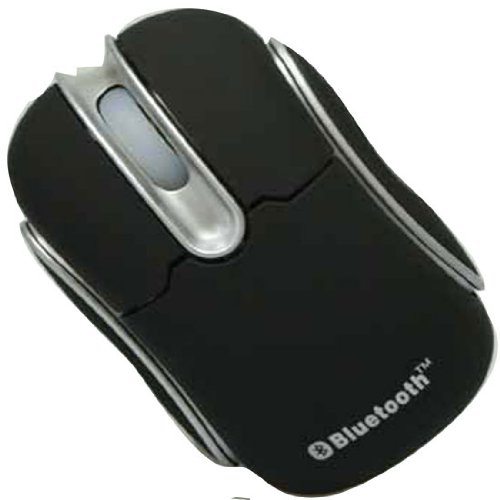
🖱️ Elevate Your Workspace with Wireless Freedom!
The GSI Mini Bluetooth Wireless Notebook Laptop Optical Mouse GM1040 is a versatile, lightweight mouse designed for professionals on the move. Compatible with a wide range of devices and operating systems, it offers a high-resolution optical sensor and an impressive wireless range, all while maximizing battery life with its smart power-saving features.
G**E
Good BT mouse with a puzzle as a bonus
I recently purchased both this GSI mouse and the GSI mini bluetooth keyboard. Of the two, the mouse is definitely more useful.I was initially frustrated by my inability to figure out how to get the silly thing open to install the batteries. Others have written descriptions of how to open it, but they didn't help much at first.Let me take a crack at it:1) Put the mouse down flat on the table with the wheel end to your left.2) Grasp the sides of the mouse with your left hand.3) Grasp the top surface of the mouse (not the buttons) with your right hand.4) Slide the top surface to your right - keep going until the top can be flipped up.I hope that makes it clear. No fingernails or prying necessary. It opens easily once you know how.Functionality: It works great with my Android tablet (Acer Iconia A100) No problems pairing or connecting. Just press the button on the bottom to get into pairing mode.It has a power saving mode that takes a little getting used to. After 5 minutes it will go to sleep to save batteries. The mouse pointer may disappear when it disconnects. To awaken it just press a mouse button - after a brief pause it will reconnect.Most people will find this behavior an annoyance at first - and it IS. But, you do get used to it.Otherwise, the mouse functions well. There is a procedure for changing the resolution of the mouse, but most people will never need to change the default setting.One final note. This GSI mouse and the GSI mini keyboard did not want to play well together on my Android tablet running Honeycomb. When the mouse was connected, the keyboard would spit out spaces and multiple characters like crazy. I don't know where to lay the blame for this one.
C**N
Works well, great price
I got this mouse to use with an Asus 1005PE Netbook and it exceeds expectations. I had it up and running in both Windows 7 and Ubuntu/Linux within minutes. The included directions are predictably bad so I threw them away, inserted batteries and was off and running using the Netbook's built in Bluetooth. It shows up as a standard HID mouse so it uses standard drivers in both Windows and Ubuntu and no software install needed. The mouse itself is light and feels a bit fragile but build quality is decent. I find that it tracks well on a variety of both glossy and textured surfaces and have used it on my work desk, granite kitchen counters and as well as some atypical surfaces like an ultra-suede couch cushion (next to me while I am in front of the TV) and even my jeans pant leg and it works suprisingly well. I keep my Netbook in sleep mode when I am not using it so the mouse powers off automatically after 5 mins and my battery life has been fine so far. It seems to pair back up very quickly when I start back up. Overall, you can't beat it for the price. I am going to buy another one to use on my work laptop.Update: the price of this item seems to have more that doubled since I bought one a short time ago. Mine was sold by "gigacity" and fulfilled by Amazon but they seem to be replaced by a new vendor. Search around Amazon and you should be able to find this item for a price in the low teens.
S**T
How do you put in the batteries?
I just received this small bluetooth mouse in the mail. I spent about an hour trying to figure out how to get into the battery compartment. The instructions must be translated from Chinese, (you can tell by the grammatical errors), and does not give you a CLUE as to how to put the batteries in. The battery compartment is very well concealed. There is a small tab on the back of the mouse that I pried on for about half an hour..turns out this is a HINGE instead of a clip. The entire rear top half of the mouse must be very carefully removed by prying on the top and sides rather than the back..you can see some small clips on the side if you look very closely. You should probably try to slide the cover back before lifting. Be very careful..I wound up damaging this thing and now I need to glue it back together because it wont stay on once the clips are damaged, and they are very delicate. Now I'm going to have to keep gluing it back together everytime I change the batteries! This is the frustration of buying products made in China, (not to mention the economic consequences)!!Otherwise the device works quite well with my Samsung netbook. Now if I can only find some glue around here! :>(
J**I
good range, easy setup
i am useing this for stick PC connected to the TV so Mom can watch britbox, and play computer games on the TV (her eyes cant read the 20" monitor, the big TV works for her)
R**L
excellent value and performance
This is a great mouse for a laptop or desktop. I use it with my Lenovo Netbook and an IOGear Bluetooth USB dongle.It took some getting used to because of the off button on the bottom of the unit. After I stopped using the off button I found it would sleep on it's own and wake up easily with a wiggle of the wheel.The off button does not turn it back on and once used the top must be opened and closed so that batteries are temporarily disconnected. (There is no on switch.) Leaving it on all the time does not use up the two AAA batteries, (sleep mode). I have used this for about a month now with the same set of batteries.When I use the mouse over an uneven surface like a blanket or armrest it occasionally will go into a mode where the cursor position jitters or wanders. A small jiggle will stop this. I notice this behavior in other less expensive optical mice. I does not happen with my HP Elite mouse, (costing 5 times as much.)After using this mouse a while a regular sized mouse feels needlessly large.I also reviewed the IOGear Bluetooth USB 2.0 dongle.
TrustPilot
1 个月前
1天前