We remain fully operational. Our teams are working around the clock to ensure your deliveries continue safely.

下载应用程序


💻 Elevate Your Typing Game!
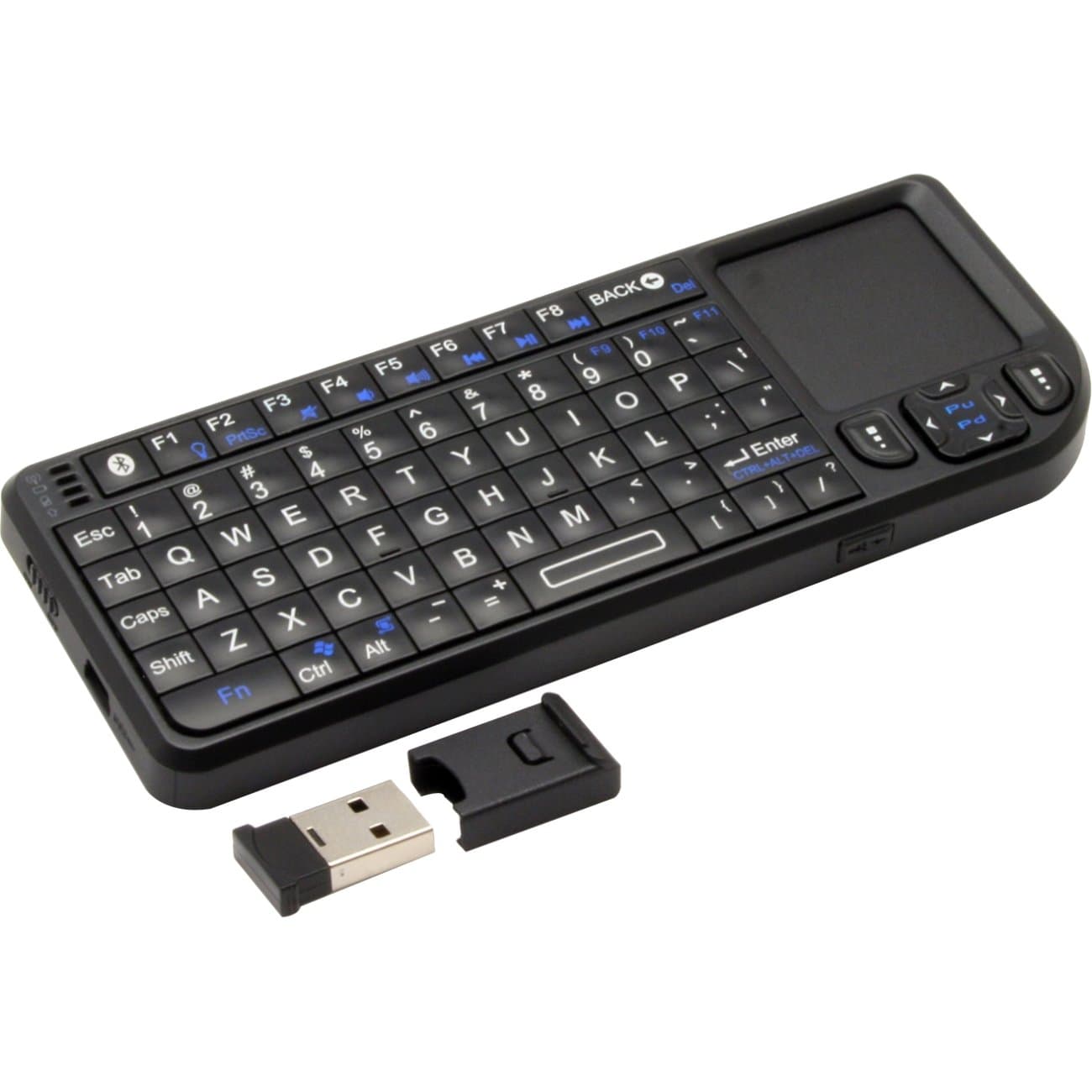
The VisionTek CandyBoard is a versatile, compact wireless Bluetooth mini QWERTY keyboard designed for seamless compatibility across multiple platforms, including Windows, Mac, Chrome, Android, and iOS. With an innovative touchpad and a rechargeable Li-ion battery, it offers both convenience and efficiency for on-the-go professionals.


J**O
great lifesaber
I purchased this (the bluetooth edition) and fell in love with it. The fn key does have a lot of uses, and it controls a few settings like changing the touchpad orientation (if you combine it with alt key) and it turns the upper keys into music controls and volume controls for every device that i have tested, which include a laptop, an iPad, an android phone. Since it also turns the backspace key into the delete key (that erases to the right instead of to the left), then an interesting way to send the infamous control alt delete is done by pressing that fn key plus enter. The other interesting combo you can make is the fn key plus the control key which acts just as the operating system key (so the windows key for pcs and the “pretzel key,” “Apple key,” or “clover key.” or most commonly command, for macs and this one also has functions in android, too). It also has a bluetooth specific key which I guess goes into pairing mode when long pressed. Also, you can use the laser pointer without having to turn on the device using the small button on the front side of it. I write this because the users manual just throws a glorified illustration of the key map and says rather little about the unit.Now, all this of the way I liked:versatility: you can combine shift plus numbers and also use some of the keys paired with the fn key to extend the keyboard. Fn plus arrows also help navigate tremendously. They were smart and mapped alt as the right alt key, so that when, or if, you change keyboard layouts on whatever you use that use the alt gr key you can get tons of other symbols by combining it with letters. Sadly, there is no really a way to input ascii characters directly such as holding alt and then typing in a number, but given that there are many references (google and find an article called Keyboard shortcuts for international characters) this is almost trivial nowadays. The added touch pad, mouse buttons and so on are just the icing on the cake.portability and compatibility: This for me is perfect. It brings back memories of blackberry and all of their lines with physical keyboard phones. As a blind user is just great because you can even unlock your phone using it so no need to get it out of a bag or whatever. plus, I can now purchase just about any touch screen only device that supports a physical keyboard and I feel at home every time. I can carry it very easily even in my jean pocket, the same I use for the phone because its just slim, and narrower, but just as tall as my samsung galaxy a9 (or pretty much any other phone in the market nowadays). So no need for extra cases, or anything, though a lanyard strap would have been kinda sleek.Only small things I did not like:Manual is too graphic thus a bit counterintuitive and you need to experiment and press everything in every way to understand what it all really does. Also, fails to mention that you can have all of the goodies when you switch layouts on the system of whatever it is you use, like the alt gr key that I explained above.Key placements. So I am still getting used to it, especially because the lower row, where the z,x, c. and so on keys are located is displaced oh so slightly to the left, I guess to acomodate more keys and such, that I trip up somewhat when I type words that contain these letters. But I am sure that with less than a month of practice this will be a breeze. Though some symbols sometimes hide in really impractical places and it can feel somewhat cramped, so nope, you cannot necessarily type easily with every finger you use if you are an avid qwerty typer.The material: OK, so this bit... is a tough shell because its very light and feels great to the touch but I would definitely have appreciated if the home row keys, in other words, j, and f, were duly marked in some tactile way. But again, getting used to things should not be much of a problem. It tends to be a bit clicky plasticky loud but i can live with that just fine.So, great product overall, I would definitely recommend this all the way.
D**2
Terrible, overpriced media center remote
I must say this is my first purchase of this type for a media center PC I have in my living room, and I am extremely disappointed. I'll break it down below:PROS:*Great battery life, don't have to charge it for weeks on end, with moderate daily use.*Backlit keyboard is a nice touch although I don't use it that frequently*Size--blends nicely with my other remotes on my coffee table.CONS:*Horrendous range, 6 feet if you're lucky. And that's assuming no obstacles. From the couch to the USB receiver, it's about 5 feet in my living room, and even still I have trouble with it. I'm thankful for front USB ports! If I had to plug it in the back, it probably wouldn't work at all.*After a short time, the keyboard enters "sleep" mode to conserve battery. To bring it back, you have to press a key at least 5 itmes before it will wake. Very annoying.*Some of the keys will "stick", although not physically. Maybe just a software issue with the driver (Windows 7), I don't know, but it REALLY makes it a pain when trying to wake it up from "sleep" as mentioned before. Occasionally during typing or scrolling, the key will "stick" and leave you with a bunch of repeated keystrokes.*If you've done extensive research on this as I have, you'll find there are TONS of different brands of these keyboards out there that are exactly this same one. Some have varying ratings. Maybe one of the others is good, but the VisionTek is total crap, and the fact that there are tons of this exact same looking model will keep me from getting any other ones just like it.Please, save your money and do your research. I'm looking into Lenovo's offering, the N9501. Has great reviews compared to others.
B**N
Great product, a lot of uses!
When giving presentations or conducting training sessions for users, I like to move around while I speak. I do not like having to remain static in front of a laptop just to change slides. This keyboard does that, and so much more. I love how compact it is and that the Bluetooth dongle stores inside it. Usability is easy to pick up on. Keys are spaced not unlike early Motorola Android smart phones and adapting to typing with it is quick. A great product with a multitude of uses.
D**Y
Buy the standard wireless, not the Bluetooth.
Giving this thing 3 stars, I had the wireless version, it was good, I won’t say it was great, but it was good. The problem tended to be distance, which wasn’t to concerning. after several years the touchpad wore out. so I bought the Bluetooth version. The battery lasts longer than the wireless, but the keyboard is extremely problematic, the keyboard seems to generate a lot of incorrect input.I’m still using it but it is driving me insane.
TrustPilot
1天前
2 周前